
Eye#
Introduction#
The Eye Sensor can detect objects and colors. It can also report how much light reflects back to the sensor and the hue value of the detected color. The Eye Sensor has a light that can be turned on or off to help it see objects and colors more clearly.
Below is a list of all available blocks:
set eye light – Turns the Eye Sensor’s light on or off.
set eye light power – Sets the Eye Sensor’s light power level.
eye found an object – Reports whether or not the Eye Sensor detects an object within range.
eye detects color – Reports whether the Eye Sensor detects a specified color.
eye hue – Reports the hue detected by the Eye Sensor.
eye bright object – Reports whether the detected object reflects a lot of light.
eye brightness – Reports the brightness detected by the Eye Sensor.
set eye light#
The set eye light stack block turns the Eye Sensor’s light on or off. The light can help the Eye Sensor detect objects and colors more clearly.
set eye light [on v]
Parameters |
Description |
|---|---|
state |
The state of the Eye Sensor’s light: on or off. |
Example
  when started
  [Continuously blink the light.]
  forever
  set eye light [on v]
  wait (2) seconds
  set eye light [off v]
  wait (2) seconds
set eye light power#
The set eye light power stack block sets how bright the Eye Sensor’s light is. The light can help the Eye Sensor detect objects and colors more clearly.
A higher percentage makes the light brighter. A lower percentage makes the light dimmer.
If the Eye Sensor’s light is off, setting the light power above 0% will turn the light on.
If the Eye Sensor’s light is on, setting the light power at 0% will turn the light off.
set eye light power to (50)%
Parameters |
Description |
|---|---|
brightness |
The brightness to set the Eye Sensor’s light to, from 0% to 100%. Use whole numbers. |
Example
  when started
  [Set the light to different power levels.]
  set eye light power to (25)%
  wait (2) seconds
  set eye light power to (50)%
  wait (2) seconds
  set eye light power to (100)%
eye found an object#
The eye found an object Boolean block reports whether or not the Eye Sensor detects an object within range.
True — The Eye Sensor detects an object.
False — The Eye Sensor does not detect an object.
<eye found an object?>
Parameters |
Description |
|---|---|
This block has no parameters. |
Example
  when started
  [Stop driving after detecting an object.]
  set eye light [on v]
  drive [forward v]
  wait (0.1) seconds
  wait until <eye found an object?>
  stop driving
eye detects color#
The eye detects color Boolean block reports whether the Eye Sensor detects a specified color, based on the detected hue value.
True – The Eye sensor detects the specified color.
False – The Eye sensor does not detect the specified color.
To check the exact hue value detected by the Eye Sensor, use the eye hue reporter block.
<eye detects [red v]?>
Parameters |
Description |
|---|---|
color |
The color for the Eye Sensor to detect:
|
Example
  when started
  [Stop driving after detecting a green object.]
  set eye light [on v]
  drive [forward v]
  wait (0.1) seconds
  wait until <eye detects [green v]?>
  stop driving
eye hue#
The eye hue reporter block reports the hue detected by the Eye Sensor as a number from 0 to 359 degrees.
Hue is a way to describe color using numbers around a color wheel.
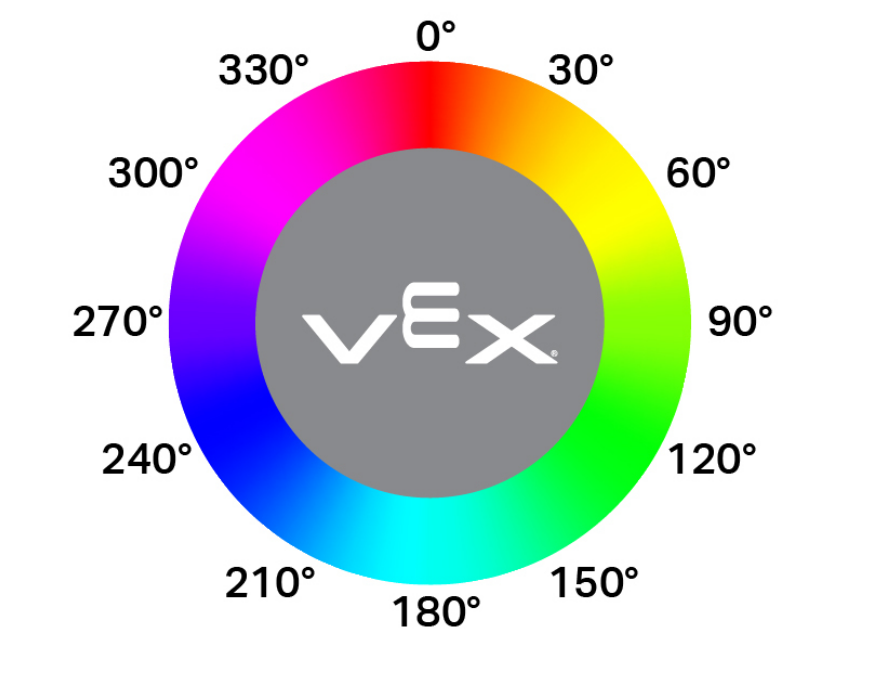
(eye hue in degrees)
Parameters |
Description |
|---|---|
This block has no parameters. |
Example
  when started
  [Display if an object is pink.]
  forever
  clear all rows
  if <[290] [math_less_than v] (eye hue in degrees) [math_less_than v] [350]> then
    print [Pink!] ▶
    wait (0.1) seconds
  else
    print [Not pink!] ▶
    wait (0.1) seconds
eye bright object#
The eye bright object Boolean block reports whether the object detected by the Eye Sensor is bright.
An object is considered bright when it reflects more than 70% brightness back to the Eye Sensor.
True — The detected object reflects more than 70% brightness.
False — The detected object reflects 70% brightness or less.
This can be used before checking for a color to make sure the object is reflecting enough light for the Eye Sensor to detect the color reliably.
<eye bright object?>
Parameters |
Description |
|---|---|
This block has no parameters. |
Example
  when started
  [Display whether a detected object is bright.]
  set eye light power to (100) %
  drive [forward v]
  wait until <eye found an object?>
  wait (0.1) seconds
  if <eye bright object?> then
    print [Bright object!] ▶
  else
    print [Object not bright.] ▶
eye brightness#
The eye brightness reporter block reports how much light is reflected back to the Eye Sensor, as a percentage from 0% to 100%.
A higher percentage means more light is reflected back to the Eye Sensor. A lower percentage means less light is reflected back.
(eye brightness in %)
Parameters |
Description |
|---|---|
This block has no parameters. |
Example
  when started
  [Display whether a detected object is bright.]
  set eye light power to (100)%
  drive [forward v]
  wait until <eye found an object?>
  wait (0.1) seconds
  if <(eye brightness in %) [math_less_than v] [70]> then
    print [Object not bright.] ▶
  else
    print [Bright object!] ▶