
眼睛#
介绍#
眼部传感器可以检测物体和颜色。它还可以报告反射回传感器的光量以及检测到的颜色色调值。眼部传感器配有一个可以开启或关闭的指示灯,以帮助其更清晰地识别物体和颜色。
以下是所有可用模块的列表:
设置眼睛灯光 – 打开或关闭眼睛传感器的灯光。
设置眼睛光功率 – 设置眼睛传感器的光功率级别。
眼睛发现物体 – 报告眼睛传感器是否在范围内检测到物体。
眼睛检测颜色 – 报告眼睛传感器是否检测到指定的颜色。
眼睛色调 – 报告眼睛传感器检测到的色调。
眼睛明亮物体 – 报告检测到的物体是否反射大量光线。
眼睛亮度 – 报告眼睛传感器检测到的亮度。
设置眼灯#
“设置眼部照明”模块用于打开或关闭眼部传感器的指示灯。指示灯可以帮助眼部传感器更清晰地检测物体和颜色。
设定辨色仪灯 [on v]
参数 |
描述 |
|---|---|
状态 |
眼部传感器指示灯的状态:开或关。 |
例子
当开始
[Continuously blink the light.]
永久循环
设定辨色仪灯 [on v]
等待 (2) 秒
设定辨色仪灯 [灭 v]
等待 (2) 秒
设置眼部照明功率#
“设置眼部照明功率”模块用于设置眼部传感器的照明亮度。照明可以帮助眼部传感器更清晰地检测物体和颜色。
百分比越高,灯光越亮;百分比越低,灯光越暗。
如果眼部传感器的灯是关闭的,将灯光功率设置为 0% 以上即可打开灯。
如果眼部传感器的指示灯亮着,将灯光功率设置为 0% 将关闭指示灯。
设定辨色仪灯功率为 (50)%
参数 |
描述 |
|---|---|
亮度 |
设置眼部传感器灯光的亮度,范围从 0% 到 100%。请使用整数。 |
例子
当开始
[Set the light to different power levels.]
设定辨色仪灯功率为 (25)%
等待 (2) 秒
设定辨色仪灯功率为 (50)%
等待 (2) 秒
设定辨色仪灯功率为 (100)%
眼睛发现了一个物体#
眼睛发现物体布尔模块报告眼睛传感器是否在范围内检测到物体。
正确 — 眼部传感器检测到物体。
错误 — 眼部传感器未检测到物体。
<辨色仪发现一个对象?>
参数 |
描述 |
|---|---|
此代码块没有参数。 |
例子
当开始
[Stop driving after detecting an object.]
设定辨色仪灯 [on v]
驱动 [向前 v]
等待 (0.1) 秒
等到 <辨色仪发现一个对象?>
驱动停止
眼睛能感知颜色#
眼睛检测颜色布尔模块根据检测到的色调值报告眼睛传感器是否检测到指定的颜色。
正确 – 眼睛传感器检测到了指定的颜色。
错误 – 眼睛传感器未检测到指定颜色。
要检查眼睛传感器检测到的确切色调值,请使用 眼睛色调 报告器模块。
<辨色仪测得 [红色 v]?>
参数 |
描述 |
|---|---|
颜色 |
眼动传感器检测的颜色:
|
例子
当开始
[Stop driving after detecting a green object.]
设定辨色仪灯 [on v]
驱动 [向前 v]
等待 (0.1) 秒
等到 <辨色仪测得 [绿色 v]?>
驱动停止
眼睛颜色#
眼睛色调报告模块将眼睛传感器检测到的色调报告为 0 到 359 度之间的数字。
色相是用色轮上的数字来描述颜色的一种方法。
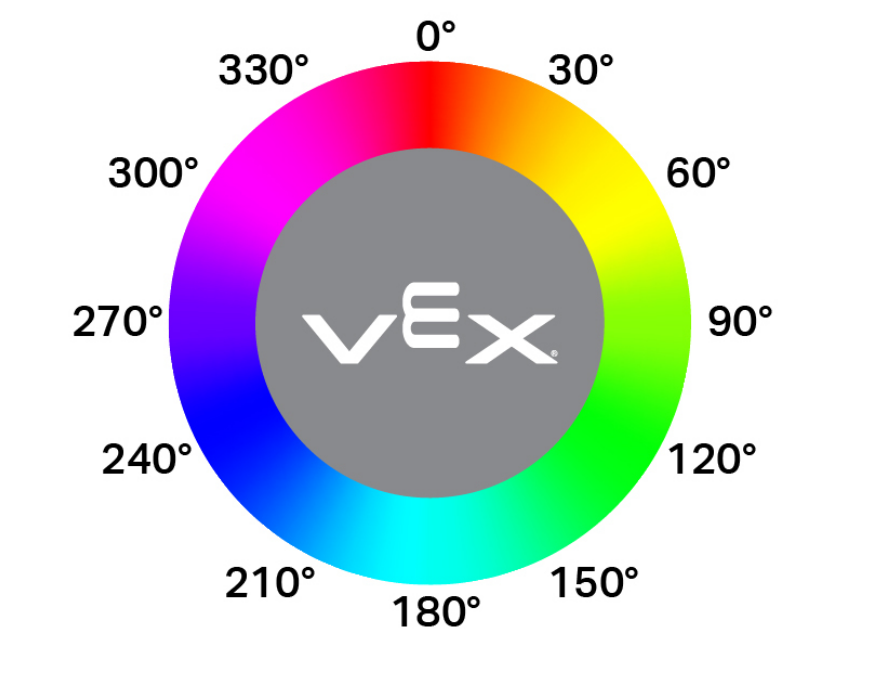
(辨色仪色度值)
参数 |
描述 |
|---|---|
此代码块没有参数。 |
例子
当开始
[Display if an object is pink.]
永久循环
清除所有行
如果 <[290] [math_less_than v] (辨色仪色度值) [math_less_than v] [350]> 那么
打印 [Pink!] ▶
等待 (0.1) 秒
否则
打印 [Not pink!] ▶
等待 (0.1) 秒
明亮的物体#
眼睛明亮物体布尔模块报告眼睛传感器检测到的物体是否明亮。
当物体反射回人眼传感器的亮度超过其亮度的 70% 时,该物体被认为是明亮的。
正确 — 检测到的物体反射超过 70% 的亮度。
错误 — 检测到的物体反射亮度低于 70%。
在检查颜色之前,可以使用此方法确保物体反射足够的光线,以便眼动传感器能够可靠地检测到颜色。
<看到明亮对象?>
参数 |
描述 |
|---|---|
此代码块没有参数。 |
例子
当开始
[Display whether a detected object is bright.]
set eye light power to (100) %
驱动 [向前 v]
等到 <辨色仪发现一个对象?>
等待 (0.1) 秒
如果 <看到明亮对象?> 那么
打印 [Bright object!] ▶
否则
打印 [Object not bright.] ▶
眼睛亮度#
眼睛亮度报告模块会报告有多少光线反射回眼睛传感器,以 0% 到 100% 的百分比表示。
百分比越高,意味着反射回眼部传感器的光线越多;百分比越低,意味着反射回的光线越少。
(辨色仪亮度百分比)
参数 |
描述 |
|---|---|
此代码块没有参数。 |
例子
当开始
[Display whether a detected object is bright.]
设定辨色仪灯功率为 (100)%
驱动 [向前 v]
等到 <辨色仪发现一个对象?>
等待 (0.1) 秒
如果 <(辨色仪亮度百分比) [math_less_than v] [70]> 那么
打印 [Object not bright.] ▶
否则
打印 [Bright object!] ▶