
Pantalla#
Introducción#
The screen class is derived from the brain base class. It controls how the IQ (1st gen) Brain displays text and values on its built-in screen.
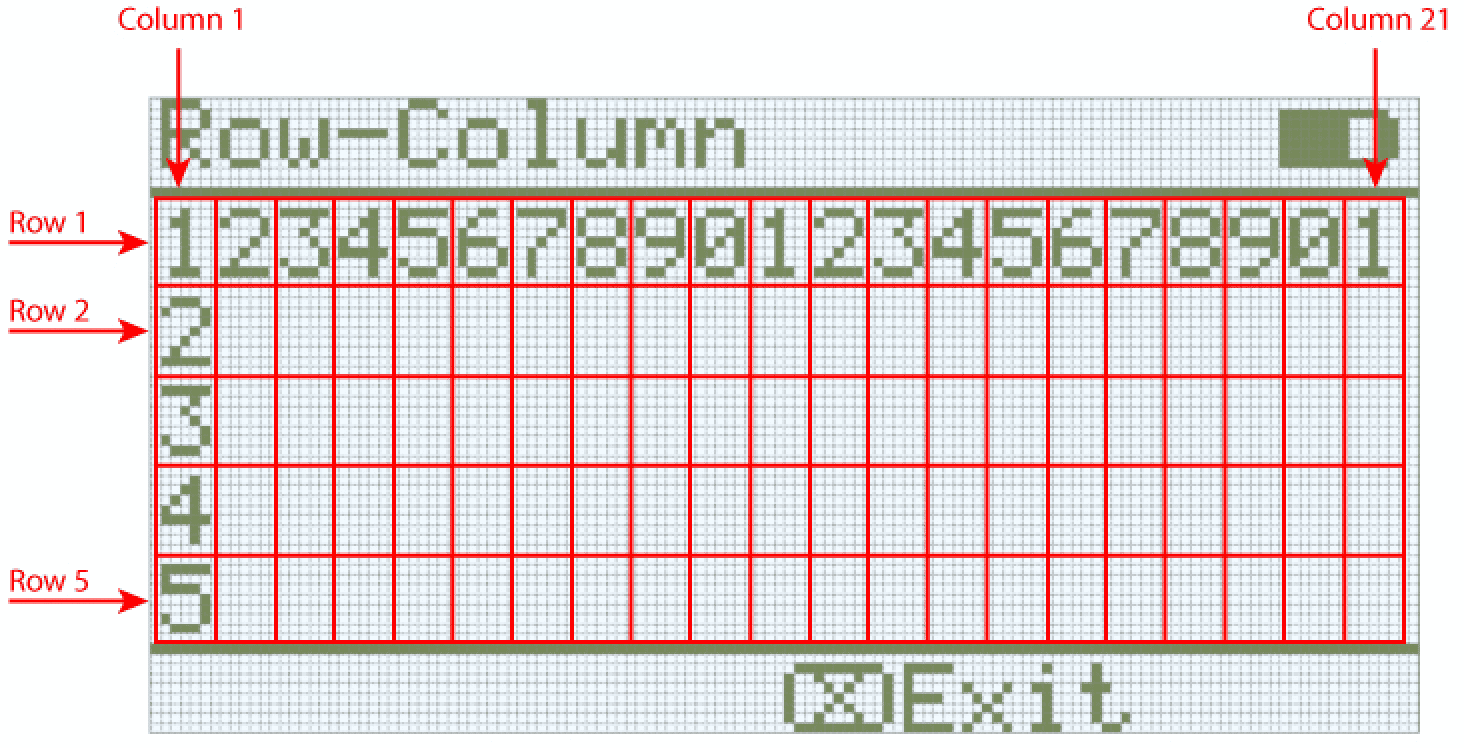
La pantalla cerebral IQ (1.ª generación) admite hasta 5 filas y 21 columnas de texto.
Acceso#
The screen class can be accessed by:
Brain.Screen
Notas#
The
screenobject is provided by the Brain. It is not constructed directly.Projects use a single global
Brainobject, so screen functions are called usingBrain.Screen.
Ejemplo#
/* This constructor is required when using VS Code.
A Brain is generated automatically at the start of
VEXcode projects. */

// Create the Brain
brain Brain = brain();

// Print text to the Brain screen
Brain.Screen.print("Hello!");
Funciones de los miembros#
The screen class includes the following member functions:
print— Prints formatted text, numbers, or Boolean values to the Brain screen.setCursor— Moves the text cursor to a specified row and column.newLine— Clears the remainder of the current line and moves the cursor to the next line.clearLine— Clears the remainder of the current line or clears a specified line.row— Returns the row where text will be printed.column— Returns the column where text will be printed.getStringHeight— Returns the height of a string in pixels using the current font.getStringWidth— Returns the width of a string in pixels using the current font.printAt— Prints formatted text at an x, y pixel location (optionally opaque).clearScreen— Clears the entire screen (optionally to a specified color).setFont— Sets the font used for printing on the screen.setPenWidth— Sets the thickness of drawn lines and shape outlines.setPenColor— Sets the color of text, pixels, lines, and shape outlines.setFillColor— Sets the fill color for drawn shapes and printed text backgrounds.setOrigin— Sets the origin used for screen coordinates.setClipRegion— Restricts screen output to a rectangular region.drawPixel— Draws one pixel at a coordinate.drawLine— Draws a line between two points.drawRectangle— Draws a rectangle at an x, y location with a specified size.drawCircle— Draws a circle at an x, y location with a specified radius.render— Enables double buffering or renders the back buffer to the screen.
Before calling any screen member functions, a brain instance must be created, as shown below:
// Create the Brain
brain Brain = brain();
print#
Muestra texto, números o valores booleanos en la pantalla cerebral del IQ (1.ª generación).
Available Functions1 — Imprime texto formateado usando literales de cadena o cadenas de estilo C de solo lectura.
void print(
    const char* format,
    ... );
Parameters2 — Imprime texto formateado utilizando matrices de caracteres modificables.
void print(
    char* format,
    ... );
Parámetro |
Tipo |
Descripción |
|---|---|---|
|
|
A format string provided as a string literal or read-only C-style string (for example, |
|
|
Una cadena de formato proporcionada como una matriz de caracteres modificable. |
|
Uno o más valores adicionales que se insertan en la cadena de formato, separados por comas. |
Esta función no devuelve ningún valor.
NotesLa salida comienza en la posición actual del cursor posición en la pantalla.
Text printed with
printis always printed with a background, and the background color is determined by the current fill color.Al usar una cadena de formato, el número y los tipos de valores pasados deben coincidir con los especificadores de formato en la cadena.
// Display a message at the starting cursor
Brain.Screen.print("Hello, Robot!");
setCursor#
Moves the cursor to a specific row and column on the IQ (1st gen) Brain screen. The next print call will start printing at that location.
void setCursor(
  int32_t row,
  int32_t col );
Parámetro |
Tipo |
Descripción |
|---|---|---|
|
|
La fila a la que mover el cursor. |
|
|
La columna a la que se debe mover el cursor. |
Esta función no devuelve ningún valor.
NotesAffects where subsequent text output begins when using
print.Las filas y columnas se basan en la fuente de pantalla configurada actualmente.
Calling
setCursoraffects the position of subsequent text output only.
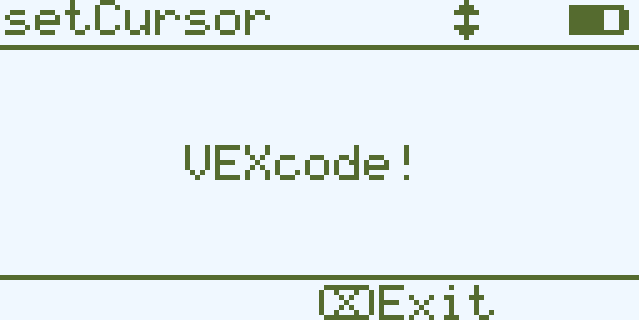
// Print at row 3 column 7
Brain.Screen.setCursor(3, 7);
Brain.Screen.print("VEXcode!");
newLine#
Mueve el cursor al principio de la siguiente fila en la pantalla del cerebro.
Available Functionsvoid newLine();
Esta función no acepta ningún parámetro.
Return ValuesEsta función no devuelve ningún valor.
NotesIf the cursor is in the middle of a sentence,
newLinewill clear the rest of the row after the cursor before moving to the next row.After calling
newLine, the cursor is positioned at the first column of the next line.The cursor position and row numbering are set using
setCursor.
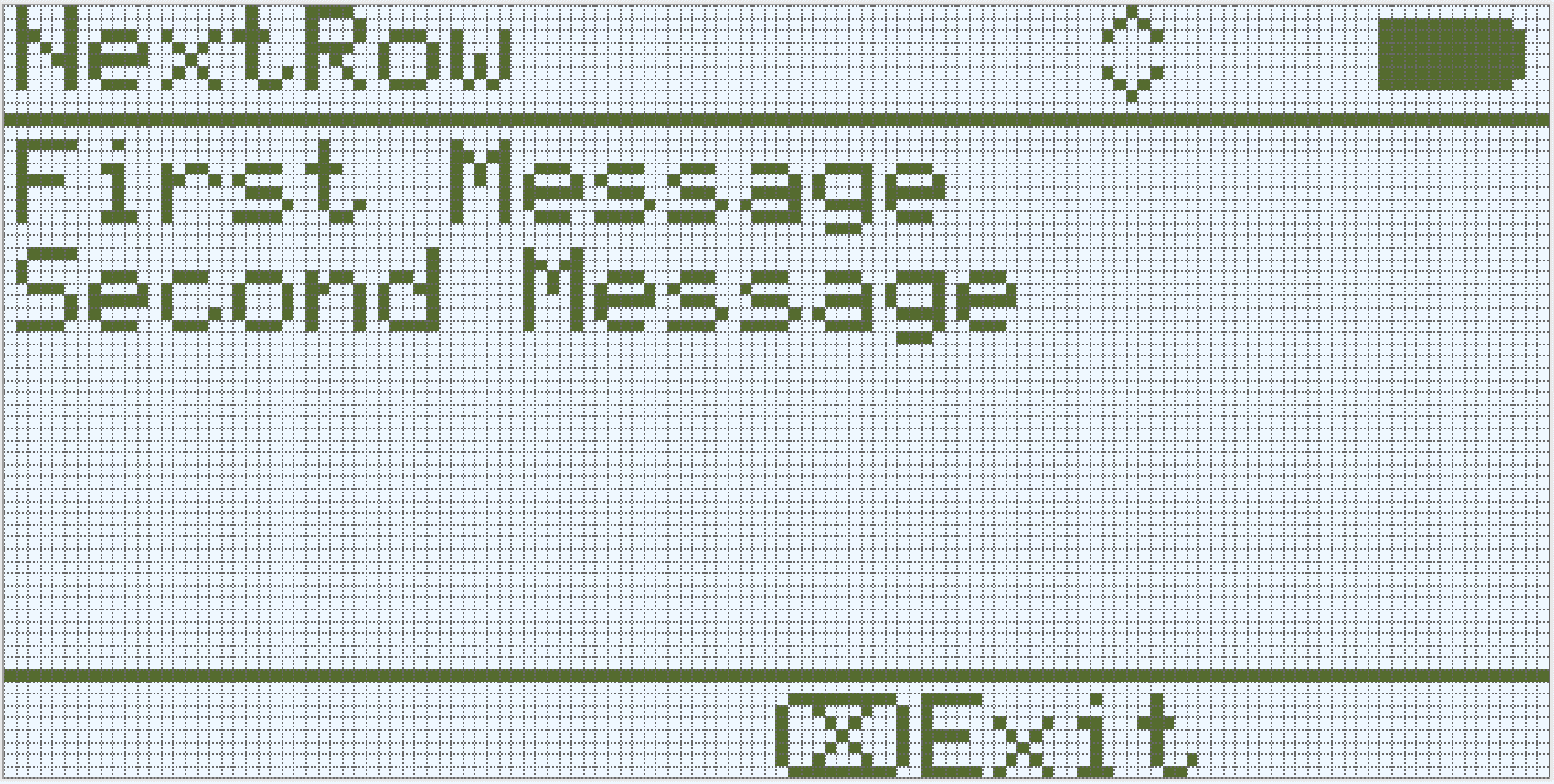
// Display two lines of text
Brain.Screen.print("First message");
Brain.Screen.newLine();
Brain.Screen.print("Second message");
clearLine#
Borra el texto de una fila en la pantalla del IQ (1.ª generación).
Available Functions1 — Borra el resto de la línea actual desde la posición del cursor.
void clearLine();
2 — Borra la fila especificada usando el color de relleno configurado actualmente.
void clearLine(
    int number );
3 — Borra la fila especificada usando un objeto de color predefinido o…/Logic/Custom_color.md.
void clearLine(
    int          number,
    const color& color );
4 — Borra la fila especificada utilizando un valor de color hexadecimal.
void clearLine(
    int         number,
    const char* color );
Parameters5 — Borra la fila especificada usando un valor de tono.
void clearLine(
    int number,
    int hue );
Parámetro |
Tipo |
Descripción |
|---|---|---|
|
|
The row number to clear. Row numbering starts at |
|
|
Clears the row using a
|
|
|
Clears the row using a hexadecimal color value (for example, |
|
|
Clears the row using an integer hue value in the range |
Esta función no devuelve ningún valor.
NotesBorrar una línea no cambia la posición actual del cursor.
The cursor position and row numbering are set using
setCursor.La pantalla del sistema IQ (1.ª generación) es monocromática, por lo que los colores especificados no aparecerán en ella.
// Display text on two rows
Brain.Screen.print("This text stays");
Brain.Screen.newLine();
Brain.Screen.print("This disappears");

// Wait 3 seconds before clearing row 2
wait(3, seconds);
Brain.Screen.clearLine(2);
row#
Devuelve la posición actual del cursor en la fila de la pantalla del cerebro IQ (1.ª generación).
Available Functionsint32_t row();
Esta función no acepta ningún parámetro.
Return ValuesReturns an int32_t representing the row where text will be printed.
La numeración de las filas comienza en el 1.
NotesLa posición del cursor se basa en la fuente de pantalla actual .
El valor devuelto indica dónde aparecerá la siguiente impresión.
The row value changes when text is printed or when
setCursoris called.
// Display the cursor's current row
Brain.Screen.setCursor(3, 12);
Brain.Screen.print("row: ", Brain.Screen.row());
column#
Devuelve la columna donde se imprimirá el texto en la pantalla del IQ (1.ª generación).
Available Functionsint32_t column();
Esta función no acepta ningún parámetro.
Return ValuesReturns an int32_t representing the column where text will be printed.
La numeración de las columnas comienza en 1.
NotesLa posición del cursor se basa en la fuente de pantalla actual .
El valor devuelto indica dónde aparecerá la siguiente impresión.
The column value changes when text is printed or when
setCursoris called.
// Display the cursor's current column
Brain.Screen.print("column: ", Brain.Screen.column());
getStringHeight#
Devuelve la altura, en píxeles, de una cadena cuando se muestra en la pantalla del procesador IQ (1.ª generación).
Available Functionsint32_t getStringHeight(
const char* cstr );
Parámetro |
Tipo |
Descripción |
|---|---|---|
|
|
The text to be measured, provided as a C-style string (for example, |
Returns an int32_t representing the height of the string in pixels when rendered on the Brain screen.
getStringWidth#
Devuelve el ancho, en píxeles, de una cadena cuando se muestra en la pantalla del procesador IQ (1.ª generación).
Available Functionsint32_t getStringWidth(
const char* cstr );
Parámetro |
Tipo |
Descripción |
|---|---|---|
|
|
The text to be measured, provided as a C-style string (for example, |
Returns an int32_t representing the width of the string in pixels when rendered on the Brain screen.
printAt#
Imprime texto, números o valores booleanos en una coordenada específica de la pantalla cerebral IQ (1.ª generación).
Available Functions1 — Imprime la salida formateada en la ubicación de píxeles especificada.
void printAt(
    int32_t    x,
    int32_t    y,
    const char* format,
    ... );
Parameters2 — Imprime la salida formateada en la ubicación de píxeles especificada y establece si el fondo del texto es opaco o transparente.
void printAt(
    int32_t    x,
    int32_t    y,
    bool       bOpaque,
    const char* format,
    ... );
Parámetro |
Tipo |
Descripción |
|---|---|---|
|
|
La posición x en la que se imprimirá, con respecto al origen de la pantalla. |
|
|
La posición Y en la que se imprimirá, con respecto al origen de la pantalla. |
|
|
Controls whether the printed text is drawn opaquely or transparently:
|
|
|
A format string that controls what is printed on the screen (for example, |
|
Uno o más valores adicionales que se insertan en la cadena de formato, separados por comas. |
Esta función no devuelve ningún valor.
NotesThe
xandycoordinates are relative to the current screen origin, which can be changed usingsetOrigin.Al usar una cadena de formato, el número y los tipos de valores pasados deben coincidir con los especificadores de formato en la cadena.
// Print the number 1 at pixel (100, 40)
Brain.Screen.printAt(100, 40, 1);
clearScreen#
Borra todos los dibujos y textos de la pantalla del Cerebro.
Available Functions1 — Borra la pantalla y la deja en negro.
void clearScreen();
2 — Borra la pantalla usando un objeto de color predefinido o color personalizado.
void clearScreen(
    const color& color );
3 — Borra la pantalla usando un valor de color hexadecimal.
void clearScreen(
    const char* color );
Parameters4 — Borra la pantalla usando un valor de tono.
void clearScreen(
    int hue );
Parámetro |
Tipo |
Descripción |
|---|---|---|
|
|
Clears the screen using a
|
|
|
Clears the screen using a hexadecimal color value represented as a string (for example, |
|
|
Clears the screen using an integer hue value in the range |
Esta función no devuelve ningún valor.
NotesLa pantalla del sistema IQ (1.ª generación) es monocromática, por lo que los colores especificados no aparecerán en ella.
// Clear screen after 2 seconds
Brain.Screen.print("VEXcode");
wait(2, seconds);
Brain.Screen.clearScreen();
// Clear screen to blue after 2 seconds
Brain.Screen.print("VEXcode");
wait(2, seconds);
Brain.Screen.clearScreen(red);
setFont#
Establece la fuente utilizada para el texto que se muestra en la pantalla del cerebro IQ (1.ª generación).
This controls the font applied to subsequent text output when using screen text functions such as print.
void setFont(
  fontType font );
Parámetro |
Tipo |
Descripción |
|---|---|---|
|
|
Sets the font to one of the following:
|
Esta función no devuelve ningún valor.
Examples// Display two different fonts on
// two separate lines
Brain.Screen.setFont(mono20);
Brain.Screen.print("Mono Medium");
Brain.Screen.newLine();
Brain.Screen.setFont(prop20);
Brain.Screen.print("Prop Medium");
setPenWidth#
Establece el grosor de las líneas dibujadas y los contornos de las formas.
Available Functionsvoid setPenWidth(
uint32_t width );
Parámetro |
Tipo |
Descripción |
|---|---|---|
|
|
El ancho del lápiz, en píxeles, va de 0 a 32. |
Esta función no devuelve ningún valor.
NotesThe pen width applies to drawing functions such as
drawLine,drawRectangle, anddrawCircle.
// Draw a circle with a pen width of 5
Brain.Screen.drawCircle(40, 70, 20);
Brain.Screen.setPenWidth(5);
Brain.Screen.drawCircle(100, 70, 20);
setPenColor#
Establece el color del texto, los píxeles, las líneas y los contornos de las formas.
Available Functions1 — Establece el color del lápiz usando un objeto predefinido o color personalizado.
void setPenColor(
    const color& color );
2 — Establece el color del lápiz usando un valor de color hexadecimal.
void setPenColor(
    const char* color );
Parameters3 — Establece el color del lápiz usando un valor de tono.
void setPenColor(
    int hue );
Parámetro |
Tipo |
Descripción |
|---|---|---|
|
|
Sets the pen color using a
|
|
|
Sets the pen color using a hexadecimal color value represented as a string (for example, |
|
|
Sets the pen color using an integer hue value in the range |
Esta función no devuelve ningún valor.
NotesLa pantalla del sistema IQ (1.ª generación) es monocromática, por lo que los colores especificados no aparecerán en ella.
Brain.Screen.drawRectangle(100, 50, 10, 20);
Brain.Screen.setPenColor(blue);
Brain.Screen.drawRectangle(50, 50, 10, 20);
setFillColor#
Establece el color de relleno que se utiliza al dibujar las formas.
Available Functions1 — Establece el color de relleno usando un objeto predefinido o color personalizado.
void setFillColor(
    const color& color );
2 — Establece el color de relleno utilizando un valor de color hexadecimal.
void setFillColor(
    const char* color );
Parameters3 — Establece el color de relleno usando un valor de tono.
void setFillColor(
    int hue );
Parámetro |
Tipo |
Descripción |
|---|---|---|
|
|
Sets the fill color using a
|
|
|
Sets the fill color using a hexadecimal color value represented as a string (for example, |
|
|
Sets the fill color using an integer hue value in the range |
Esta función no devuelve ningún valor.
NotesLa pantalla del sistema IQ (1.ª generación) es monocromática, por lo que los colores especificados no aparecerán en ella.
// Draw a circle filled with yellow
Brain.Screen.setFillColor(yellow);
Brain.Screen.drawCircle(50, 50, 20);
setOrigin#
Establece el origen utilizado para dibujar gráficos en la pantalla del cerebro.
Available Functionsvoid setOrigin(
int32_t x,
int32_t y );
Parámetro |
Tipo |
Descripción |
|---|---|---|
|
|
La posición x del origen en relación con la esquina superior izquierda de la pantalla del Cerebro, de 0 a 159. |
|
|
La posición y del origen en relación con la esquina superior izquierda de la pantalla del Cerebro, de 0 a 107. |
Esta función no devuelve ningún valor.
NotesEl origen predeterminado es la esquina superior izquierda de la pantalla en la coordenada (0, 0).
The origin applies to coordinate functions such as
drawLine,drawRectangle,drawCircle, andprintAt.El origen permanece vigente hasta que se modifique de nuevo o se reinicie el proyecto.
setClipRegion#
Define un área rectangular en la pantalla donde se mostrarán todos los dibujos y el texto. Cualquier contenido fuera de esta región no se mostrará.
Available Functionsvoid setClipRegion(
int x,
int y,
int width,
int height );
Parámetro |
Tipo |
Descripción |
|---|---|---|
|
|
La coordenada x de la esquina superior izquierda de la región de recorte, dada como un número entero entre 0 y 159. |
|
|
La coordenada y de la esquina superior izquierda de la región de recorte, dada como un número entero de 0 a 107. |
|
|
El ancho de la región de recorte en píxeles, expresado como un número entero entre 0 y 159. |
|
|
La altura de la región de recorte en píxeles, expresada como un número entero entre 0 y 107. |
Esta función no devuelve ningún valor.
NotesLas funciones de dibujo se siguen ejecutando aunque queden fuera de la región de recorte, pero solo se ve la parte que está dentro de dicha región.
The
xandycoordinates are relative to the current screen origin, which can be changed usingsetOrigin.La región de recorte se aplica únicamente al hilo actual.
Al establecer una nueva región de recorte, se reemplaza cualquier región de recorte establecida previamente para el hilo actual.
// Restrict text and drawings to a specific region
Brain.Screen.setClipRegion(0, 0, 120, 120);
Brain.Screen.drawRectangle(60, 60, 100, 100, red);
Brain.Screen.printAt(60, 60, "Cut off!");
drawPixel#
Dibuja un único píxel en la pantalla del IQ (1.ª generación) Brain en la ubicación de píxeles x e y especificada.
Available Functionsvoid drawPixel(
int x,
int y );
Parámetro |
Tipo |
Descripción |
|---|---|---|
|
|
La coordenada x donde se dibujará el píxel, dada como un número entero del 0 al 159. |
|
|
La coordenada y donde se dibujará el píxel, dada como un número entero del 0 al 107. |
Esta función no devuelve ningún valor.
NotesLa pantalla del sistema IQ (1.ª generación) es monocromática, por lo que los colores especificados no aparecerán en ella.
The
xandycoordinates are relative to the current screen origin, which can be set usingsetOrigin.Si la ubicación del píxel especificada está fuera de los límites de la pantalla, el píxel no se dibuja.
// Draw one pixel at the center
// of the screen
Brain.Screen.drawPixel(80, 50);
drawLine#
Dibuja una línea recta que conecta dos puntos en la pantalla cerebral de CI (1.ª generación).
Available Functionsvoid drawLine(
int x1,
int y1,
int x2,
int y2 );
Parámetro |
Tipo |
Descripción |
|---|---|---|
|
|
La coordenada x inicial de la línea, dada como un número entero entre 0 y 159. |
|
|
La coordenada y inicial de la línea, dada como un número entero entre 0 y 107. |
|
|
La coordenada x final de la línea, dada como un número entero entre 0 y 159. |
|
|
La coordenada y final de la línea, dada como un número entero entre 0 y 107. |
Esta función no devuelve ningún valor.
NotesLa pantalla del sistema IQ (1.ª generación) es monocromática, por lo que los colores especificados no aparecerán en ella.
The width of the line is determined by the current pen width set with
setPenWidth.The
xandycoordinates are relative to the current screen origin, which can be set usingsetOrigin.Si alguna parte de la línea queda fuera de los límites de la pantalla, solo se dibuja la parte visible.
// Draw a line from the top left to
// bottom right of the screen
Brain.Screen.drawLine(0, 0, 159, 107);
drawRectangle#
Dibuja un rectángulo en la pantalla del cerebro IQ (1.ª generación) en la posición y el tamaño especificados.
Available Functions1 — Dibuja y rellena un rectángulo usando el color de relleno configurado actualmente.
void drawRectangle(
    int x,
    int y,
    int width,
    int height );
2 — Dibuja y rellena un rectángulo usando un objeto de color predefinido o color personalizado.
void drawRectangle(
    int           x,
    int           y,
    int           width,
    int           height,
    const color&  color );
3 — Dibuja y rellena un rectángulo utilizando un valor de color hexadecimal.
void drawRectangle(
    int           x,
    int           y,
    int           width,
    int           height,
    const char*   color );
Parameters4 — Dibuja y rellena un rectángulo usando un valor de tono.
void drawRectangle(
    int x,
    int y,
    int width,
    int height,
    int hue );
Parámetro |
Tipo |
Descripción |
|---|---|---|
|
|
La coordenada x de la esquina superior izquierda del rectángulo, dada como un número entero entre 0 y 159. |
|
|
La coordenada y de la esquina superior izquierda del rectángulo, dada como un número entero entre 0 y 107. |
|
|
El ancho del rectángulo, dado como un número entero de 0 a 159. |
|
|
La altura del rectángulo, dada como un número entero de 0 a 107. |
|
|
Fills the rectangle using a
|
|
|
Fills the rectangle using a hexadecimal color value (for example, |
|
|
Fills the rectangle using a hue value in the range |
Esta función no devuelve ningún valor.
NotesLa pantalla del sistema IQ (1.ª generación) es monocromática, por lo que los colores especificados no aparecerán en ella.
The outline thickness is determined by the current pen width set with
setPenWidth.The
xandycoordinates are relative to the current screen origin, which can be changed usingsetOrigin.Si alguna parte del rectángulo queda fuera de los límites de la pantalla, solo se dibujará la parte visible.
// Draw a red rectangle on the screen
Brain.Screen.drawRectangle(25, 25, 100, 50, red);
drawCircle#
Dibuja un círculo en la pantalla del sensor IQ (1.ª generación) en la posición y el radio especificados.
Available Functions1 — Dibuja y rellena un círculo usando el color de relleno configurado actualmente.
void drawCircle(
    int x,
    int y,
    int radius );
2 — Dibuja y rellena un círculo usando un objeto de color predefinido o color personalizado.
void drawCircle(
    int           x,
    int           y,
    int           radius,
    const color&  color );
3 — Dibuja y rellena un círculo utilizando un valor de color hexadecimal.
void drawCircle(
    int           x,
    int           y,
    int           radius,
    const char*   color );
Parameters4 — Dibuja y rellena un círculo usando un valor de tono.
void drawCircle(
    int x,
    int y,
    int radius,
    int hue );
Parámetro |
Tipo |
Descripción |
|---|---|---|
|
|
La coordenada x del centro del círculo, dada como un número entero entre 0 y 159. |
|
|
La coordenada y del centro del círculo, dada como un número entero entre 0 y 107. |
|
|
El radio del círculo, expresado como un número entero entre 0 y 107 píxeles. |
|
|
Fills the circle using a
|
|
|
Fills the circle using a hexadecimal color value (for example, |
|
|
Fills the circle using a hue value in the range |
Esta función no devuelve ningún valor.
NotesLa pantalla del sistema IQ (1.ª generación) es monocromática, por lo que los colores especificados no aparecerán en ella.
The outline thickness is determined by the current pen width set with
setPenWidth.The
xandycoordinates are relative to the current screen origin, which can be changed usingsetOrigin.
// Draw a green circle on the screen
Brain.Screen.drawCircle(80, 50, 20, green);
render#
Enables double buffering for the Brain’s screen. Once called, any drawing functions (like text or shapes) will no longer appear immediately for the rest of the project. Instead, updates will only be shown when render is used again. This allows for smoother and more controlled screen updates, but means nothing will be visible until render is used.
1 — Habilita el doble búfer o renderiza el búfer de respaldo en la pantalla.
bool render();
Parameters2 — Renderiza el búfer de fondo en la pantalla con control sobre el comportamiento de sincronización vertical y ejecución del programador opcional.
bool render(
    bool bVsyncWait,
    bool bRunScheduler = true );
Parámetro |
Tipo |
Descripción |
|---|---|---|
|
|
|
|
|
Optional.
|
Returns a Boolean indicating whether the saved drawings in the buffer were successfully rendered to the screen:
true— The drawings were successfully rendered on the screen.false— The drawings could not be rendered on the screen.
Notes
Calling
renderwill requirerenderto be used for the rest of the project.
Brain.Screen.render();

// Draw text to the back buffer
Brain.Screen.print("Render later...");

// Wait for a screen press to render drawings
while (!Brain.Screen.pressing()) {
  wait(20, msec);
}
Brain.Screen.render();