
Controller#
Introduction#
The VEX EXP Controller has buttons and two joysticks. Controller methods can be used to check button presses, read joystick movement, enable or disable configured controller actions, or run functions when controller events happen.
Configured controller actions are controller behaviors set in the Devices menu. Use remote_control_code_enabled to temporarily enable or disable those configured actions during a project.
This page uses controller as the example controller name. Replace it with your own configured name as needed.
Below is a list of all available methods:
Action — Turn configured controller actions on or off.
remote_control_code_enabled— Enables or disables controller actions configured in the Devices menu.
Getters — Read button states and joystick positions.
.pressing— Returns whether a specified button is being pressed..position— Returns the position of a specified joystick axis.
Callbacks — Run functions when controller input changes.
.pressed— Runs a function when a specified button is pressed..released— Runs a function when a specified button is released..changed— Runs a function when the joystick’s position changes along a specified axis.
Constructor — Manually create a Controller object.
Controller— Creates a Controller object.
Action#
remote_control_code_enabled#
remote_control_code_enabled is a variable that enables or disables controller actions configured in the Devices menu. Controller configured actions are enabled by default.
Usage:
remote_control_code_enabled = state
Value |
Description |
|---|---|
|
Enables controller configured actions. |
|
Disables controller configured actions. |
# Drive forward or backward using the left joystick
remote_control_code_enabled = False

while True:
    if controller.axis3.position() > 0:
        drivetrain.drive(FORWARD)
    elif controller.axis3.position() < 0:
        drivetrain.drive(REVERSE)
    # Press A to use controller configured actions again
    elif controller.buttonA.pressing():
        break
    else:
        drivetrain.stop()

    wait(20, MSEC)

remote_control_code_enabled = True
Getters#
.pressing#
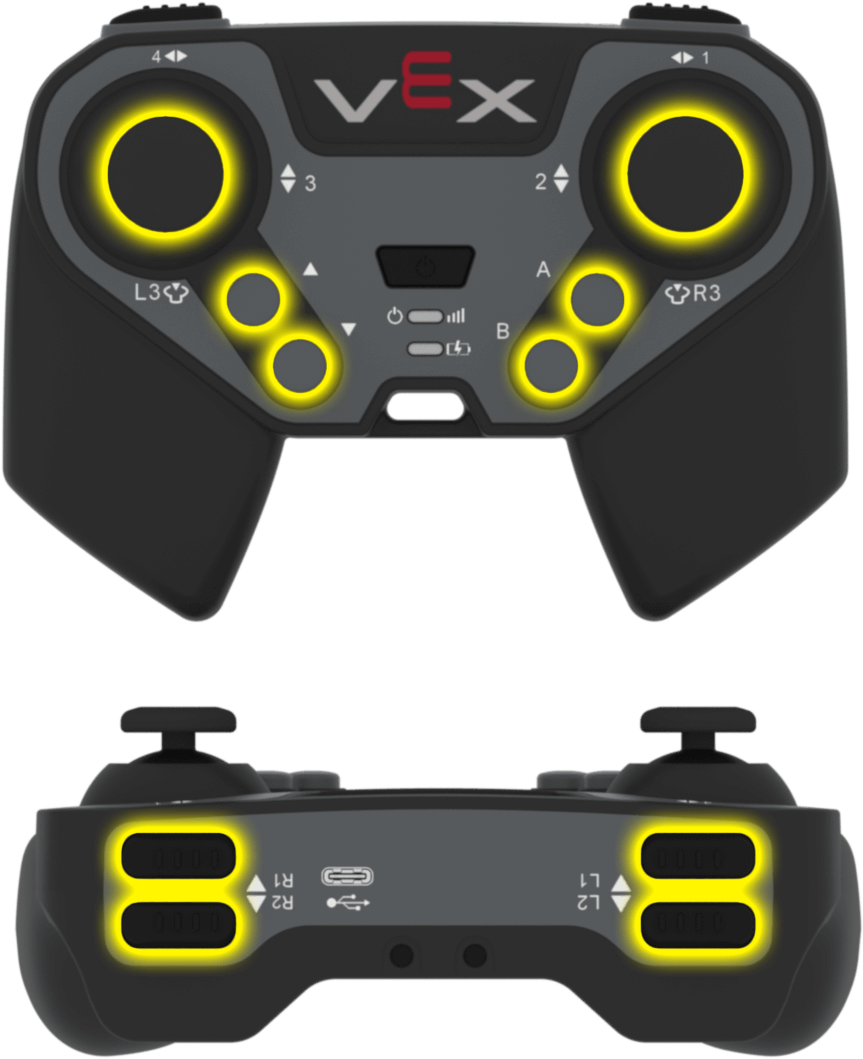
.pressing returns whether a specific button on the controller is currently being pressed. This method must be called on a specific button object, such as controller.buttonA.
True— The specified button is being pressed.False— The specified button is not being pressed.
Usage:
One of the available button objects can be used with this method:
Button |
Command |
|---|---|
|
|
|
|
|
|
|
|
|
|
|
|
|
|
|
|
|
|
|
|
Parameters |
Description |
|---|---|
This method has no parameters. |
# Turn right while L1 is pressed
while True:
    if controller.buttonL1.pressing():
        drivetrain.turn(RIGHT)
    else:
        drivetrain.stop()

    wait(20, MSEC)
.position#
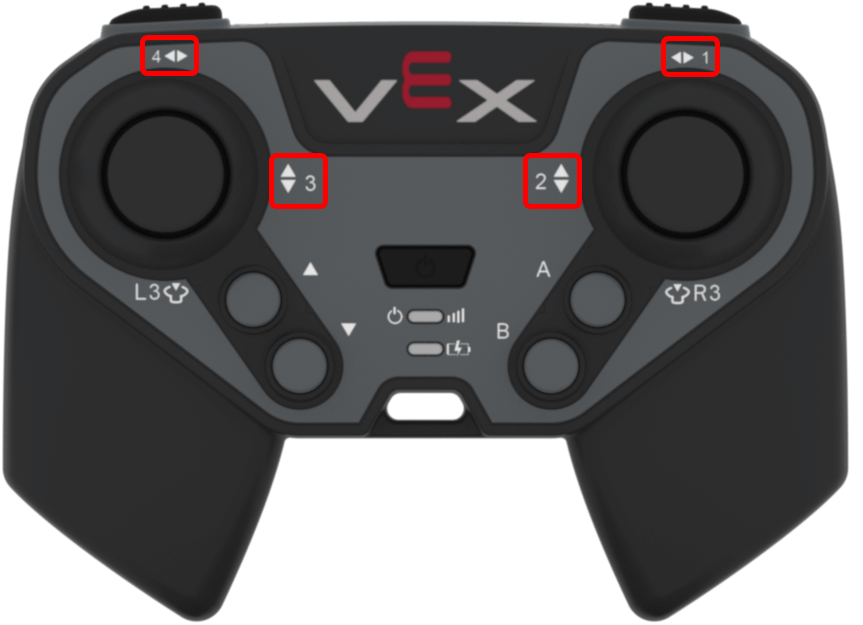
.position returns the position of a joystick axis as a number from -100 to 100.
This method must be called on a specific axis object, such as controller.axis1.
Usage:
One of the available axis objects can be used with this method:
Axis |
Command |
|---|---|
|
|
|
|
|
|
|
|
Parameters |
Description |
|---|---|
This method has no parameters. |
# Turn with the left joystick
remote_control_code_enabled = False

while True:
    if controller.axis4.position() > 10:
        drivetrain.turn(RIGHT)
    elif controller.axis4.position() < -10:
        drivetrain.turn(LEFT)
    else:
        drivetrain.stop()

    wait(20, MSEC)
Callbacks#
.pressed#
.pressed runs a function when the specified button is pressed. Once it is used, the function will run automatically each time that button is pressed.
Usage:
One of the available button objects can be used with this method:
Button |
Command |
|---|---|
|
|
|
|
|
|
|
|
|
|
|
|
|
|
|
|
|
|
|
|
Parameter |
Description |
|---|---|
|
A previously defined function to run each time the specified button is pressed. |
|
Optional. A tuple containing arguments to pass to the callback function. See Using Events with Parameters for more information. |
# Drive forward when R1 is pressed
def drive_forward():
    drivetrain.drive_for(FORWARD, 200, MM)

controller.buttonR1.pressed(drive_forward)
.released#
.released runs a function when the specified button is released. Once it is used, the function will run automatically each time that button is released.
Usage:
One of the available button objects can be used with this method:
Button |
Command |
|---|---|
|
|
|
|
|
|
|
|
|
|
|
|
|
|
|
|
|
|
|
|
Parameter |
Description |
|---|---|
|
A previously defined function to run each time the specified button is released. |
|
Optional. A tuple containing arguments to pass to the callback function. See Using Events with Parameters for more information. |
# Stop driving when R1 is released
def stop_driving():
    drivetrain.stop()

controller.buttonR1.released(stop_driving)
.changed#
.changed runs a function when the joystick’s position changes along the specified axis. Once it is used, the function will run automatically each time the joystick’s position changes along that axis.
Usage:
One of the available axis objects can be used with this method:
Axis |
Command |
|---|---|
|
|
|
|
|
|
|
|
Parameter |
Description |
|---|---|
|
A previously defined function to run each time the joystick’s position changes along the specified axis. |
|
Optional. A tuple containing arguments to pass to the callback function. See Using Events with Parameters for more information. |
# Play a sound when the left joystick moves
def beep():
    brain.play_sound(SoundType.TADA)

controller.axis3.changed(beep)
Constructors#
Controller#
Controller creates a Controller object. Manually creating a Controller object is only needed when configuring a controller outside of VEXcode.
Usage:
Controller()
Parameters |
Description |
|---|---|
This constructor has no parameters. |
# Create a Controller object
my_controller = Controller()