
Using Loops#
This tutorial walks you through using the repeat block to drive your robot in a square in VEXcode EXP. By the end, you’ll have a project that repeats the same two blocks four times to complete the square.
If you want your robot to repeat the same action multiple times, like driving in a square, you could keep duplicating the same blocks over and over until they move in the pattern of a square. A simpler way, however, is to use the repeat block within the Logic - Control category.
Attach a drive for block and a turn for block below the when started block.
    when started
        drive [forward v] for (200) [mm v] ▶
        turn [right v] for (90) degrees ▶
Attach a repeat block below the when started block.
    when started
        repeat (10)
        end
        drive [forward v] for (200) [mm v] ▶
        turn [right v] for (90) degrees ▶
Drag the drive for and turn for blocks inside the repeat block.
    when started
        repeat (10)
            drive [forward v] for (200) [mm v] ▶
            turn [right v] for (90) degrees ▶
        end
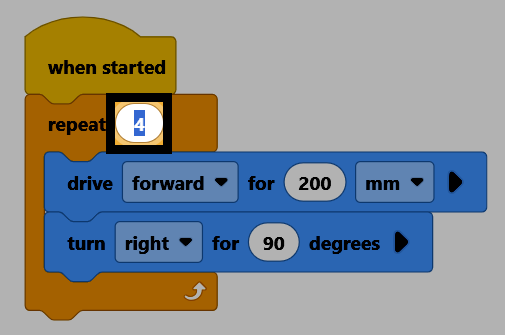
Select the repeat number and change it to 4, so the blocks inside run once for each side of the square.
Make sure your robot is connected to VEXcode, then select Download to download the project to the Brain.

Select Run to run the project. The robot will drive in a square.

You can also repeat a sequence of actions forever, using the forever block instead of repeat.
    forever
    end
To break out of a loop, use the break block within a loop, to make the code exit the looping block immediately.
break