
Button#
Introduction#
The button class is a derived class of the controller class. It provides access to controller button states and button event callbacks.
A button object is accessed through a controller object. It is not constructed directly.
The IQ (1st gen) Controller has eight main button objects. If an IQ (2nd gen) Controller is connected to the IQ (1st gen) Brain, the joystick buttons ButtonL3 and ButtonR3 can also be used.
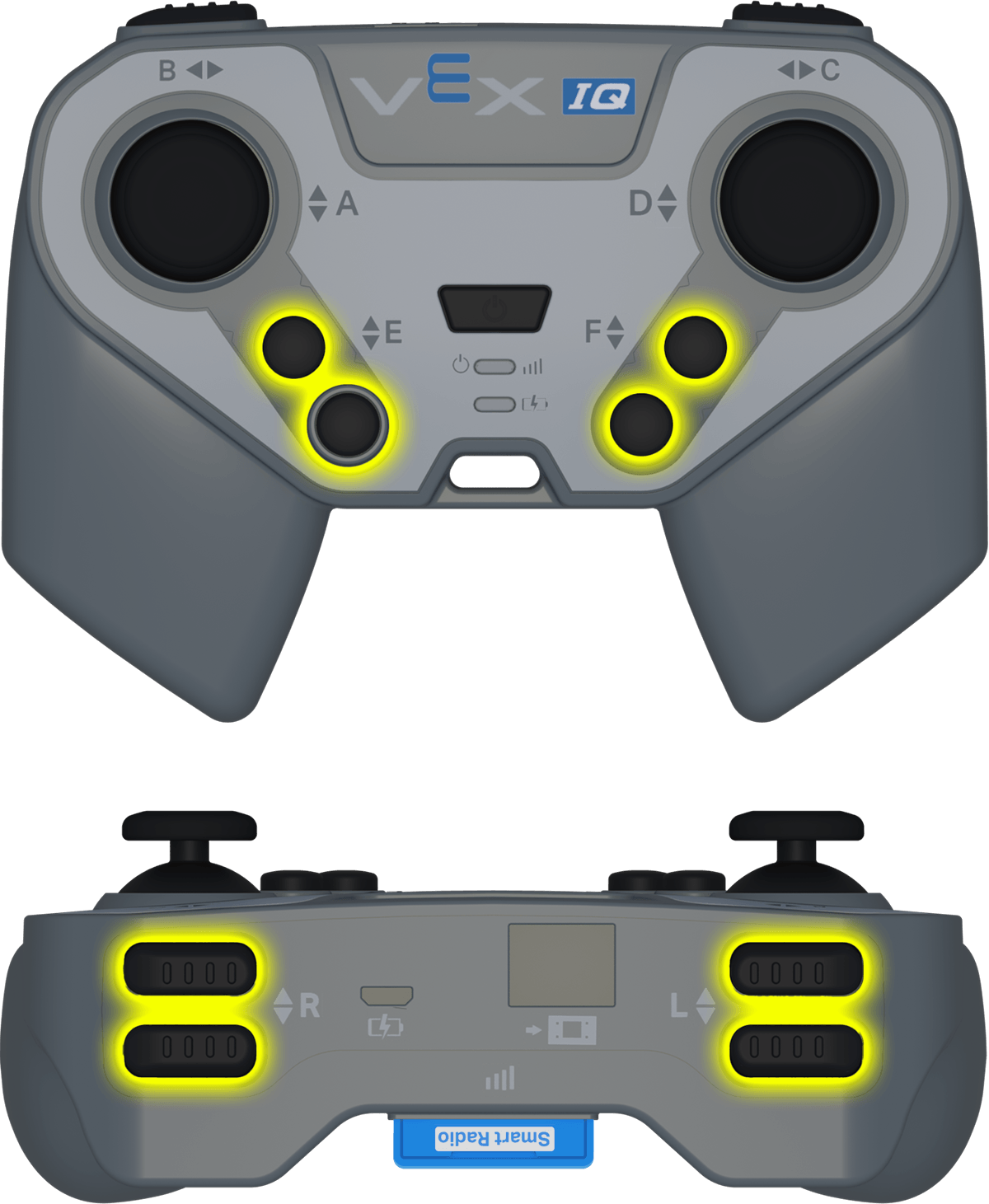
Access#
The controller class provides the following button objects. Each object is an instance of the button class.
Object |
Example Usage |
Description |
|---|---|---|
|
|
The E ▼ button. |
|
|
The E ▲ button. |
|
|
The F ▼ button. |
|
|
The F ▲ button. |
|
|
The L ▼ button. |
|
|
The L ▲ button. |
|
|
The R ▼ button. |
|
|
The R ▲ button. |
|
|
The Left Joystick button. IQ (2nd gen) Controller only. |
|
|
The Right Joystick button. IQ (2nd gen) Controller only. |
Notes#
Before using a
buttonmember function, create acontrollerobject.ButtonL3andButtonR3are only available when an IQ (2nd gen) Controller is connected.
// Create a controller object
controller Controller = controller();
Member Functions#
The button class includes the following member functions:
Getter — Read button state.
pressing— Returns whether the button is being pressed.
Callbacks — Run functions when button events occur.
Getter#
pressing#
pressing returns whether the button is currently being pressed.
Available Function
bool pressing() const;
Parameters
This function does not have parameters.
Return Value
Returns a Boolean value.
true— The button is being pressed.false— The button is not being pressed.
Example
// Turn right while R Up is pressed
while (true) {
  if (Controller.ButtonRUp.pressing()) {
    Drivetrain.turn(right);
  }
  else {
    Drivetrain.stop();
  }

  wait(20, msec);
}
Callbacks#
pressed#
pressed registers a function that runs when the button is pressed.
Available Function
void pressed(void (* callback)(void)) const;
Parameter |
Type |
Description |
|---|---|---|
|
|
A function that runs when the button is pressed. |
Return Value
This function does not return a value.
Example
Define the callback function outside of main.
// Drive forward when F Up is pressed
void driveForward() {
  Drivetrain.driveFor(forward, 100, mm);
}
Register the callback inside main.
int main() {
  vexcodeInit();

  // Run driveForward when F Up is pressed
  Controller.ButtonFUp.pressed(driveForward);
}
released#
released registers a function that runs when the button is released.
Available Function
void released(void (* callback)(void)) const;
Parameter |
Type |
Description |
|---|---|---|
|
|
A function that runs when the button is released. |
Return Value
This function does not return a value.
Example
Define the callback function outside of main.
// Stop the drivetrain when F Up is released
void stopDriving() {
  Drivetrain.stop();
}
Register the callback inside main.
int main() {
  vexcodeInit();

  // Run stopDriving when F Up is released
  Controller.ButtonFUp.released(stopDriving);
}