
Color#
Introduction#
The Color Sensor is an optical sensor that allows your robot to detect when an object is present, recognize specific colors, and return visual data such as brightness and hue.
You can also configure the brightness of the sensor’s internal light. These tools are ideal for programs that need to react to colored objects, lighting conditions, or sensor feedback in real time.
This page uses color_1 as the example Color Sensor name. Replace it with your own configured name as needed.
Below is a list of all methods:
Actions — Detect objects with the Color Sensor.
object_detected— Registers a function to be called when an object is detected.
Mutators — Modify the lights on the Color Sensor.
set_light— Sets the Color Sensor’s LED to on, off, or a set brightness level.set_light_power— Sets the brightness of the Color Sensor’s LED.
Getters — Return object data with the Color Sensor.
is_near_object— Returns whether an object is within range of the sensor.color— Returns the hex code of the detected color.brightness— Returns the detected brightness.hue— Returns the detected hue value.installed— Returns whether the Color Sensor is connected to the Brain.
Constructors — Manually initialize and configure a Color Sensor.
ColorSensor— Creates a Color Sensor.
Actions#
object_detected#
object_detected registers a function to be called when the Color Sensor detects an object.
Usage:
color_1.object_detected(callback, args)
Parameters |
Description |
|---|---|
|
A function that is previously defined to execute when the Color Sensor detects an object. |
|
Optional. A tuple containing arguments to pass to the callback function. See Functions with Parameters for more information. |
Mutators#
set_light#
set_light sets the Color Sensor’s LED to on, off, or a set brightness level.
Usage:
color_1.set_light(value, units)
Parameters |
Description |
|---|---|
|
Specifies whether to turn the LED on or off using one of the following:
|
|
Optional. The unit that represents the brightness value: |
# Turn the LED on and off forever
while True:
    color_1.set_light(LedStateType.ON)
    wait(0.5, SECONDS)
    color_1.set_light(LedStateType.OFF)
    wait(0.5, SECONDS)
# Turn the LED on and off forever
while True:
    color_1.set_light(LedStateType.ON, 75)
    wait(0.5, SECONDS)
    color_1.set_light(0)
    wait(0.5, SECONDS)
set_light_power#
set_light_power sets the brightness of the Color Sensor’s LED. If the LED is not already on, this method will also turn the LED on.
Usage:
color_1.set_light_power(value)
Parameters |
Description |
|---|---|
|
The brightness of the LED as a percent from 0 to 100. A value of 0 turns the LED off. |
# Turn the LED light on at different intensities
color_1.set_light_power(10)
wait(2, SECONDS)
color_1.set_light_power(100)
Getters#
is_near_object#
is_near_object returns a Boolean indicating whether the Color Sensor is within approximately 57 millimeters (2.25 inches) of an object. Detection depends on reflected light, so dark or non-reflective surfaces may not be detected reliably.
True— The detected object is within approximately 57 millimeters.False— The detected object is not within approximately 57 millimeters.
Usage:
color_1.is_near_object()
Parameters |
Description |
|---|---|
This method has no parameters. |
color#
color returns the hex code of the detected color as a string in the format “Color” followed by two zeros and the color’s hex value.
For example, detecting red (#FF0000) would return “Color 00FF0000”.
Usage:
color_1.color()
Parameters |
Description |
|---|---|
This method has no parameters. |
# Display the currently detected hex value
while True:
    brain.screen.clear_screen()
    brain.screen.set_cursor(1, 1)
    brain.screen.print(color_1.color())
    wait(0.5,SECONDS)
brightness#
brightness returns how bright the detected color is, as an integer from 0% to 100%.
A higher percentage means the Color Sensor detects more light. A lower percentage means the Color Sensor detects less light.
Usage:
color_1.brightness()
Parameters |
Description |
|---|---|
This method has no parameters. |
# Display the currently detected brightness
while True:
    brain.screen.clear_screen()
    brain.screen.set_cursor(1, 1)
    brain.screen.print("Brightness:")
    brain.screen.next_row()
    brain.screen.print(color_1.brightness())
    wait(0.5,SECONDS)
hue#
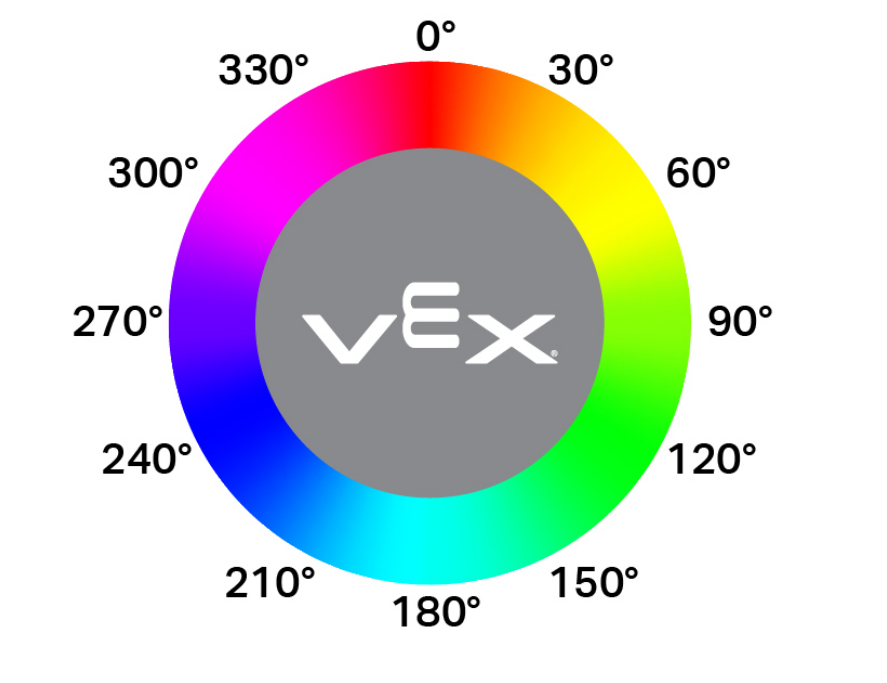
hue returns the detected hue value as a float in the range of 0 to 359.99 degrees.
Hue is a way to describe color using numbers around a color wheel, as shown below.
Usage:
color_1.hue()
Parameters |
Description |
|---|---|
This method has no parameters. |
# Display the currently detected hue
while True:
    brain.screen.clear_screen()
    brain.screen.set_cursor(1, 1)
    brain.screen.print("Hue: ")
    brain.screen.print(color_1.hue())
    wait(0.5,SECONDS)
installed#
installed returns a Boolean indicating whether the Color Sensor is connected to the Brain.
True— The Color Sensor is connected to the Brain.False— The Color Sensor is not connected to the Brain.
Usage:
color_1.installed()
Parameters |
Description |
|---|---|
This method has no parameters. |
Constructors#
Constructors are used to manually create ColorSensor objects, which are necessary for configuring a Color Sensor outside of VEXcode.
ColorSensor#
ColorSensor creates a Color Sensor.
Usage:
color_1 = ColorSensor(smartport)
Parameter |
Description |
|---|---|
|
The Smart Port that the Color Sensor is connected to, written as PORTx where x is the number of the port. |
# Create a Color Sensor object in Port 3
color_1 = ColorSensor(Ports.PORT3)