
Motor Controller 55#
Introduction#
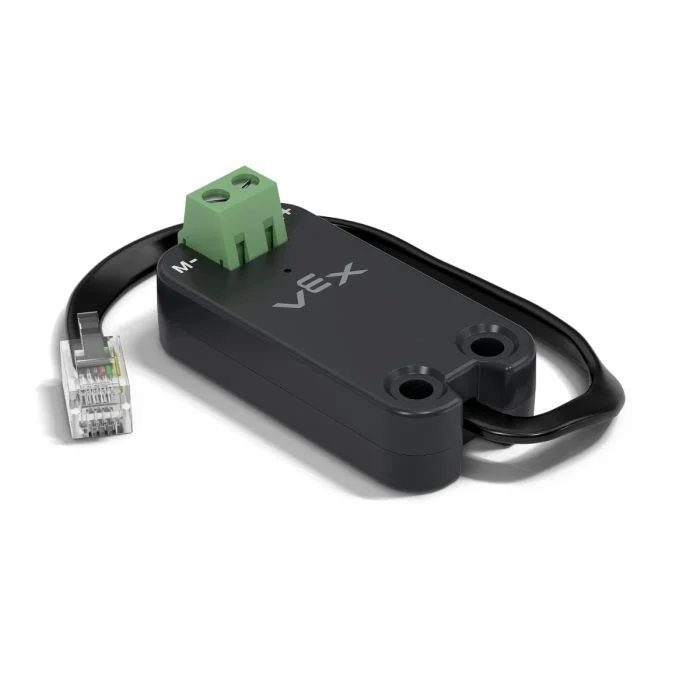
The motor55 class is used to control a VEX Motor Controller 55 connected to the EXP Brain. The Motor Controller 55 is a legacy motor controller designed to operate 2-wire DC motors.
Class Constructors#
1 — Creates a
motor55object on the specified Smart Port.motor55( int32_t index );
2 — Creates a
motor55object on the specified Smart Port and changes the positive turning direction.motor55( int32_t index, bool reverse );
3 — Creates a
motor55object on the specified Smart Port, sets the maximum drive voltage, and changes the positive turning direction.motor55( int32_t index, double maxv, bool reverse );
Class Destructor#
Destroys the motor55 object and releases associated resources.
~motor55();
Parameters#
Parameter |
Type |
Description |
|---|---|---|
|
|
The Smart Port that the Motor Controller 55 is connected to, written as |
|
|
Determines whether the motor’s direction is reversed:
|
|
|
The maximum voltage that the Motor Controller 55 can apply to the motor. |
Example#
// Create the motor55 instance in Smart Port 1
motor55 Motor1 = motor55(PORT1);
Member Functions#
The motor55 class includes the following member functions:
spin— Spins the motor in a specified direction.stop— Stops the motor.setVelocity— Tells the DC motor how fast to spin.setStopping— Sets the stopping behavior (coast or brake).setReversed— Sets whether the motor’s direction is reversed.current— Returns the motor’s electrical current.voltage— Returns the motor’s electrical voltage.temperature— Returns the motor temperature.getMotorType— Returns the detected motor/controller type.installed— Returns whether the Motor Controller 55 is detected on the specified Smart Port.
Before calling any motor55 member functions, an instance must be created, as shown below:
/* This constructor is required when using VS Code.
Motor Controller 55 configuration is generated automatically
in VEXcode using the Device Menu. Replace the values
as needed. */

// Create the motor55 instance in Smart Port 1
motor55 MC55_1 = motor55(PORT1);
spin#
Spins the motor in the specified direction indefinitely.
Available Functions
1 — Spins using the currently configured velocity.
void spin(
  directionType dir );
2 — Spins at the specified voltage.
void spin(
  directionType dir,
  double        voltage,
  voltageUnits  units );
Parameters
Parameter |
Type |
Description |
|---|---|---|
|
|
The direction in which the motor spins: |
|
|
The voltage value applied to the motor. A negative value spins opposite the given |
|
|
The unit used to represent voltage:
|
Return Values
This function does not return a value.
Notes
This function is non-waiting and the program continues immediately after the call.
The motor will continue spinning until
stopis called or anotherspinis used.
stop#
Stops the motor from spinning using the currently configured brake mode.
Available Functions
void stop();
Parameters
This function does not take any parameters.
Return Values
This function does not return a value.
Notes
Stops the motor using the currently configured stopping mode set by
setStopping.
setVelocity#
Tells a DC motor how fast to spin. A higher percentage makes the DC motor spin faster and a lower percentage makes the DC motor spin slower.
Every project begins with each connected DC motor spinning at 50% velocity by default.
Available Functions
void setVelocity(
    double       velocity,
    percentUnits units = percent );
Parameters
Parameter |
Type |
Description |
|---|---|---|
|
|
The velocity to spin with from 0% to 100% when using |
|
|
The velocity unit: |
Return Values
This function does not return a value.
Notes
Any subsequent call to
spinwithout a specified voltage will use this value.
setStopping#
Sets how a motor behaves when it stops.
Available Functions
void setStopping(
    brakeType mode );
Parameters
Parameter |
Type |
Description |
|---|---|---|
|
|
The stopping mode applied when
|
Return Values
This function does not return a value.
Notes
Any subsequent call to
stopwill use this stopping mode.The Motor Controller 55 supports
coastandbrakeonly.holdis not supported.
setReversed#
Sets whether the motor’s rotation direction is reversed.
Available Functions
void setReversed(
    bool value );
Parameters
Parameter |
Type |
Description |
|---|---|---|
|
|
Whether the motor’s direction is reversed:
|
Return Values
This function does not return a value.
Notes
Calling
setReversedis the same as changing thereverseparameter in the constructor.
current#
current returns how much electrical current the DC motor is using. Current is the amount of electricity flowing through the DC motor. When returned in amps, current is reported from 0.0 to 1.2 A.
A higher current value means the DC motor is using more electrical current. This can happen when the DC motor is lifting something heavy, pushing against an object, or trying to move when it is stuck.
This can be used to check if the DC motor is struggling during a movement. If current stays high, the motor may get warmer or use power less efficiently.
Available Functions1 — Returns the DC motor’s electrical current in amps.
double current(
  currentUnits units = amp );
Parameters2 — Returns the DC motor’s electrical current as a percentage of maximum rated current.
double current(
  percentUnits units );
Parameter |
Type |
Description |
|---|---|---|
|
|
The unit used to represent current: |
|
|
Represents current as a percentage of the motor’s maximum rated current: |
Returns a double representing how much electrical current the DC motor is using in the specified units.
voltage#
Returns the electrical voltage supplied to the motor.
Available Functionsdouble voltage(
voltageUnits units = volt );
Parameters
Parameter |
Type |
Description |
|---|---|---|
|
|
The unit to represent the voltage:
|
Return Values
Returns a double representing the motor’s electrical voltage in the specified units.
temperature#
temperature returns the temperature of the DC motor.
Motor temperature shows how warm the DC motor is. A higher temperature means the DC motor is getting warmer while it works. The motor should stay below 55°C to keep working at full performance.
If the DC motor gets too hot, it will lower its maximum current to protect itself. At 70°C, the motor will stop running until it cools down.
This can be used to check if the DC motor is getting too hot during repeated movements, long runs, or when it is pushing against an object.
Available Functions1 — Returns DC motor temperature as a percentage of maximum operating temperature.
double temperature(
  percentUnits units = percent );
2 — Returns DC motor temperature in physical temperature units.
double temperature(
  temperatureUnits units );
Parameters
Parameter |
Type |
Description |
|---|---|---|
|
|
The unit used to represent DC motor temperature as a percentage:
|
|
|
The unit used to represent DC motor temperature in degrees:
|
Return Values
Returns a double representing the DC motor’s temperature in the specified units.
Notes
The operating temperature range for the motor is approximately
20°C(68°F) to70°C(158°F).
getMotorType#
Returns the detected motor/controller type.
Available Functions
int32_t getMotorType();
Parameters
This function does not take any parameters.
Return Values
Returns an int32_t indicating the detected motor/controller type:
0— 11W Motor1— 5.5W Motor2— Motor Controller 55
installed#
Returns whether the Motor Controller 55 is connected to the EXP Brain.
Available Functionsbool installed();
Parameters
This function does not take any parameters.
Return Values
Returns a bool indicating if the Motor Controller 55 is connected.
true— The Motor Controller 55 is connected.false— The Motor Controller 55 is not connected.