
Controlador de motor 55#
Introducción#
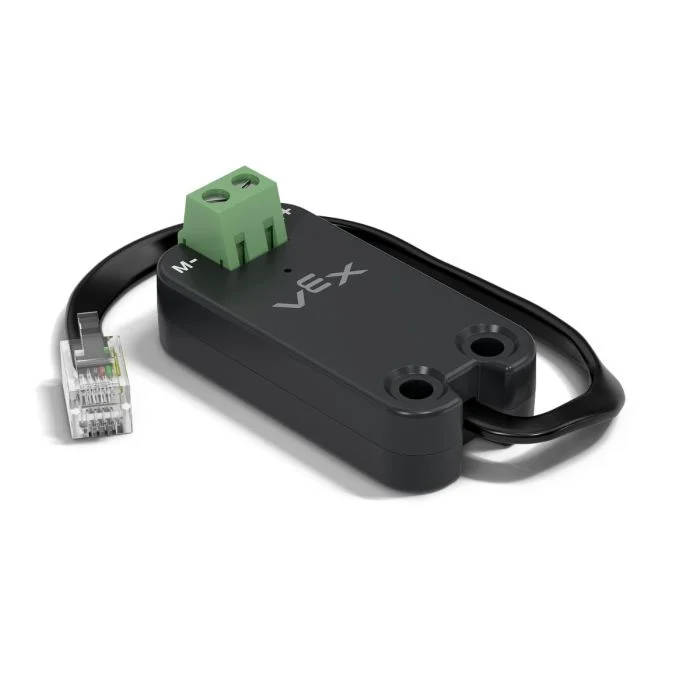
The motor55 class is used to control a VEX Motor Controller 55 connected to the EXP Brain. The Motor Controller 55 is a legacy motor controller designed to operate 2-wire DC motors.
Constructores de clases#
1 — Creates a
motor55object on the specified Smart Port.motor55( int32_t index );
2 — Creates a
motor55object on the specified Smart Port and changes the positive turning direction.motor55( int32_t index, bool reverse );
3 — Creates a
motor55object on the specified Smart Port, sets the maximum drive voltage, and changes the positive turning direction.motor55( int32_t index, double maxv, bool reverse );
Instructor de clase#
Destroys the motor55 object and releases associated resources.
~motor55();
Parámetros#
Parámetro |
Tipo |
Descripción |
|---|---|---|
|
|
The Smart Port that the Motor Controller 55 is connected to, written as |
|
|
Determines whether the motor’s direction is reversed:
|
|
|
La tensión máxima que el controlador de motor 55 puede aplicar al motor. |
Ejemplo#
// Create the motor55 instance in Smart Port 1
motor55 Motor1 = motor55(PORT1);
Funciones de los miembros#
The motor55 class includes the following member functions:
spin— Spins the motor in a specified direction.stop— Stops the motor.setVelocity— Tells the DC motor how fast to spin.setStopping— Sets the stopping behavior (coast or brake).setReversed— Sets whether the motor’s direction is reversed.current— Returns the motor’s electrical current.voltage— Returns the motor’s electrical voltage.temperature— Returns the motor temperature.getMotorType— Returns the detected motor/controller type.installed— Returns whether the Motor Controller 55 is detected on the specified Smart Port.
Before calling any motor55 member functions, an instance must be created, as shown below:
/* This constructor is required when using VS Code.
Motor Controller 55 configuration is generated automatically
in VEXcode using the Device Menu. Replace the values
as needed. */

// Create the motor55 instance in Smart Port 1
motor55 MC55_1 = motor55(PORT1);
spin#
Hace girar el motor en la dirección especificada de forma indefinida.
Funciones disponibles
1 — Gira usando la velocidad configurada actualmente.
void spin(
  directionType dir );
2 — Gira al voltaje especificado.
void spin(
  directionType dir,
  double        voltage,
  voltageUnits  units );
Parámetros
Parámetro |
Tipo |
Descripción |
|---|---|---|
|
|
The direction in which the motor spins: |
|
|
The voltage value applied to the motor. A negative value spins opposite the given |
|
|
The unit used to represent voltage:
|
Valores de retorno
Esta función no devuelve ningún valor.
Notas
Esta función no requiere espera y el programa continúa inmediatamente después de la llamada.
The motor will continue spinning until
stopis called or anotherspinis used.
stop#
Detiene el giro del motor utilizando el modo de freno configurado actualmente.
Funciones disponibles
void stop();
Parámetros
Esta función no requiere ningún parámetro.
Valores de retorno
Esta función no devuelve ningún valor.
Notas
Stops the motor using the currently configured stopping mode set by
setStopping.
setVelocity#
Indica a un motor de corriente continua (CC) a qué velocidad debe girar. Un porcentaje mayor hace que el motor de CC gire más rápido y un porcentaje menor hace que gire más lento.
Cada proyecto comienza con cada motor de CC conectado girando al 50% de su velocidad por defecto.
Funciones disponibles
void setVelocity(
    double       velocity,
    percentUnits units = percent );
Parámetros
Parámetro |
Tipo |
Descripción |
|---|---|---|
|
|
The velocity to spin with from 0% to 100% when using |
|
|
The velocity unit: |
Valores de retorno
Esta función no devuelve ningún valor.
Notas
Any subsequent call to
spinwithout a specified voltage will use this value.
setStopping#
Define cómo se comporta un motor cuando se detiene.
Funciones disponibles
void setStopping(
    brakeType mode );
Parámetros
Parámetro |
Tipo |
Descripción |
|---|---|---|
|
|
The stopping mode applied when
|
Valores de retorno
Esta función no devuelve ningún valor.
Notas
Any subsequent call to
stopwill use this stopping mode.The Motor Controller 55 supports
coastandbrakeonly.holdis not supported.
setReversed#
Establece si se invierte el sentido de giro del motor.
Funciones disponibles
void setReversed(
    bool value );
Parámetros
Parámetro |
Tipo |
Descripción |
|---|---|---|
|
|
Whether the motor’s direction is reversed:
|
Valores de retorno
Esta función no devuelve ningún valor.
Notas
Calling
setReversedis the same as changing thereverseparameter in the constructor.
current#
current returns how much electrical current the DC motor is using. Current is the amount of electricity flowing through the DC motor. When returned in amps, current is reported from 0.0 to 1.2 A.
Un valor de corriente más alto significa que el motor de CC está consumiendo más energía eléctrica. Esto puede ocurrir cuando el motor de CC está levantando algo pesado, empujando contra un objeto o intentando moverse cuando está atascado.
Esto puede utilizarse para comprobar si el motor de CC tiene dificultades durante el movimiento. Si la corriente se mantiene alta, el motor podría calentarse o consumir energía de forma menos eficiente.
Available Functions1 — Devuelve la corriente eléctrica del motor de CC en amperios.
double current(
  currentUnits units = amp );
Parameters2 — Devuelve la corriente eléctrica del motor de CC como un porcentaje de la corriente nominal máxima.
double current(
  percentUnits units );
Parámetro |
Tipo |
Descripción |
|---|---|---|
|
|
The unit used to represent current: |
|
|
Represents current as a percentage of the motor’s maximum rated current: |
Returns a double representing how much electrical current the DC motor is using in the specified units.
voltage#
Devuelve la tensión eléctrica suministrada al motor.
Available Functionsdouble voltage(
voltageUnits units = volt );
Parámetros
Parámetro |
Tipo |
Descripción |
|---|---|---|
|
|
The unit to represent the voltage:
|
Valores de retorno
Returns a double representing the motor’s electrical voltage in the specified units.
temperature#
temperature returns the temperature of the DC motor.
La temperatura del motor indica su nivel de calentamiento. Una temperatura más alta significa que el motor se está calentando durante su funcionamiento. Para que el motor funcione a pleno rendimiento, debe mantenerse por debajo de los 55 °C.
Si el motor de CC se calienta demasiado, reducirá su corriente máxima para protegerse. A 70 °C, el motor dejará de funcionar hasta que se enfríe.
Esto puede utilizarse para comprobar si el motor de CC se calienta demasiado durante movimientos repetidos, funcionamientos prolongados o cuando ejerce presión contra un objeto.
Available Functions1 — Devuelve la temperatura del motor de CC como un porcentaje de la temperatura máxima de funcionamiento.
double temperature(
  percentUnits units = percent );
2 — Devuelve la temperatura del motor de CC en unidades de temperatura física.
double temperature(
  temperatureUnits units );
Parámetros
Parámetro |
Tipo |
Descripción |
|---|---|---|
|
|
The unit used to represent DC motor temperature as a percentage:
|
|
|
The unit used to represent DC motor temperature in degrees:
|
Valores de retorno
Returns a double representing the DC motor’s temperature in the specified units.
Notas
The operating temperature range for the motor is approximately
20°C(68°F) to70°C(158°F).
getMotorType#
Devuelve el tipo de motor/controlador detectado.
Funciones disponibles
int32_t getMotorType();
Parámetros
Esta función no requiere ningún parámetro.
Valores de retorno
Returns an int32_t indicating the detected motor/controller type:
0— 11W Motor1— 5.5W Motor2— Motor Controller 55
installed#
Indica si el controlador de motor 55 está conectado al EXP Brain.
Available Functionsbool installed();
Parámetros
Esta función no requiere ningún parámetro.
Valores de retorno
Returns a bool indicating if the Motor Controller 55 is connected.
true— The Motor Controller 55 is connected.false— The Motor Controller 55 is not connected.