
Optical Sensor#
Introduction#
The optical class is used to access data from the EXP Optical Sensor. It uses reflected light to detect objects, identify colors, and measure brightness and hue.
Class Constructors#
optical(
    int32_t index );
Class Destructor#
Destroys the optical object and releases associated resources.
virtual ~optical();
Parameters#
Parameter |
Type |
Description |
|---|---|---|
|
|
The Smart Port that the Optical Sensor is connected to, written as |
Examples#
// Create an optical instance in Port 1
optical Optical1 = optical(PORT1);
Member Functions#
The optical class includes the following member functions:
setLight— Turns the Optical Sensor’s LED on or off.setLightPower— Sets the Optical Sensor’s light power level.isNearObject— Returns whether the Optical Sensor detects an object within range.color— Returns the color detected by the Optical Sensor.brightness— Returns the amount of light reflected from the object.hue— Returns the hue detected by the Optical Sensor.objectDetected— Registers a function to be called when the Optical Sensor detects an object.objectLost— Registers a function to be called when the Optical Sensor loses an object.
Before calling any optical member functions, an optical instance must be created, as shown below:
/* This constructor is required when using VS Code.
Optical Sensor configuration is generated automatically
in VEXcode using the Device Menu. Replace the values
as needed. */

// Create an optical instance
optical Optical1 = optical(
    PORT1);   // Smart Port 1
setLight#
Sets Optical Sensor’s LED to on or off. The light can help the Optical Sensor detect objects and colors more clearly.
Available Functionsvoid setLight(ledState state);
Parameter |
Type |
Description |
|---|---|---|
|
|
Sets the LED on or off. |
This function does not return a value.
Examples// Turn on LED with previous intensity.
Optical.setLight(ledState::on);
setLightPower#
Sets the brightness of the Optical Sensor’s LED. The light can help the Optical Sensor detect objects and colors more clearly.
If the Optical Sensor’s light is off, setting the light power above 0% will turn the light on.
If the Optical Sensor’s light is on, setting the light power at 0% will turn the light off.
A higher percentage makes the light brighter. A lower percentage makes the light dimmer.
Available Functionsvoid setLightPower(
int32_t intensity,
percentUnits units = percent );
Parameter |
Type |
Description |
|---|---|---|
|
|
The power level to set the light from 0 – 100. |
|
|
The unit that represents the light intensity: |
This function does not return a value.
Examples// Set the light power to 50 percent.
Optical.setLightPower(50, percent);
isNearObject#
Returns if the Optical Sensor detects a nearby object.
Available Functionsbool isNearObject();
This function does not accept any parameters.
Return ValuesThis function returns a Boolean indicating if a nearby object is detected:
true– The Optical Sensor detects an object.false– The Optical Sensor does not detect an object.
// If an object is detected by the Optical Sensor, print
// "near object".
if (Optical.isNearObject()){
  Brain.Screen.print("near object");
}
color#
Returns the color detected by the Optical Sensor.
Available Functionsvex::color color();
This function does not accept any parameters.
Return ValuesThe color detected by the Optical Sensor as an instance of the color class.
Possible colors are:
blackwhitered- A hue value between 340° - 20°green- A hue value between 80° - 140°blue- A hue value between 200° - 240°yellow- A hue value between 40° - 60°orange- A hue value between 20° - 40°purple- A hue value between 240° - 280°cyan- A hue value between 140° - 200°
// Set a variable, detectColor, to the color detected by the
// Optical Sensor
color detectColor = Optical.color();

// Print the color detected by the Optical Sensor
// to the Brain's screen
Brain.Screen.print(detectColor);
brightness#
Returns the amount of light reflected from the object.
A higher percentage means more light is reflected back to the Optical Sensor. A lower percentage means less light is reflected back.
Available Functionsdouble brightness(bool bRaw = false);
Parameter |
Type |
Description |
|---|---|---|
|
|
A Boolean value to read raw brightness data instead of percentage. The default is |
A double representing the brightness detected by the Optical Sensor as a double in the range 0 - 100%, or a double representing the raw data detected by the sensor.
Examples// Set a variable, brightness, to the value of the brightness
// detected by the Optical Sensor
double brightness = Optical.brightness();
// Print the brightness detected by the Optical Sensor to the
// Brain's screen
Brain.Screen.print(brightness);
hue#
Returns the hue value of the detected color.
Hue is a way to describe color using numbers around a color wheel.
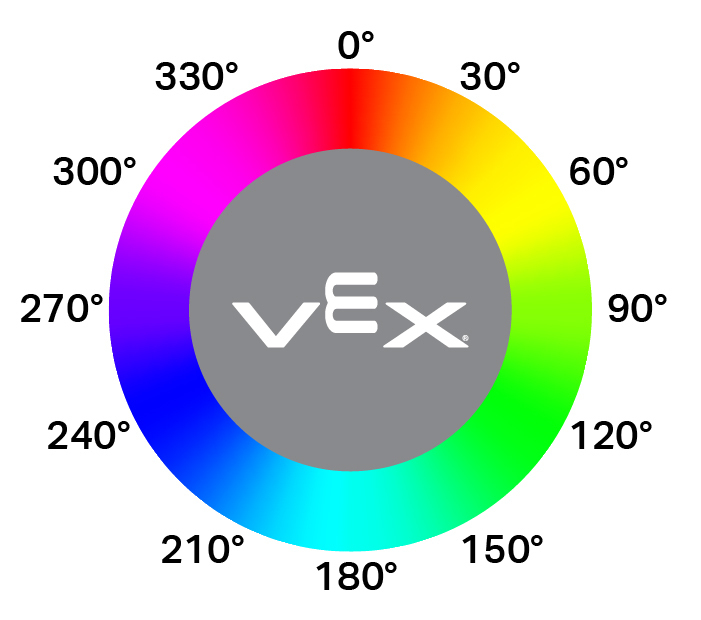
double hue();
This function does not accept any parameters.
Return ValuesA double representing the value of the hue detected by the Optical Sensor in the range 0 — 359.99.
Examples// Set a variable, hue, to the value of the hue detected
// by the Optical Sensor.
double hue = Optical.hue();
objectDetected#
Registers a callback function for when an object is detected.
Available Functionsvoid objectDetected(void (* callback)(void));
Parameter |
Type |
Description |
|---|---|---|
|
|
A previously defined function that executes when the Optical Sensor detects a new object. |
This function does not return a value.
ExamplesDefine the callback function (outside of
int main())// Called when the Optical Sensor detects an object void detected() { // The Brain will print that the Optical Sensor detected an // object to the Brain's screen. Brain.Screen.print("object detected"); }Register the callback inside
int main()/* vexcodeInit() is only required when using VEXcode. Remove vexcodeInit() if compiling in VS Code. */ int main() { // Run when the Optical Sensor detects an object. Optical.objectDetected(detected); }
objectLost#
Registers a callback function for when an object is lost.
Available Functionsvoid objectLost(void (* callback)(void));
Parameter |
Type |
Description |
|---|---|---|
|
|
A previously defined function that executes when the Optical Sensor loses a detected object. |
This function does not return a value.
ExamplesDefine the callback function (outside of
int main())// Called when the Optical Sensor loses an object void lost() { // The Brain will print that the Optical Sensor lost an // object to the Brain's screen. Brain.Screen.print("object lost"); }Register the callback inside
int main()/* vexcodeInit() is only required when using VEXcode. Remove vexcodeInit() if compiling in VS Code. */ int main() { // Run lost when the Optical Sensor loses an object. Optical.objectLost(lost); }