
光学传感器#
介绍#
The optical class is used to access data from the EXP Optical Sensor. It uses reflected light to detect objects, identify colors, and measure brightness and hue.
类构造函数#
optical(
    int32_t index );
类析构函数#
Destroys the optical object and releases associated resources.
virtual ~optical();
参数#
范围 |
类型 |
描述 |
|---|---|---|
|
|
The Smart Port that the Optical Sensor is connected to, written as |
示例#
// Create an optical instance in Port 1
optical Optical1 = optical(PORT1);
成员功能#
The optical class includes the following member functions:
setLight— Turns the Optical Sensor’s LED on or off.setLightPower— Sets the Optical Sensor’s light power level.isNearObject— Returns whether the Optical Sensor detects an object within range.color— Returns the color detected by the Optical Sensor.brightness— Returns the amount of light reflected from the object.hue— Returns the hue detected by the Optical Sensor.objectDetected— Registers a function to be called when the Optical Sensor detects an object.objectLost— Registers a function to be called when the Optical Sensor loses an object.
Before calling any optical member functions, an optical instance must be created, as shown below:
/* This constructor is required when using VS Code.
Optical Sensor configuration is generated automatically
in VEXcode using the Device Menu. Replace the values
as needed. */

// Create an optical instance
optical Optical1 = optical(
    PORT1);   // Smart Port 1
setLight#
设置光学传感器的 LED 指示灯亮起或熄灭。指示灯可以帮助光学传感器更清晰地检测物体和颜色。
Available Functionsvoid setLight(ledState state);
范围 |
类型 |
描述 |
|---|---|---|
|
|
Sets the LED on or off. |
此函数不返回值。
Examples// Turn on LED with previous intensity.
Optical.setLight(ledState::on);
setLightPower#
设置光学传感器的LED亮度。灯光可以帮助光学传感器更清晰地检测物体和颜色。
如果光传感器的灯熄灭,将灯光功率设置为 0% 以上即可打开灯。
如果光传感器的指示灯亮着,将光功率设置为 0% 将关闭指示灯。
百分比越高,灯光越亮;百分比越低,灯光越暗。
Available Functionsvoid setLightPower(
int32_t intensity,
percentUnits units = percent );
范围 |
类型 |
描述 |
|---|---|---|
|
|
灯光亮度级别,范围从 0 到 100。 |
|
|
The unit that represents the light intensity: |
此函数不返回值。
Examples// Set the light power to 50 percent.
Optical.setLightPower(50, percent);
isNearObject#
返回光学传感器检测到附近物体时的值。
Available Functionsbool isNearObject();
此函数不接受任何参数。
Return Values此函数返回一个布尔值,指示是否检测到附近物体:
true– The Optical Sensor detects an object.false– The Optical Sensor does not detect an object.
// If an object is detected by the Optical Sensor, print
// "near object".
if (Optical.isNearObject()){
  Brain.Screen.print("near object");
}
color#
返回光学传感器检测到的颜色。
Available Functionsvex::color color();
此函数不接受任何参数。
Return Values光学传感器检测到的颜色是颜色类的一个实例。
可选颜色有:
blackwhitered- A hue value between 340° - 20°green- A hue value between 80° - 140°blue- A hue value between 200° - 240°yellow- A hue value between 40° - 60°orange- A hue value between 20° - 40°purple- A hue value between 240° - 280°cyan- A hue value between 140° - 200°
// Set a variable, detectColor, to the color detected by the
// Optical Sensor
color detectColor = Optical.color();

// Print the color detected by the Optical Sensor
// to the Brain's screen
Brain.Screen.print(detectColor);
brightness#
返回物体反射的光量。
百分比越高,意味着反射回光学传感器的光线越多;百分比越低,意味着反射回的光线越少。
Available Functionsdouble brightness(bool bRaw = false);
范围 |
类型 |
描述 |
|---|---|---|
|
|
A Boolean value to read raw brightness data instead of percentage. The default is |
表示光学传感器检测到的亮度的双精度浮点数,范围为 0 - 100%,或者表示传感器检测到的原始数据的双精度浮点数。
Examples// Set a variable, brightness, to the value of the brightness
// detected by the Optical Sensor
double brightness = Optical.brightness();
// Print the brightness detected by the Optical Sensor to the
// Brain's screen
Brain.Screen.print(brightness);
hue#
返回检测到的颜色的色调值。
色相是用色轮上的数字来描述颜色的一种方法。
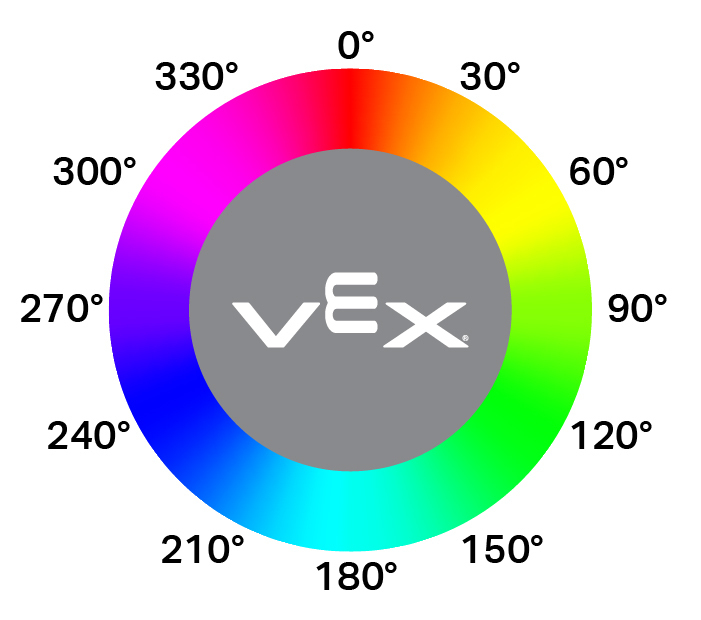
double hue();
此函数不接受任何参数。
Return Values表示光学传感器检测到的色调值的双精度浮点数,范围为 0 — 359.99。
Examples// Set a variable, hue, to the value of the hue detected
// by the Optical Sensor.
double hue = Optical.hue();
objectDetected#
注册一个回调函数,用于在检测到对象时执行该回调函数。
Available Functionsvoid objectDetected(void (* callback)(void));
范围 |
类型 |
描述 |
|---|---|---|
|
|
先前定义的 函数,当光学传感器检测到新物体时执行。 |
此函数不返回值。
ExamplesDefine the callback function (outside of
int main())// Called when the Optical Sensor detects an object void detected() { // The Brain will print that the Optical Sensor detected an // object to the Brain's screen. Brain.Screen.print("object detected"); }Register the callback inside
int main()/* vexcodeInit() is only required when using VEXcode. Remove vexcodeInit() if compiling in VS Code. */ int main() { // Run when the Optical Sensor detects an object. Optical.objectDetected(detected); }
objectLost#
注册一个对象丢失时的回调函数。
Available Functionsvoid objectLost(void (* callback)(void));
范围 |
类型 |
描述 |
|---|---|---|
|
|
先前定义的 函数,当光学传感器丢失检测到的对象时执行。 |
此函数不返回值。
ExamplesDefine the callback function (outside of
int main())// Called when the Optical Sensor loses an object void lost() { // The Brain will print that the Optical Sensor lost an // object to the Brain's screen. Brain.Screen.print("object lost"); }Register the callback inside
int main()/* vexcodeInit() is only required when using VEXcode. Remove vexcodeInit() if compiling in VS Code. */ int main() { // Run lost when the Optical Sensor loses an object. Optical.objectLost(lost); }