
Button#
Introduction#
The button class is a derived class of the controller class. It provides access to Controller button states and button event callbacks.
A button object is accessed through a controller object. It is not constructed directly.
Access#
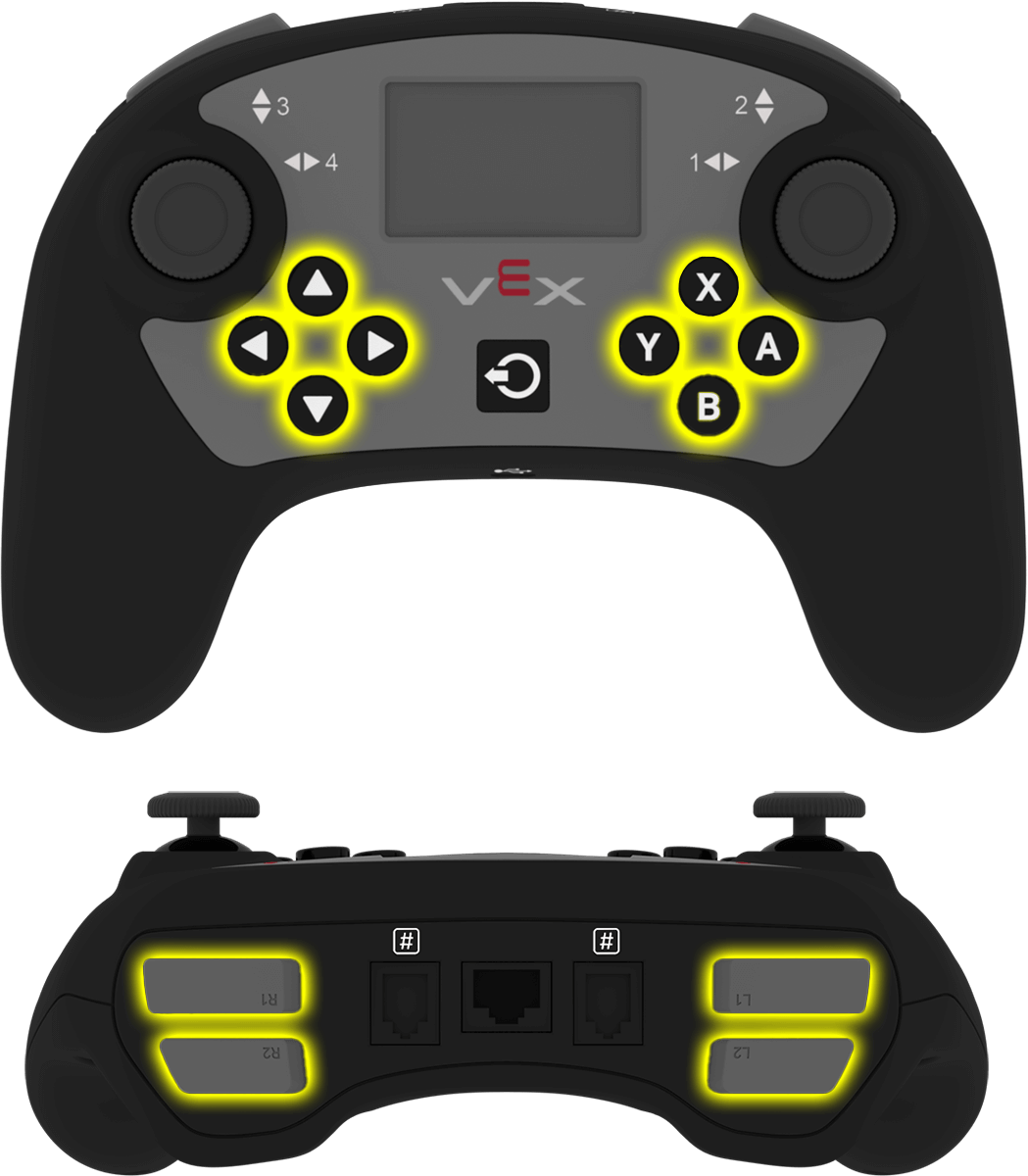
The controller class provides the following button objects. Each object is an instance of the button class.
Object |
Example Usage |
Description |
|---|---|---|
|
|
The A button. |
|
|
The B button. |
|
|
The X button. |
|
|
The Y button. |
|
|
The Down button. |
|
|
The Up button. |
|
|
The Left button. |
|
|
The Right button. |
|
|
The L1 button. |
|
|
The L2 button. |
|
|
The R1 button. |
|
|
The R2 button. |
Notes#
Before using a
buttonmember function, create acontrollerobject.
// Create a Controller object
controller Controller = controller();
Member Functions#
The button class includes the following member functions:
Getter — Read button state.
pressing— Returns whether the button is being pressed.
Callbacks — Run functions when button events occur.
Getter#
pressing#
pressing returns whether the button is currently being pressed.
Available Function
bool pressing() const;
Parameters
This function does not have parameters.
Return Value
Returns a Boolean value.
true— The button is being pressed.false— The button is not being pressed.
Example
// Turn right while L1 is pressed
while (true) {
  if (Controller.ButtonL1.pressing()) {
    Drivetrain.turn(right);
  }
  else {
    Drivetrain.stop();
  }

  wait(20, msec);
}
Callbacks#
pressed#
pressed registers a function that runs when the button is pressed.
Available Function
void pressed(void (* callback)(void)) const;
Parameter |
Type |
Description |
|---|---|---|
|
|
A function that runs when the button is pressed. |
Return Value
This function does not return a value.
Example
Define the callback function outside of main.
// Drive forward when A is pressed
void driveForward() {
  Drivetrain.driveFor(forward, 100, mm);
}
Register the callback inside main.
int main() {
  vexcodeInit();

  // Run driveForward when A is pressed
  Controller.ButtonA.pressed(driveForward);
}
released#
released registers a function that runs when the button is released.
Available Function
void released(void (* callback)(void)) const;
Parameter |
Type |
Description |
|---|---|---|
|
|
A function that runs when the button is released. |
Return Value
This function does not return a value.
Example
Define the callback function outside of main.
// Stop the drivetrain when A is released
void stopDriving() {
  Drivetrain.stop();
}
Register the callback inside main.
int main() {
  vexcodeInit();

  // Run stopDriving when A is released
  Controller.ButtonA.released(stopDriving);
}