
Robot Specific Blocks#
Introduction#
The VIQRC 25-26 Mix & Match Playground features blocks exclusive to the build designed for this Playground, including two motor options, IQ AI Vision Sensor, Optical Sensor, and Touch LED.
All standard VEXcode VR Blocks are available for use in the VIQRC 25-26 Mix & Match Playground.
Below is a list of all available Playground specific Blocks:
Motion – Move and track the robot’s motors.
Actions
spin – Spins the selected motor or motor group indefinitely.
spin for – Spins a motor or group for a specific distance in degrees or turns.
spin to position – Spins a motor or motor group to a set position.
stop motor – Stops a specific motor or motor group from spinning.
Settings
set motor velocity – Sets the speed of a motor or motor group as a percentage.
set motor timeout – Limits how long a motor block waits before giving up if movement is blocked.
Position
motor position – Returns the motor’s current rotational position in degrees or turns.
set motor position – Sets the encoder value of a motor or motor group.
Values
motor is done? – Returns a Boolean indicating whether the motor is no longer spinning.
motor is spinning? – Returns a Boolean indicating whether the motor is currently spinning.
motor velocity – Returns the motor’s current velocity in %.
AI Vision – Capture and analyze objects using the IQ AI Vision Sensor.
Actions
get object data – Captures data for a specific object type, such as colors, pre-trained objects, or AprilTags.
Settings
set object item – Selects a specific object from the list.
Values
object exists? – Returns whether any classification was detected.
object count – Returns how many objects were detected.
object property – Returns details such as:
AI Classification is – Returns if a specific classification is detected.
Sensing - Utilize the robot’s various sensors.
Optical
Optical found object? – Returns whether an object is detected.
Optical detects color? – Returns whether a specific color is detected.
Optical brightness – Returns the brightness percentage detected by the sensor.
Optical hue – Returns the hue value of the detected color.
when Optical – Executes the attached stack of blocks when the Optical Sensor detects or loses an object.
Touch LED
set TouchLED color – Sets the TouchLED to a selected color.
Motion#
Actions#
spin#
The spin block spins a selected motor or motor group in a specified direction using the current motor velocity.
[ClawMotor v] [打开 v] 转
Parameters |
Description |
|---|---|
motor |
The motor or motor group to spin:
|
direction |
The direction to spin:
|
Example
当开始
[Place a pin atop another pin.]
[LiftMotor v] [向上 v] 转 [600] [度 v] ▶
驱动 [向前 v] (140) [毫米 v] ▶
[ClawMotor v] [打开 v] 转
spin for#
The spin for block spins a selected motor or motor group for a specific amount of rotation using the current motor velocity, measured in degrees or turns.
[ClawMotor v] [打开 v] 转 (90) [度 v] ▶
Parameters |
Description |
|---|---|
motor |
The motor or motor group to spin:
|
direction |
The direction to spin:
|
distance |
The rotation amount, as an integer or decimal. |
unit |
The unit of measurement representing the distance:
|
expanding arrow |
By default, this is a waiting block, so the motor will finish moving before running the next block. To make the motor start moving and immediately run the next block right away, expand the block to say and don’t wait. |
Example
当开始
[Place a pin atop another pin.]
[LiftMotor v] [向上 v] 转 [600] [度 v] ▶
驱动 [向前 v] (140) [毫米 v] ▶
[ClawMotor v] [打开 v] 转
spin to position#
The spin to position block spins a motor or motor group to a specific absolute position using the current motor velocity and motor position.
[ClawMotor v] 转至 (90) [度 v] ▶
Parameters |
Description |
|---|---|
motor |
The motor or motor group to spin:
|
position |
The target position to spin the motor or motor group to. |
unit |
The unit of measurement:
|
expanding arrow |
By default, this is a waiting block, so the motor will finish moving before running the next block. To make the motor start moving and immediately run the next block right away, expand the block to say and don’t wait. |
Example
当开始
[Place a pin atop another pin.]
[LiftMotor v] 转至 [-2] [转 v] ▶
驱动 [向前 v] (140) [毫米 v] ▶
[ClawMotor v] [打开 v] 转
stop motor#
The stop motor block immediately stops the selected motor or motor group.
[ClawMotor v] 停止
Parameters |
Description |
|---|---|
motor |
The motor or motor group to stop:
|
Example
当开始
[Place a pin atop another pin.]
[LiftMotor v] [向上 v] 转
等待 [2] 秒
[LiftMotor v] 停止
驱动 [向前 v] (140) [毫米 v] ▶
[ClawMotor v] [打开 v] 转
Settings#
set motor velocity#
The set motor velocity block sets the default spinning speed of a motor or motor group as a percentage for all subsequent Motor blocks in the project.
设定 [ClawMotor v] 转速为 (50) [% v]
Parameters |
Description |
|---|---|
motor |
The motor or motor group to set the velocity of:
|
velocity |
Sets the default movement velocity from 0 to 100 as a percent. |
unit |
The unit that represents the velocity:
|
Example
当开始
[Place a pin atop another pin.]
设定 [LiftMotor v] 转速为 [100] [% v]
[LiftMotor v] [向上 v] 转 [600] [度 v] ▶
驱动 [向前 v] (140) [毫米 v] ▶
[ClawMotor v] [打开 v] 转
set motor timeout#
The set motor timeout block sets a time limit for how long a Motor block will wait to reach its target. If the robot cannot complete the movement within the set time, it will stop automatically and continue with the next block.
Note: The Motor’s time limit is used to prevent Motor blocks that do not reach their target position from stopping the execution of other blocks in the stack.
设定 [ClawMotor v] 超时为 (1) 秒
Parameters |
Description |
|---|---|
motor |
The motor or motor group to set the timeout of:
|
time |
The maximum number of seconds a Motor block will run before stopping and moving to the next block. |
Example
当开始
[Place a pin atop another pin.]
设定 [LiftMotor v] 超时为 [2] 秒
[LiftMotor v] [向上 v] 转 [5] [转 v] ▶
驱动 [向前 v] (140) [毫米 v] ▶
[ClawMotor v] [打开 v] 转
Position#
motor position#
The motor position block returns the total distance the selected motor or motor group has rotated.
([ClawMotor v] 转位 [度 v])
Parameters |
Description |
|---|---|
motor |
The motor or motor group to return the position of:
|
unit |
The unit of measurement:
|
Example
当开始
[Place a pin atop another pin.]
[LiftMotor v] [向上 v] 转
等到 <[-600] [math_greater_than v] ([LiftMotor v] 转位 [度 v])>
[LiftMotor v] 停止
驱动 [向前 v] (140) [毫米 v] ▶
[ClawMotor v] [打开 v] 转
set motor position#
The set motor position block sets a specific position value to a motor or motor group, which updates the encoder reading.
设定 [ClawMotor v] 转位至 (0) [度 v]
Parameters |
Description |
|---|---|
motor |
The motor or motor group to set the position of:
|
position |
The encoder position value to set. |
unit |
The unit of measurement:
|
Example
当开始
[Place a pin atop another pin.]
设定 [LiftMotor v] 位置为 [100] 度
[LiftMotor v] 转至 [-500] [度 v] ▶
驱动 [向前 v] (140) [毫米 v] ▶
[ClawMotor v] [打开 v] 转
Values#
motor is done#
The motor is done? block returns a Boolean indicating whether the motor or motor group is not spinning.
True – The motor is not spinning.
False – The motor is spinning.
<[ClawMotor v] 已结束?>
Parameters |
Description |
|---|---|
motor |
The motor or motor group to check if it is done spinning:
|
Example
当开始
[Place a pin atop another pin.]
[LiftMotor v] [向上 v] 转 [600] [度 v] ◀ 并且不等待
等待 [0.1] 秒
重复直到 <[LiftMotor v] 已结束?>
设定 [TouchLED v] 颜色为 [红色 v]
等待 [0.5] 秒
设定 [TouchLED v] 颜色为 [红色 v]
等待 [0.5] 秒
结束
驱动 [向前 v] (140) [毫米 v] ▶
[ClawMotor v] [打开 v] 转
motor is spinning?#
The motor is spinning? block returns a Boolean indicating whether the motor is spinning.
True – The motor is spinning.
False – The motor is not spinning.
<[ClawMotor v] 正在转?>
Parameters |
Description |
|---|---|
motor |
The motor or motor group to check if it is currently spinning:
|
Example
当开始
[Place a pin atop another pin.]
[LiftMotor v] [向上 v] 转 [600] [度 v] ◀ 并且不等待
等待 [0.1] 秒
当 <[LiftMotor v] 正在转?>
设定 [TouchLED v] 颜色为 [红色 v]
等待 [0.5] 秒
设定 [TouchLED v] 颜色为 [红色 v]
等待 [0.5] 秒
结束
驱动 [向前 v] (140) [毫米 v] ▶
[ClawMotor v] [打开 v] 转
motor velocity#
The motor velocity block returns the current rotational speed of the motor or motor group in a range from -100% to 100%.
([ClawMotor v] 速度 [% v] 值 :: custom-motion)
Parameters |
Description |
|---|---|
motor |
The motor or motor group to return the velocity of:
|
unit |
The unit that represents the velocity:
|
Example
当开始
[Place a pin atop another pin.]
设定 [LiftMotor v] 转速为 [100] [% v]
[LiftMotor v] [向上 v] 转 [600] [度 v] ◀ 并且不等待
等待 [0.5] 秒
打印 ([LiftMotor v] 速度 [% v] 值 :: custom-motion) ▶
驱动 [向前 v] (140) [毫米 v] ▶
[ClawMotor v] [打开 v] 转
AI Vision#
Actions#
get object data#
The get object data block filters data from the IQ AI Vision Sensor frame. The IQ AI Vision Sensor can detect Game Elements on the field.
The dataset stores objects ordered from largest to smallest by width, starting at index 0. Each object’s properties can be accessed using AI Vision object property block. An empty dataset is returned if no matching objects are detected.
从 [AIVision v]获取 [AI Classifications v] 数据
Parameter |
Description |
|---|---|
signature |
Filters the dataset to only include data of the given signature. The only available signature is:
|
Example
当开始
[Place the Red Pin on the top left Blue Pin.]
[LiftMotor v] [向上 v] 转 [600] [度 v] ▶
[左 v] 转 [38] 度 ▶
重复直到 <([AIVision v] 对象 [宽 v]) [math_greater_than v] [48]>
[Move forward until the robot is close to the Pin.]
从 [AIVision v]获取 [AI Classifications v] 数据
驱动 [向前 v]
结束
驱动 [向前 v] [160] [毫米 v] ▶
[ClawMotor v] [打开 v] 转
Settings#
set object item#
The set object item block sets which item in the dataset to use.
设定 [AIVision v] 对象标号为 [1]
Parameters |
Description |
|---|---|
item |
The number of the item in the dataset to use. |
Example
当开始
[Find the object index of the nearest Orange Pin.]
[LiftMotor v] [向上 v] 转 [600] [度 v] ▶
设定 [object_counter v] 为 [1]
从 [AIVision v]获取 [AI Classifications v] 数据
[Iterate through all detected objects.]
重复 ([AIVision v] 对象数目)
设定 [AIVision v] 对象标号为 (object_counter)
如果 <[AIVision v] object is [Orange Pin v] ?> 那么
打印 (连接 [Nearest Orange Pin is ] (object_counter)) ▶
否则
将 [object_counter v] 改变 [1]
Values#
object exists?#
The object exists? block returns a Boolean indicating whether any object is detected in the dataset.
True – The dataset includes a detected object.
False – The dataset does not include any detected objects.
<AI 视觉仪对象存在?>
Parameters |
Description |
|---|---|
This block has no parameters. |
Example
当开始
[Raise the Lift until a Pin or Beam is detected.]
重复直到 <[AIVision v] 对象存在?>
从 [AIVision v]获取 [AI Classifications v] 数据
[LiftMotor v] [向上 v] 转
结束
[LiftMotor v] 停止
object count#
The object count block returns the number of detected objects in the dataset as an integer.
([AIVision v] 对象数目)
Parameters |
Description |
|---|---|
This block has no parameters. |
Example
当开始
[Find the object index of the nearest Orange Pin.]
[LiftMotor v] [向上 v] 转 [600] [度 v] ▶
设定 [object_counter v] 为 [1]
从 [AIVision v]获取 [AI Classifications v] 数据
[Iterate through all detected objects.]
重复 ([AIVision v] 对象数目)
设定 [AIVision v] 对象标号为 (object_counter)
如果 <[AIVision v] object is [Orange Pin v] ?> 那么
打印 (连接 [Nearest Orange Pin is ] (object_counter)) ▶
否则
将 [object_counter v] 改变 [1]
object property#
There are six properties that are included with each object (shown below) stored after the get object data block is used.
([AIVision v] 对象 [宽 v])
Some property values are based off of the detected object’s position in the IQ AI Vision Sensor’s view at the time that the get object data block was used. The IQ AI Vision Sensor has a resolution of 320 by 240 pixels.
Parameter |
Description |
|---|---|
property |
Which property of the detected object to use: |
width#
width returns the width of the detected object in pixels as an integer from 1 to 320.
([AIVision v] 对象 [宽 v])
Example
当开始
[Place the Red Pin on the top left Blue Pin.]
[LiftMotor v] [向上 v] 转 [600] [度 v] ▶
[左 v] 转 [38] 度 ▶
重复直到 <([AIVision v] 对象 [宽 v]) [math_greater_than v] [48]>
[Move forward until the robot is close to the Pin.]
从 [AIVision v]获取 [AI Classifications v] 数据
驱动 [向前 v]
结束
驱动 [向前 v] [160] [毫米 v] ▶
[ClawMotor v] [打开 v] 转
height#
height returns the height of the detected object in pixels as an integer from 1 to 240.
([AIVision v] 对象 [高 v])
Example
当开始
[Place the Red Pin on the top left Blue Pin.]
[LiftMotor v] [向上 v] 转 [600] [度 v] ▶
[左 v] 转 [38] 度 ▶
重复直到 <([AIVision v] 对象 [高 v]) [math_greater_than v] [68]>
[Move forward until the robot is close to the Pin.]
从 [AIVision v]获取 [AI Classifications v] 数据
驱动 [向前 v]
结束
驱动 [向前 v] [160] [毫米 v] ▶
[ClawMotor v] [打开 v] 转
centerX#
centerX returns the x-coordinate of the center of the detected object in pixels as an integer from 0 to 320.
([AIVision v] 对象 [中心X坐标 v])
Example
当开始
[Place the Red Pin on the bottom left Blue Pin.]
驱动 [向前 v] [50] [毫米 v] ▶
[LiftMotor v] [向上 v] 转 [450] [度 v] ▶
设定转向速度为 [10] [% v]
从 [AIVision v]获取 [AI Classifications v] 数据
重复直到 <([AIVision v] 对象 [中心X坐标 v]) [math_less_than v] [190]>
[Turn until the robot is centered on the Blue Pin.]
从 [AIVision v]获取 [AI Classifications v] 数据
[右 v] 转
结束
驱动 [向前 v] [350] [毫米 v] ▶
[ClawMotor v] [打开 v] 转
centerY#
centerY returns the y-coordinate of the center of the detected object in pixels as an integer from 0 to 240.
([AIVision v] 对象 [中心Y坐标 v])
Example
当开始
[Place the Red Pin on the top left Blue Pin.]
[LiftMotor v] [向上 v] 转 [600] [度 v] ▶
[左 v] 转 [38] 度 ▶
重复直到 <([AIVision v] 对象 [中心Y坐标 v]) [math_greater_than v] [210]>
[Move forward until the robot is close to the Pin.]
从 [AIVision v]获取 [AI Classifications v] 数据
驱动 [向前 v]
结束
驱动 [向前 v] [160] [毫米 v] ▶
[ClawMotor v] [打开 v] 转
originX#
originX returns the x-coordinate of the top-left corner of the detected object’s bounding box in pixels as an integer from 0 to 320.
([AIVision v] 对象 [原点X v])
Example
当开始
[Place the Red Pin on the bottom left Blue Pin.]
驱动 [向前 v] [50] [毫米 v] ▶
[LiftMotor v] [向上 v] 转 [450] [度 v] ▶
设定转向速度为 [10] [% v]
从 [AIVision v]获取 [AI Classifications v] 数据
重复直到 <([AIVision v] 对象 [中心X坐标 v]) [math_less_than v] [160]>
[Turn until the robot is centered on the Blue Pin.]
从 [AIVision v]获取 [AI Classifications v] 数据
[右 v] 转
结束
驱动 [向前 v] [350] [毫米 v] ▶
[ClawMotor v] [打开 v] 转
originY#
originY returns the y-coordinate of the top-left corner of the detected object’s bounding box in pixels as an integer from 0 to 240.
([AIVision v] 对象 [原点Y v])
Example
当开始
[Place the Red Pin on the top left Blue Pin.]
[LiftMotor v] [向上 v] 转 [600] [度 v] ▶
[左 v] 转 [38] 度 ▶
重复直到 <([AIVision v] 对象 [原点Y v]) [math_greater_than v] [180]>
[Move forward until the robot is close to the Pin.]
从 [AIVision v]获取 [AI Classifications v] 数据
驱动 [向前 v]
结束
驱动 [向前 v] [160] [毫米 v] ▶
[ClawMotor v] [打开 v] 转
AI Classification is#
The AI Vision object is? block returns a Boolean indicating whether a detected object matches a specific classification.
True – The item in the dataset is the specific object.
False – The item in the dataset is not the specific object.
<[AIVision] object is [Beam v]?>
Parameter |
Description |
|---|---|
object |
Which object to compare the item to:
|
Example
当开始
[Find the object index of the nearest Orange Pin.]
[LiftMotor v] [向上 v] 转 [600] [度 v] ▶
设定 [object_counter v] 为 [1]
从 [AIVision v]获取 [AI Classifications v] 数据
[Iterate through all detected objects.]
重复 ([AIVision v] 对象数目)
设定 [AIVision v] 对象标号为 (object_counter)
如果 <[AIVision v] object is [Orange Pin v] ?> 那么
打印 (连接 [Nearest Orange Pin is ] (object_counter)) ▶
否则
将 [object_counter v] 改变 [1]
Sensing#
Optical#
Optical found object?#
The Optical found object? block returns a Boolean indicating whether the Optical Sensor has detected an object.
True – The Optical Sensor has detected an object.
False – The Optical Sensor has not detected an object.
<[Optical v] 发现对象?>
Parameters |
Description |
|---|---|
This block has no parameters. |
Example
当开始
[Place a pin atop another pin.]
[LiftMotor v] [向上 v] 转 [600] [度 v] ▶
驱动 [向前 v] (140) [毫米 v] ▶
[ClawMotor v] [打开 v] 转
等到 <非 <[Optical v] 发现对象?>>
[LiftMotor v] 转至 [0] [度 v] ▶
Optical detects color?#
The Optical detects color? block returns a Boolean indicating whether the Optical Sensor has detected a specific color.
True – The Optical Sensor has detected the specified color.
False – The Optical Sensor has not detected the specified color.
<[Optical v] 测得 [红色 v]?>
Parameters |
Description |
|---|---|
color |
Which color to check for:
|
Example
当开始
[Place a pin atop another pin.]
[LiftMotor v] [向上 v] 转 [600] [度 v] ▶
驱动 [向前 v] (140) [毫米 v] ▶
[ClawMotor v] [打开 v] 转
等到 <非 <[Optical v] 测得 [红色 v]?>>
[LiftMotor v] 转至 [0] [度 v] ▶
Optical brightness#
The Optical brightness block returns the amount of light detected by the Optical Sensor in a range from 0% to 100%.
([Optical v] 亮度百分比)
Parameters |
Description |
|---|---|
This block has no parameters. |
Example
当开始
[Place a pin atop another pin.]
[LiftMotor v] [向上 v] 转 [600] [度 v] ▶
驱动 [向前 v] (140) [毫米 v] ▶
[ClawMotor v] [打开 v] 转
等到 <[30] [math_greater_than v] ([Optical v] 亮度百分比)>
[LiftMotor v] 转至 [0] [度 v] ▶
Optical hue#
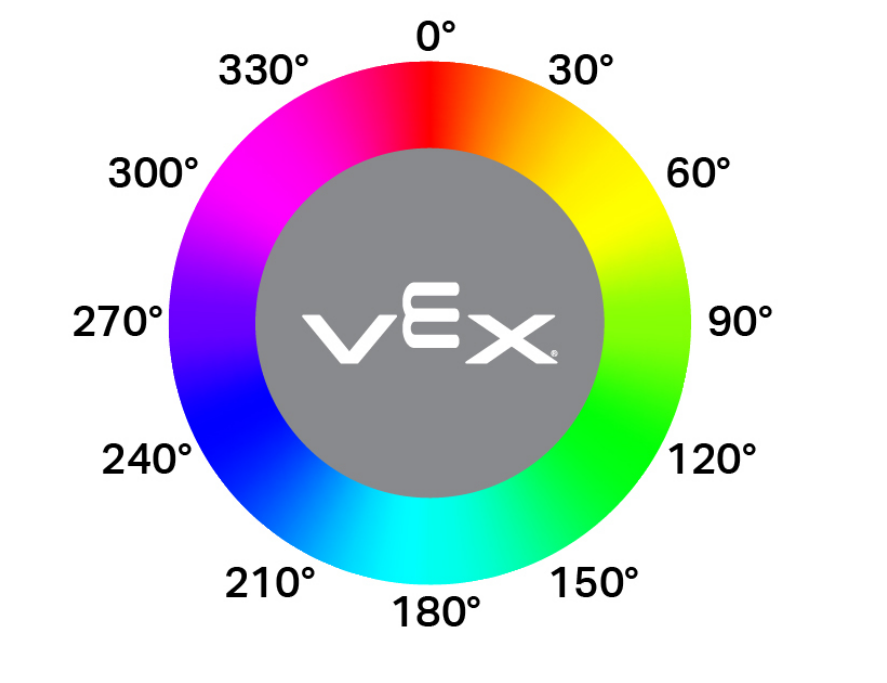
The Optical hue block returns the hue value of the color detected by the Optical Sensor.
Hue values range from 0 to 359 degrees, corresponding to positions on the color wheel shown below.
([Optical v] 色调度数)
Parameters |
Description |
|---|---|
This block has no parameters. |
Example
当开始
[Place a pin atop another pin.]
[LiftMotor v] [向上 v] 转 [600] [度 v] ▶
驱动 [向前 v] (140) [毫米 v] ▶
[ClawMotor v] [打开 v] 转
等到 <([Optical v] 色调度数) [math_greater_than v] [0]>
[LiftMotor v] 转至 [0] [度 v] ▶
when Optical#
The when Optical block runs its stack when the Optical Sensor detects or loses an object. You can have multiple when Optical blocks to run multiple stacks of blocks at once.
当 [Optical v] [detects v] 一个对象
Parameters |
Description |
|---|---|
action |
Which action to trigger the hat block:
|
Example
当开始
[Place a pin atop another pin.]
[LiftMotor v] [向上 v] 转 [600] [度 v] ▶
驱动 [向前 v] (140) [毫米 v] ▶
[ClawMotor v] [打开 v] 转
当 [Optical v] [loses v] 一个对象
[Lower the lift when the red pin is not in the claw.]
[LiftMotor v] 转至 [0] [度 v] ▶
Touch LED#
set TouchLED color#
The set TouchLED color block sets the color of the Touch LED.
设定 [TouchLED v] 颜色为 [none v]
Parameters |
Description |
|---|---|
color |
Sets the LED’s color to:
|
Example
当开始
[Place a pin atop another pin.]
设定 [TouchLED v] 颜色为 [红色 v]
[LiftMotor v] [向上 v] 转 [600] [度 v] ▶
驱动 [向前 v] (140) [毫米 v] ▶
[ClawMotor v] [打开 v] 转
设定 [TouchLED v] 颜色为 [none v]