
Οθόνη#
Εισαγωγή#
Η κλάση screen προέρχεται από την βασική κλάση brain. Ελέγχει τον τρόπο με τον οποίο ο εγκέφαλος IQ (1ης γενιάς) εμφανίζει κείμενο και τιμές στην ενσωματωμένη οθόνη του.
Η οθόνη IQ (1ης γενιάς) Brain υποστηρίζει έως και 5 γραμμές και 21 στήλες κειμένου.
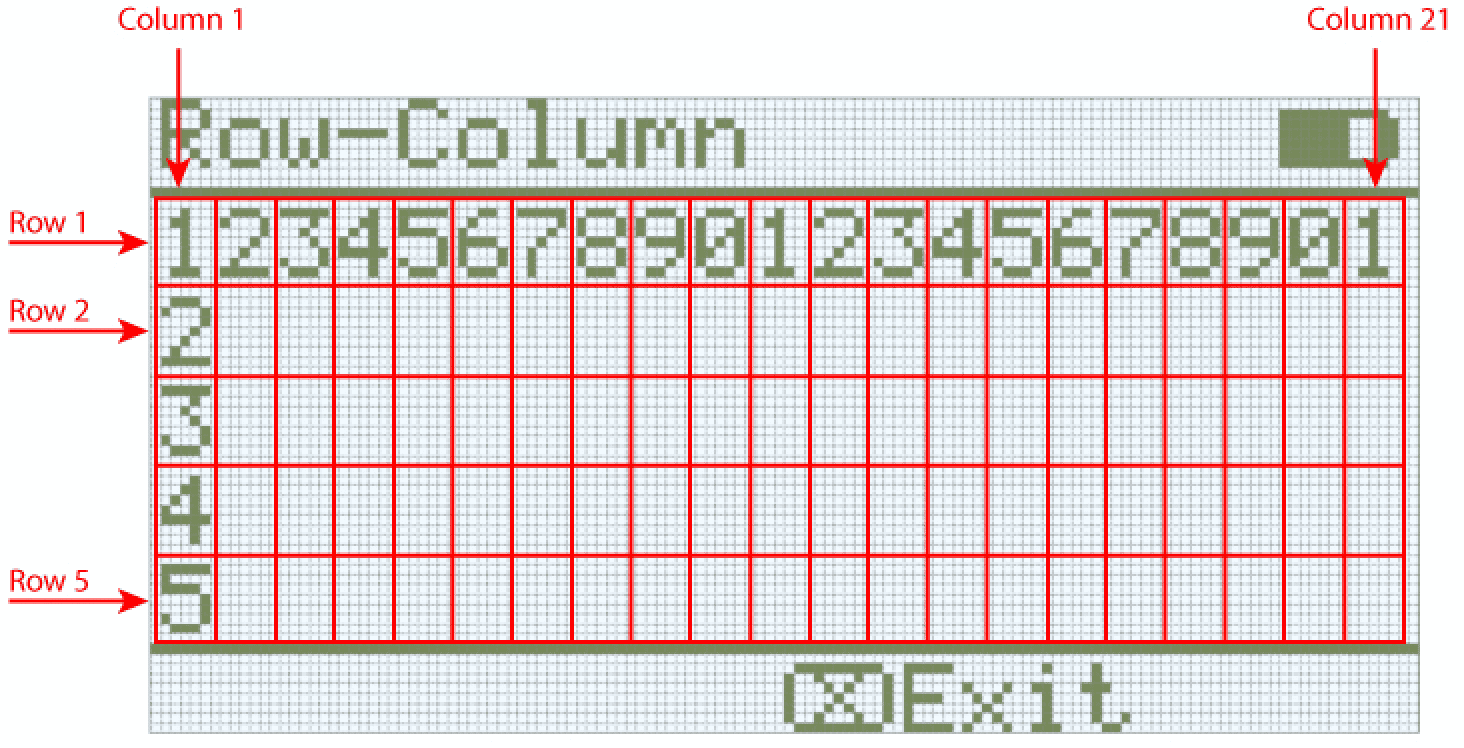
Πρόσβαση#
Η πρόσβαση στην κλάση screen είναι δυνατή μέσω:
Brain.Screen
Σημειώσεις#
Το αντικείμενο
screenπαρέχεται από τον Εγκέφαλο. Δεν κατασκευάζεται απευθείας.Τα έργα χρησιμοποιούν ένα μόνο καθολικό αντικείμενο
Brain, επομένως οι συναρτήσεις οθόνης καλούνται χρησιμοποιώντας τοBrain.Screen.
Παράδειγμα#
/* This constructor is required when using VS Code.
A Brain is generated automatically at the start of
VEXcode projects. */

// Create the Brain
brain Brain = brain();

// Print text to the Brain screen
Brain.Screen.print("Hello!");
Συναρτήσεις Μελών#
Η κλάση screen περιλαμβάνει τις ακόλουθες συναρτήσεις-μέλη:
print— Εκτυπώνει μορφοποιημένο κείμενο, αριθμούς ή λογικές τιμές στην οθόνη Brain.setCursor— Μετακινεί τον κέρσορα κειμένου σε μια καθορισμένη γραμμή και στήλη.newLine— Διαγράφει το υπόλοιπο της τρέχουσας γραμμής και μετακινεί τον κέρσορα στην επόμενη γραμμή.clearLine— Διαγράφει το υπόλοιπο της τρέχουσας γραμμής ή διαγράφει μια συγκεκριμένη γραμμή.row— Επιστρέφει τη γραμμή όπου θα εκτυπωθεί το κείμενο.column— Επιστρέφει τη στήλη όπου θα εκτυπωθεί το κείμενο.getStringHeight— Επιστρέφει το ύψος μιας συμβολοσειράς σε pixel χρησιμοποιώντας την τρέχουσα γραμματοσειρά.getStringWidth— Επιστρέφει το πλάτος μιας συμβολοσειράς σε pixel χρησιμοποιώντας την τρέχουσα γραμματοσειρά.printAt— Εκτυπώνει μορφοποιημένο κείμενο σε μια θέση εικονοστοιχείου x, y (προαιρετικά αδιαφανές).clearScreen— Καθαρίζει ολόκληρη την οθόνη (προαιρετικά σε ένα καθορισμένο χρώμα).setFont— Ορίζει τη γραμματοσειρά που χρησιμοποιείται για την εκτύπωση στην οθόνη.setPenWidth— Ορίζει το πάχος των γραμμών που έχουν σχεδιαστεί και των περιγραμμάτων των σχημάτων.setPenColor— Ορίζει το χρώμα κειμένου, pixel, γραμμών και περιγραμμάτων σχήματος.setFillColor— Ορίζει το χρώμα γεμίσματος για τα σχεδιασμένα σχήματα και τα φόντα εκτυπωμένου κειμένου.setOrigin— Ορίζει την αρχή που χρησιμοποιείται για τις συντεταγμένες της οθόνης.setClipRegion— Περιορίζει την έξοδο της οθόνης σε μια ορθογώνια περιοχή.drawPixel— Σχεδιάζει ένα pixel σε μια συντεταγμένη.drawLine— Σχεδιάζει μια γραμμή μεταξύ δύο σημείων.drawRectangle— Σχεδιάζει ένα ορθογώνιο σε μια θέση x, y με ένα καθορισμένο μέγεθος.drawCircle— Σχεδιάζει έναν κύκλο σε μια θέση x, y με καθορισμένη ακτίνα.render— Ενεργοποιεί τη διπλή προσωρινή αποθήκευση ή αποδίδει την προσωρινή αποθήκευση στην οθόνη.
Πριν από την κλήση οποιασδήποτε συνάρτησης μέλους screen , πρέπει να δημιουργηθεί μια παρουσία brain , όπως φαίνεται παρακάτω:
// Create the Brain
brain Brain = brain();
print#
Εμφανίζει κείμενο, αριθμούς ή λογικές τιμές στην οθόνη IQ (1ης γενιάς) Brain.
Available Functions1 — Εκτυπώνει μορφοποιημένο κείμενο χρησιμοποιώντας κυριολεκτικές συμβολοσειρές ή συμβολοσειρές τύπου C μόνο για ανάγνωση.
void print(
    const char* format,
    ... );
Parameters2 — Εκτυπώνει μορφοποιημένο κείμενο χρησιμοποιώντας τροποποιήσιμους πίνακες χαρακτήρων.
void print(
    char* format,
    ... );
Παράμετρος |
Τύπος |
Περιγραφή |
|---|---|---|
|
|
Μια συμβολοσειρά μορφοποίησης που παρέχεται ως κυριολεκτική συμβολοσειρά ή συμβολοσειρά τύπου C μόνο για ανάγνωση (για παράδειγμα, |
|
|
Μια συμβολοσειρά μορφοποίησης που παρέχεται ως τροποποιήσιμος πίνακας χαρακτήρων. |
|
Μία ή περισσότερες πρόσθετες τιμές που εισάγονται στη συμβολοσειρά μορφοποίησης, διαχωρισμένες με κόμματα. |
Αυτή η συνάρτηση δεν επιστρέφει τιμή.
NotesOutput begins at the current cursor position on the screen.
Το τυπωμένο κείμενο χρησιμοποιεί την τρέχουσα γραμματοσειρά οθόνης .
Το κείμενο που εκτυπώνεται με
printεκτυπώνεται πάντα με φόντο και το χρώμα φόντου καθορίζεται από το τρέχον χρώμα γεμίσματος .Όταν χρησιμοποιείτε μια συμβολοσειρά μορφοποίησης, ο αριθμός και οι τύποι των τιμών που διαβιβάζονται πρέπει να ταιριάζουν με τους προσδιοριστές μορφής στη συμβολοσειρά.
// Display a message at the starting cursor
Brain.Screen.print("Hello, Robot!");
setCursor#
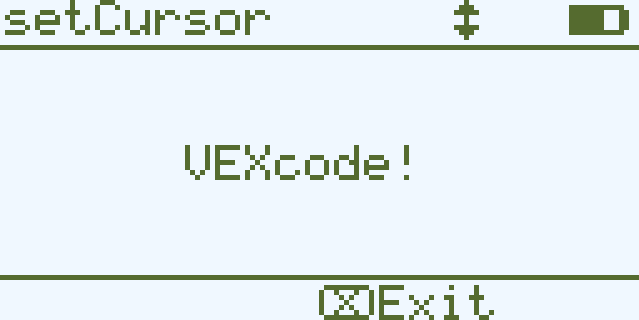
Μετακινεί τον κέρσορα σε μια συγκεκριμένη γραμμή και στήλη στην οθόνη IQ (1ης γενιάς) Brain. Η επόμενη κλήση print θα ξεκινήσει την εκτύπωση σε αυτήν την τοποθεσία.
void setCursor(
  int32_t row,
  int32_t col );
Παράμετρος |
Τύπος |
Περιγραφή |
|---|---|---|
|
|
Η γραμμή στην οποία θα μετακινηθεί ο κέρσορας. |
|
|
Η στήλη στην οποία θα μετακινηθεί ο κέρσορας. |
Αυτή η συνάρτηση δεν επιστρέφει τιμή.
NotesΕπηρεάζει την έναρξη της επακόλουθης εξόδου κειμένου κατά τη χρήση
print.Οι γραμμές και οι στήλες βασίζονται στην τρέχουσα γραμματοσειρά οθόνης.
Η κλήση του
setCursorεπηρεάζει μόνο τη θέση του επόμενου κειμένου που εμφανίζεται.
// Print at row 3 column 7
Brain.Screen.setCursor(3, 7);
Brain.Screen.print("VEXcode!");
newLine#
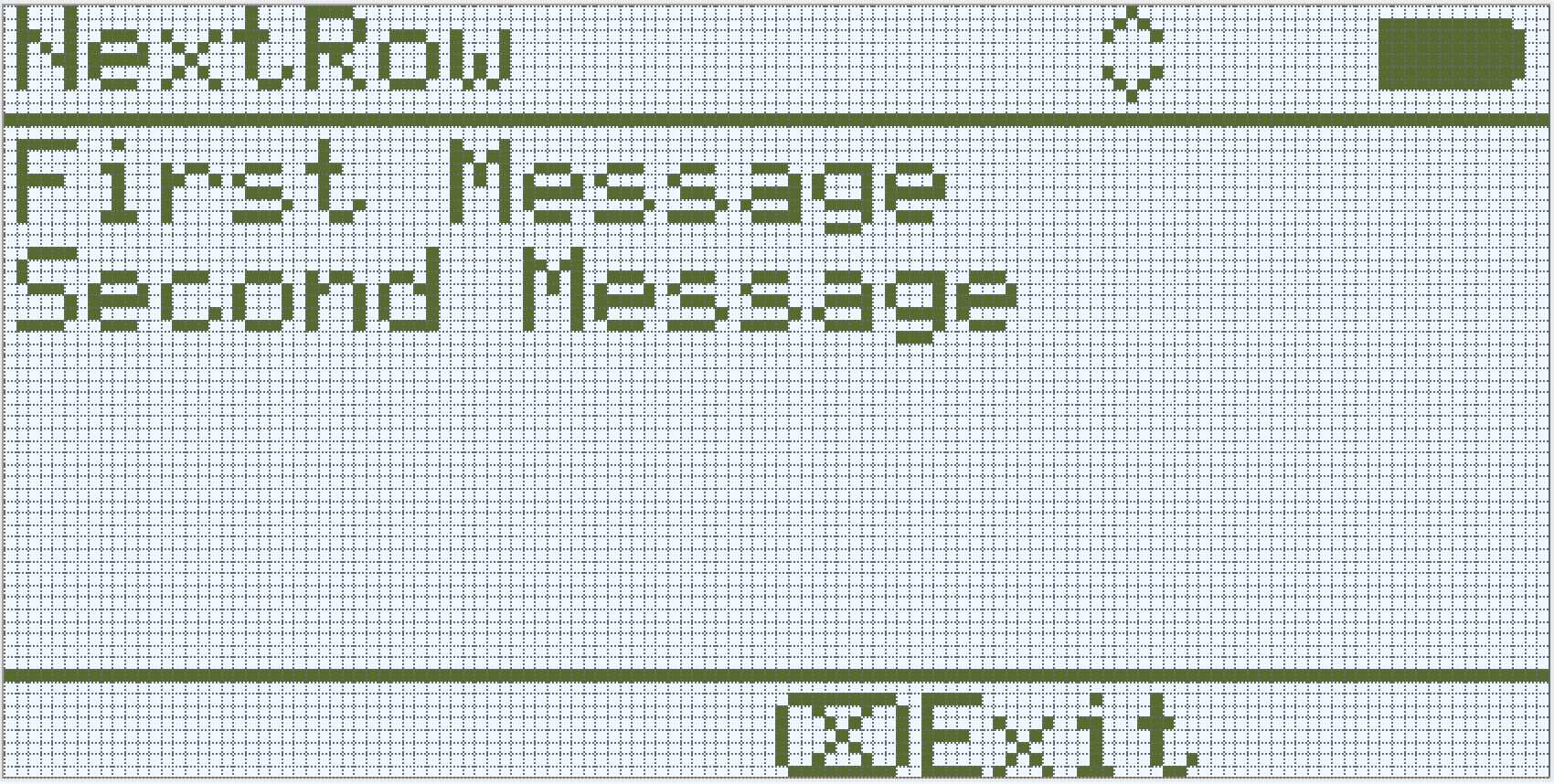
Μετακινεί τον κέρσορα στην αρχή της επόμενης γραμμής στην οθόνη Brain.
Available Functionsvoid newLine();
Αυτή η συνάρτηση δεν δέχεται καμία παράμετρο.
Return ValuesΑυτή η συνάρτηση δεν επιστρέφει τιμή.
NotesΕάν ο δρομέας βρίσκεται στη μέση μιας πρότασης, η εντολή
newLineθα διαγράψει την υπόλοιπη γραμμή μετά τον δρομέα πριν μετακινηθεί στην επόμενη γραμμή.Μετά την κλήση της εντολής
newLine, ο κέρσορας τοποθετείται στην πρώτη στήλη της επόμενης γραμμής.Η θέση του δρομέα και η αρίθμηση γραμμών ορίζονται χρησιμοποιώντας
setCursor.
// Display two lines of text
Brain.Screen.print("First message");
Brain.Screen.newLine();
Brain.Screen.print("Second message");
clearLine#
Διαγράφει κείμενο από μια σειρά στην οθόνη IQ (1ης γενιάς) Brain.
Available Functions1 — Διαγράφει το υπόλοιπο της τρέχουσας γραμμής από τη θέση του κέρσορα.
void clearLine();
2 — Διαγράφει την καθορισμένη γραμμή χρησιμοποιώντας το τρέχον διαμορφωμένο χρώμα γεμίσματος.
void clearLine(
    int number );
3 — Διαγράφει την καθορισμένη γραμμή χρησιμοποιώντας ένα προκαθορισμένο ή προσαρμοσμένο χρώμα αντικείμενο.
void clearLine(
    int          number,
    const color& color );
4 — Διαγράφει την καθορισμένη γραμμή χρησιμοποιώντας μια δεκαεξαδική τιμή χρώματος.
void clearLine(
    int         number,
    const char* color );
Parameters5 — Διαγράφει την καθορισμένη γραμμή χρησιμοποιώντας μια τιμή απόχρωσης.
void clearLine(
    int number,
    int hue );
Παράμετρος |
Τύπος |
Περιγραφή |
|---|---|---|
|
|
Ο αριθμός γραμμής που θα διαγραφεί. Η αρίθμηση γραμμών ξεκινά από |
|
|
Clears the row using a
|
|
|
Καθαρίζει τη γραμμή χρησιμοποιώντας μια δεκαεξαδική τιμή χρώματος (για παράδειγμα, |
|
|
Καθαρίζει τη γραμμή χρησιμοποιώντας μια ακέραια τιμή απόχρωσης στην περιοχή |
Αυτή η συνάρτηση δεν επιστρέφει τιμή.
NotesΗ διαγραφή μιας γραμμής δεν αλλάζει την τρέχουσα θέση του κέρσορα.
Η θέση του δρομέα και η αρίθμηση γραμμών ορίζονται χρησιμοποιώντας
setCursor.Η οθόνη IQ (1ης γενιάς) Brain είναι μονόχρωμη, επομένως τα συγκεκριμένα χρώματα δεν θα εμφανίζονται στην οθόνη.
// Display text on two rows
Brain.Screen.print("This text stays");
Brain.Screen.newLine();
Brain.Screen.print("This disappears");

// Wait 3 seconds before clearing row 2
wait(3, seconds);
Brain.Screen.clearLine(2);
row#
Επιστρέφει την τρέχουσα θέση της γραμμής του κέρσορα στην οθόνη IQ (1ης γενιάς) Brain.
Available Functionsint32_t row();
Αυτή η συνάρτηση δεν δέχεται καμία παράμετρο.
Return ValuesΕπιστρέφει μια τιμή int32_t που αντιπροσωπεύει τη γραμμή όπου θα εκτυπωθεί το κείμενο.
Η αρίθμηση γραμμών ξεκινά από το 1.
NotesΗ θέση του κέρσορα βασίζεται στην τρέχουσα γραμματοσειρά οθόνης .
Η επιστρεφόμενη τιμή υποδεικνύει πού θα εμφανιστεί η επόμενη εκτυπωμένη έξοδος.
Η τιμή της γραμμής αλλάζει όταν εκτυπώνεται κείμενο ή όταν καλείται η συνάρτηση
setCursor.
// Display the cursor's current row
Brain.Screen.setCursor(3, 12);
Brain.Screen.print("row: ", Brain.Screen.row());
column#
Επιστρέφει τη στήλη όπου θα εκτυπωθεί το κείμενο στην οθόνη IQ (1ης γενιάς) Brain.
Available Functionsint32_t column();
Αυτή η συνάρτηση δεν δέχεται καμία παράμετρο.
Return ValuesΕπιστρέφει μια τιμή int32_t που αντιπροσωπεύει τη στήλη όπου θα εκτυπωθεί το κείμενο.
Η αρίθμηση στηλών ξεκινά από το 1.
NotesΗ θέση του κέρσορα βασίζεται στην τρέχουσα γραμματοσειρά οθόνης .
Η επιστρεφόμενη τιμή υποδεικνύει πού θα εμφανιστεί η επόμενη εκτυπωμένη έξοδος.
Η τιμή της στήλης αλλάζει όταν εκτυπώνεται κείμενο ή όταν καλείται η συνάρτηση
setCursor.
// Display the cursor's current column
Brain.Screen.print("column: ", Brain.Screen.column());
getStringHeight#
Επιστρέφει το ύψος, σε pixel, μιας συμβολοσειράς όταν αποδίδεται στην οθόνη IQ (1ης γενιάς) Brain.
Available Functionsint32_t getStringHeight(
const char* cstr );
Παράμετρος |
Τύπος |
Περιγραφή |
|---|---|---|
|
|
Το κείμενο που θα μετρηθεί, παρέχεται ως συμβολοσειρά τύπου C (για παράδειγμα, |
Επιστρέφει μια τιμή int32_t που αντιπροσωπεύει το ύψος της συμβολοσειράς σε pixel όταν αποδίδεται στην οθόνη Brain.
getStringWidth#
Επιστρέφει το πλάτος, σε pixel, μιας συμβολοσειράς όταν αποδίδεται στην οθόνη IQ (1ης γενιάς) Brain.
Available Functionsint32_t getStringWidth(
const char* cstr );
Παράμετρος |
Τύπος |
Περιγραφή |
|---|---|---|
|
|
Το κείμενο που θα μετρηθεί, παρέχεται ως συμβολοσειρά τύπου C (για παράδειγμα, |
Επιστρέφει μια τιμή int32_t που αντιπροσωπεύει το πλάτος της συμβολοσειράς σε pixel όταν αποδίδεται στην οθόνη Brain.
The returned width depends on the currently selected screen font.
Αυτή η συνάρτηση μετρά τη συμβολοσειρά χωρίς να την απεικονίζει στην οθόνη.
Το επιστρεφόμενο πλάτος αντικατοπτρίζει τον τρόπο με τον οποίο θα εμφανιζόταν η συμβολοσειρά κατά την εκτύπωση.
printAt#
Εκτυπώνει κείμενο, αριθμούς ή λογικές τιμές σε μια συγκεκριμένη συντεταγμένη στην οθόνη IQ (1ης γενιάς) Brain.
Available Functions1 — Εκτυπώνει τη μορφοποιημένη έξοδο στην καθορισμένη θέση pixel.
void printAt(
    int32_t    x,
    int32_t    y,
    const char* format,
    ... );
Parameters2 — Εκτυπώνει τη μορφοποιημένη έξοδο στην καθορισμένη θέση pixel και ορίζει εάν το φόντο κειμένου είναι αδιαφανές ή διαφανές.
void printAt(
    int32_t    x,
    int32_t    y,
    bool       bOpaque,
    const char* format,
    ... );
Παράμετρος |
Τύπος |
Περιγραφή |
|---|---|---|
|
|
Η θέση x για εκτύπωση, με αναφορά στην αρχή της οθόνης. |
|
|
Η θέση y για εκτύπωση, με αναφορά στην αρχή της οθόνης. |
|
|
Ελέγχει εάν το εκτυπωμένο κείμενο σχεδιάζεται αδιαφανώς ή διαφανώς:
|
|
|
Μια συμβολοσειρά μορφοποίησης που ελέγχει τι εκτυπώνεται στην οθόνη (για παράδειγμα, |
|
Μία ή περισσότερες πρόσθετες τιμές που εισάγονται στη συμβολοσειρά μορφοποίησης, διαχωρισμένες με κόμματα. |
Αυτή η συνάρτηση δεν επιστρέφει τιμή.
NotesThe
xandycoordinates are relative to the current screen origin, which can be changed usingsetOrigin.Το τυπωμένο κείμενο χρησιμοποιεί την τρέχουσα γραμματοσειρά οθόνης .
Όταν χρησιμοποιείτε μια συμβολοσειρά μορφοποίησης, ο αριθμός και οι τύποι των τιμών που διαβιβάζονται πρέπει να ταιριάζουν με τους προσδιοριστές μορφής στη συμβολοσειρά.
// Print the number 1 at pixel (100, 40)
Brain.Screen.printAt(100, 40, 1);
clearScreen#
Διαγράφει όλα τα σχέδια και το κείμενο από την οθόνη του Εγκεφάλου.
Available Functions1 — Μαυρίζει την οθόνη.
void clearScreen();
2 — Καθαρίζει την οθόνη χρησιμοποιώντας ένα προκαθορισμένο ή προσαρμοσμένο χρώμα αντικείμενο.
void clearScreen(
    const color& color );
3 — Καθαρίζει την οθόνη χρησιμοποιώντας μια δεκαεξαδική τιμή χρώματος.
void clearScreen(
    const char* color );
Parameters4 — Καθαρίζει την οθόνη χρησιμοποιώντας μια τιμή απόχρωσης.
void clearScreen(
    int hue );
Παράμετρος |
Τύπος |
Περιγραφή |
|---|---|---|
|
|
Clears the screen using a
|
|
|
Καθαρίζει την οθόνη χρησιμοποιώντας μια δεκαεξαδική τιμή χρώματος που αναπαρίσταται ως συμβολοσειρά (για παράδειγμα, |
|
|
Καθαρίζει την οθόνη χρησιμοποιώντας μια ακέραια τιμή απόχρωσης στην περιοχή |
Αυτή η συνάρτηση δεν επιστρέφει τιμή.
NotesΗ οθόνη IQ (1ης γενιάς) Brain είναι μονόχρωμη, επομένως τα συγκεκριμένα χρώματα δεν θα εμφανίζονται στην οθόνη.
// Clear screen after 2 seconds
Brain.Screen.print("VEXcode");
wait(2, seconds);
Brain.Screen.clearScreen();
// Clear screen to blue after 2 seconds
Brain.Screen.print("VEXcode");
wait(2, seconds);
Brain.Screen.clearScreen(red);
setFont#
Ορίζει τη γραμματοσειρά που χρησιμοποιείται για το κείμενο που εμφανίζεται στην οθόνη IQ (1ης γενιάς) Brain.
Αυτό ελέγχει τη γραμματοσειρά που εφαρμόζεται στην επακόλουθη έξοδο κειμένου όταν χρησιμοποιούνται συναρτήσεις κειμένου οθόνης όπως print.
void setFont(
  fontType font );
Παράμετρος |
Τύπος |
Περιγραφή |
|---|---|---|
|
|
Ορίζει τη γραμματοσειρά σε μία από τις ακόλουθες ρυθμίσεις:
|
Αυτή η συνάρτηση δεν επιστρέφει τιμή.
Examples// Display two different fonts on
// two separate lines
Brain.Screen.setFont(mono20);
Brain.Screen.print("Mono Medium");
Brain.Screen.newLine();
Brain.Screen.setFont(prop20);
Brain.Screen.print("Prop Medium");
setPenWidth#
Ορίζει το πάχος των γραμμών που σχεδιάζονται και των περιγραμμάτων σχήματος.
Available Functionsvoid setPenWidth(
uint32_t width );
Παράμετρος |
Τύπος |
Περιγραφή |
|---|---|---|
|
|
Το πλάτος της πένας, σε pixel, κυμαίνεται από 0 έως 32. |
Αυτή η συνάρτηση δεν επιστρέφει τιμή.
NotesΤο πλάτος της πένας ισχύει για συναρτήσεις σχεδίασης όπως
drawLine,drawRectangleκαιdrawCircle.
// Draw a circle with a pen width of 5
Brain.Screen.drawCircle(40, 70, 20);
Brain.Screen.setPenWidth(5);
Brain.Screen.drawCircle(100, 70, 20);
setPenColor#
Ορίζει το χρώμα κειμένου, pixel, γραμμών και περιγραμμάτων σχήματος.
Available Functions1 — Ορίζει το χρώμα της πένας χρησιμοποιώντας ένα προκαθορισμένο ή προσαρμοσμένο χρώμα αντικείμενο.
void setPenColor(
    const color& color );
2 — Ορίζει το χρώμα της πένας χρησιμοποιώντας μια δεκαεξαδική τιμή χρώματος.
void setPenColor(
    const char* color );
Parameters3 — Ορίζει το χρώμα της πένας χρησιμοποιώντας μια τιμή απόχρωσης.
void setPenColor(
    int hue );
Παράμετρος |
Τύπος |
Περιγραφή |
|---|---|---|
|
|
Ορίζει το χρώμα της πένας χρησιμοποιώντας ένα αντικείμενο
|
|
|
Ορίζει το χρώμα της πένας χρησιμοποιώντας μια δεκαεξαδική τιμή χρώματος που αναπαρίσταται ως συμβολοσειρά (για παράδειγμα, |
|
|
Ορίζει το χρώμα της πένας χρησιμοποιώντας μια ακέραια τιμή απόχρωσης στην περιοχή |
Αυτή η συνάρτηση δεν επιστρέφει τιμή.
NotesΗ οθόνη IQ (1ης γενιάς) Brain είναι μονόχρωμη, επομένως τα συγκεκριμένα χρώματα δεν θα εμφανίζονται στην οθόνη.
Brain.Screen.drawRectangle(100, 50, 10, 20);
Brain.Screen.setPenColor(blue);
Brain.Screen.drawRectangle(50, 50, 10, 20);
setFillColor#
Ορίζει το χρώμα γεμίσματος που χρησιμοποιείται κατά τη σχεδίαση σχημάτων.
Available Functions1 — Ορίζει το χρώμα γεμίσματος χρησιμοποιώντας ένα προκαθορισμένο ή προσαρμοσμένο χρώμα αντικείμενο.
void setFillColor(
    const color& color );
2 — Ορίζει το χρώμα γεμίσματος χρησιμοποιώντας μια δεκαεξαδική τιμή χρώματος.
void setFillColor(
    const char* color );
Parameters3 — Ορίζει το χρώμα γεμίσματος χρησιμοποιώντας μια τιμή απόχρωσης.
void setFillColor(
    int hue );
Παράμετρος |
Τύπος |
Περιγραφή |
|---|---|---|
|
|
Ορίζει το χρώμα γεμίσματος χρησιμοποιώντας ένα αντικείμενο
|
|
|
Ορίζει το χρώμα γεμίσματος χρησιμοποιώντας μια δεκαεξαδική τιμή χρώματος που αναπαρίσταται ως συμβολοσειρά (για παράδειγμα, |
|
|
Ορίζει το χρώμα γεμίσματος χρησιμοποιώντας μια ακέραια τιμή απόχρωσης στην περιοχή |
Αυτή η συνάρτηση δεν επιστρέφει τιμή.
NotesΗ οθόνη IQ (1ης γενιάς) Brain είναι μονόχρωμη, επομένως τα συγκεκριμένα χρώματα δεν θα εμφανίζονται στην οθόνη.
// Draw a circle filled with yellow
Brain.Screen.setFillColor(yellow);
Brain.Screen.drawCircle(50, 50, 20);
setOrigin#
Ορίζει την προέλευση που χρησιμοποιείται για τη σχεδίαση γραφικών στην οθόνη του εγκεφάλου.
Available Functionsvoid setOrigin(
int32_t x,
int32_t y );
Παράμετρος |
Τύπος |
Περιγραφή |
|---|---|---|
|
|
Η θέση x της αρχής των αξόνων σε σχέση με την επάνω αριστερή γωνία της οθόνης του εγκεφάλου από 0 έως 159. |
|
|
Η θέση y της αρχής των αξόνων σε σχέση με την επάνω αριστερή γωνία της οθόνης του εγκεφάλου από 0 έως 107. |
Αυτή η συνάρτηση δεν επιστρέφει τιμή.
NotesΗ προεπιλεγμένη αρχή είναι η επάνω αριστερή γωνία της οθόνης στη συντεταγμένη (0, 0).
Η αρχή των αξόνων ισχύει για συναρτήσεις συντεταγμένων όπως
drawLine,drawRectangle,drawCircleκαιprintAt.Η προέλευση παραμένει σε ισχύ μέχρι να αλλάξει ξανά ή να γίνει επαναφορά του έργου.
setClipRegion#
Ορίζει μια ορθογώνια περιοχή στην οθόνη όπου θα περιορίζονται όλα τα σχέδια και το κείμενο. Δεν θα εμφανίζεται κανένα περιεχόμενο εκτός αυτής της περιοχής.
Available Functionsvoid setClipRegion(
int x,
int y,
int width,
int height );
Παράμετρος |
Τύπος |
Περιγραφή |
|---|---|---|
|
|
Η συντεταγμένη x της επάνω αριστερής γωνίας της περιοχής αποκοπής, που δίνεται ως ακέραιος αριθμός από 0 έως 159. |
|
|
Η συντεταγμένη y της επάνω αριστερής γωνίας της περιοχής αποκοπής, που δίνεται ως ακέραιος αριθμός από 0 έως 107. |
|
|
Το πλάτος της περιοχής κλιπ σε pixel, που δίνεται ως ακέραιος αριθμός από 0 έως 159. |
|
|
Το ύψος της περιοχής κλιπ σε pixel, που δίνεται ως ακέραιος αριθμός από 0 έως 107. |
Αυτή η συνάρτηση δεν επιστρέφει τιμή.
NotesΟι συναρτήσεις σχεδίασης εξακολουθούν να εκτελούνται ακόμη και αν βρίσκονται εκτός της περιοχής κλιπ, αλλά μόνο το τμήμα εντός της περιοχής είναι ορατό.
The
xandycoordinates are relative to the current screen origin, which can be changed usingsetOrigin.Η περιοχή αποκοπής ισχύει μόνο για το τρέχον νήμα.
Ο ορισμός μιας νέας περιοχής κλιπ αντικαθιστά οποιαδήποτε προηγουμένως ορισμένη περιοχή κλιπ για το τρέχον νήμα.
// Restrict text and drawings to a specific region
Brain.Screen.setClipRegion(0, 0, 120, 120);
Brain.Screen.drawRectangle(60, 60, 100, 100, red);
Brain.Screen.printAt(60, 60, "Cut off!");
drawPixel#
Σχεδιάζει ένα μόνο pixel στην οθόνη IQ (1ης γενιάς) Brain στην καθορισμένη θέση pixel x και y.
Available Functionsvoid drawPixel(
int x,
int y );
Παράμετρος |
Τύπος |
Περιγραφή |
|---|---|---|
|
|
Η συντεταγμένη x όπου θα σχεδιαστεί το εικονοστοιχείο, η οποία δίνεται ως ακέραιος αριθμός από 0 έως 159. |
|
|
Η συντεταγμένη y όπου θα σχεδιαστεί το εικονοστοιχείο, η οποία δίνεται ως ακέραιος αριθμός από 0 έως 107. |
Αυτή η συνάρτηση δεν επιστρέφει τιμή.
NotesΗ οθόνη IQ (1ης γενιάς) Brain είναι μονόχρωμη, επομένως τα συγκεκριμένα χρώματα δεν θα εμφανίζονται στην οθόνη.
The
xandycoordinates are relative to the current screen origin, which can be set usingsetOrigin.Εάν η καθορισμένη θέση του pixel βρίσκεται εκτός των ορίων της οθόνης, το pixel δεν σχεδιάζεται.
// Draw one pixel at the center
// of the screen
Brain.Screen.drawPixel(80, 50);
drawLine#
Σχεδιάζει μια ευθεία γραμμή που συνδέει δύο σημεία στην οθόνη IQ (1ης γενιάς) Brain.
Available Functionsvoid drawLine(
int x1,
int y1,
int x2,
int y2 );
Παράμετρος |
Τύπος |
Περιγραφή |
|---|---|---|
|
|
Η αρχική συντεταγμένη x της γραμμής, που δίνεται ως ακέραιος αριθμός από 0 έως 159. |
|
|
Η αρχική συντεταγμένη y της γραμμής, που δίνεται ως ακέραιος αριθμός από 0 έως 107. |
|
|
Η τελική συντεταγμένη x της γραμμής, που δίνεται ως ακέραιος αριθμός από 0 έως 159. |
|
|
Η τελική συντεταγμένη y της γραμμής, η οποία δίνεται ως ακέραιος αριθμός από 0 έως 107. |
Αυτή η συνάρτηση δεν επιστρέφει τιμή.
NotesΗ οθόνη IQ (1ης γενιάς) Brain είναι μονόχρωμη, επομένως τα συγκεκριμένα χρώματα δεν θα εμφανίζονται στην οθόνη.
Το πλάτος της γραμμής καθορίζεται από το τρέχον πλάτος πένας που έχει οριστεί με
setPenWidth.The
xandycoordinates are relative to the current screen origin, which can be set usingsetOrigin.Εάν οποιοδήποτε τμήμα της γραμμής βρίσκεται εκτός των ορίων της οθόνης, σχεδιάζεται μόνο το ορατό τμήμα.
// Draw a line from the top left to
// bottom right of the screen
Brain.Screen.drawLine(0, 0, 159, 107);
drawRectangle#
Σχεδιάζει ένα ορθογώνιο στην οθόνη IQ (1ης γενιάς) Brain στην καθορισμένη θέση και μέγεθος.
Available Functions1 — Σχεδιάζει και γεμίζει ένα ορθογώνιο χρησιμοποιώντας το τρέχον διαμορφωμένο χρώμα γεμίσματος.
void drawRectangle(
    int x,
    int y,
    int width,
    int height );
2 — Σχεδιάζει και γεμίζει ένα ορθογώνιο χρησιμοποιώντας ένα προκαθορισμένο ή προσαρμοσμένο χρώμα αντικείμενο.
void drawRectangle(
    int           x,
    int           y,
    int           width,
    int           height,
    const color&  color );
3 — Σχεδιάζει και γεμίζει ένα ορθογώνιο χρησιμοποιώντας μια δεκαεξαδική τιμή χρώματος.
void drawRectangle(
    int           x,
    int           y,
    int           width,
    int           height,
    const char*   color );
Parameters4 — Σχεδιάζει και γεμίζει ένα ορθογώνιο χρησιμοποιώντας μια τιμή απόχρωσης.
void drawRectangle(
    int x,
    int y,
    int width,
    int height,
    int hue );
Παράμετρος |
Τύπος |
Περιγραφή |
|---|---|---|
|
|
Η συντεταγμένη x της επάνω αριστερής γωνίας του ορθογωνίου, που δίνεται ως ακέραιος αριθμός από 0 έως 159. |
|
|
Η συντεταγμένη y της επάνω αριστερής γωνίας του ορθογωνίου, που δίνεται ως ακέραιος αριθμός από 0 έως 107. |
|
|
Το πλάτος του ορθογωνίου, που δίνεται ως ακέραιος αριθμός από 0 έως 159. |
|
|
Το ύψος του ορθογωνίου, που δίνεται ως ακέραιος αριθμός από 0 έως 107. |
|
|
Fills the rectangle using a
|
|
|
Γεμίζει το ορθογώνιο χρησιμοποιώντας μια δεκαεξαδική τιμή χρώματος (για παράδειγμα, |
|
|
Γεμίζει το ορθογώνιο χρησιμοποιώντας μια τιμή απόχρωσης στην περιοχή |
Αυτή η συνάρτηση δεν επιστρέφει τιμή.
NotesΗ οθόνη IQ (1ης γενιάς) Brain είναι μονόχρωμη, επομένως τα συγκεκριμένα χρώματα δεν θα εμφανίζονται στην οθόνη.
Το πάχος του περιγράμματος καθορίζεται από το τρέχον πλάτος πένας που έχει οριστεί με
setPenWidth.The
xandycoordinates are relative to the current screen origin, which can be changed usingsetOrigin.Εάν οποιοδήποτε τμήμα του ορθογωνίου βρίσκεται εκτός των ορίων της οθόνης, σχεδιάζεται μόνο το ορατό τμήμα.
// Draw a red rectangle on the screen
Brain.Screen.drawRectangle(25, 25, 100, 50, red);
drawCircle#
Σχεδιάζει έναν κύκλο στην οθόνη IQ (1ης γενιάς) Brain στην καθορισμένη θέση και ακτίνα.
Available Functions1 — Σχεδιάζει και γεμίζει έναν κύκλο χρησιμοποιώντας το τρέχον διαμορφωμένο χρώμα γεμίσματος.
void drawCircle(
    int x,
    int y,
    int radius );
2 — Σχεδιάζει και γεμίζει έναν κύκλο χρησιμοποιώντας ένα προκαθορισμένο ή προσαρμοσμένο χρώμα αντικείμενο.
void drawCircle(
    int           x,
    int           y,
    int           radius,
    const color&  color );
3 — Σχεδιάζει και γεμίζει έναν κύκλο χρησιμοποιώντας μια δεκαεξαδική τιμή χρώματος.
void drawCircle(
    int           x,
    int           y,
    int           radius,
    const char*   color );
Parameters4 — Σχεδιάζει και γεμίζει έναν κύκλο χρησιμοποιώντας μια τιμή απόχρωσης.
void drawCircle(
    int x,
    int y,
    int radius,
    int hue );
Παράμετρος |
Τύπος |
Περιγραφή |
|---|---|---|
|
|
Η συντεταγμένη x του κέντρου του κύκλου, που δίνεται ως ακέραιος αριθμός από 0 έως 159. |
|
|
Η συντεταγμένη y του κέντρου του κύκλου, που δίνεται ως ακέραιος αριθμός από 0 έως 107. |
|
|
Η ακτίνα του κύκλου, που δίνεται ως ακέραιος αριθμός από 0 έως 107 pixel. |
|
|
Fills the circle using a
|
|
|
Γεμίζει τον κύκλο χρησιμοποιώντας μια δεκαεξαδική τιμή χρώματος (για παράδειγμα, |
|
|
Γεμίζει τον κύκλο χρησιμοποιώντας μια τιμή απόχρωσης στην περιοχή |
Αυτή η συνάρτηση δεν επιστρέφει τιμή.
NotesΗ οθόνη IQ (1ης γενιάς) Brain είναι μονόχρωμη, επομένως τα συγκεκριμένα χρώματα δεν θα εμφανίζονται στην οθόνη.
Το πάχος του περιγράμματος καθορίζεται από το τρέχον πλάτος πένας που έχει οριστεί με
setPenWidth.The
xandycoordinates are relative to the current screen origin, which can be changed usingsetOrigin.
// Draw a green circle on the screen
Brain.Screen.drawCircle(80, 50, 20, green);
render#
Ενεργοποιεί τη διπλή προσωρινή αποθήκευση για την οθόνη του Εγκεφάλου. Μόλις κληθούν, τυχόν συναρτήσεις σχεδίασης (όπως κείμενο ή σχήματα) δεν θα εμφανίζονται πλέον αμέσως για το υπόλοιπο έργο. Αντίθετα, οι ενημερώσεις θα εμφανίζονται μόνο όταν χρησιμοποιηθεί ξανά η απόδοση render Αυτό επιτρέπει ομαλότερες και πιο ελεγχόμενες ενημερώσεις οθόνης, αλλά σημαίνει ότι τίποτα δεν θα είναι ορατό μέχρι να χρησιμοποιηθεί η απόδοση render.
1 — Ενεργοποιεί τη διπλή προσωρινή αποθήκευση ή αποδίδει την προσωρινή αποθήκευση στην οθόνη.
bool render();
Parameters2 — Αποδίδει το back buffer στην οθόνη με έλεγχο της συμπεριφοράς κάθετου συγχρονισμού και προαιρετική εκτέλεση χρονοδιαγράμματος.
bool render(
    bool bVsyncWait,
    bool bRunScheduler = true );
Παράμετρος |
Τύπος |
Περιγραφή |
|---|---|---|
|
|
|
|
|
Προαιρετικό.
|
Επιστρέφει μια λογική τιμή που υποδεικνύει εάν τα αποθηκευμένα σχέδια στο buffer αποδώθηκαν με επιτυχία στην οθόνη:
true— Τα σχέδια αποδώθηκαν με επιτυχία στην οθόνη.false— Τα σχέδια δεν ήταν δυνατό να αποδοθούν στην οθόνη.
Notes
Η κλήση της συνάρτησης
renderθα απαιτήσει τη χρήση της συνάρτησηςrenderγια το υπόλοιπο έργο.
Brain.Screen.render();

// Draw text to the back buffer
Brain.Screen.print("Render later...");

// Wait for a screen press to render drawings
while (!Brain.Screen.pressing()) {
  wait(20, msec);
}
Brain.Screen.render();