
Transmisión#
Introducción#
El sistema de transmisión incluye ruedas y motores que controlan cómo el robot se desplaza y gira. Estos sistemas se pueden encontrar en robots como Code Base 2.0, Super Car o en robots personalizados.
Drivetrains use the Inertial Sensor in the Brain to detect crashes and help the robot move and turn precisely. At the start of each project, the drivetrain calibrates the Inertial Sensor automatically. Keep the robot still for about 2 seconds during calibration, so the robot can move and turn correctly.
Existen muchas maneras de programar el sistema de transmisión. A continuación se muestra una lista de todos los métodos del sistema de transmisión:
Acciones: Mover y girar el robot.
drive— Mueve el robot hacia adelante o hacia atrás indefinidamente.drive_for— Mueve el robot hacia adelante o hacia atrás una distancia específica.drive_until— Mueve el robot hacia adelante hasta que el sensor ocular detecte un objeto o el robot detecte un choque.turn— Gira el robot a la izquierda o a la derecha indefinidamente.turn_for— Gira el robot hacia la izquierda o hacia la derecha un número específico de grados.turn_to_heading— Gira el robot para que mire hacia un rumbo específico de -359 a 359 grados. El robot girará en la dirección más corta para alcanzar el rumbo objetivo.turn_to_rotation— Gira el robot a una rotación específica.stop— Detiene el movimiento del robot.
Motadores: Ajusta la configuración de la transmisión.
set_drive_velocity— Indica al robot a qué velocidad debe conducir.set_turn_velocity— Indica al robot a qué velocidad debe girar.set_stopping— Indica cómo el robot dejará de moverse: frenando, dejándose llevar por inercia o manteniéndose en posición.set_timeout— Establece cuánto tiempo intentará el robot terminar un movimiento.set_heading— Cambia el rumbo actual del robot a un nuevo rumbo.set_rotation— Cambia la rotación actual del robot a una nueva rotación.
Obtenedores: comprobar el estado del movimiento.
get_heading— Devuelve la dirección actual del robot de 0 a 359 grados.get_rotation— Devuelve la rotación actual del robot.get_velocity— Devuelve la velocidad a la que se desplaza el robot, como un porcentaje de -100% a 100%.get_yaw— Devuelve la guiñada actual del robot.get_roll— Devuelve el lanzamiento actual del robot.get_pitch— Devuelve el paso actual del robot.get_crashed— Devuelve si el robot ha detectado un choque, como un valor booleano.is_stopped— Devuelve si el robot ha terminado de moverse, como un valor booleano.
Comportamiento#
drive#
La acción drive indefinidamente. El robot continuará moviéndose hasta que se le indique otra acción, como girar o detenerse.
Uso:
drivetrain.drive(direction)
Parámetros |
Descripción |
|---|---|
|
La dirección en la que se mueve el robot: |
# Build Used: Code Base 2.0
def main():
    # Drive forward then stop
    drivetrain.drive(FORWARD)
    wait(2, SECONDS)
    drivetrain.stop()

# Start threads — Do not delete
start_thread(main)
drive_for#
drive_for mueve el robot hacia adelante o hacia atrás una distancia específica.
Usage:
drivetrain.drive_for(direction, distance, units, wait)
Parámetros |
Descripción |
|---|---|
|
La dirección en la que se mueve el robot: |
|
La distancia que recorre el robot. Puede ser un número entero o decimal. |
|
Opcional. La unidad de distancia: |
|
Opcional. |
# Build Used: Code Base 2.0
def main():
    # Drive back and forth
    drivetrain.drive_for(FORWARD, 100, MM)
    drivetrain.drive_for(REVERSE, 4, INCHES)


# Start threads — Do not delete
start_thread(main)
drive_until#
drive_until mueve el robot hacia adelante hasta que el sensor ocular detecte un objeto o el robot detecte un choque.
Uso:
drivetrain.drive_until(condition, wait)
Parámetros |
Descripción |
|---|---|
|
La condición que detiene al robot: |
|
Opcional. |
# Build Used: Code Base 2.0
def main():
    # Turn right after a crash
    drivetrain.drive_until(CRASH)
    drivetrain.turn_for(RIGHT, 90)

# Start threads — Do not delete
start_thread(main)
turn#
turn hace que el robot gire a la izquierda o a la derecha indefinidamente. El robot seguirá girando hasta que se le dé otra orden, como conducir o detenerse.
Uso:
drivetrain.turn(direction)
Parámetros |
Descripción |
|---|---|
|
La dirección en la que gira el robot: |
# Build Used: Code Base 2.0
def main():
    # Turn right and left, then stop
    drivetrain.turn(RIGHT)
    wait(2, SECONDS)
    drivetrain.turn(LEFT)
    wait(2, SECONDS)
    drivetrain.stop()

# Start threads — Do not delete
start_thread(main)
turn_for#
turn_for gira el robot hacia la izquierda o hacia la derecha un número específico de grados. El giro es relativo a la posición actual del robot.
Uso:
drivetrain.turn_for(direction, angle, wait)
Parámetros |
Descripción |
|---|---|
|
La dirección en la que gira el robot: |
|
El número de grados que gira el robot. Puede ser un número entero o decimal. |
|
Opcional. |
# Build Used: Code Base 2.0
def main():
    # Turn right then left
    drivetrain.turn_for(RIGHT, 90)
    drivetrain.turn_for(LEFT, 90)

# Start threads — Do not delete
start_thread(main)
turn_to_heading#
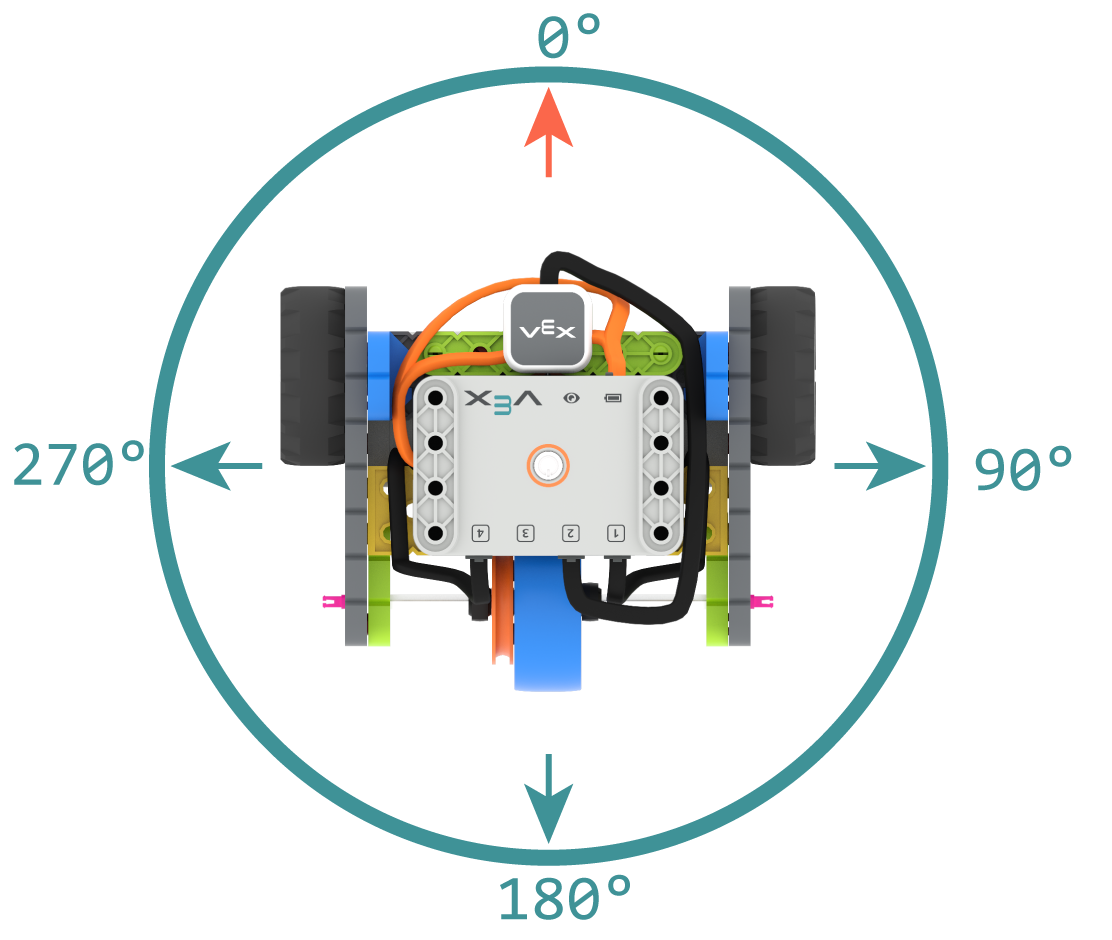
El rumbo es la dirección hacia la que apunta el cerebro del robot, medida en grados. turn_to_heading hace que el robot gire para apuntar a un rumbo específico entre -359 y 359 grados. El robot girará en la dirección más corta para alcanzar el rumbo objetivo.
El rumbo inicial es de 0 grados.
Uso:
drivetrain.turn_to_heading(angle, wait)
Parámetros |
Descripción |
|---|---|
|
La dirección hacia la que debe mirar el robot, expresada como un número entero, entre -359 y 359 grados. |
|
Opcional. |
# Build Used: Code Base 2.0
def main():
    # Turn to face the cardinal directions
    drivetrain.turn_to_heading(90)
    wait(1, SECONDS)
    drivetrain.turn_to_heading(180)
    wait(1, SECONDS)
    drivetrain.turn_to_heading(270)
    wait(1, SECONDS)
    drivetrain.turn_to_heading(0)

# Start threads — Do not delete
start_thread(main)
turn_to_rotation#
turn_to_rotation gira el robot a una rotación específica.
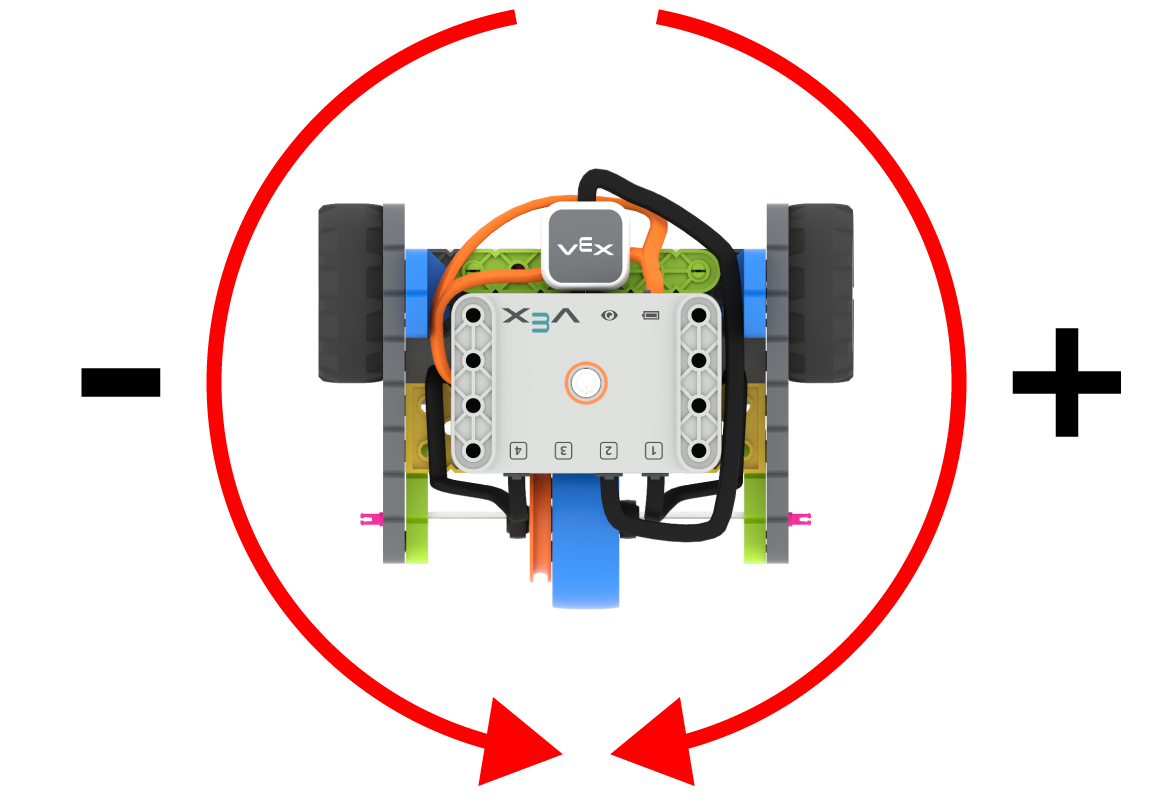
La rotación es cuánto ha girado el robot, medido en grados. Al inicio de un proyecto, el valor de rotación se establece en 0 grados. La rotación también se puede establecer usando set_rotation.
Los valores de rotación son absolutos. Esto significa que la dirección del giro depende de la rotación actual del robot. Girar a la derecha aumenta la rotación, y girar a la izquierda la disminuye.
Por ejemplo, si el robot comienza en 0 grados y se le da una rotación de 720 grados, girará dos veces a la derecha. Si luego se le da una rotación de 360 grados, girará una vez a la izquierda, ya que 360 es menor que 720.
Uso:
drivetrain.turn_to_rotation(angle, wait)
Parámetros |
Descripción |
|---|---|
|
El valor de rotación, en grados, que alcanzará el robot. Puede ser un número entero. |
|
Opcional. |
# Build Used: Code Base 2.0
def main():
    # Make one full turn to the right
    drivetrain.turn_to_rotation(360)
    # Make another full turn to the right
    drivetrain.turn_to_rotation(720)
    # Make one full turn to the left, returning to 360 degrees
    drivetrain.turn_to_rotation(360)
# Start threads — Do not delete
start_thread(main)
stop#
stop detiene el movimiento del robot.
Uso:
drivetrain.stop()
Parámetros |
Descripción |
|---|---|
Este método no tiene parámetros. |
# Build Used: Code Base 2.0
def main():
    # Drive forward then stop
    drivetrain.drive(FORWARD)
    wait(2, SECONDS)
    drivetrain.stop()

# Start threads — Do not delete
start_thread(main)
Mutadores#
set_drive_velocity#
El valor set_drive_velocity indica al robot la velocidad a la que debe conducir. Un porcentaje mayor hace que el robot conduzca más rápido y un porcentaje menor hace que conduzca más lento.
Todos los proyectos comienzan con el robot conduciendo al 50% de su velocidad por defecto.
Nota: Una mayor velocidad hace que el robot se desplace más rápido, pero puede ser menos preciso. Una menor velocidad hace que el robot se desplace más despacio, pero es más preciso.
Uso:
drivetrain.set_drive_velocity(velocity)
Parámetros |
Descripción |
|---|---|
|
La velocidad de conducción varía del 0% al 100%. |
# Build Used: Code Base 2.0
def main():
    # Drive at different velocities
    drivetrain.drive_for(FORWARD, 100, MM)
    wait(1, SECONDS)
    # Drive slow
    drivetrain.set_drive_velocity(20)
    drivetrain.drive_for(FORWARD, 100, MM)
    wait(1, SECONDS)
    # Drive fast
    drivetrain.set_drive_velocity(100)
    drivetrain.drive_for(FORWARD, 100, MM)

# Start threads — Do not delete
start_thread(main)
set_turn_velocity#
set_turn_velocity tells the robot how fast to turn. A higher percentage makes the robot turn faster and a lower percentage makes the robot turn slower.
Todos los proyectos comienzan con el robot girando al 50% de su velocidad por defecto.
Nota: Una mayor velocidad hace que el robot gire más rápido, pero puede ser menos preciso. Una menor velocidad hace que el robot gire más despacio, pero es más preciso.
Uso:
drivetrain.set_turn_velocity(velocity)
Parámetros |
Descripción |
|---|---|
|
La velocidad de giro varía del 0% al 100%. |
# Build Used: Code Base 2.0
def main():
    # Turn at different velocities
    drivetrain.turn_for(RIGHT, 180)
    wait(1, SECONDS)
    # Turn fast
    drivetrain.set_turn_velocity(100)
    drivetrain.turn_for(RIGHT, 180)

# Start threads — Do not delete
start_thread(main)
set_stopping#
set_stopping establece cómo el robot dejará de moverse: frenando, dejándose llevar por inercia o manteniéndose en reposo.
Uso:
drivetrain.set_stopping(brake)
Parámetros |
Descripción |
|---|---|
|
Cómo se detendrá el robot:
|
Si no se utiliza este método, el robot utilizará BRAKE al detenerse.
# Build Used: Code Base 2.0
def main():
    # Drive, then coast to a stop
    drivetrain.set_drive_velocity(100)
    drivetrain.set_stopping(COAST)
    drivetrain.drive(FORWARD)
    wait(2, SECONDS)
    drivetrain.stop()

# Start threads — Do not delete
start_thread(main)
set_timeout#
El parámetro set_timeout establece cuánto tiempo intentará el robot completar un movimiento. Si no lo logra en ese tiempo, dejará de intentarlo y pasará a la siguiente línea de código. Esto evita que el robot se quede atascado en un movimiento.
Uso:
drivetrain.set_timeout(value, units)
Parámetros |
Descripción |
|---|---|
|
El tiempo que el robot puede intentar para completar un movimiento. Puede ser un número entero o decimal. |
|
Opcional. La unidad de tiempo: |
# Build Used: Code Base 2.0
def main():
    # Drive as far as possible for 1 second before turning right
    drivetrain.set_timeout(1, SECONDS)
    drivetrain.drive_for(FORWARD, 25, INCHES)
    drivetrain.turn_for(RIGHT, 90)

# Start threads — Do not delete
start_thread(main)
set_heading#
Un rumbo es la dirección hacia la que apunta el cerebro del robot, medida en grados. set_heading cambia el rumbo actual del robot a un nuevo valor de rumbo.
Por ejemplo, si el robot ha girado para mirar hacia la derecha, al establecer la orientación a 0 grados, esa posición mirando hacia la derecha se convierte en la nueva posición de 0 grados. Entonces, el robot puede girar a otras posiciones en función de esa nueva orientación.
Uso:
drivetrain.set_heading(value)
Parámetros |
Descripción |
|---|---|
|
El valor de rumbo, en grados, que se debe configurar para el robot. Puede ser un número entero entre 0 y 359. |
# Build Used: Code Base 2.0
def main():
    # Face the new 0 degree heading
    drivetrain.set_heading(90)
    drivetrain.turn_to_heading(0)

# Start threads — Do not delete
start_thread(main)
set_rotation#
La rotación indica cuánto ha girado el robot, medido en grados. Al inicio de un proyecto, el valor de rotación se establece en 0 grados. El comando set_rotation cambia la rotación actual del robot a un nuevo valor.
Por ejemplo, si el robot ha dado dos vueltas completas a la derecha, su valor de rotación será de 720 grados. Si se establece la rotación en 0 grados, esta volverá a su valor original. A partir de ahí, el robot podrá girar según ese nuevo valor.
Uso:
drivetrain.set_rotation(value)
Parámetros |
Descripción |
|---|---|
|
El valor de rotación, en grados, que se debe configurar para el robot. Puede ser un número entero. |
# Build Used: Code Base 2.0
def main():
    # Spin counterclockwise two times
    drivetrain.set_rotation(720)
    drivetrain.turn_to_rotation(0)

# Start threads — Do not delete
start_thread(main)
Captadores#
get_heading#
Un rumbo es la dirección hacia la que apunta el cerebro del robot, medida en grados. get_heading devuelve ese rumbo de 0 a 359 grados.
La dirección inicial del robot es de 0 grados.
Uso:
drivetrain.get_heading()
Parámetros |
Descripción |
|---|---|
Este método no tiene parámetros. |
# Build Used: Code Base 2.0
def main():
    # Display the heading while turning
    monitor_sensor("drivetrain.get_heading")
    drivetrain.turn_for(RIGHT, 450)


# Start threads — Do not delete
start_thread(main)
get_rotation#
La rotación indica cuánto ha girado el robot, medida en grados. Al inicio de un proyecto, el valor de rotación se establece en 0 grados. El comando get_rotation devuelve la rotación actual del robot.
Girar a la derecha aumenta la rotación, y girar a la izquierda la disminuye. Por ejemplo, dar dos vueltas completas a la derecha produce una rotación de 720 grados.
Uso:
drivetrain.get_rotation()
Parámetros |
Descripción |
|---|---|
Este método no tiene parámetros. |
# Build Used: Code Base 2.0
def main():
    # Display the rotation while turning
    monitor_sensor("drivetrain.get_rotation")
    drivetrain.turn_for(RIGHT, 450)


# Start threads — Do not delete
start_thread(main)
get_velocity#
get_velocity devuelve la velocidad a la que se desplaza el robot, como un porcentaje de -100% a 100%.
Un valor positivo significa que el robot avanza. Un valor negativo significa que el robot retrocede.
Uso:
drivetrain.get_velocity()
Parámetros |
Descripción |
|---|---|
Este método no tiene parámetros. |
# Build Used: Code Base 2.0
def main():
    # Display the velocity of the robot before and while moving
    console.print("Start: ")
    console.print(drivetrain.get_velocity())
    console.new_line()
    drivetrain.drive(FORWARD)
    wait(0.5, SECONDS)
    console.print("Moving: ")
    console.print(drivetrain.get_velocity())
    drivetrain.stop()


# Start threads — Do not delete
start_thread(main)
get_yaw#
El guiñada indica cuánto ha girado el robot hacia la izquierda o hacia la derecha desde su posición inicial, medido en grados. get_yaw devuelve el valor actual de guiñada del robot.
Girar a la derecha aumenta el valor de guiñada, y girar a la izquierda lo disminuye.
Uso:
drivetrain.get_yaw()
Parámetros |
Descripción |
|---|---|
Este método no tiene parámetros. |
# Build Used: Super Code Base 2.0
def main():
    # Change the LED color based on the yaw while
    # moving the robot by hand
    monitor_sensor("drivetrain.get_yaw")
    while True:
        if drivetrain.get_yaw() > 0:
            bumper.set_color(GREEN)
        elif drivetrain.get_yaw() < 0:
            bumper.set_color(RED)
        else:
            bumper.set_color(NONE)

# Start threads — Do not delete
start_thread(main)
get_roll#
El balanceo indica cuánto se inclina el robot hacia la izquierda o hacia la derecha, medido en grados. get_roll devuelve el valor de balanceo actual del robot.
Con el cerebro mirando hacia adelante, inclinarlo hacia la izquierda aumenta el valor de balanceo, e inclinarlo hacia la derecha lo disminuye.
Uso:
drivetrain.get_roll()
Parámetros |
Descripción |
|---|---|
Este método no tiene parámetros. |
# Build Used: Super Code Base 2.0
def main():
    # Change the LED color based on the roll while
    # moving the robot by hand
    monitor_sensor("drivetrain.get_roll")
    while True:
        if drivetrain.get_roll() > 0:
            bumper.set_color(GREEN)
        elif drivetrain.get_roll() < 0:
            bumper.set_color(RED)
        else:
            bumper.set_color(NONE)

# Start threads — Do not delete
start_thread(main)
get_pitch#
El pitch indica cuánto se inclina el robot hacia adelante o hacia atrás, medido en grados. get_pitch devuelve el valor actual del pitch del robot.
Con el cerebro orientado hacia adelante, inclinarlo hacia adelante aumenta el valor del tono, e inclinarlo hacia atrás lo disminuye.
Uso:
drivetrain.get_pitch()
Parámetros |
Descripción |
|---|---|
Este método no tiene parámetros. |
# Build Used: Super Code Base 2.0
def main():
    # Change the LED color based on the pitch while
    # moving the robot by hand
    monitor_sensor("drivetrain.get_pitch")
    while True:
        if drivetrain.get_pitch() > 0:
            bumper.set_color(GREEN)
        elif drivetrain.get_pitch() < 0:
            bumper.set_color(RED)
        else:
            bumper.set_color(NONE)

# Start threads — Do not delete
start_thread(main)
get_crashed#
get_crashed devuelve si el robot ha detectado un choque, como un valor booleano.
True— Se ha detectado un fallo.False— No se ha detectado ningún fallo.
Uso:
drivetrain.get_crashed()
Parámetros |
Descripción |
|---|---|
Este método no tiene parámetros. |
# Build Used: Super Code Base 2.0
def main():
    # Drive until a crash
    drivetrain.drive(FORWARD)
    while not drivetrain.get_crashed():
        wait(50, MSEC)
    drivetrain.stop()
    drivetrain.turn_for(RIGHT, 90)

# Start threads — Do not delete
start_thread(main)
is_stopped#
is_stopped devuelve un valor booleano que indica si el robot ha terminado de moverse. Esto se puede usar para controlar la sincronización de otros comportamientos en función del movimiento del robot.
True— El robot ha terminado de moverse.False— El robot sigue moviéndose.
Este método funciona junto con los siguientes métodos de transmisión que tienen el parámetro wait : drive_for, drive_until, turn_for, turn_to_heading, y turn_to_rotation.
Uso:
drivetrain.is_stopped()
Parámetros |
Descripción |
|---|---|
Este método no tiene parámetros. |
# Build Used: Code Base 2.0
def main():
    # Turn when the drivetrain is done moving forward
    drivetrain.drive_for(FORWARD, 100, MM, wait=False)
    wait(0.25, SECONDS)
    while True:
        if drivetrain.is_stopped():
            drivetrain.turn_for(RIGHT, 180)
            break
        else:
            console.print("Still moving...")
            wait(0.1, SECONDS)
            console.clear()

# Start threads — Do not delete
start_thread(main)