
Consola#
Introducción#
La consola VEXcode GO se muestra en la pestaña Consola dentro de VEXcode. Los métodos de la consola pueden mostrar texto, números y valores de variables mientras se ejecuta un proyecto. También pueden mover el cursor de la consola a una nueva fila, borrar la consola, leer la entrada del usuario, establecer el color del texto impreso después de cambiar el color y supervisar variables o valores de sensores en la pestaña Monitor de VEXcode.
A continuación se muestra una lista de todos los métodos:
Acciones: Mostrar texto o borrar la consola.
print— Muestra texto, números o valores de variables en la consola.new_line— Mueve el cursor de la consola al inicio de la siguiente fila.clear— Borra todas las filas de la consola.
Obtenido: lee la entrada del usuario.
input— Espera la entrada del usuario y devuelve la respuesta como texto.
Modificador: formatea el texto impreso.
set_print_color— Establece el color utilizado para el texto impreso en la consola.
Monitor: supervise el valor de un sensor o variable durante un proyecto en la pestaña Monitor de VEXcode.
monitor_sensor— Agrega uno o más valores de sensor a la pestaña Monitor.monitor_variable— Agrega una o más variables predefinidas a la pestaña Monitor.
Comportamiento#
print#
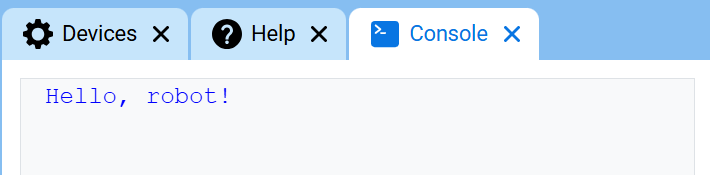
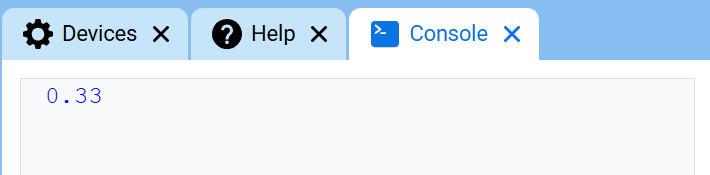
print muestra texto, números o valores de variables en la consola utilizando la posición actual del cursor.
Utilice el formato de cadena personalizado cuando desee que un mensaje impreso incluya valores de su proyecto, como una puntuación, un temporizador o una lectura de sensor. Consulte la página Formato de cadena para obtener más información.
Utilice new_line cuando desee que el siguiente valor impreso comience en una nueva fila.
Uso:
console.print(value, precision)
Parámetros |
Descripción |
|---|---|
|
El texto, número o valor de variable que se mostrará en la consola. |
|
Opcional. Número de decimales que se mostrarán al imprimir un número. El valor predeterminado es |
def main():
    # Display a message in the Console
    console.print("Hello, robot!")

# Start threads — Do not delete
start_thread(main)
def main():
    # Display 1/3 with two decimals
    console.print(1 / 3, precision=2)

# Start threads — Do not delete
start_thread(main)
new_line#
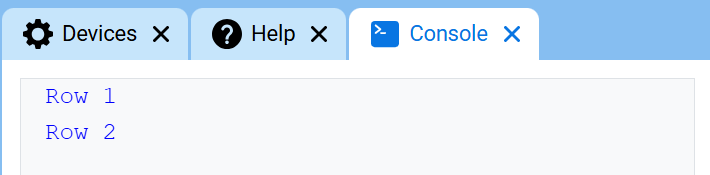
new_line mueve el cursor a la columna 1 en la siguiente fila de la consola. El siguiente valor impreso aparecerá en esa fila.
Utilice este método cuando desee que el siguiente valor impreso comience en una nueva fila.
Uso:
console.new_line()
Parámetros |
Descripción |
|---|---|
Este método no tiene parámetros. |
def main():
    # Print on two lines
    console.print("Row 1")
    console.new_line()
    console.print("Row 2")

# Start threads — Do not delete
start_thread(main)
clear#
clear borra todas las filas de la consola.
Uso:
console.clear()
Parámetros |
Descripción |
|---|---|
Este método no tiene parámetros. |
def main():
    # Display text, then clear it after two seconds
    console.print("This will disappear...")
    wait(2, SECONDS)
    console.clear()

# Start threads — Do not delete
start_thread(main)
Adquiridor#
input#
input espera a que el usuario ingrese una respuesta y luego devuelve esa respuesta como texto.
El proyecto se pausa en input() hasta que se ingrese una respuesta en la consola.
El valor devuelto por input() siempre es texto. Para usar la respuesta como un número, conviértala primero con int() o float().
Usage:
input()
Parámetros |
Descripción |
|---|---|
Este método no tiene parámetros. |
# Ask for a name, then print a greeting
answer = input("What's your name?")
console.print("Hello, " + answer)
# Ask for a number, then use it in math
answer = input("Enter a number:")
number = float(answer)
console.print(number + 1)
Mutador#
set_print_color#
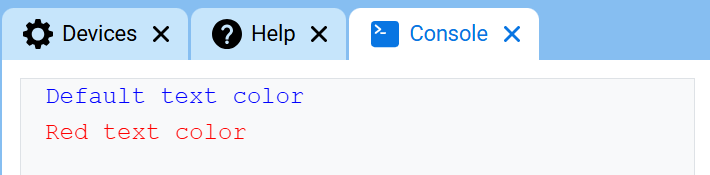
set_print_color establece el color utilizado para el texto impreso en la Consola después de que se utilice este método. Al inicio de un proyecto, el color del texto de la Consola se establece en BLUE.
Usage:
console.set_print_color(color)
Parámetros |
Descripción |
|---|---|
|
El color que se utilizará para el texto impreso en la consola:
|
def main():
    # Print text in different colors
    console.print("Default text color")
    console.new_line()
    console.set_print_color(RED)
    console.print("Red text color")

# Start threads — Do not delete
start_thread(main)
Monitor#
monitor_sensor#
monitor_sensor agrega uno o más valores de sensor a la pestaña Monitor en VEXcode. Esto le permite observar cómo cambian los valores de los sensores mientras se ejecuta un proyecto.
Proporcione cada valor del sensor como una cadena de texto.
Usage:
monitor_sensor(“sensor”)
monitor_sensor(“sensor1”, “sensor2”)
Parámetros |
Descripción |
|---|---|
|
El valor del sensor que se va a monitorizar, especificado como una cadena de texto. Para monitorizar más de un valor de sensor, sepárelos con una coma. Las opciones incluyen:
|
# Build Used: Super Code Base 2.0
def main():
    # Monitor the rotation in the Monitor tab
    monitor_sensor("drivetrain.get_rotation")
    drivetrain.turn_for(RIGHT, 450)

# Start threads — Do not delete
start_thread(main)
# Build Used: Super Code Base 2.0
def main():
    # Monitor the rotation and heading in the Monitor tab
    monitor_sensor("drivetrain.get_rotation", "drivetrain.get_heading")
    drivetrain.turn_for(RIGHT, 450)

# Start threads — Do not delete
start_thread(main)
monitor_variable#
monitor_variable agrega una o más variables predefinidas a la pestaña Monitor en VEXcode. Esto le permite observar cómo cambia el valor de una variable mientras se ejecuta un proyecto.
Las variables deben ser globales para que monitor_variable pueda monitorizarlas correctamente. Proporcione el nombre de cada variable como una cadena.
Usage:
monitor_variable(“variable”)
monitor_variable(“variable1”, “variable2”)
Parámetros |
Descripción |
|---|---|
|
El nombre de una variable global predefinida que se desea monitorizar, especificado como una cadena de texto. Para monitorizar más de una variable, separe cada nombre con una coma. |
# Build Used: Super Code Base 2.0
def main():
    # Monitor the amount of loops
    global loops
    monitor_variable("loops")

    # Drive in a square 3 times
    for loops in range(12):
        drivetrain.turn_for(RIGHT, 90, DEGREES)
        drivetrain.drive_for(FORWARD, 150, MM)

# Start threads — Do not delete
start_thread(main)
actions = 0

# Build Used: Super Code Base 2.0
def main():
    # Monitor the amount of loops and actions
    global loops, actions
    monitor_variable("loops", "actions")

    # Drive in a square 3 times
    for loops in range(12):
        drivetrain.turn_for(RIGHT, 90, DEGREES)
        drivetrain.drive_for(FORWARD, 150, MM)
        actions = actions + 2

# Start threads — Do not delete
start_thread(main)