
传动系统#
介绍#
驱动系统包括车轮和电机,用于控制机器人的行驶和转向。驱动系统常见于 Code Base 2.0、Super Car 等机器人或定制机器人中。
Drivetrains use the Inertial Sensor in the Brain to detect crashes and help the robot move and turn precisely. At the start of each project, the drivetrain calibrates the Inertial Sensor automatically. Keep the robot still for about 2 seconds during calibration, so the robot can move and turn correctly.
传动系统编码方式有很多种。以下列出了所有传动系统编码方法:
动作——移动和转向机器人。
drive— 使机器人无限向前或向后移动。drive_for— 使机器人向前或向后移动指定的距离。drive_until— 使机器人向前移动,直到眼传感器检测到物体或机器人检测到碰撞为止。turn— 使机器人永远向左或向右转弯。turn_for— 使机器人向左或向右旋转指定的度数。turn_to_heading— 将机器人转向 -359 度到 359 度之间的特定航向。机器人将沿最短路径转向以达到目标航向。turn_to_rotation— 将机器人旋转到指定的方向。stop— 停止机器人的运动。
变异器 — 调整传动系统设置。
set_drive_velocity— 告诉机器人以多快的速度行驶。set_turn_velocity— 告诉机器人转弯的速度。set_stopping— 说明机器人如何停止移动:通过制动、滑行或保持。set_timeout— 设置机器人尝试完成一次动作的时间。set_heading— 将机器人的当前航向更改为新的航向。set_rotation— 将机器人的当前旋转更改为新的旋转。
获取者 — 查看移动状态。
get_heading— 返回机器人的当前航向,范围从 0 到 359 度。get_rotation— 返回机器人的当前旋转角度。get_velocity— 返回机器人行驶的速度,以 -100% 到 100% 的百分比表示。get_yaw— 返回机器人的当前偏航角。get_roll— 返回机器人的当前滚动位置。get_pitch— 返回机器人的当前俯仰角。get_crashed— 返回机器人是否检测到碰撞,以布尔值表示。is_stopped— 返回机器人是否停止移动,以布尔值表示。
行动#
drive#
drive 使机器人无限前进或后退。机器人将持续移动,直到收到其他指令,例如转向或停止。
用法:
drivetrain.drive(direction)
参数 |
描述 |
|---|---|
|
机器人移动方向: |
# Build Used: Code Base 2.0
def main():
    # Drive forward then stop
    drivetrain.drive(FORWARD)
    wait(2, SECONDS)
    drivetrain.stop()

# Start threads — Do not delete
start_thread(main)
drive_for#
drive_for 使机器人向前或向后移动指定的距离。
Usage:
drivetrain.drive_for(direction, distance, units, wait)
参数 |
描述 |
|---|---|
|
机器人移动方向: |
|
机器人行驶的距离。可以是整数,也可以是小数。 |
|
可选。距离单位: |
|
可选 |
# Build Used: Code Base 2.0
def main():
    # Drive back and forth
    drivetrain.drive_for(FORWARD, 100, MM)
    drivetrain.drive_for(REVERSE, 4, INCHES)


# Start threads — Do not delete
start_thread(main)
drive_until#
drive_until 使机器人向前移动,直到眼部传感器检测到物体或机器人检测到碰撞为止。
用法:
drivetrain.drive_until(condition, wait)
参数 |
描述 |
|---|---|
|
导致机器人停止的条件: |
|
可选 |
# Build Used: Code Base 2.0
def main():
    # Turn right after a crash
    drivetrain.drive_until(CRASH)
    drivetrain.turn_for(RIGHT, 90)

# Start threads — Do not delete
start_thread(main)
turn#
turn 表示机器人无限向左或向右转向。机器人会一直转向,直到收到其他指令,例如行驶或停止。
用法:
drivetrain.turn(direction)
参数 |
描述 |
|---|---|
|
机器人转向的方向: |
# Build Used: Code Base 2.0
def main():
    # Turn right and left, then stop
    drivetrain.turn(RIGHT)
    wait(2, SECONDS)
    drivetrain.turn(LEFT)
    wait(2, SECONDS)
    drivetrain.stop()

# Start threads — Do not delete
start_thread(main)
turn_for#
turn_for 使机器人向左或向右旋转指定角度。旋转角度是相对于机器人的当前位置而言的。
用法:
drivetrain.turn_for(direction, angle, wait)
参数 |
描述 |
|---|---|
|
机器人转向的方向: |
|
机器人旋转的角度数。可以是整数,也可以是小数。 |
|
可选 |
# Build Used: Code Base 2.0
def main():
    # Turn right then left
    drivetrain.turn_for(RIGHT, 90)
    drivetrain.turn_for(LEFT, 90)

# Start threads — Do not delete
start_thread(main)
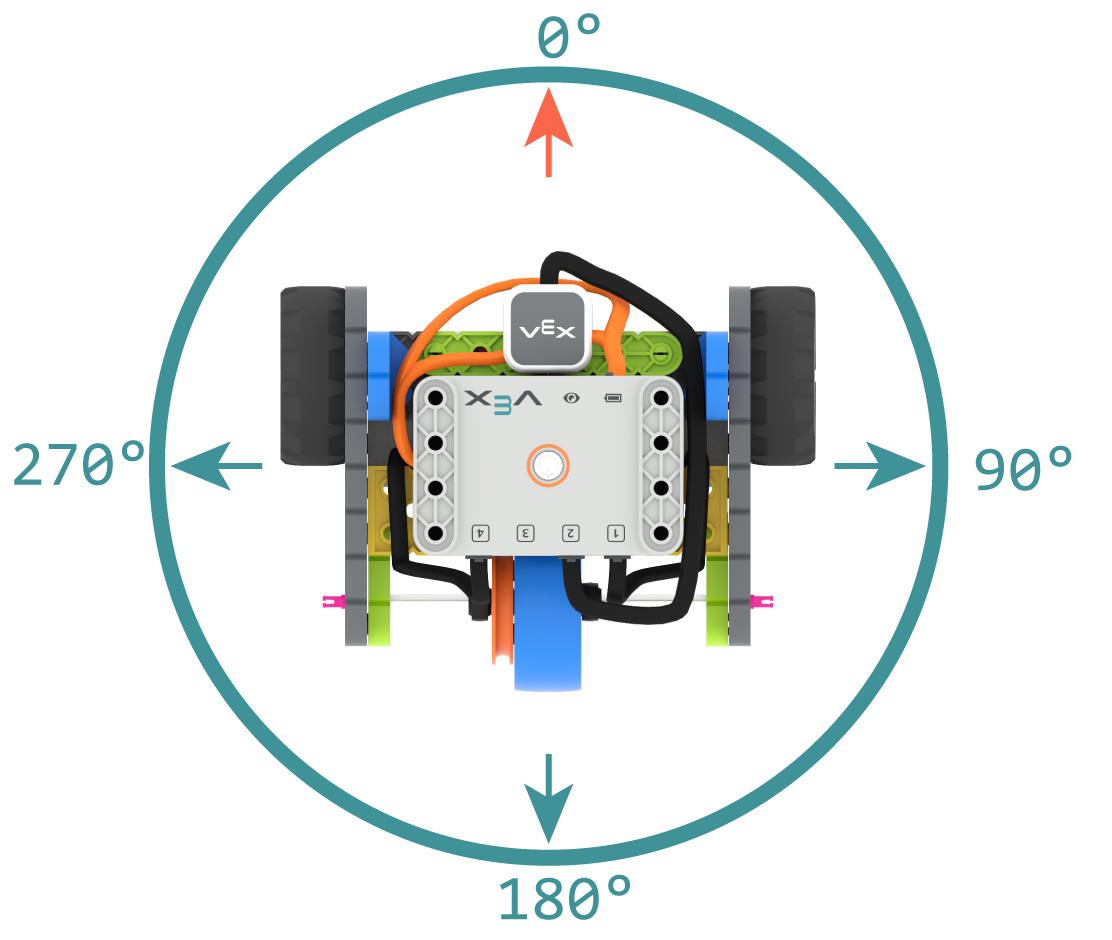
turn_to_heading#
航向角是指机器人大脑所朝向的方向,以度为单位。`turn_to_heading 使机器人转向 -359 度到 359 度之间的特定航向角。机器人将沿最短路径转向以达到目标航向角。
起始航向为0度。
用法:
drivetrain.turn_to_heading(angle, wait)
参数 |
描述 |
|---|---|
|
机器人应面向的方向,以整数表示,范围从 -359 度到 359 度。 |
|
可选 |
# Build Used: Code Base 2.0
def main():
    # Turn to face the cardinal directions
    drivetrain.turn_to_heading(90)
    wait(1, SECONDS)
    drivetrain.turn_to_heading(180)
    wait(1, SECONDS)
    drivetrain.turn_to_heading(270)
    wait(1, SECONDS)
    drivetrain.turn_to_heading(0)

# Start threads — Do not delete
start_thread(main)
turn_to_rotation#
turn_to_rotation 将机器人旋转到指定角度。
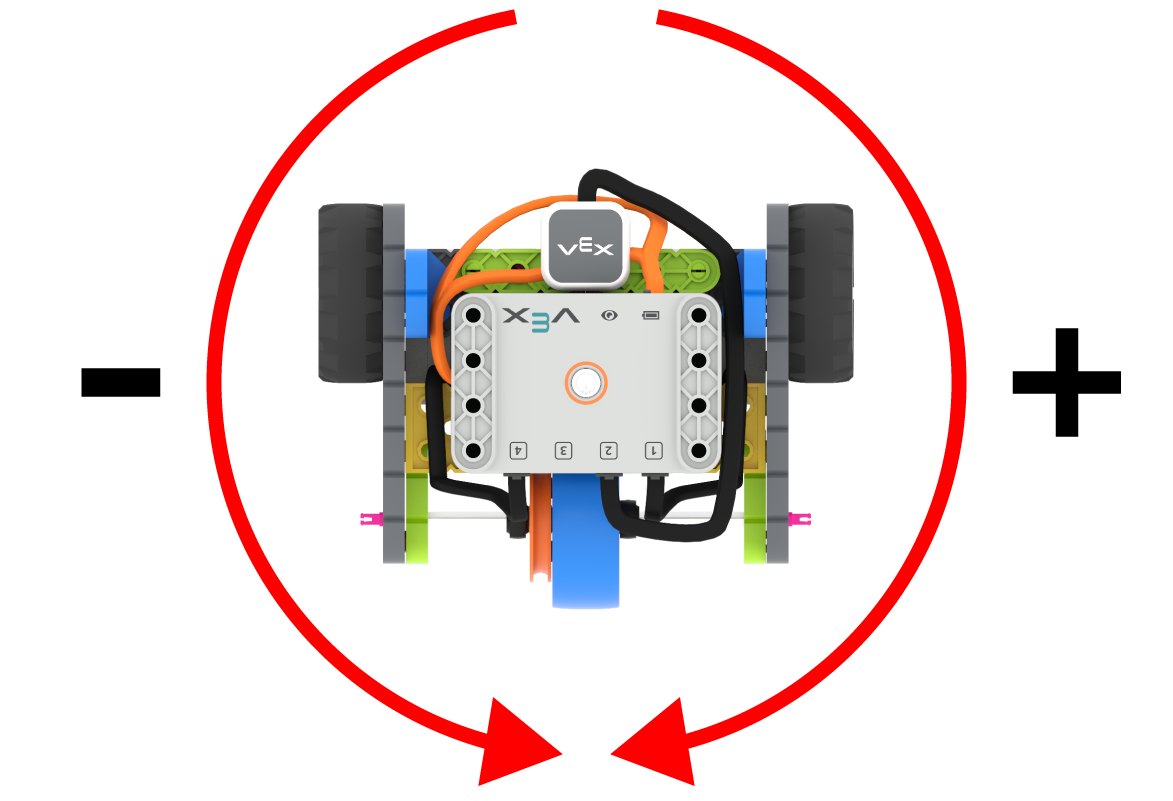
旋转角度是指机器人转动的程度,以度为单位。在项目开始时,旋转角度值设置为 0 度。也可以使用 set_rotation 设置旋转角度。
旋转角度是绝对值。这意味着转弯方向取决于机器人当前的旋转角度。向右转弯会增加旋转角度,向左转弯会减少旋转角度。
例如,如果机器人从0度开始,你将其旋转720度,它会向右转两次。如果你再将其旋转360度,它会向左转一次,因为360小于720。
用法:
drivetrain.turn_to_rotation(angle, wait)
参数 |
描述 |
|---|---|
|
机器人将要旋转的角度值,以度为单位。该值可以是整数。 |
|
可选 |
# Build Used: Code Base 2.0
def main():
    # Make one full turn to the right
    drivetrain.turn_to_rotation(360)
    # Make another full turn to the right
    drivetrain.turn_to_rotation(720)
    # Make one full turn to the left, returning to 360 degrees
    drivetrain.turn_to_rotation(360)
# Start threads — Do not delete
start_thread(main)
stop#
stop 停止机器人的移动。
用法:
drivetrain.stop()
参数 |
描述 |
|---|---|
该方法没有参数。 |
# Build Used: Code Base 2.0
def main():
    # Drive forward then stop
    drivetrain.drive(FORWARD)
    wait(2, SECONDS)
    drivetrain.stop()

# Start threads — Do not delete
start_thread(main)
修改器#
set_drive_velocity#
set_drive_velocity 告诉机器人行驶速度。百分比越高,机器人行驶速度越快;百分比越低,机器人行驶速度越慢。
每个项目开始时,机器人默认以 50% 的速度行驶。
注意: 速度越高,机器人行驶速度越快,但精度可能越低。速度越低,机器人行驶速度越慢,但精度越高。
用法:
drivetrain.set_drive_velocity(velocity)
参数 |
描述 |
|---|---|
|
行驶速度,范围从 0% 到 100%。 |
# Build Used: Code Base 2.0
def main():
    # Drive at different velocities
    drivetrain.drive_for(FORWARD, 100, MM)
    wait(1, SECONDS)
    # Drive slow
    drivetrain.set_drive_velocity(20)
    drivetrain.drive_for(FORWARD, 100, MM)
    wait(1, SECONDS)
    # Drive fast
    drivetrain.set_drive_velocity(100)
    drivetrain.drive_for(FORWARD, 100, MM)

# Start threads — Do not delete
start_thread(main)
set_turn_velocity#
set_turn_velocity 告诉机器人转弯的速度。百分比越高,机器人转弯越快;百分比越低,机器人转弯越慢。
每个项目开始时,机器人默认以 50% 的速度旋转。
注意: 速度越高,机器人转弯越快,但精度可能越低。速度越低,机器人转弯越慢,但精度越高。
用法:
drivetrain.set_turn_velocity(velocity)
参数 |
描述 |
|---|---|
|
转弯速度从 0% 到 100%。 |
# Build Used: Code Base 2.0
def main():
    # Turn at different velocities
    drivetrain.turn_for(RIGHT, 180)
    wait(1, SECONDS)
    # Turn fast
    drivetrain.set_turn_velocity(100)
    drivetrain.turn_for(RIGHT, 180)

# Start threads — Do not delete
start_thread(main)
set_stopping#
set_stopping 设置机器人停止移动的方式:通过刹车、滑行或保持。
用法:
drivetrain.set_stopping(brake)
参数 |
描述 |
|---|---|
|
How the robot will stop:
|
如果不使用此方法,机器人停止时将使用 BRAKE。
# Build Used: Code Base 2.0
def main():
    # Drive, then coast to a stop
    drivetrain.set_drive_velocity(100)
    drivetrain.set_stopping(COAST)
    drivetrain.drive(FORWARD)
    wait(2, SECONDS)
    drivetrain.stop()

# Start threads — Do not delete
start_thread(main)
set_timeout#
set_timeout 设置机器人尝试完成一个动作的超时时间。如果机器人无法在规定时间内完成,它将停止尝试并执行下一行代码。这可以防止机器人卡在某个动作中。
用法:
drivetrain.set_timeout(value, units)
参数 |
描述 |
|---|---|
|
机器人尝试完成一次动作的时间。该值可以是整数或小数。 |
|
可选。时间单位: |
# Build Used: Code Base 2.0
def main():
    # Drive as far as possible for 1 second before turning right
    drivetrain.set_timeout(1, SECONDS)
    drivetrain.drive_for(FORWARD, 25, INCHES)
    drivetrain.turn_for(RIGHT, 90)

# Start threads — Do not delete
start_thread(main)
set_heading#
航向角是指机器人大脑所朝向的方向,以度为单位。0 set_heading set_heading 当前航向角更改为新的航向角值。
例如,如果机器人转向右侧,将航向设置为 0 度,则该右侧位置将成为新的 0 度航向。然后,机器人可以根据新的航向转向其他位置。
用法:
drivetrain.set_heading(value)
参数 |
描述 |
|---|---|
|
要设置的机器人航向角值,单位为度。该值可以是 0 到 359 之间的整数。 |
# Build Used: Code Base 2.0
def main():
    # Face the new 0 degree heading
    drivetrain.set_heading(90)
    drivetrain.turn_to_heading(0)

# Start threads — Do not delete
start_thread(main)
set_rotation#
旋转角度是指机器人转动的程度,以度为单位。项目开始时,旋转角度值设置为 0 度。`set_rotation 会将机器人的当前旋转角度更改为新值。
例如,如果机器人向右转了两圈,它的旋转角度将为 720 度。将旋转角度设置为 0 度会将旋转角度从 720 度重置为 0 度。然后,机器人可以根据这个新的旋转角度进行旋转。
用法:
drivetrain.set_rotation(value)
参数 |
描述 |
|---|---|
|
机器人旋转角度值,以度为单位。该值可以是整数。 |
# Build Used: Code Base 2.0
def main():
    # Spin counterclockwise two times
    drivetrain.set_rotation(720)
    drivetrain.turn_to_rotation(0)

# Start threads — Do not delete
start_thread(main)
吸气剂#
get_heading#
航向角是指机器人大脑所面向的方向,以度为单位。get_heading get_heading 航向角。
机器人的初始航向角为0度。
用法:
drivetrain.get_heading()
参数 |
描述 |
|---|---|
该方法没有参数。 |
# Build Used: Code Base 2.0
def main():
    # Display the heading while turning
    monitor_sensor("drivetrain.get_heading")
    drivetrain.turn_for(RIGHT, 450)


# Start threads — Do not delete
start_thread(main)
get_rotation#
旋转角度是指机器人转动的程度,以度为单位。项目开始时,旋转角度值设置为 0 度 get_rotation 返回机器人当前的旋转角度。
向右转会增加旋转角度,向左转会减少旋转角度。例如,向右转两圈将得到 720 度的旋转角度。
用法:
drivetrain.get_rotation()
参数 |
描述 |
|---|---|
该方法没有参数。 |
# Build Used: Code Base 2.0
def main():
    # Display the rotation while turning
    monitor_sensor("drivetrain.get_rotation")
    drivetrain.turn_for(RIGHT, 450)


# Start threads — Do not delete
start_thread(main)
get_velocity#
get_velocity 返回机器人行驶的速度,以 -100% 到 100% 的百分比表示。
正值表示机器人向前行驶,负值表示机器人向后行驶。
用法:
drivetrain.get_velocity()
参数 |
描述 |
|---|---|
该方法没有参数。 |
# Build Used: Code Base 2.0
def main():
    # Display the velocity of the robot before and while moving
    console.print("Start: ")
    console.print(drivetrain.get_velocity())
    console.new_line()
    drivetrain.drive(FORWARD)
    wait(0.5, SECONDS)
    console.print("Moving: ")
    console.print(drivetrain.get_velocity())
    drivetrain.stop()


# Start threads — Do not delete
start_thread(main)
get_yaw#
偏航角是指机器人从起始位置向左或向右转动的角度,以度为单位。0 get_yaw 返回机器人当前的偏航角值。
向右转弯会增加偏航角,向左转弯会减小偏航角。
用法:
drivetrain.get_yaw()
参数 |
描述 |
|---|---|
该方法没有参数。 |
# Build Used: Super Code Base 2.0
def main():
    # Change the LED color based on the yaw while
    # moving the robot by hand
    monitor_sensor("drivetrain.get_yaw")
    while True:
        if drivetrain.get_yaw() > 0:
            bumper.set_color(GREEN)
        elif drivetrain.get_yaw() < 0:
            bumper.set_color(RED)
        else:
            bumper.set_color(NONE)

# Start threads — Do not delete
start_thread(main)
get_roll#
Roll is how much the robot tilts to the left or right, measured in degrees. get_roll returns the robot’s current roll value.
大脑朝向前方时,向左倾斜会增加滚动值,向右倾斜会减少滚动值。
用法:
drivetrain.get_roll()
参数 |
描述 |
|---|---|
该方法没有参数。 |
# Build Used: Super Code Base 2.0
def main():
    # Change the LED color based on the roll while
    # moving the robot by hand
    monitor_sensor("drivetrain.get_roll")
    while True:
        if drivetrain.get_roll() > 0:
            bumper.set_color(GREEN)
        elif drivetrain.get_roll() < 0:
            bumper.set_color(RED)
        else:
            bumper.set_color(NONE)

# Start threads — Do not delete
start_thread(main)
get_pitch#
Pitch is how much the robot tilts forward or backward, measured in degrees. get_pitch returns the robot’s current pitch value.
大脑朝向前方,向前倾斜会增加音调值,向后倾斜会降低音调值。
用法:
drivetrain.get_pitch()
参数 |
描述 |
|---|---|
该方法没有参数。 |
# Build Used: Super Code Base 2.0
def main():
    # Change the LED color based on the pitch while
    # moving the robot by hand
    monitor_sensor("drivetrain.get_pitch")
    while True:
        if drivetrain.get_pitch() > 0:
            bumper.set_color(GREEN)
        elif drivetrain.get_pitch() < 0:
            bumper.set_color(RED)
        else:
            bumper.set_color(NONE)

# Start threads — Do not delete
start_thread(main)
get_crashed#
get_crashed 返回机器人是否检测到碰撞,返回布尔值。
True— 检测到崩溃。False— 未检测到崩溃。
用法:
drivetrain.get_crashed()
参数 |
描述 |
|---|---|
该方法没有参数。 |
# Build Used: Super Code Base 2.0
def main():
    # Drive until a crash
    drivetrain.drive(FORWARD)
    while not drivetrain.get_crashed():
        wait(50, MSEC)
    drivetrain.stop()
    drivetrain.turn_for(RIGHT, 90)

# Start threads — Do not delete
start_thread(main)
is_stopped#
is_stopped 返回机器人是否停止移动,返回一个布尔值。这可用于根据机器人的移动状态控制其他行为的执行时间。
True— 机器人已停止移动。False— 机器人仍在移动。
此方法与以下具有 wait 参数的传动系统方法配合使用:drive_for, drive_until, turn_for, turn_to_heading, 和 turn_to_rotation。
用法:
drivetrain.is_stopped()
参数 |
描述 |
|---|---|
该方法没有参数。 |
# Build Used: Code Base 2.0
def main():
    # Turn when the drivetrain is done moving forward
    drivetrain.drive_for(FORWARD, 100, MM, wait=False)
    wait(0.25, SECONDS)
    while True:
        if drivetrain.is_stopped():
            drivetrain.turn_for(RIGHT, 180)
            break
        else:
            console.print("Still moving...")
            wait(0.1, SECONDS)
            console.clear()

# Start threads — Do not delete
start_thread(main)