
Aspecto#
Bolígrafo#
pen.move#
The pen.move(action) method is used to set the position of the VR Pen.
Este es un método sin espera y permite que cualquier método subsiguiente se ejecute sin demora.
Parámetros |
Descripción |
|---|---|
|
The set position of the VR Pen as |
Devoluciones: Ninguna.
UP- the pen will not draw a line on the playground.DOWN- the pen will draw a colored line on the playground.
def main():
    # Position the VR Pen down.
    pen.move(DOWN)
    # Move forward for 400 mm to draw a line.
    drivetrain.drive_for(FORWARD, 400, MM)
pen.set_pen_color#
The pen.set_pen_color(color) method is used to set the color of the VR Pen.
Este es un método sin espera y permite que cualquier método subsiguiente se ejecute sin demora.
Parámetros |
Descripción |
|---|---|
|
The color of the VR Pen: |
Devoluciones: Ninguna.
def main():
    # Move the VR Pen down.
    pen.move(DOWN)
    # Set the VR Pen color to blue.
    pen.set_pen_color(BLUE)
    # Drive forward for 400 mm to draw a line.
    drivetrain.drive_for(FORWARD, 400, MM)
pen.set_pen_width#
The pen.set_pen_width(width) method is used to set the width of the VR Pen.
Este es un método sin espera y permite que cualquier método subsiguiente se ejecute sin demora.
Parámetros |
Descripción |
|---|---|
|
The width of the VR Pen: |
Devoluciones: Ninguna.
The default VR Pen width is THIN.
def main():
    # Move the VR Pen down.
    pen.move(DOWN)
    # Set the VR Pen's width to medium.
    pen.set_pen_width(MEDIUM)
    # Drive forward for 400 mm to draw a line.
    drivetrain.drive_for(FORWARD, 400, MM)
pen.set_pen_color_rgb#
The pen.set_pen_color_rgb(red, green, blue, opacity) method is used to set the RGB value for the VR Pen’s color.
Este es un método sin espera y permite que cualquier método subsiguiente se ejecute sin demora.
Parámetros |
Descripción |
|---|---|
|
La intensidad del color rojo en el valor RGB, que va de 0 a 255. |
|
La intensidad del color verde en el valor RGB, que va de 0 a 255. |
|
La intensidad del color azul en el valor RGB, que va de 0 a 255. |
|
La transparencia del color del VR Pen, que varía entre 0 y 100 por ciento. |
Devoluciones: Ninguna.
def main():
    # Move the VR Pen down.
    pen.move(DOWN)
    # Set the color to orange at full opacity.
    pen.set_pen_color_rgb(225, 112, 52, 100)
    # Drive forward for 400 MM to draw a line.
    drivetrain.drive_for(FORWARD, 400, MM)
pen.fill#
The pen.fill(red, green, blue, opacity) method fills in the shape of whatever the VR Pen is on top of, for example:
|
|
|
|---|---|---|
Líneas de cuadrícula |
Cuadrícula |
En los patios de juego sin cuadrícula, llena todo el piso del patio de juegos. |
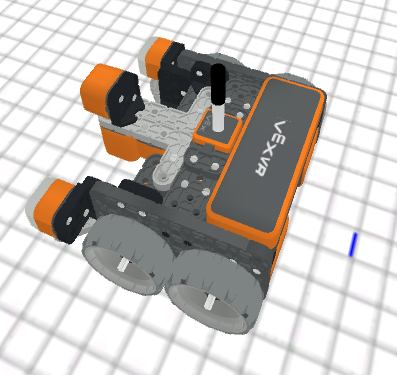
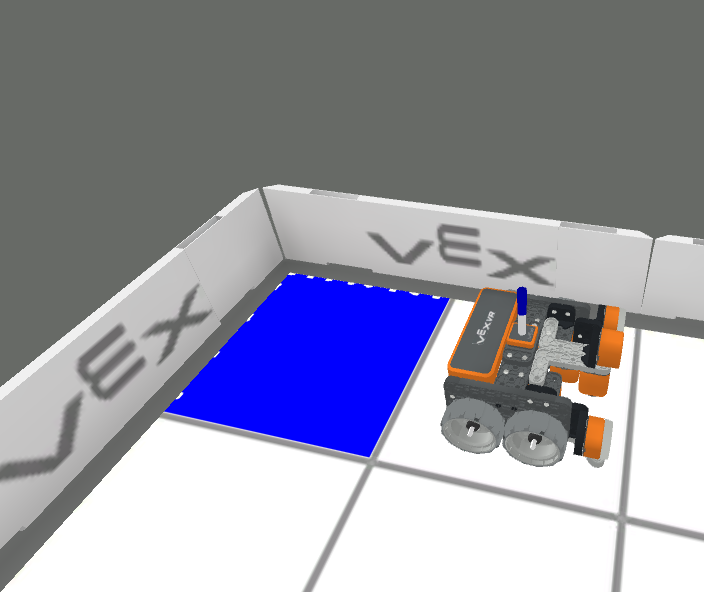
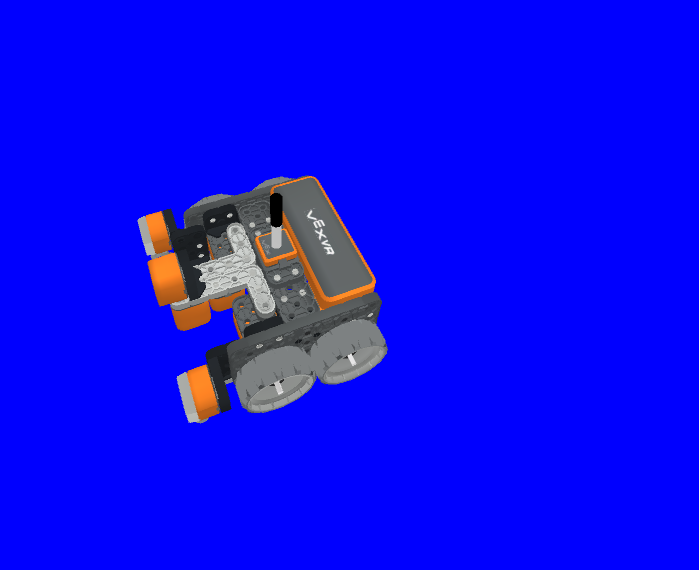
Este es un método sin espera y permite que cualquier método subsiguiente se ejecute sin demora.
Parámetros |
Descripción |
|---|---|
|
La intensidad del color rojo en el valor RGB, que va de 0 a 255. |
|
La intensidad del color verde en el valor RGB, que va de 0 a 255. |
|
La intensidad del color azul en el valor RGB, que va de 0 a 255. |
|
La transparencia del color del VR Pen, que varía entre 0 y 100 por ciento. |
Devoluciones: Ninguna.
def main():
    # Fill the playground's floor with blue at full opacity.
    pen.fill(43, 162, 202, 100)
Imprimir#
brain.print#
The brain.print(value, precision = 0) method is used to print words, numbers, and reported values to the Print Console.
Este es un método sin espera y permite que cualquier método subsiguiente se ejecute sin demora.
Parámetros |
Descripción |
|---|---|
|
Any words, numbers, or sensors that report a value. Words must be in quotation marks: |
|
Optional. The amount of decimals reported from a value from a sensor or variable, from |
Devoluciones: Ninguna.
def main():
    # Print the Drivetrain's current heading in degrees with 2 decimal points.
    brain.print("Drivetrain's heading:",
        drivetrain.heading(DEGREES), precision = 2)
brain.clear#
The brain.clear() method is used to clear all the rows in the Print Console and resets the cursor to the first line.
Este es un método sin espera y permite que cualquier método subsiguiente se ejecute sin demora.
Devoluciones: Ninguna.
def main():
    # Print "Project has started."
    brain.print("Project has started.")
    # Wait 3 seconds.
    wait(3, SECONDS)
    # Clear the print console.
    brain.clear()
brain.new_line#
The brain.new_line() method is used to set the cursor to a new line in the Print Console.
Este es un método sin espera y permite que cualquier método subsiguiente se ejecute sin demora.
Devoluciones: Ninguna.
def main():
    # Print "Project has started."
    brain.print("Project has started.")
    # Move the cursor to a new line.
    brain.new_line()
brain.set_print_color#
The brain.set_print_color(color) method is used to set the color of the text printed to the Print Console.
Este es un método sin espera y permite que cualquier método subsiguiente se ejecute sin demora.
Parámetros |
Descripción |
|---|---|
|
The color of the text to be printed: |
Devoluciones: Ninguna.
def main():
    # Set the print text color to red.
    brain.set_print_color(RED)
    # Print a message.
    brain.print("This is red!")
variable_de_monitor#
The monitor_variable(“variable”, …) method is used to add variables to the Monitor Console so that the value of the variables can be seen and monitored.
Este es un método sin espera y permite que cualquier método subsiguiente se ejecute sin demora.
Parámetros |
Descripción |
|---|---|
|
Cualquier variable global establecida previamente. |
Devoluciones: Ninguna.
# Create global variable.
disk_count = 1

def main():
    # Add disk_count to the Monitor Console.
    monitor_variable("disk_count")
sensor_de_monitor#
The monitor_sensor(“sensor”, …) method is used to add sensors to the monitor console so that the sensor values can be monitored.
Este es un método sin espera y permite que cualquier método subsiguiente se ejecute sin demora.
Parámetros |
Descripción |
|---|---|
|
Cualquier identificador de sensor compatible. |
Devoluciones: Ninguna.
Identificadores de sensores compatibles:
brain.timer.timedrivetrain.is_donedrivetrain.is_movingdrivetrain.headingdrivetrain.rotationdrivetrain.velocity_rpmdrivetrain.velocity_percentarm_motor.is_donearm_motor.is_spinningarm_motor.position_degreesarm_motor.position_turnsarm_motor.velocity_rpmarm_motor.velocity_percentarm_motor_group.is_donearm_motor_group.is_spinningarm_motor_group.position_degreesarm_motor_group.position_turnsarm_motor_group.velocity_rpmarm_motor_group.velocity_percentintake_motor.is_doneintake_motor.is_spinningintake_motor.position_degreesintake_motor.position_turnsintake_motor.velocity_rpmintake_motor.velocity_percentintake_motor_group.is_doneintake_motor_group.is_spinningintake_motor_group.position_degreesintake_motor_group.position_turnsintake_motor_group.velocity_rpmintake_motor_group.velocity_percentcatapult_motor.is_donecatapult_motor.is_spinningcatapult_motor.position_degreescatapult_motor.position_turnscatapult_motor.velocity_rpmcatapult_motor.velocity_percentcatapult_tension_motor.is_donecatapult_tension_motor.is_spinningcatapult_tension_motor.position_degreescatapult_tension_motor.position_turnscatapult_tension_motor.velocity_rpmcatapult_tension_motor.velocity_percentintake_bumper.pressingbumper.pressingfront_distance.is_object_detectedfront_distance.object_distance_mmfront_distance.object_distance_inchesfront_optical.is_near_objectfront_optical.colorfront_optical.brightnessfront_optical.huecolor.is_near_objectcolor.colorcolor.brightnesscolor.hue
def main():
    # Add the VR Robot's positional coordinates to the monitor console.
    monitor_sensor("location.position")