
Consola#
Introducción#
VEXcode VR incluye una pestaña de Monitor que puede mostrar la salida de la consola, las variables de monitorización y los valores de los sensores mientras se ejecuta un proyecto.
Los métodos de consola pueden mostrar texto, números y valores de variables. También pueden mover el cursor de la consola a una nueva fila, borrar la consola y establecer el color del texto impreso después de que se haya cambiado el color.
A continuación se muestra una lista de todos los métodos:
Imprimir: Muestra texto o borra la consola.
print— Displays text, numbers, or variable values in the Console.new_line— Moves the Console cursor to the start of the next row.set_print_color— Sets the color used for text printed in the Console.clear— Clears all rows in the Console.
Monitor: supervise el valor de un sensor o variable durante un proyecto en la pestaña Monitor de VEXcode.
monitor_variable— Adds one or more predefined variables to the Monitor tab.monitor_sensor— Adds one or more sensor values to the Monitor tab.
Imprimir#
print#
print displays text, numbers, or variable values in the Console using the current cursor position.
Utilice el formato de cadena personalizado cuando desee que un mensaje impreso incluya valores de su proyecto, como una puntuación, un temporizador o una lectura de sensor. Consulte la página Formato de cadena para obtener más información.
Use new_line when you want the next printed value to start on a new row.
Usage:
brain.print(value, precision)
Parámetros |
Descripción |
|---|---|
|
El texto, número o valor de variable que se mostrará en la consola. |
|
Optional. The number of decimal places to display when printing a number. The default is |
def main():
    # Display a message in the Console
    brain.print("Hello, robot!")

# VR threads — Do not delete
vr_thread(main)
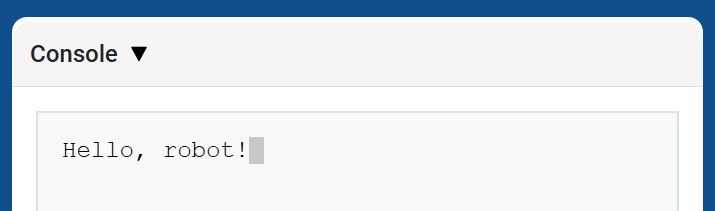
def main():
    # Print a number with 5 decimal places
    brain.print(math.pi, precision=5)

# VR threads — Do not delete
vr_thread(main)
new_line#
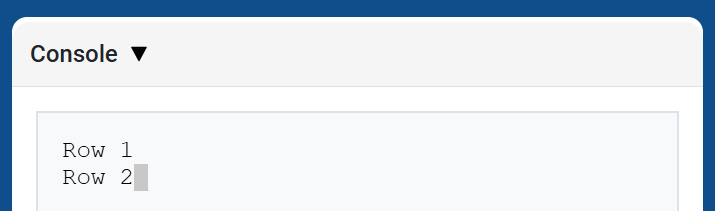
new_line moves the cursor to column 1 on the next row in the Console. The next value printed will appear on that row.
Utilice este método cuando desee que el siguiente valor impreso comience en una nueva fila.
Usage:
brain.new_line()
Parámetros |
Descripción |
|---|---|
Este método no tiene parámetros. |
def main():
    # Print on two lines
    brain.print("Row 1")
    brain.new_line()
    brain.print("Row 2")

# VR threads — Do not delete
vr_thread(main)
set_print_color#
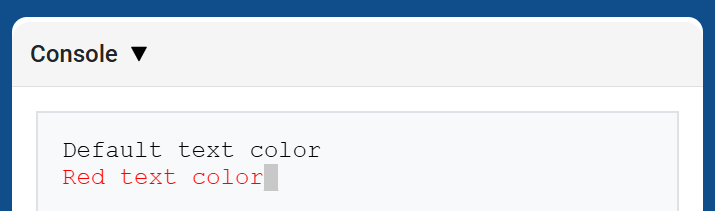
set_print_color sets the color used for text printed in the Console after this method is used. At the start of a project, the Console text color is set to BLACK.
Usage:
brain.set_print_color(color)
Parámetros |
Descripción |
|---|---|
|
The color to use for text printed in the Console:
|
def main():
    # Print text in different colors
    brain.print("Default text color")
    brain.new_line()
    brain.set_print_color(RED)
    brain.print("Red text color")

# VR threads — Do not delete
vr_thread(main)
clear#
clear clears all rows from the Console.
Usage:
brain.clear()
Parámetros |
Descripción |
|---|---|
Este método no tiene parámetros. |
def main():
    # Display text, then clear it after two seconds
    brain.print("This will disappear...")
    wait(2, SECONDS)
    brain.clear()

# VR threads — Do not delete
vr_thread(main)
Monitor#
monitor_variable#
monitor_variable adds one or more predefined variables to the Monitor tab in VEXcode. This lets you watch a variable’s value change while a project is running.
Variables must be global for monitor_variable to monitor them successfully. Provide each variable name as a string.
Usage:
monitor_variable(“variable”)
monitor_variable(“variable1”, “variable2”)
Parámetros |
Descripción |
|---|---|
|
El nombre de una variable global predefinida que se desea monitorizar, especificado como una cadena de texto. Para monitorizar más de una variable, separe cada nombre con una coma. |
def main():
    # Monitor the amount of loops
    global loops
    monitor_variable("loops")

    # Drive in a square 3 times
    for loops in range(12):
        drivetrain.turn_for(RIGHT, 90, DEGREES)
        drivetrain.drive_for(FORWARD, 150, MM)

# VR threads — Do not delete
vr_thread(main)
actions = 0

def main():
    # Monitor the amount of loops and actions
    global loops, actions
    monitor_variable("loops", "actions")

    # Drive in a square 3 times
    for loops in range(12):
        drivetrain.turn_for(RIGHT, 90, DEGREES)
        drivetrain.drive_for(FORWARD, 150, MM)
        actions = actions + 2

# VR threads — Do not delete
vr_thread(main)
monitor_sensor#
monitor_sensor adds one or more sensor values to the Monitor tab in VEXcode. This lets you watch sensor values change while a project is running.
Si un sensor puede devolver datos en diferentes unidades, la pestaña Monitor mostrará los datos devueltos en cada unidad disponible. Proporcione cada valor del sensor como una cadena de texto.
Usage:
monitor_sensor(“sensor”)
monitor_sensor(“sensor1”, “sensor2”)
Parámetros |
Descripción |
|---|---|
|
The sensor value to monitor, given as a string. To monitor more than one sensor value, separate each sensor value with a comma. This can be any sensor method that returns a value, such as |
def main():
    # Monitor the distance in MM and inches
    monitor_sensor("front_distance.get_distance")
    drivetrain.drive_for(FORWARD, 400, MM)

# VR threads — Do not delete
vr_thread(main)
def main():
    # Monitor the rotation in the Monitor tab
    monitor_sensor("drivetrain.rotation", "drivetrain.heading")
    drivetrain.turn_for(RIGHT, 450, DEGREES)

# VR threads — Do not delete
vr_thread(main)