
Console#
Introduction#
The VEXcode GO Console is displayed in the Console Tab within VEXcode. Console methods can display text, numbers, and variable values while a project is running. They can also move the Console cursor to a new row, clear the Console, read user input, set the color of text printed after the color is changed, and monitor variables or sensor values in VEXcode’s Monitor tab.
Below is a list of all methods:
Actions — Output text or clear the Console.
print— Displays text, numbers, or variable values in the Console.new_line— Moves the Console cursor to the start of the next row.clear— Clears all rows in the Console.
Getter — Read user input.
input— Waits for user input and returns the response as text.
Mutator — Format printed text.
set_print_color— Sets the color used for text printed in the Console.
Monitor — Monitor a sensor’s or variable’s value during a project in VEXcode’s Monitor tab.
monitor_sensor— Adds one or more sensor values to the Monitor tab.monitor_variable— Adds one or more predefined variables to the Monitor tab.
Actions#
print#
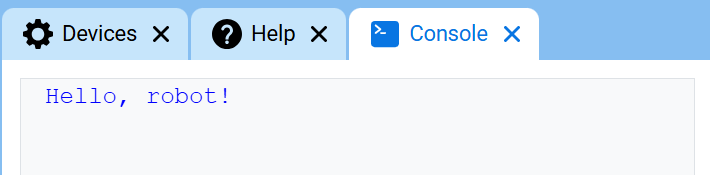
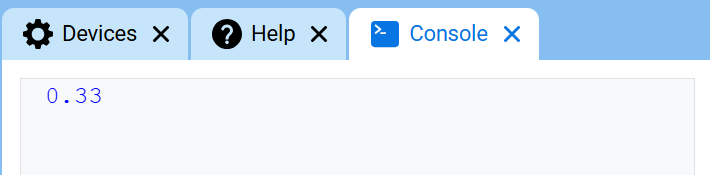
print displays text, numbers, or variable values in the Console using the current cursor position.
Use custom string formatting when you want a printed message to include values from your project, like a score, timer, or sensor reading. See the String Formatting page for more information.
Use new_line when you want the next printed value to start on a new row.
Usage:
console.print(value, precision)
Parameters |
Description |
|---|---|
|
The text, number, or variable value to display in the Console. |
|
Optional. The number of decimal places to display when printing a number. The default is |
def main():
    # Display a message in the Console
    console.print("Hello, robot!")

# Start threads — Do not delete
start_thread(main)
def main():
    # Display 1/3 with two decimals
    console.print(1 / 3, precision=2)

# Start threads — Do not delete
start_thread(main)
new_line#
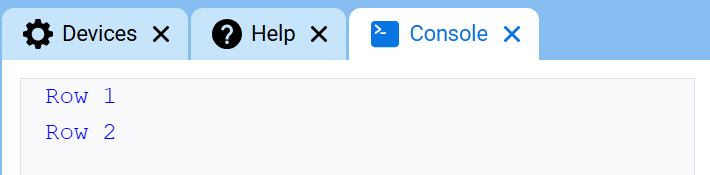
new_line moves the cursor to column 1 on the next row in the Console. The next value printed will appear on that row.
Use this method when you want the next printed value to start on a new row.
Usage:
console.new_line()
Parameters |
Description |
|---|---|
This method has no parameters. |
def main():
    # Print on two lines
    console.print("Row 1")
    console.new_line()
    console.print("Row 2")

# Start threads — Do not delete
start_thread(main)
clear#
clear clears all rows from the Console.
Usage:
console.clear()
Parameters |
Description |
|---|---|
This method has no parameters. |
def main():
    # Display text, then clear it after two seconds
    console.print("This will disappear...")
    wait(2, SECONDS)
    console.clear()

# Start threads — Do not delete
start_thread(main)
Getter#
input#
input waits for the user to enter a response, then returns that response as text.
The project pauses at input() until a response is entered in the Console.
The value returned by input() is always text. To use the response as a number, convert it first with int() or float().
Usage:
input()
Parameters |
Description |
|---|---|
This method has no parameters. |
# Ask for a name, then print a greeting
answer = input("What's your name?")
console.print("Hello, " + answer)
# Ask for a number, then use it in math
answer = input("Enter a number:")
number = float(answer)
console.print(number + 1)
Mutator#
set_print_color#
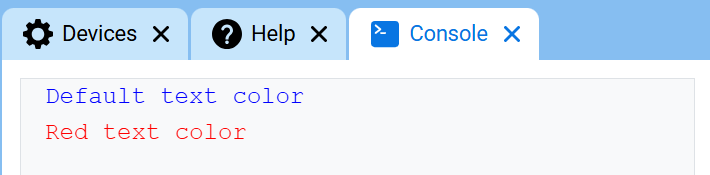
set_print_color sets the color used for text printed in the Console after this method is used. At the start of a project, the Console text color is set to BLUE.
Usage:
console.set_print_color(color)
Parameters |
Description |
|---|---|
|
The color to use for text printed in the Console:
|
def main():
    # Print text in different colors
    console.print("Default text color")
    console.new_line()
    console.set_print_color(RED)
    console.print("Red text color")

# Start threads — Do not delete
start_thread(main)
Monitor#
monitor_sensor#
monitor_sensor adds one or more sensor values to the Monitor tab in VEXcode. This lets you watch sensor values change while a project is running.
Provide each sensor value as a string.
Usage:
monitor_sensor(“sensor”)
monitor_sensor(“sensor1”, “sensor2”)
Parameters |
Description |
|---|---|
|
The sensor value to monitor, given as a string. To monitor more than one sensor value, separate each sensor value with a comma. Options include:
|
# Build Used: Super Code Base 2.0
def main():
    # Monitor the rotation in the Monitor tab
    monitor_sensor("drivetrain.get_rotation")
    drivetrain.turn_for(RIGHT, 450)

# Start threads — Do not delete
start_thread(main)
# Build Used: Super Code Base 2.0
def main():
    # Monitor the rotation and heading in the Monitor tab
    monitor_sensor("drivetrain.get_rotation", "drivetrain.get_heading")
    drivetrain.turn_for(RIGHT, 450)

# Start threads — Do not delete
start_thread(main)
monitor_variable#
monitor_variable adds one or more predefined variables to the Monitor tab in VEXcode. This lets you watch a variable’s value change while a project is running.
Variables must be global for monitor_variable to monitor them successfully. Provide each variable name as a string.
Usage:
monitor_variable(“variable”)
monitor_variable(“variable1”, “variable2”)
Parameters |
Description |
|---|---|
|
The name of a predefined global variable to monitor, given as a string. To monitor more than one variable, separate each variable name with a comma. |
# Build Used: Super Code Base 2.0
def main():
    # Monitor the amount of loops
    global loops
    monitor_variable("loops")

    # Drive in a square 3 times
    for loops in range(12):
        drivetrain.turn_for(RIGHT, 90, DEGREES)
        drivetrain.drive_for(FORWARD, 150, MM)

# Start threads — Do not delete
start_thread(main)
actions = 0

# Build Used: Super Code Base 2.0
def main():
    # Monitor the amount of loops and actions
    global loops, actions
    monitor_variable("loops", "actions")

    # Drive in a square 3 times
    for loops in range(12):
        drivetrain.turn_for(RIGHT, 90, DEGREES)
        drivetrain.drive_for(FORWARD, 150, MM)
        actions = actions + 2

# Start threads — Do not delete
start_thread(main)