
安慰#
介绍#
VEXcode GO 控制台显示在 VEXcode 的“控制台”选项卡中。控制台方法可以在项目运行时显示文本、数字和变量值。它们还可以将控制台光标移动到新的一行、清除控制台、读取用户输入、设置更改颜色后打印的文本颜色,以及在 VEXcode 的“监视器”选项卡中监视变量或传感器值。
以下是所有方法的列表:
操作——输出文本或清空控制台。
Getter 方法——读取用户输入。
input— 等待用户输入并以文本形式返回响应。
Mutator — 格式化打印文本。
set_print_color— 设置控制台中打印文本的颜色。
监控 — 在 VEXcode 的“监控”选项卡中,监控项目期间传感器或变量的值。
monitor_sensor— 向监视器选项卡添加一个或多个传感器值。monitor_variable— 向“监视器”选项卡添加一个或多个预定义变量。
行动#
print#
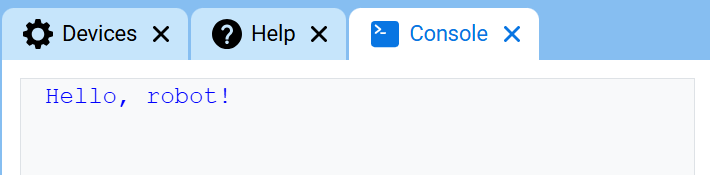
print 使用当前光标位置在控制台中显示文本、数字或变量值。
如果您希望打印消息中包含项目中的值(例如分数、计时器或传感器读数),请使用自定义字符串格式。有关更多信息,请参阅字符串格式页面。
当您希望下一个打印值从新的一行开始时,请使用 new_line。
用法:
console.print(value, precision)
参数 |
描述 |
|---|---|
|
要在控制台中显示的文本、数字或变量值。 |
|
可选。打印数字时显示的小数位数。默认值为 |
def main():
    # Display a message in the Console
    console.print("Hello, robot!")

# Start threads — Do not delete
start_thread(main)
def main():
    # Display 1/3 with two decimals
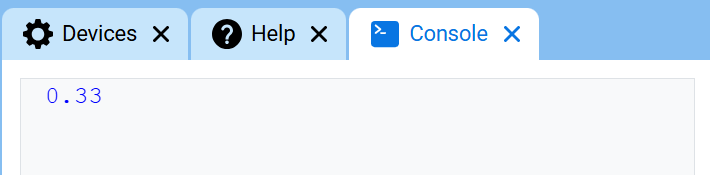
    console.print(1 / 3, precision=2)

# Start threads — Do not delete
start_thread(main)
new_line#
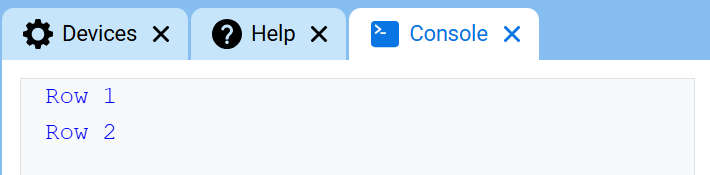
new_line 将光标移动到控制台中下一行的第 1 列。下一个打印的值将显示在该行。
当您希望下一个打印值从新的一行开始时,请使用此方法。
用法:
console.new_line()
参数 |
描述 |
|---|---|
该方法没有参数。 |
def main():
    # Print on two lines
    console.print("Row 1")
    console.new_line()
    console.print("Row 2")

# Start threads — Do not delete
start_thread(main)
clear#
clear 清除控制台中的所有行。
用法:
console.clear()
参数 |
描述 |
|---|---|
该方法没有参数。 |
def main():
    # Display text, then clear it after two seconds
    console.print("This will disappear...")
    wait(2, SECONDS)
    console.clear()

# Start threads — Do not delete
start_thread(main)
Getter#
input#
input 等待用户输入响应,然后将该响应作为文本返回。
项目在 input() 处暂停,直到在控制台中输入响应。
input() 是文本。要将响应用作数字,请先使用 int() 或 float()。
Usage:
input()
参数 |
描述 |
|---|---|
该方法没有参数。 |
# Ask for a name, then print a greeting
answer = input("What's your name?")
console.print("Hello, " + answer)
# Ask for a number, then use it in math
answer = input("Enter a number:")
number = float(answer)
console.print(number + 1)
变异体#
set_print_color#
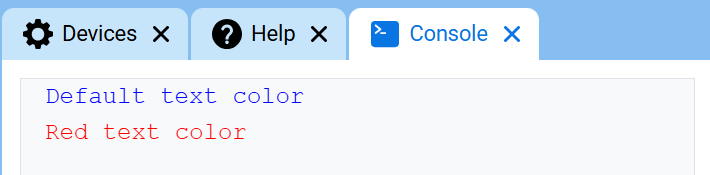
set_print_color 设置使用此方法后控制台中打印的文本颜色。在项目开始时,控制台文本颜色设置为 BLUE。
Usage:
console.set_print_color(color)
参数 |
描述 |
|---|---|
|
控制台打印文本的颜色:
|
def main():
    # Print text in different colors
    console.print("Default text color")
    console.new_line()
    console.set_print_color(RED)
    console.print("Red text color")

# Start threads — Do not delete
start_thread(main)
监视器#
monitor_sensor#
monitor_sensor 将一个或多个传感器值添加到 VEXcode 的“监视器”选项卡中。这样,您就可以在项目运行时观察传感器值的变化。
请以字符串形式提供每个传感器的值。
Usage:
monitor_sensor(“sensor”)
monitor_sensor(“sensor1”, “sensor2”)
参数 |
描述 |
|---|---|
|
The sensor value to monitor, given as a string. To monitor more than one sensor value, separate each sensor value with a comma. Options include:
|
# Build Used: Super Code Base 2.0
def main():
    # Monitor the rotation in the Monitor tab
    monitor_sensor("drivetrain.get_rotation")
    drivetrain.turn_for(RIGHT, 450)

# Start threads — Do not delete
start_thread(main)
# Build Used: Super Code Base 2.0
def main():
    # Monitor the rotation and heading in the Monitor tab
    monitor_sensor("drivetrain.get_rotation", "drivetrain.get_heading")
    drivetrain.turn_for(RIGHT, 450)

# Start threads — Do not delete
start_thread(main)
monitor_variable#
monitor_variable 将一个或多个预定义变量添加到 VEXcode 的“监视器”选项卡中。这样,您就可以在项目运行时监视变量值的变化。
要成功监控 monitor_variable 变量必须是全局变量。请以字符串形式提供每个变量名。
Usage:
monitor_variable(“variable”)
monitor_variable(“variable1”, “variable2”)
参数 |
描述 |
|---|---|
|
要监控的预定义全局变量的名称,以字符串形式给出。要监控多个变量,请用逗号分隔每个变量名。 |
# Build Used: Super Code Base 2.0
def main():
    # Monitor the amount of loops
    global loops
    monitor_variable("loops")

    # Drive in a square 3 times
    for loops in range(12):
        drivetrain.turn_for(RIGHT, 90, DEGREES)
        drivetrain.drive_for(FORWARD, 150, MM)

# Start threads — Do not delete
start_thread(main)
actions = 0

# Build Used: Super Code Base 2.0
def main():
    # Monitor the amount of loops and actions
    global loops, actions
    monitor_variable("loops", "actions")

    # Drive in a square 3 times
    for loops in range(12):
        drivetrain.turn_for(RIGHT, 90, DEGREES)
        drivetrain.drive_for(FORWARD, 150, MM)
        actions = actions + 2

# Start threads — Do not delete
start_thread(main)