
Console#
Introduction#
VEXcode VR includes a Monitor tab that can display Console output, monitor variables, and monitor sensor values while a project is running.
Console methods can display text, numbers, and variable values. They can also move the Console cursor to a new row, clear the Console, and set the color of text printed after the color is changed.
Below is a list of all methods:
Print — Output text or clear the Console.
print— Displays text, numbers, or variable values in the Console.new_line— Moves the Console cursor to the start of the next row.set_print_color— Sets the color used for text printed in the Console.clear— Clears all rows in the Console.
Monitor — Monitor a sensor’s or variable’s value during a project in VEXcode’s Monitor tab.
monitor_variable— Adds one or more predefined variables to the Monitor tab.monitor_sensor— Adds one or more sensor values to the Monitor tab.
Print#
print#
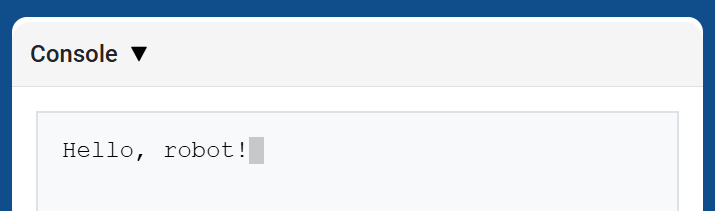
print displays text, numbers, or variable values in the Console using the current cursor position.
Use custom string formatting when you want a printed message to include values from your project, like a score, timer, or sensor reading. See the String Formatting page for more information.
Use new_line when you want the next printed value to start on a new row.
Usage:
brain.print(value, precision)
Parameters |
Description |
|---|---|
|
The text, number, or variable value to display in the Console. |
|
Optional. The number of decimal places to display when printing a number. The default is |
def main():
    # Display a message in the Console
    brain.print("Hello, robot!")

# VR threads — Do not delete
vr_thread(main)
def main():
    # Print a number with 5 decimal places
    brain.print(math.pi, precision=5)

# VR threads — Do not delete
vr_thread(main)
new_line#
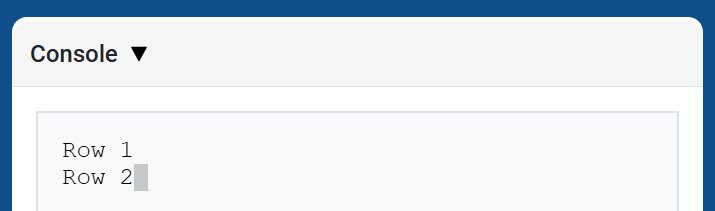
new_line moves the cursor to column 1 on the next row in the Console. The next value printed will appear on that row.
Use this method when you want the next printed value to start on a new row.
Usage:
brain.new_line()
Parameters |
Description |
|---|---|
This method has no parameters. |
def main():
    # Print on two lines
    brain.print("Row 1")
    brain.new_line()
    brain.print("Row 2")

# VR threads — Do not delete
vr_thread(main)
set_print_color#
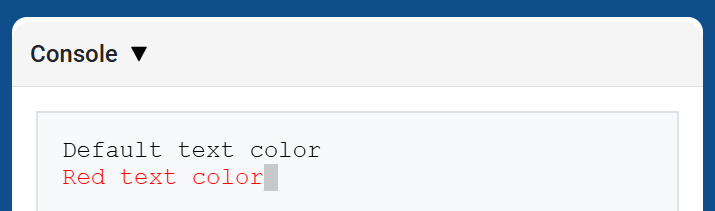
set_print_color sets the color used for text printed in the Console after this method is used. At the start of a project, the Console text color is set to BLACK.
Usage:
brain.set_print_color(color)
Parameters |
Description |
|---|---|
|
The color to use for text printed in the Console:
|
def main():
    # Print text in different colors
    brain.print("Default text color")
    brain.new_line()
    brain.set_print_color(RED)
    brain.print("Red text color")

# VR threads — Do not delete
vr_thread(main)
clear#
clear clears all rows from the Console.
Usage:
brain.clear()
Parameters |
Description |
|---|---|
This method has no parameters. |
def main():
    # Display text, then clear it after two seconds
    brain.print("This will disappear...")
    wait(2, SECONDS)
    brain.clear()

# VR threads — Do not delete
vr_thread(main)
Monitor#
monitor_variable#
monitor_variable adds one or more predefined variables to the Monitor tab in VEXcode. This lets you watch a variable’s value change while a project is running.
Variables must be global for monitor_variable to monitor them successfully. Provide each variable name as a string.
Usage:
monitor_variable(“variable”)
monitor_variable(“variable1”, “variable2”)
Parameters |
Description |
|---|---|
|
The name of a predefined global variable to monitor, given as a string. To monitor more than one variable, separate each variable name with a comma. |
def main():
    # Monitor the amount of loops
    global loops
    monitor_variable("loops")

    # Drive in a square 3 times
    for loops in range(12):
        drivetrain.turn_for(RIGHT, 90, DEGREES)
        drivetrain.drive_for(FORWARD, 150, MM)

# VR threads — Do not delete
vr_thread(main)
actions = 0

def main():
    # Monitor the amount of loops and actions
    global loops, actions
    monitor_variable("loops", "actions")

    # Drive in a square 3 times
    for loops in range(12):
        drivetrain.turn_for(RIGHT, 90, DEGREES)
        drivetrain.drive_for(FORWARD, 150, MM)
        actions = actions + 2

# VR threads — Do not delete
vr_thread(main)
monitor_sensor#
monitor_sensor adds one or more sensor values to the Monitor tab in VEXcode. This lets you watch sensor values change while a project is running.
If a sensor can return data in different units, the Monitor tab will display the returned data in each available unit. Provide each sensor value as a string.
Usage:
monitor_sensor(“sensor”)
monitor_sensor(“sensor1”, “sensor2”)
Parameters |
Description |
|---|---|
|
The sensor value to monitor, given as a string. To monitor more than one sensor value, separate each sensor value with a comma. This can be any sensor method that returns a value, such as |
def main():
    # Monitor the distance in MM and inches
    monitor_sensor("front_distance.get_distance")
    drivetrain.drive_for(FORWARD, 400, MM)

# VR threads — Do not delete
vr_thread(main)
def main():
    # Monitor the rotation in the Monitor tab
    monitor_sensor("drivetrain.rotation", "drivetrain.heading")
    drivetrain.turn_for(RIGHT, 450, DEGREES)

# VR threads — Do not delete
vr_thread(main)