
光學感測器#
介紹#
optical 類用於存取來自 V5 光學感測器 的數據。它利用反射光來偵測物體、識別顏色以及測量亮度和色調。
類別建構函數#
optical Optical = optical(index);
類別析構函數#
銷毀 optical 物件並釋放相關資源。
virtual ~optical();
參數#
範圍 |
類型 |
描述 |
|---|---|---|
|
|
光感測器連接的智慧型端口,記為 |
範例#
// Create an optical instance in Port 1
optical Optical1 = optical(PORT1);
成員功能#
optical 類別包含以下成員函數:
setLight— 開啟或關閉光學感測器的 LED。setLightPower— 設定光學感測器的光功率等級。isNearObject— 返迴光學感測器是否偵測到範圍內的物體。color— 返迴光學感測器偵測到的顏色。brightness— 傳回物體反射的光量。hue— 返迴光學感測器偵測到的色調。objectDetected— 註冊一個當光學感測器偵測到物體時要呼叫的函數。objectLost— 註冊一個當光學感測器遺失物體時要呼叫的函數。
在呼叫任何 optical 成員函數之前,必須建立一個 optical 實例,如下所示:
// Create an optical object in Port 1
optical Optical1 = optical(PORT1);
setLight#
設定光學感測器的 LED 指示燈亮起或熄滅。指示燈可以幫助光學感測器更清晰地偵測物體和顏色。
Available Functionsvoid setLight(ledState state);
範圍 |
類型 |
描述 |
|---|---|---|
|
|
Sets the LED on or off. |
此函數不傳回值。
Examples// Turn on LED with previous intensity.
Optical.setLight(ledState::on);
setLightPower#
設定光學感測器的LED亮度。燈光可以幫助光學感測器更清晰地偵測物體和顏色。
如果光感應器的燈熄滅,將燈光功率設定為 0% 以上即可開啟燈。
如果光感應器的指示燈亮著,將光功率設定為 0% 將關閉指示燈。
百分比越高,燈光越亮;百分比越低,燈光越暗。
Available Functionsvoid setLightPower(
int32_t intensity,
percentUnits units = percent );
範圍 |
類型 |
描述 |
|---|---|---|
|
|
燈光亮度級別,範圍從 0 到 100。 |
|
|
表示光照強度的單位: |
此函數不傳回值。
Examples// Set the light power to 50 percent.
Optical.setLightPower(50, percent);
isNearObject#
返迴光學感測器偵測到附近物體時的值。
Available Functionsbool isNearObject();
此函數不接受任何參數。
Return Values此函數傳回布林值,指示是否偵測到附近物體:
true– 光學感測器偵測到物體。false– 光學感測器未偵測到物體。
// If an object is detected by the Optical Sensor, print
// "near object".
if (Optical.isNearObject()){
  Brain.Screen.print("near object");
}
color#
返迴光學感測器檢測到的顏色。
Available Functionsvex::color color();
此函數不接受任何參數。
Return Values光學感測器偵測到的顏色是顏色類別的一個實例。
可選顏色有:
blackwhitered- 色調值介於 340° 至 20° 之間green- 色調值介於 80° 至 140° 之間blue- 色調值介於 200° 至 240° 之間yellow- 色調值介於 40° 至 60° 之間orange- 色調值介於 20° 至 40° 之間purple- 色調值介於 240° 至 280° 之間cyan- 色調值介於 140° 至 200° 之間
// Set a variable, detectColor, to the color detected by the
// Optical Sensor
color detectColor = Optical.color();

// Print the color detected by the Optical Sensor
// to the Brain's screen
Brain.Screen.print(detectColor);
brightness#
傳回物體反射的光量。
百分比越高,表示反射迴光學感測器的光線越多;百分比越低,表示反射回的光線越少。
Available Functionsdouble brightness(bool bRaw = false);
範圍 |
類型 |
描述 |
|---|---|---|
|
|
一個布林值,用於讀取原始亮度資料而不是百分比。預設值為 |
表示光學感測器偵測到的亮度的雙精度浮點數,範圍為 0 - 100%,或表示感測器偵測到的原始資料的雙精度浮點數。
Examples// Set a variable, brightness, to the value of the brightness
// detected by the Optical Sensor
double brightness = Optical.brightness();
// Print the brightness detected by the Optical Sensor to the
// Brain's screen
Brain.Screen.print(brightness);
hue#
傳回偵測到的顏色的色調值。
色相是用色輪上的數字來描述顏色的一種方法。
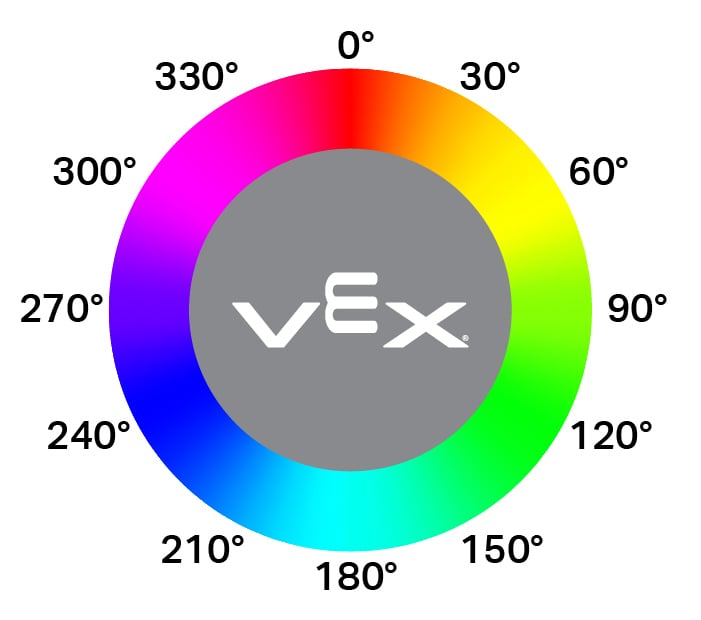
double hue();
此函數不接受任何參數。
Return Values表示光學感測器偵測到的色調值的雙精度浮點數,範圍為 0 — 359.99。
Examples// Set a variable, hue, to the value of the hue detected
// by the Optical Sensor.
double hue = Optical.hue();
objectDetected#
註冊一個回調函數,用於在偵測到物件時執行該回呼函數。
Available Functionsvoid objectDetected(void (* callback)(void));
範圍 |
類型 |
描述 |
|---|---|---|
|
|
先前定義的 函數,當光學感測器偵測到新物體時執行。 |
此函數不傳回值。
Examples定義回呼函數(在
int main()之外)// Display a message when the Optical Sensor detects an object. void detected() { Brain.Screen.print("object detected"); }在
int main()中註冊回呼函數int main() { // Run detected when the Optical Sensor detects an object. Optical.objectDetected(detected); }
objectLost#
註冊一個物件遺失時的回調函數。
Available Functionsvoid objectLost(void (* callback)(void));
範圍 |
類型 |
描述 |
|---|---|---|
|
|
先前定義的 函數,當光學感測器遺失偵測到的物件時執行。 |
此函數不傳回值。
Examples定義回呼函數(在
int main()之外)// Display a message when the Optical Sensor loses an object. void lost() { Brain.Screen.print("object lost"); }在
int main()中註冊回呼函數int main() { // Run lost when the Optical Sensor loses an object. Optical.objectLost(lost); }