
Sensor óptico#
Introducción#
The optical class is used to access data from the V5 Optical Sensor. It uses reflected light to detect objects, identify colors, and measure brightness and hue.
Constructor de clases#
optical Optical = optical(index);
Instructor de clase#
Destroys the optical object and releases associated resources.
virtual ~optical();
Parámetros#
Parámetro |
Tipo |
Descripción |
|---|---|---|
|
|
The Smart Port that the Optical Sensor is connected to, written as |
Ejemplos#
// Create an optical instance in Port 1
optical Optical1 = optical(PORT1);
Funciones de los miembros#
The optical class includes the following member functions:
setLight— Turns the Optical Sensor’s LED on or off.setLightPower— Sets the Optical Sensor’s light power level.isNearObject— Returns whether the Optical Sensor detects an object within range.color— Returns the color detected by the Optical Sensor.brightness— Returns the amount of light reflected from the object.hue— Returns the hue detected by the Optical Sensor.objectDetected— Registers a function to be called when the Optical Sensor detects an object.objectLost— Registers a function to be called when the Optical Sensor loses an object.
Before calling any optical member functions, an optical instance must be created, as shown below:
// Create an optical object in Port 1
optical Optical1 = optical(PORT1);
setLight#
Permite encender o apagar el LED del sensor óptico. Esta luz ayuda al sensor óptico a detectar objetos y colores con mayor claridad.
Available Functionsvoid setLight(ledState state);
Parámetro |
Tipo |
Descripción |
|---|---|---|
|
|
Sets the LED on or off. |
Esta función no devuelve ningún valor.
Examples// Turn on LED with previous intensity.
Optical.setLight(ledState::on);
setLightPower#
Ajusta el brillo del LED del sensor óptico. La luz ayuda al sensor óptico a detectar objetos y colores con mayor claridad.
Si la luz del sensor óptico está apagada, al ajustar la potencia de la luz por encima del 0% se encenderá la luz.
Si la luz del sensor óptico está encendida, al ajustar la potencia de la luz al 0%, esta se apagará.
Un porcentaje mayor hace que la luz sea más brillante. Un porcentaje menor hace que la luz sea más tenue.
Available Functionsvoid setLightPower(
int32_t intensity,
percentUnits units = percent );
Parámetro |
Tipo |
Descripción |
|---|---|---|
|
|
Nivel de potencia para ajustar la luz de 0 a 100. |
|
|
The unit that represents the light intensity: |
Esta función no devuelve ningún valor.
Examples// Set the light power to 50 percent.
Optical.setLightPower(50, percent);
isNearObject#
Devuelve un valor si el sensor óptico detecta un objeto cercano.
Available Functionsbool isNearObject();
Esta función no acepta ningún parámetro.
Return ValuesEsta función devuelve un valor booleano que indica si se ha detectado un objeto cercano:
true– The Optical Sensor detects an object.false– The Optical Sensor does not detect an object.
// If an object is detected by the Optical Sensor, print
// "near object".
if (Optical.isNearObject()){
  Brain.Screen.print("near object");
}
color#
Devuelve el color detectado por el sensor óptico.
Available Functionsvex::color color();
Esta función no acepta ningún parámetro.
Return ValuesEl color detectado por el sensor óptico como una instancia de la clase de color.
Los colores posibles son:
blackwhitered- A hue value between 340° - 20°green- A hue value between 80° - 140°blue- A hue value between 200° - 240°yellow- A hue value between 40° - 60°orange- A hue value between 20° - 40°purple- A hue value between 240° - 280°cyan- A hue value between 140° - 200°
// Set a variable, detectColor, to the color detected by the
// Optical Sensor
color detectColor = Optical.color();

// Print the color detected by the Optical Sensor
// to the Brain's screen
Brain.Screen.print(detectColor);
brightness#
Devuelve la cantidad de luz reflejada por el objeto.
Un porcentaje más alto significa que se refleja más luz de vuelta al sensor óptico. Un porcentaje más bajo significa que se refleja menos luz.
Available Functionsdouble brightness(bool bRaw = false);
Parámetro |
Tipo |
Descripción |
|---|---|---|
|
|
A Boolean value to read raw brightness data instead of percentage. The default is |
Un valor doble que representa el brillo detectado por el sensor óptico como un valor doble en el rango de 0 a 100 %, o un valor doble que representa los datos brutos detectados por el sensor.
Examples// Set a variable, brightness, to the value of the brightness
// detected by the Optical Sensor
double brightness = Optical.brightness();
// Print the brightness detected by the Optical Sensor to the
// Brain's screen
Brain.Screen.print(brightness);
hue#
Devuelve el valor de tono del color detectado.
El matiz es una forma de describir el color utilizando números alrededor de una rueda de colores.
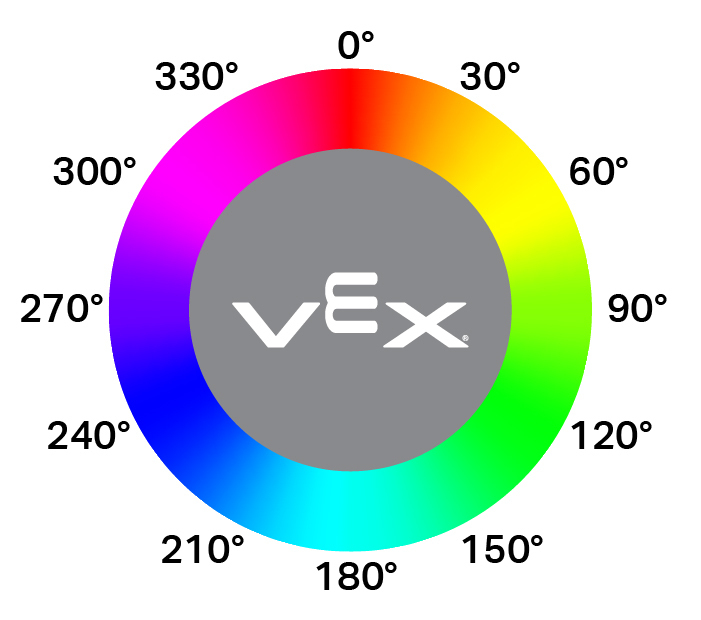
double hue();
Esta función no acepta ningún parámetro.
Return ValuesUn valor double que representa el valor del tono detectado por el sensor óptico en el rango de 0 a 359,99.
Examples// Set a variable, hue, to the value of the hue detected
// by the Optical Sensor.
double hue = Optical.hue();
objectDetected#
Registra una función de devolución de llamada para cuando se detecta un objeto.
Available Functionsvoid objectDetected(void (* callback)(void));
Parámetro |
Tipo |
Descripción |
|---|---|---|
|
|
Una función definida previamente que se ejecuta cuando el sensor óptico detecta un nuevo objeto. |
Esta función no devuelve ningún valor.
ExamplesDefine the callback function (outside of
int main())// Display a message when the Optical Sensor detects an object. void detected() { Brain.Screen.print("object detected"); }Register the callback inside
int main()int main() { // Run detected when the Optical Sensor detects an object. Optical.objectDetected(detected); }
objectLost#
Registra una función de devolución de llamada para cuando se pierde un objeto.
Available Functionsvoid objectLost(void (* callback)(void));
Parámetro |
Tipo |
Descripción |
|---|---|---|
|
|
Una función definida previamente que se ejecuta cuando el sensor óptico pierde un objeto detectado. |
Esta función no devuelve ningún valor.
ExamplesDefine the callback function (outside of
int main())// Display a message when the Optical Sensor loses an object. void lost() { Brain.Screen.print("object lost"); }Register the callback inside
int main()int main() { // Run lost when the Optical Sensor loses an object. Optical.objectLost(lost); }