
Eye#
Introduction#
The VEX 123 Robot has a built-in Eye Sensor that can detect objects and colors. It can also report how much light reflects back to the sensor and the hue value of the detected color.
The Eye Sensor has a light that can be turned on or off to help it see objects and colors more clearly.
There are many ways to code the Eye Sensor. Below is a list of all Eye methods:
Mutators — Adjust Eye Sensor settings.
set_light— Turns the Eye Sensor’s light on or off.set_light_power— Sets the Eye Sensor’s light power level.
Getters — Return what the Eye Sensor detects.
get_hue— Returns the hue detected by the Eye Sensor.get_brightness— Returns the brightness detected by the Eye Sensor.is_object_detected— Returns whether the Eye Sensor detects an object within range.is_color_detected— Returns whether the Eye Sensor detects a specific color.is_bright— Returns whether the Eye Sensor detects a bright object.
Mutators#
set_light#
set_light turns the Eye Sensor’s light on or off.
Usage:
robot.eye.set_light(state)
Parameters |
Description |
|---|---|
|
The state of the Eye Sensor’s light: |
# Continuously blink the light.
while True:
    robot.eye.set_light(ON)
    wait(2, SECONDS)
    robot.eye.set_light(OFF)
    wait(2, SECONDS)
set_light_power#
set_light_power sets how bright the Eye Sensor’s light is. The light can help the Eye Sensor detect objects and colors more clearly.
A higher percentage makes the light brighter. A lower percentage makes the light dimmer.
If the Eye Sensor’s light is off, setting the light power above 0% will turn the light on.
If the Eye Sensor’s light is on, setting the light power at 0% will turn the light off.
Usage:
robot.eye.set_light_power(value)
Parameters |
Description |
|---|---|
|
The brightness to set the Eye Sensor’s light to, from 0% to 100%. Use whole numbers. |
# Set the light to different power levels.
robot.eye.set_light_power(25)
wait(2, SECONDS)
robot.eye.set_light_power(50)
wait(2, SECONDS)
robot.eye.set_light_power(100)
Getters#
get_hue#
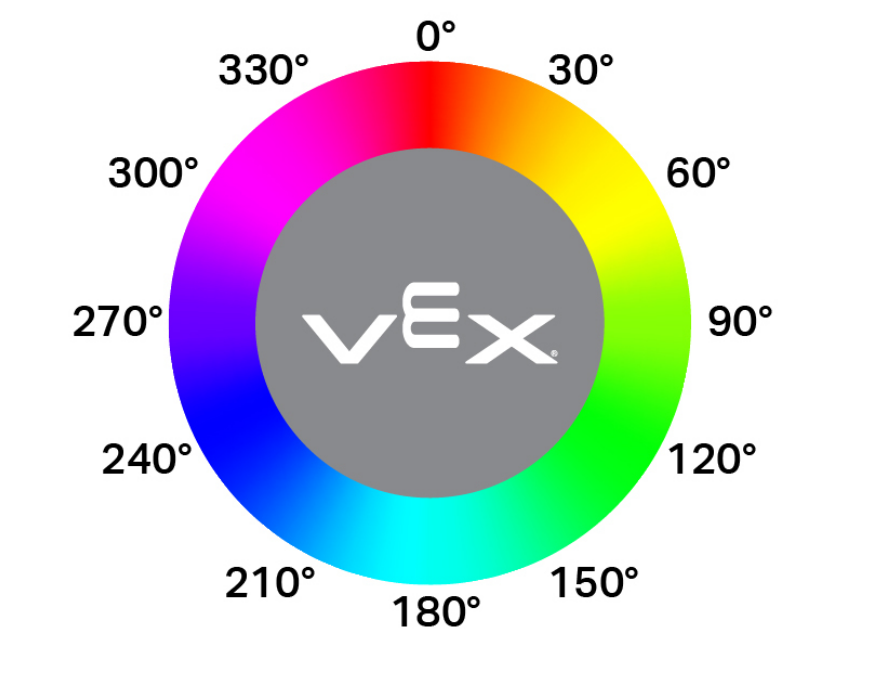
get_hue returns the color detected by the Eye Sensor as a whole number from 0 to 359.00 degrees.
Hue is a way to describe color using numbers around a color wheel.
Usage:
robot.eye.get_hue()
Parameters |
Description |
|---|---|
This method has no parameters. |
# Display if an object is pink.
while True:
    console.clear()
    if 290 < robot.eye.get_hue() < 350:
        console.print("Pink!")
    else:
        console.print("Not pink!")
    wait(0.1, SECONDS)
get_brightness#
get_brightness returns how bright the detected light is, as a whole number from 0% to 100%.
A higher percentage means more light is reflected back to the Eye Sensor. A lower percentage means less light is reflected back.
Usage:
robot.eye.get_brightness()
Parameters |
Description |
|---|---|
This method has no parameters. |
# Display whether a detected object is bright.
robot.eye.set_light_power(100)
robot.drive(FORWARD)
while not robot.eye.is_object_detected():
    wait(0.1, SECONDS)
wait(0.1, SECONDS)
if robot.eye.get_brightness() < 70:
    console.print("Object not bright.")
else:
    console.print("Bright object!")
is_object_detected#
is_object_detected returns a Boolean that reports whether or not the Eye Sensor detects an object within range.
True— The Eye Sensor detects an object.False— The Eye Sensor does not detect an object.
Usage:
robot.eye.is_object_detected()
Parameters |
Description |
|---|---|
This method has no parameters. |
# Stop driving after detecting an object.
robot.eye.set_light(ON)
robot.drive(FORWARD)
wait(0.1, SECONDS)
while not robot.eye.is_object_detected():
    wait(0.1, SECONDS)
robot.stop()
is_color_detected#
is_color_detected returns a Boolean that reports whether the Eye Sensor detects a specified color, based on the detected hue value.
True— The Eye Sensor detects the selected color.False— The Eye Sensor does not detect the selected color.
The Eye Sensor works best when the object is close and the lighting is clear.
Usage:
robot.eye.is_color_detected(color)
Parameters |
Description |
|---|---|
|
The color for the Eye Sensor to check:
|
# Stop driving after detecting a green object.
robot.eye.set_light(ON)
robot.drive(FORWARD)
wait(0.1, SECONDS)
while not robot.eye.is_color_detected(GREEN):
    wait(0.1, SECONDS)
robot.stop()
is_bright#
is_bright returns a Boolean that reports whether the object detected by the Eye Sensor is bright.
An object is considered bright when it reflects more than 70% brightness back to the Eye Sensor.
True— The detected object reflects more than 70% brightness.False— The detected object reflects 70% brightness or less.
Usage:
robot.eye.is_bright()
Parameters |
Description |
|---|---|
This method has no parameters. |
# Display whether a detected object is bright.
robot.eye.set_light_power(100)
robot.drive(FORWARD)
while not robot.eye.is_object_detected():
    wait(0.1, SECONDS)
wait(0.1, SECONDS)
if robot.eye.is_bright():
    console.print("Bright object!")
else:
    console.print("Object not bright.")