
眼睛#
介绍#
VEX 123 机器人内置眼部传感器,可以检测物体和颜色。它还可以报告反射回传感器的光量以及检测到的颜色色调值。
眼睛传感器带有一个可以打开或关闭的指示灯,以帮助它更清晰地识别物体和颜色。
眼动追踪传感器的编码方式有很多种。以下列出了所有眼动追踪方法:
变异器 — 调整眼部传感器设置。
set_light— Turns the Eye Sensor’s light on or off.set_light_power— Sets the Eye Sensor’s light power level.
获取器 — 返回眼动传感器检测到的内容。
get_hue— Returns the hue detected by the Eye Sensor.get_brightness— Returns the brightness detected by the Eye Sensor.is_object_detected— Returns whether the Eye Sensor detects an object within range.is_color_detected— Returns whether the Eye Sensor detects a specific color.is_bright— Returns whether the Eye Sensor detects a bright object.
突变体#
set_light#
set_light turns the Eye Sensor’s light on or off.
Usage:
robot.eye.set_light(state)
参数 |
描述 |
|---|---|
|
The state of the Eye Sensor’s light: |
# Continuously blink the light.
while True:
    robot.eye.set_light(ON)
    wait(2, SECONDS)
    robot.eye.set_light(OFF)
    wait(2, SECONDS)
set_light_power#
set_light_power sets how bright the Eye Sensor’s light is. The light can help the Eye Sensor detect objects and colors more clearly.
百分比越高,灯光越亮;百分比越低,灯光越暗。
如果眼部传感器的灯是关闭的,将灯光功率设置为 0% 以上即可打开灯。
如果眼部传感器的指示灯亮着,将灯光功率设置为 0% 将关闭指示灯。
Usage:
robot.eye.set_light_power(value)
参数 |
描述 |
|---|---|
|
设置眼部传感器灯光的亮度,范围从 0% 到 100%。请使用整数。 |
# Set the light to different power levels.
robot.eye.set_light_power(25)
wait(2, SECONDS)
robot.eye.set_light_power(50)
wait(2, SECONDS)
robot.eye.set_light_power(100)
获取器#
get_hue#
get_hue returns the color detected by the Eye Sensor as a whole number from 0 to 359.00 degrees.
色相是用色轮上的数字来描述颜色的一种方法。
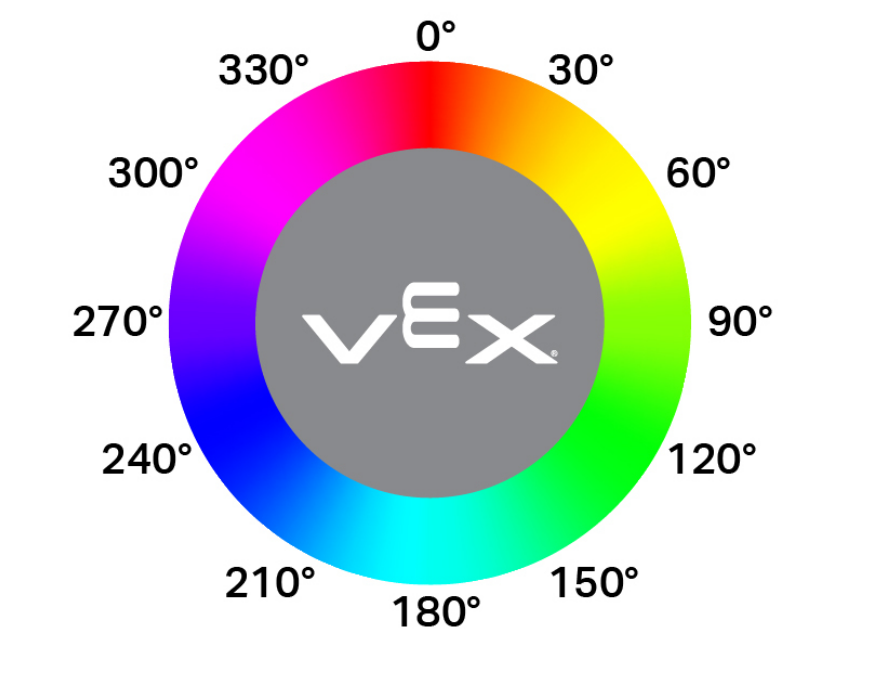
Usage:
robot.eye.get_hue()
参数 |
描述 |
|---|---|
此方法没有参数。 |
# Display if an object is pink.
while True:
    console.clear()
    if 290 < robot.eye.get_hue() < 350:
        console.print("Pink!")
    else:
        console.print("Not pink!")
    wait(0.1, SECONDS)
get_brightness#
get_brightness returns how bright the detected light is, as a whole number from 0% to 100%.
百分比越高,意味着反射回眼部传感器的光线越多;百分比越低,意味着反射回的光线越少。
Usage:
robot.eye.get_brightness()
参数 |
描述 |
|---|---|
此方法没有参数。 |
# Display whether a detected object is bright.
robot.eye.set_light_power(100)
robot.drive(FORWARD)
while not robot.eye.is_object_detected():
    wait(0.1, SECONDS)
wait(0.1, SECONDS)
if robot.eye.get_brightness() < 70:
    console.print("Object not bright.")
else:
    console.print("Bright object!")
is_object_detected#
is_object_detected returns a Boolean that reports whether or not the Eye Sensor detects an object within range.
True— The Eye Sensor detects an object.False— The Eye Sensor does not detect an object.
Usage:
robot.eye.is_object_detected()
参数 |
描述 |
|---|---|
此方法没有参数。 |
# Stop driving after detecting an object.
robot.eye.set_light(ON)
robot.drive(FORWARD)
wait(0.1, SECONDS)
while not robot.eye.is_object_detected():
    wait(0.1, SECONDS)
robot.stop()
is_color_detected#
is_color_detected returns a Boolean that reports whether the Eye Sensor detects a specified color, based on the detected hue value.
True— The Eye Sensor detects the selected color.False— The Eye Sensor does not detect the selected color.
当物体距离较近且光线充足时,眼部传感器工作效果最佳。
Usage:
robot.eye.is_color_detected(color)
参数 |
描述 |
|---|---|
|
The color for the Eye Sensor to check:
|
# Stop driving after detecting a green object.
robot.eye.set_light(ON)
robot.drive(FORWARD)
wait(0.1, SECONDS)
while not robot.eye.is_color_detected(GREEN):
    wait(0.1, SECONDS)
robot.stop()
is_bright#
is_bright returns a Boolean that reports whether the object detected by the Eye Sensor is bright.
当物体反射回人眼传感器的亮度超过其亮度的 70% 时,该物体被认为是明亮的。
True— The detected object reflects more than 70% brightness.False— The detected object reflects 70% brightness or less.
Usage:
robot.eye.is_bright()
参数 |
描述 |
|---|---|
此方法没有参数。 |
# Display whether a detected object is bright.
robot.eye.set_light_power(100)
robot.drive(FORWARD)
while not robot.eye.is_object_detected():
    wait(0.1, SECONDS)
wait(0.1, SECONDS)
if robot.eye.is_bright():
    console.print("Bright object!")
else:
    console.print("Object not bright.")