
Ojo#
Introducción#
El robot VEX 123 cuenta con un sensor ocular integrado capaz de detectar objetos y colores. Además, puede informar sobre la cantidad de luz que se refleja hacia el sensor y el valor de tono del color detectado.
El sensor ocular dispone de una luz que se puede encender o apagar para ayudarle a ver los objetos y los colores con mayor claridad.
Existen muchas maneras de programar el sensor ocular. A continuación se muestra una lista de todos los métodos para programar el sensor ocular:
Motadores: Ajusta la configuración del sensor ocular.
set_light— Turns the Eye Sensor’s light on or off.set_light_power— Sets the Eye Sensor’s light power level.
Obtenedores: Devuelven lo que detecta el sensor ocular.
get_hue— Returns the hue detected by the Eye Sensor.get_brightness— Returns the brightness detected by the Eye Sensor.is_object_detected— Returns whether the Eye Sensor detects an object within range.is_color_detected— Returns whether the Eye Sensor detects a specific color.is_bright— Returns whether the Eye Sensor detects a bright object.
Mutadores#
set_light#
set_light turns the Eye Sensor’s light on or off.
Usage:
robot.eye.set_light(state)
Parámetros |
Descripción |
|---|---|
|
The state of the Eye Sensor’s light: |
# Continuously blink the light.
while True:
    robot.eye.set_light(ON)
    wait(2, SECONDS)
    robot.eye.set_light(OFF)
    wait(2, SECONDS)
set_light_power#
set_light_power sets how bright the Eye Sensor’s light is. The light can help the Eye Sensor detect objects and colors more clearly.
Un porcentaje mayor hace que la luz sea más brillante. Un porcentaje menor hace que la luz sea más tenue.
Si la luz del sensor ocular está apagada, al configurar la potencia de la luz por encima del 0% se encenderá la luz.
Si la luz del sensor ocular está encendida, al ajustar la potencia de la luz al 0%, esta se apagará.
Usage:
robot.eye.set_light_power(value)
Parámetros |
Descripción |
|---|---|
|
El nivel de brillo al que se ajustará la luz del sensor ocular, de 0% a 100%. Utilice números enteros. |
# Set the light to different power levels.
robot.eye.set_light_power(25)
wait(2, SECONDS)
robot.eye.set_light_power(50)
wait(2, SECONDS)
robot.eye.set_light_power(100)
Getters#
get_hue#
get_hue returns the color detected by the Eye Sensor as a whole number from 0 to 359.00 degrees.
El matiz es una forma de describir el color utilizando números alrededor de una rueda de colores.
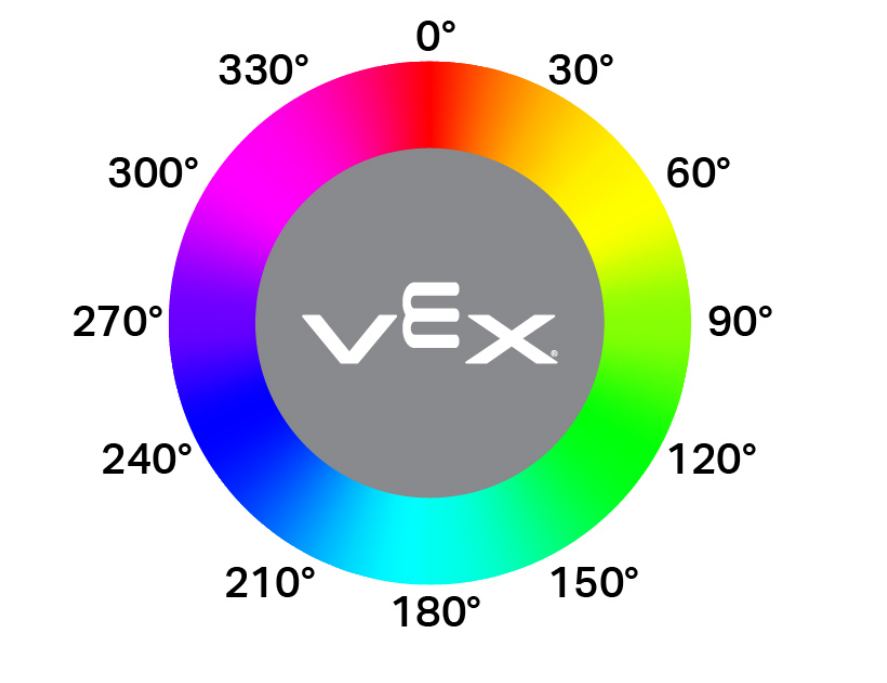
Usage:
robot.eye.get_hue()
Parámetros |
Descripción |
|---|---|
Este método no tiene parámetros. |
# Display if an object is pink.
while True:
    console.clear()
    if 290 < robot.eye.get_hue() < 350:
        console.print("Pink!")
    else:
        console.print("Not pink!")
    wait(0.1, SECONDS)
get_brightness#
get_brightness returns how bright the detected light is, as a whole number from 0% to 100%.
Un porcentaje más alto significa que se refleja más luz hacia el sensor ocular. Un porcentaje más bajo significa que se refleja menos luz.
Usage:
robot.eye.get_brightness()
Parámetros |
Descripción |
|---|---|
Este método no tiene parámetros. |
# Display whether a detected object is bright.
robot.eye.set_light_power(100)
robot.drive(FORWARD)
while not robot.eye.is_object_detected():
    wait(0.1, SECONDS)
wait(0.1, SECONDS)
if robot.eye.get_brightness() < 70:
    console.print("Object not bright.")
else:
    console.print("Bright object!")
is_object_detected#
is_object_detected returns a Boolean that reports whether or not the Eye Sensor detects an object within range.
True— The Eye Sensor detects an object.False— The Eye Sensor does not detect an object.
Usage:
robot.eye.is_object_detected()
Parámetros |
Descripción |
|---|---|
Este método no tiene parámetros. |
# Stop driving after detecting an object.
robot.eye.set_light(ON)
robot.drive(FORWARD)
wait(0.1, SECONDS)
while not robot.eye.is_object_detected():
    wait(0.1, SECONDS)
robot.stop()
is_color_detected#
is_color_detected returns a Boolean that reports whether the Eye Sensor detects a specified color, based on the detected hue value.
True— The Eye Sensor detects the selected color.False— The Eye Sensor does not detect the selected color.
El sensor ocular funciona mejor cuando el objeto está cerca y la iluminación es buena.
Usage:
robot.eye.is_color_detected(color)
Parámetros |
Descripción |
|---|---|
|
The color for the Eye Sensor to check:
|
# Stop driving after detecting a green object.
robot.eye.set_light(ON)
robot.drive(FORWARD)
wait(0.1, SECONDS)
while not robot.eye.is_color_detected(GREEN):
    wait(0.1, SECONDS)
robot.stop()
is_bright#
is_bright returns a Boolean that reports whether the object detected by the Eye Sensor is bright.
Se considera que un objeto es brillante cuando refleja más del 70 % de su brillo hacia el sensor ocular.
True— The detected object reflects more than 70% brightness.False— The detected object reflects 70% brightness or less.
Usage:
robot.eye.is_bright()
Parámetros |
Descripción |
|---|---|
Este método no tiene parámetros. |
# Display whether a detected object is bright.
robot.eye.set_light_power(100)
robot.drive(FORWARD)
while not robot.eye.is_object_detected():
    wait(0.1, SECONDS)
wait(0.1, SECONDS)
if robot.eye.is_bright():
    console.print("Bright object!")
else:
    console.print("Object not bright.")