
Κονσόλα#
Εισαγωγή#
Η κονσόλα VEXcode V5 εμφανίζεται στο παράθυρο Monitor μέσα στο VEXcode. Η έξοδος της κονσόλας μπορεί να εμφανίσει κείμενο, αριθμούς και τιμές μεταβλητών ενώ εκτελείται ένα έργο.
Όταν χρησιμοποιείτε τον κώδικα VS, η έξοδος της κονσόλας που βασίζεται σε κείμενο εμφανίζεται στο τερματικό αντί για την κονσόλα VEXcode.
Σημείωση: Όταν χρησιμοποιείτε την Κονσόλα VEXcode, πρέπει να συνδεθείτε στη Σειριακή Θύρα της Κονσόλας προτού εκτυπωθεί οποιαδήποτε έξοδος στην Κονσόλα.
Παρακάτω είναι μια λίστα με όλες τις λειτουργίες:
Ενέργεια — Έξοδος κειμένου.
printf— Εμφανίζει κείμενο, αριθμούς ή τιμές μεταβλητών στην Κονσόλα ή στο τερματικό.
Δράση#
printf#
printf εμφανίζει κείμενο, αριθμούς ή τιμές μεταβλητών στην Κονσόλα. Στον Κώδικα VS, printf εμφανίζει την έξοδο στο τερματικό.
Στην C++, printf χρησιμοποιεί μια συμβολοσειρά μορφοποίησης. Η συμβολοσειρά μορφοποίησης είναι το κείμενο μέσα στα εισαγωγικά. Μπορεί να περιλαμβάνει κανονικό κείμενο, ακολουθίες ελέγχου και προσδιοριστές μορφοποίησης που εισάγουν τιμές από το έργο σας, όπως μια βαθμολογία, ένα χρονόμετρο ή μια ένδειξη αισθητήρα. Ανατρέξτε στη σελίδα Μορφοποίηση συμβολοσειράς για περισσότερες πληροφορίες σχετικά με τους προσδιοριστές μορφοποίησης.
Από προεπιλογή, η συνάρτηση printf δεν μετακινείται αυτόματα στην επόμενη γραμμή. Προσθέστε \n, το οποίο αντιπροσωπεύει μια νέα γραμμή, όταν θέλετε η επόμενη εκτυπωμένη τιμή να ξεκινά σε μια νέα γραμμή.
Usage:
printf(value);
Παράμετρος |
Τύπος |
Περιγραφή |
|---|---|---|
|
|
Το κείμενο, η συμβολοσειρά μορφοποίησης ή η ακολουθία ελέγχου που θα εμφανίζεται στην Κονσόλα ή στο τερματικό. |
Επιστρέφεται τιμή:
Αυτή η συνάρτηση δεν επιστρέφει τιμή.
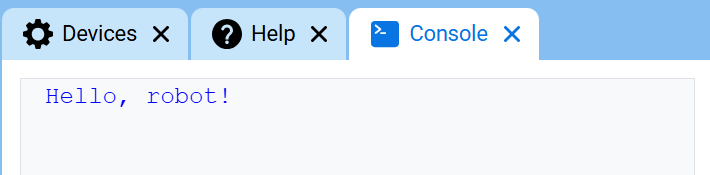
// Display a message in the Console
printf("Hello, robot!\n");
// Display two messages on separate lines
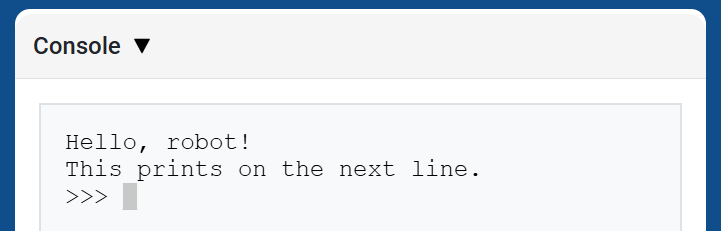
printf("Hello, robot!\n");
printf("This prints on the next line.\n");
// Display two messages on the same line
printf("Hello, ");
printf("robot!\n");
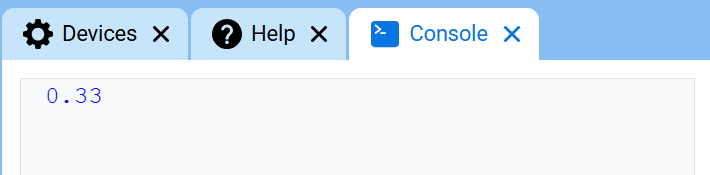
// Display a number with two decimal places
printf("%.2f\n", 1.0 / 3.0);
Ακολουθίες ελέγχου#
Οι ακολουθίες ελέγχου είναι σύντομοι κωδικοί που μπορούν να εκτυπωθούν με printf για να αλλάξουν τον τρόπο εμφάνισης του κειμένου στην Κονσόλα.
Οι ακολουθίες ελέγχου είναι χρήσιμες όταν θέλετε να αλλάξετε το χρώμα του κειμένου ή να καθαρίσετε την Κονσόλα απευθείας μέσα σε μια εντολή printf.
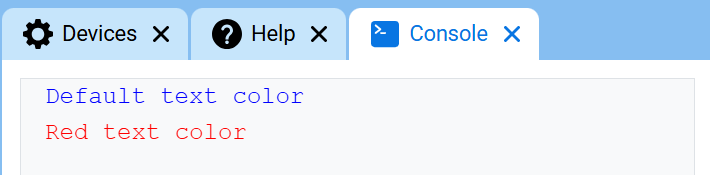
Για να αλλάξετε το χρώμα κειμένου, εκτυπώστε \033 ακολουθούμενο από έναν κωδικό χρώματος. Στην αρχή ενός έργου, το χρώμα κειμένου της Κονσόλας ορίζεται σε μπλε.
Χρώμα |
Ακολουθία ελέγχου |
|---|---|
Μαύρος |
|
Κόκκινος |
|
Πράσινος |
|
Κίτρινος |
|
Μπλε |
|
Μωβ |
|
Κυανό |
|
Λευκό |
|
Πορτοκάλι |
|
Διαφανής |
|
// Print text in different colors
printf("Default text color\n");
printf("\033[31m");
printf("Red text color\n");
Καθαρισμός της κονσόλας#
Η C++ δεν διαθέτει ξεχωριστή συνάρτηση Console για την εκκαθάριση όλων των γραμμών. Για να εκκαθαρίσετε την Console, εκτυπώστε την ακολουθία ελέγχου \033[2J με printf.
Αυτό διαγράφει όλες τις γραμμές από την Κονσόλα και μετακινεί τον κέρσορα πίσω στη γραμμή 1.
// Clear the Console after two seconds
printf("VEXcode\n");
wait(2, seconds);
printf("\033[2J");