
Consola#
Introducción#
La consola de VEXcode V5 se muestra en la ventana del monitor dentro de VEXcode. La salida de la consola puede mostrar texto, números y valores de variables mientras se ejecuta un proyecto.
Al usar VS Code, la salida de la consola basada en texto aparece en la terminal en lugar de en la consola de VEXcode.
Nota: Al usar la consola VEXcode, debe conectarse al puerto serie de la consola antes de que se pueda imprimir cualquier salida en la consola.
A continuación se muestra una lista de todas las funciones:
Acción: Mostrar texto.
printf— Displays text, numbers, or variable values in the Console or terminal.
Acción#
printf#
printf displays text, numbers, or variable values in the Console. In VS Code, printf displays output in the terminal.
In C++, printf uses a format string. The format string is the text inside the quotation marks. It can include regular text, control sequences, and format specifiers that insert values from your project, like a score, timer, or sensor reading. See the String Formatting page for more information about format specifiers.
By default, printf does not automatically move to the next line. Add \n, which stands for a new line, when you want the next printed value to start on a new row.
Usage:
printf(value);
Parámetro |
Tipo |
Descripción |
|---|---|---|
|
|
El texto, la cadena de formato o la secuencia de control que se mostrará en la consola o terminal. |
Valor de retorno:
Esta función no devuelve ningún valor.
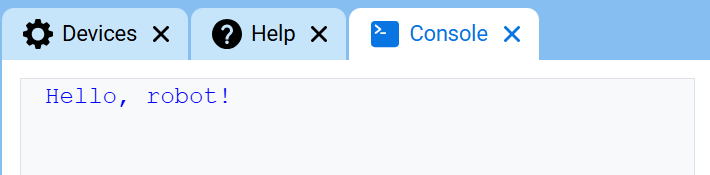
// Display a message in the Console
printf("Hello, robot!\n");
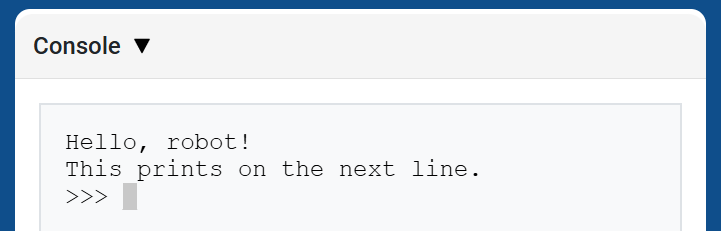
// Display two messages on separate lines
printf("Hello, robot!\n");
printf("This prints on the next line.\n");
// Display two messages on the same line
printf("Hello, ");
printf("robot!\n");
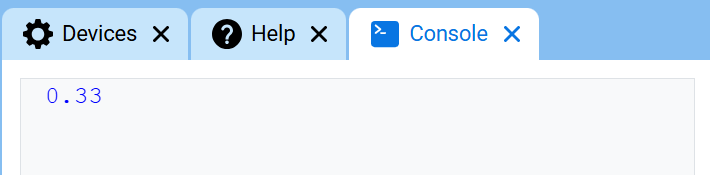
// Display a number with two decimal places
printf("%.2f\n", 1.0 / 3.0);
Secuencias de control#
Control sequences are short codes that can be printed with printf to change how text appears in the Console.
Control sequences are useful when you want to change text color or clear the Console directly inside a printf statement.
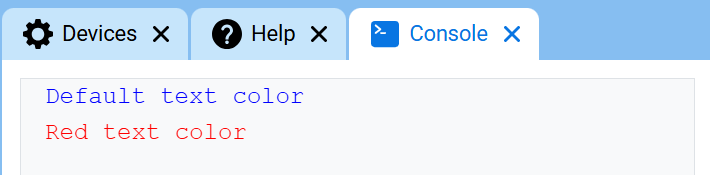
To change the text color, print \033 followed by a color code. At the start of a project, the Console text color is set to blue.
Color |
Secuencia de control |
|---|---|
Negro |
|
Rojo |
|
Verde |
|
Amarillo |
|
Azul |
|
Púrpura |
|
Cian |
|
Blanco |
|
Naranja |
|
Transparente |
|
// Print text in different colors
printf("Default text color\n");
printf("\033[31m");
printf("Red text color\n");
Borra la consola#
C++ does not have a separate Console function for clearing all rows. To clear the Console, print the control sequence \033[2J with printf.
Esto borra todas las filas de la consola y mueve el cursor de vuelta a la fila 1.
// Clear the Console after two seconds
printf("VEXcode\n");
wait(2, seconds);
printf("\033[2J");