
Inertial and Gyro Sensor#
Introduction#
The VEX IQ (2nd gen) Brain has a built-in Inertial Sensor. This sensor measures how the Brain is moving and turning.
The built-in Inertial Sensor uses two parts to do this. The gyroscope measures turning, such as heading, rotation, gyro rate, and orientation. The accelerometer measures changes in motion, such as speeding up or slowing down.
The built-in Inertial Sensor is automatically configured and ready to use at the start of every project. An external Gyro Sensor can also be used, but it must be configured before use. The external VEX IQ Gyro Sensor measures turning only.
Below is a list of all blocks:
Gyro Sensing — Work with heading and rotation values.
calibrate gyro — Calibrates a configured external Gyro Sensor.
calibrate BrainInertial — Calibrates the Brain’s built-in Inertial Sensor.
set Inertial/Gyro heading — Sets the sensor’s current heading to a new heading value.
set Inertial/Gyro rotation — Sets the sensor’s current rotation to a new rotation value.
angle of Inertial/Gyro heading — Reports the direction the sensor is facing, from 0 to 359.99 degrees.
angle of Inertial/Gyro rotation — Reports how far the sensor has turned.
rate of gyro — Reports the external Gyro Sensor’s current rotation speed.
Inertial Sensing — Use the built-in BrainInertial Sensor.
acceleration — Reports how quickly the Brain is speeding up or slowing down on the selected axis.
gyro rate — Reports how fast the Brain is rotating on the selected axis.
orientation — Reports the Brain’s roll, pitch, or yaw angle.
Gyro Sensing#
calibrate gyro#
The calibrate gyro stack block calibrates a configured external Gyro Sensor.
Calibration helps the Gyro Sensor measure turns correctly. Keep the sensor still during calibration. If the sensor moves during calibration, heading and rotation values may not measure turns correctly.
The project will wait until calibration is done before the next block in the stack runs.
Note: This block is only available if there is a configured Gyro Sensor.
calibrate [Gyro1 v] for [2 v] seconds
Parameters |
Description |
|---|---|
gyro |
The external Gyro Sensor to calibrate. |
duration |
How long to calibrate the sensor for in seconds:
|
Example
    when started
    [Calibrate a Gyro Sensor and display its angle of heading.]
    calibrate [Gyro1 v] for [2 v] seconds
    print ([Gyro1 v] heading in degrees) on screen ◀ and set cursor to next row
calibrate BrainInertial#
The calibrate BrainInertial stack block calibrates the Brain’s built-in Inertial Sensor.
Calibration helps the Inertial Sensor measure turns correctly. Keep the Brain still during calibration. If the Brain moves during calibration, heading, rotation, gyro rate, and orientation values may not measure correctly.
The project will wait until calibration is done before the next block in the stack runs.
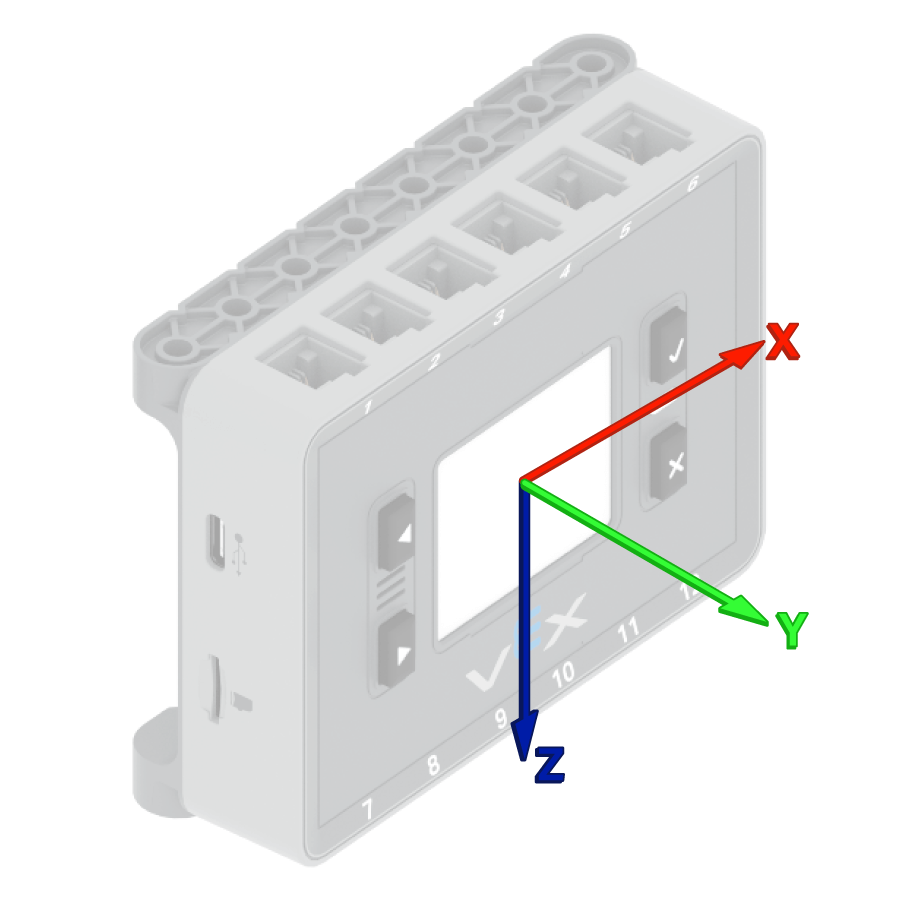
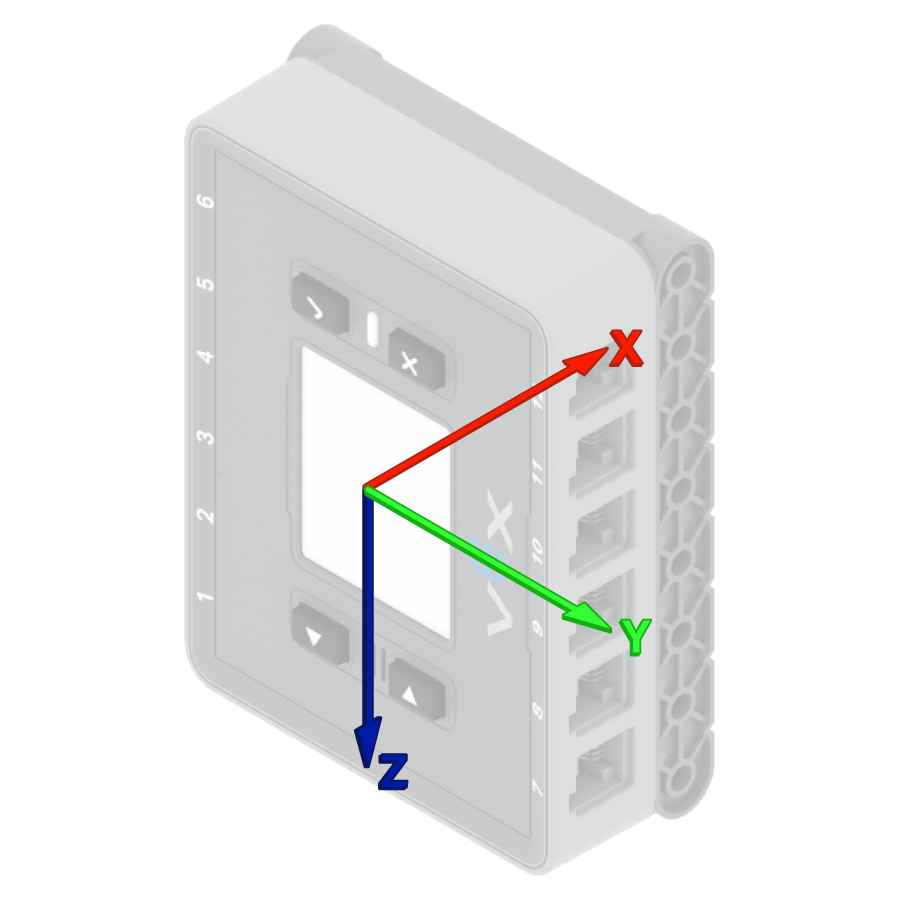
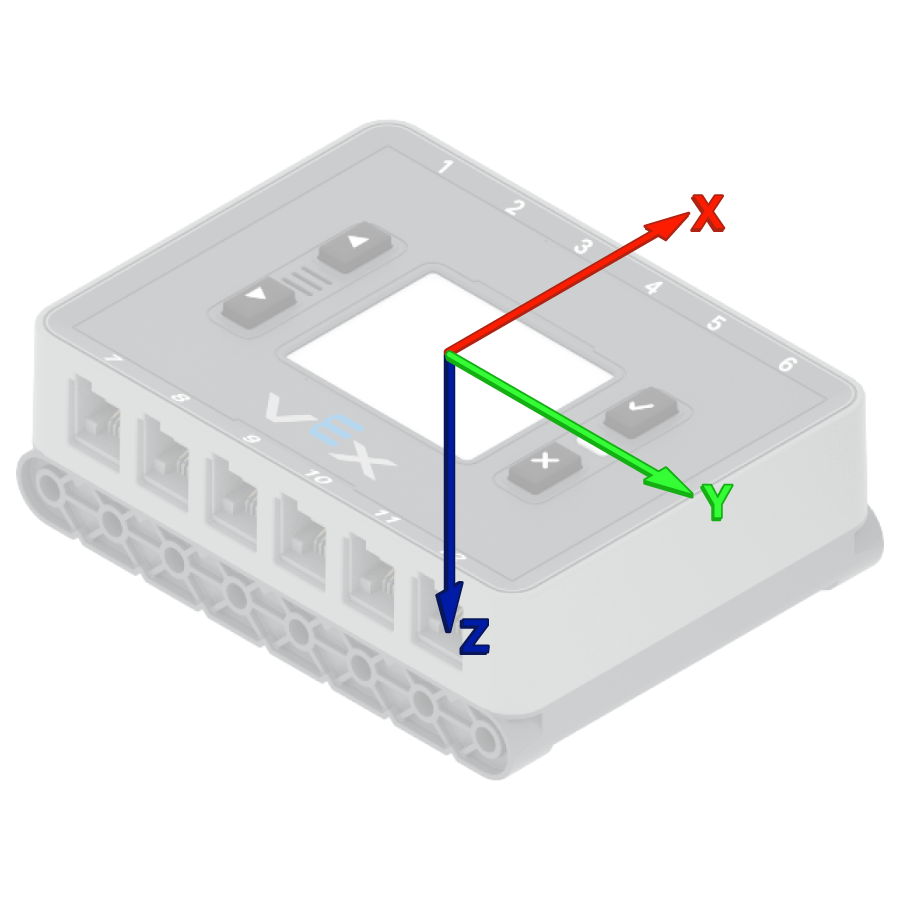
VEX Brains attempt to calibrate themselves automatically at the start of every project. However, if the robot is being carried or moved during project start, the sensor may fail to calibrate properly or yield incorrect calibration.
calibrate BrainInertial
Parameters |
Description |
|---|---|
This block has no parameters. |
Example
    when started
    [Calibrate the Brain's sensor and display its angle of heading.]
    calibrate BrainInertial
    print ([BrainInertial v] heading in degrees) on screen ◀ and set cursor to next row
set Inertial/Gyro heading#
A heading is the direction the sensor is facing, measured in degrees from 0 to 359.99. The set Inertial/Gyro heading stack block changes the sensor’s current heading to a new heading value.
For example, if the sensor has turned to face right, setting the heading to 0 degrees makes that right-facing position the new 0 degrees. Then the sensor can track other headings based on that new direction.
set [Gyro1 v] heading to (0) degrees
Parameters |
Description |
|---|---|
gyro |
The Inertial or Gyro Sensor to use. |
heading |
The heading value, in degrees, to set for the sensor. This can be a value from 0 to 359.99. |
Example
    when started
    [Turn to the new 0 degrees heading.]
    set [Gyro1 v] heading to (90) degrees
    turn to heading (0) degrees ▶
set Inertial/Gyro rotation#
Rotation is how much the sensor has turned, measured in degrees. Unlike heading, rotation can increase past 359.99 degrees or decrease below 0 degrees. At the beginning of a project, the rotation value is set to 0 degrees. The set Inertial/Gyro rotation stack block changes the sensor’s current rotation to a new value.
For example, if the sensor has made two full turns to the right, its rotation value will be 720 degrees. Setting the rotation to 0 degrees will reset that rotation from 720 to 0 degrees. Then the sensor can track rotations based on that new value.
set [Gyro1 v] rotation to (0) degrees
Parameters |
Description |
|---|---|
gyro |
The Inertial or Gyro Sensor to use. |
rotation |
The rotation value, in degrees, to set for the sensor. This can be an integer or a decimal. |
Example
    when started
    [Turn to the new 0 rotation.]
    set [Gyro1 v] rotation to (-100) degrees
    turn to rotation (0) degrees ▶
angle of Inertial/Gyro heading#
A heading is the direction the sensor is facing, measured in degrees from 0 to 359.99. The angle of Inertial/Gyro heading reporter block reports the sensor’s current heading.
The starting heading is 0 degrees. If the sensor turns past 359.99 degrees, the heading wraps back to 0 degrees.
([Gyro1 v] heading in degrees)
Parameters |
Description |
|---|---|
gyro |
The Inertial or Gyro Sensor to report the heading from. |
Example
    when started
    [Display the Gyro Sensor's heading before and after rotating.]
    print ([Gyro1 v] heading in degrees) on screen ◀ and set cursor to next row
    turn [right v] for (390) degrees ▶
    print ([Gyro1 v] heading in degrees) on screen ◀ and set cursor to next row
angle of Inertial/Gyro rotation#
Rotation is how much the sensor has turned, measured in degrees. Unlike heading, rotation can increase past 359.99 degrees or decrease below 0 degrees. At the beginning of a project, the rotation value is set to 0 degrees. The angle of Inertial/Gyro rotation reporter block reports the sensor’s current rotation.
Turning right increases the rotation, and turning left decreases the rotation. For example, making two full turns to the right will report a rotation of 720 degrees. Turning one full turn to the left from 0 degrees will report a rotation of -360 degrees.
([Gyro1 v] rotation in degrees)
Parameters |
Description |
|---|---|
gyro |
The Inertial or Gyro Sensor to report the rotation from. |
Example
    when started
    [Display the Gyro Sensor's angle of rotation before and after rotating.]
    print ([Gyro1 v] rotation in degrees) on screen ◀ and set cursor to next row
    turn [right v] for (390) degrees ▶
    print ([Gyro1 v] rotation in degrees) on screen ◀ and set cursor to next row
rate of gyro#
The rate of gyro reporter block reports the external Gyro Sensor’s current rotation speed in degrees per second (dps). The value can be positive or negative depending on the direction the Gyro Sensor is rotating.
([Gyro1 v] rate in dps)
Parameters |
Description |
|---|---|
gyro |
The external Gyro Sensor to report the rotation speed from. |
Example
    when started
    [Display the Gyro Sensor's current rotation speed.]
    turn [right v]
    wait (1) seconds
    print ([Gyro1 v] rate in dps) on screen ◀ and set cursor to next row
Inertial Sensing#
acceleration#
Acceleration is how quickly the Brain is speeding up or slowing down. The acceleration reporter block reports the Brain’s acceleration along the selected axis, from -4.00 G to 4.00 G.
A G is a unit used to measure acceleration. 1 G is about the acceleration you feel from gravity while sitting still.
The value can be positive or negative depending on the direction of acceleration on the selected axis. The axis options are x, y, and z.
(BrainInertial acceleration of [x v] axis in g)
Parameters |
Description |
|---|---|
axis |
The axis to measure acceleration on:
|
Example
    when started
    [Display the acceleration along the x-axis while the drivetrain is moving.]
    set print precision to [0.01 v] on screen
    set drive velocity to (100)%
    print [Resting: ] on screen ◀ and set cursor to next row
    print (BrainInertial acceleration of [x v] axis in g) on screen ◀ and set cursor to next row
    wait (1) seconds
    drive [forward v] for (500) [mm v] ◀ and don't wait
    wait (0.1) seconds
    print [Startup: ] on screen ◀ and set cursor to next row
    print (BrainInertial acceleration of [x v] axis in g) on screen ◀ and set cursor to next row
gyro rate#
Gyro rate is how fast the Brain is rotating. The gyro rate reporter block reports the Brain’s current rotation speed along the selected axis in degrees per second (dps) as a decimal number.
The value can be positive or negative depending on the direction the Brain is rotating on that axis.
(BrainInertial gyro rate of [x v] axis in dps)
Parameters |
Description |
|---|---|
axis |
The axis to report gyro rate on:
|
Example
    when started
    [Display the gyro rate around the z-axis while the drivetrain is turning.]
    turn [right v]
    wait (1) seconds
    print (BrainInertial gyro rate of [z v] axis in dps) on screen ◀ and set cursor to next row
orientation#
Orientation is the Brain’s current angle on a selected turning axis. The orientation reporter block reports the Brain’s roll, pitch, or yaw, from -180.00 to 180.00 degrees.
Roll, pitch, and yaw describe different ways the Brain can tilt or turn.
(BrainInertial orientation of [roll v] in degrees)
Parameters |
Description |
|---|---|
axis |
The orientation axis to report:
|
Example
    when started
    [Display the roll, pitch, and yaw of the Brain as it is rotated by hand.]
    forever
    clear screen
    print (BrainInertial orientation of [roll v] in degrees) on screen ◀ and set cursor to next row
    print (BrainInertial orientation of [pitch v] in degrees) on screen ◀ and set cursor to next row
    print (BrainInertial orientation of [yaw v] in degrees) on screen ◀ and set cursor to next row
    set cursor to row (1) column (1) on screen
    wait (0.05) seconds
    end