
Bumper Switch#
Introduction#
The Bumper Switch is a mechanical switch that completes a circuit when pressed, allowing the robot to detect presses and releases.
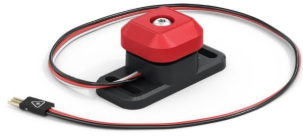
Below is a list of available blocks:
Bumper Switch pressed – Reports a Boolean indicating if the Bumper Switch is being pressed.
when Bumper Switch – Runs the attached stack of blocks when the Bumper Switch is pressed or released.
Bumper Switch pressed?#
The Bumper Switch pressed Boolean block reports whether or not a Bumper Switch is being pressed. This can be used to check if the robot bumps into other objects.
True — The Bumper Switch is being pressed.
False — The Bumper Switch is not being pressed
<[BumperA v] pressed?>
Parameter |
Description |
|---|---|
device |
Which Bumper Switch to use, configured in the Devices window. |
  when started
  [Display a message when the Bumper Switch is pressed.]
  wait until <[BumperA v] pressed?>
  print [Bumper Switch pressed!] on screen ▶
when Bumper Switch#
The when Bumper Switch hat block runs the attached stack of blocks when the selected Bumper Switch is pressed or released.
when [BumperA v] [pressed v] :: hat events
Parameter |
Description |
|---|---|
device |
Which Bumper Switch to use, configured in the Devices window. |
state |
When the attached stack of blocks will run: pressed will run when the Bumper Switch is pressed down, and released runs when the Bumper Switch is released. |
  when [BumperA v] [pressed v]  :: hat events
  [Display a message when the Bumper Switch is pressed.]
  print [Bumper Switch pressed!] on screen ▶