
Robot-Specific Python#
Introduction#
The Hero Bot, Moby, includes a motor group, Optical Sensor, Rotation Sensor, and Game Positioning System (GPS) Sensor.
All standard VEXcode VR methods are available for use in the V5 21-22 Tipping Point Playground.
Below is a list of all available Robot-specific methods:
Drivetrain – Move and turn the robot.
Actions
drive— Moves the robot forward or reverse forever.drive_for— Moves the robot forward or reverse for a specific distance.turn— Turns the robot left or right forever.turn_for— Turns the robot left or right for a specific number of degrees.turn_to_heading— Turns the robot to face a specific heading from -359 to 359 degrees.turn_to_rotation— Turns the robot to a specific rotation.stop— Stops the robot’s movement.
Mutators
set_heading— Changes the robot’s current heading to a new heading.set_rotation— Changes the robot’s current rotation to a new rotation.set_timeout— Sets how much time the robot will try to finish a movement.set_drive_velocity— Tells the robot how fast to drive.set_turn_velocity— Tells the robot how fast to turn.
Getters
heading— Returns the robot’s current heading from 0 to 359.99 degrees.rotation— Returns the robot’s current rotation.is_done— Returns whether the robot is finished moving, as a Boolean value.is_moving— Returns whether the robot is moving, as a Boolean value.velocity— Returns how fast the robot is driving.
Motion – Move and track the robot’s motor group.
Actions
spin— Spins a motor group forward or reverse forever.spin_for— Spins a motor group for a specific distance.spin_to_position— Spins a motor group to a specific position.stop— Stops a motor group from spinning.
Mutators
set_position— Changes the motor group’s current position to a new value.set_velocity— Tells a motor group how fast to spin.set_timeout— Sets how much time a motor group will try to finish a movement.
Getters
is_done— Returns whether the motor group is finished moving, as a Boolean value.is_spinning— Returns whether the motor group is spinning, as a Boolean value.position— Returns the motor group’s current position.velocity— Returns how fast the motor group is spinning.
Console – Print to the Console and monitor values.
Print
brain.screen.print— Displays text, numbers, or variable values in the Console.brain.screen.next_row— Moves the Console cursor to the start of the next row.brain.screen.clear_screen— Clears all rows from the Console.
Monitor
monitor_variable— Adds one or more predefined variables to the Monitor tab.monitor_sensor— Adds one or more sensor values to the Monitor tab.
Sensing - Utilize the robot’s various sensors.
Optical
is_near_object– Returns whether the Optical Sensor detects an object within range.color– Returns the color detected by the Optical Sensor.brightness– Returns the amount of light reflected from the object.hue– Returns the hue detected by the Optical Sensor.object_detected– Registers a function to be called when the Optical Sensor detects an object.object_lost– Registers a function to be called when the Optical Sensor loses an object.
Rotation
set_position– Sets the current position of the Rotation Sensor to a specific value.angle– Returns the current angle of the sensor between 0 and 359.99 degrees.position– Returns the total rotational position in degrees or turns.
GPS
x_position– Returns the current x coordinate of a GPS Sensor on the field.y_position– Returns the current y coordinate of a GPS Sensor on the field.heading– Returns the heading that the robot is currently facing based on the GPS Sensor’s readings from 0 to 359 degrees.
The examples on this page use the default Playground start position.
Drivetrain#
The drivetrain controls how the VR Robot drives and turns. The drivetrain can move forward or reverse, turn left or right, turn to headings, and track its rotation.
Actions#
drive#
drive moves the robot forward or reverse forever. The robot will continue to move until it is given another action, like turning or stopping.
Usage:
drivetrain.drive(direction)
Parameters |
Description |
|---|---|
|
The direction the robot moves: |
def main():
    # Drive forward then stop
    drivetrain.drive(FORWARD)
    wait(2, SECONDS)
    drivetrain.stop()

# VR threads — Do not delete
vr_thread(main)
drive_for#
drive_for moves the robot forward or reverse for a specific distance. The project will wait until the robot is done moving before the next line of code runs.
Usage:
drivetrain.drive_for(direction, distance, units, wait)
Parameters |
Description |
|---|---|
|
The direction the robot moves: |
|
The distance the robot drives. This can be an |
|
Optional. The distance unit: |
|
Optional. |
def main():
    # Drive forward and backward
    drivetrain.drive_for(FORWARD, 200, MM)
    drivetrain.drive_for(REVERSE, 200, MM)

# VR threads — Do not delete
vr_thread(main)
turn#
turn turns the robot left or right forever. The robot will continue to turn until it is given another action, like driving or stopping.
Usage:
drivetrain.turn(direction)
Parameters |
Description |
|---|---|
|
The direction the robot turns: |
def main():
    # Turn right and left, then stop
    drivetrain.turn(RIGHT)
    wait(2, SECONDS)
    drivetrain.turn(LEFT)
    wait(2, SECONDS)
    drivetrain.stop()

# VR threads — Do not delete
vr_thread(main)
turn_for#
turn_for turns the robot left or right for a specific number of degrees. The turn is relative to the current position of the robot. The project will wait until the robot is done turning before the next line of code runs.
Usage:
drivetrain.turn_for(direction, angle, units, wait)
Parameters |
Description |
|---|---|
|
The direction the robot turns: |
|
The number of degrees the robot turns. This can be an |
|
Optional. The rotation unit: |
|
Optional. |
def main():
    # Turn the robot right and left
    drivetrain.turn_for(RIGHT, 90, DEGREES)
    wait(1, SECONDS)
    drivetrain.turn_for(LEFT, 90, DEGREES)

# VR threads — Do not delete
vr_thread(main)
turn_to_heading#
A heading is the direction the robot is facing, measured in degrees. turn_to_heading turns the robot to face a specific heading from -359 to 359 degrees. The robot will turn the shortest direction to reach the target heading.
The robot’s starting heading is 0 degrees.
The project will wait until the robot is done turning before the next line of code runs.
Usage:
drivetrain.turn_to_heading(angle, units, wait)
Parameters |
Description |
|---|---|
|
The direction the robot should face, in degrees. This can be an |
|
Optional. The rotation unit: |
|
Optional. |
def main():
    # Turn to face the cardinal directions
    drivetrain.turn_to_heading(90, DEGREES)
    wait(1, SECONDS)
    drivetrain.turn_to_heading(180, DEGREES)
    wait(1, SECONDS)
    drivetrain.turn_to_heading(270, DEGREES)
    wait(1, SECONDS)
    drivetrain.turn_to_heading(0, DEGREES)

# VR threads — Do not delete
vr_thread(main)
turn_to_rotation#
turn_to_rotation turns the robot to a specific rotation.
Rotation is how much the robot has turned, measured in degrees. At the beginning of a project, the rotation value is set to 0 degrees. Rotation can also be set using the set_rotation method.
Rotation values are absolute. This means the direction of the turn depends on the robot’s current rotation. Turning right increases the rotation, and turning left decreases the rotation.
For example, if the robot starts at 0 degrees and you turn to a rotation of 720 degrees, it will turn right twice. If you then turn to a rotation of 360 degrees, it will turn left once, because 360 is less than 720.
The project will wait until the robot is done turning before the next line of code runs.
Usage:
drivetrain.turn_to_rotation(angle, units, wait)
Parameters |
Description |
|---|---|
|
The rotation value, in degrees, that the robot will turn to. This can be an |
|
Optional. The rotation unit: |
|
Optional. |
def main():
    # Turn left, then spin in a circle
    # clockwise and face right
    drivetrain.turn_to_rotation(-90, DEGREES)
    wait(1, SECONDS)
    drivetrain.turn_to_rotation(450, DEGREES)

# VR threads — Do not delete
vr_thread(main)
stop#
stop stops the robot’s movement.
Usage:
drivetrain.stop()
Parameters |
Description |
|---|---|
This method has no parameters. |
def main():
    # Drive forward then stop
    drivetrain.drive(FORWARD)
    wait(2, SECONDS)
    drivetrain.stop()

# VR threads — Do not delete
vr_thread(main)
Mutators#
set_heading#
A heading is the direction the robot is facing, measured in degrees. set_heading changes the robot’s current heading to a new heading value.
For example, if the robot has turned to face right, setting the heading to 0 degrees makes that right-facing position the new 0 degrees. Then the robot can turn to other positions based on that new heading.
Usage:
drivetrain.set_heading(heading, units)
Parameters |
Description |
|---|---|
|
The heading value, in degrees, to set for the robot. This can be an |
|
Optional. The heading unit: |
def main():
    # Face the new 0 degrees
    drivetrain.set_heading(90, DEGREES)
    drivetrain.turn_to_heading(0, DEGREES)

# VR threads — Do not delete
vr_thread(main)
set_rotation#
Rotation is how much the robot has turned, measured in degrees. At the beginning of a project, the rotation value is set to 0 degrees. set_rotation changes the robot’s current rotation to a new value.
For example, if the robot has made two full turns to the right, its rotation value will be 720 degrees. Setting the rotation to 0 degrees will reset that rotation from 720 to 0 degrees. Then the robot can turn to rotations based on that new value.
Usage:
drivetrain.set_rotation(rotation, units)
Parameters |
Description |
|---|---|
|
The rotation value, in degrees, to set for the robot. This can be an |
|
Optional. The rotation unit: |
def main():
    # Spin counterclockwise two times
    drivetrain.set_rotation(720, DEGREES)
    drivetrain.turn_to_rotation(0, DEGREES)

# VR threads — Do not delete
vr_thread(main)
set_timeout#
set_timeout sets how much time the robot will try to finish a movement. If the robot cannot finish in that time, it will stop trying and move on to the next line of code. This keeps the robot from getting stuck on a movement.
Usage:
drivetrain.set_timeout(value, units)
Parameters |
Description |
|---|---|
|
The amount of time the robot can try to finish a movement. This can be a positive |
|
The time unit: |
def main():
    # Turn right after driving forward
    drivetrain.set_timeout(1, SECONDS)
    drivetrain.drive_for(FORWARD, 25, INCHES)
    drivetrain.turn_for(RIGHT, 90)

# VR threads — Do not delete
vr_thread(main)
set_drive_velocity#
set_drive_velocity tells the robot how fast to drive. A higher percentage makes the robot drive faster and a lower percentage makes the robot drive slower.
Every project begins with the robot driving at 50% velocity by default.
Note: A higher velocity makes the robot drive faster, but it may be less precise. A lower velocity makes the robot drive slower, but it can be more precise.
Usage:
drivetrain.set_drive_velocity(velocity, units)
Parameters |
Description |
|---|---|
|
The velocity to drive with from 0% to 100%. This can be an |
|
Optional. The velocity unit: |
def main():
    # Drive forward at different velocities
    # Default velocity
    drivetrain.drive_for(FORWARD, 150, MM)
    wait(1, SECONDS)
    # Drive slower
    drivetrain.set_drive_velocity(20, PERCENT)
    drivetrain.drive_for(FORWARD, 150, MM)
    wait(1, SECONDS)
    # Drive faster
    drivetrain.set_drive_velocity(100, PERCENT)
    drivetrain.drive_for(FORWARD, 150, MM)

# VR threads — Do not delete
vr_thread(main)
set_turn_velocity#
set_turn_velocity tells the robot how fast to turn. A higher percentage makes the robot turn faster and a lower percentage makes the robot turn slower.
Every project begins with the robot turning at 50% velocity by default.
Note: A higher velocity makes the robot turn faster, but it may be less precise. A lower velocity makes the robot turn slower, but it can be more precise.
Usage:
drivetrain.set_turn_velocity(velocity, units)
Parameters |
Description |
|---|---|
|
The velocity to turn with from 0% to 100%. This can be an |
|
Optional. The velocity unit: |
def main():
    # Turn at different velocities
    # Default velocity
    drivetrain.turn_for(RIGHT, 120, DEGREES)
    wait(1, SECONDS)
    # Turn slower
    drivetrain.set_turn_velocity(20, PERCENT)
    drivetrain.turn_for(RIGHT, 120, DEGREES)
    wait(1, SECONDS)
    # Turn faster
    drivetrain.set_turn_velocity(100, PERCENT)
    drivetrain.turn_for(RIGHT, 120, DEGREES)

# VR threads — Do not delete
vr_thread(main)
Getters#
heading#
A heading is the direction the robot is facing, measured in degrees. heading returns the robot’s current heading from 0 to 359.99 degrees.
The robot’s starting heading is 0 degrees.
Usage:
drivetrain.heading(units)
Parameters |
Description |
|---|---|
|
Optional. The heading unit: |
def main():
    # Display the heading after turning
    drivetrain.turn_for(RIGHT, 450, DEGREES)
    brain.screen.print("Heading: ")
    brain.screen.print(drivetrain.heading(DEGREES))

# VR threads — Do not delete
vr_thread(main)
rotation#
Rotation is how much the robot has turned, measured in degrees. At the beginning of a project, the rotation value is set to 0 degrees. rotation returns the robot’s current rotation.
Turning right increases the rotation, and turning left decreases the rotation. For example, making two full turns to the right will return a rotation of 720 degrees.
Usage:
drivetrain.rotation(units)
Parameters |
Description |
|---|---|
|
Optional. The rotation unit: |
def main():
    # Display the rotation after turning
    drivetrain.turn_for(RIGHT, 450, DEGREES)
    brain.screen.print("Rotation: ")
    brain.screen.print(drivetrain.rotation(DEGREES))

# VR threads — Do not delete
vr_thread(main)
is_done#
is_done returns whether the robot is finished moving, as a Boolean value. This can be used to control the timing of other behaviors based on the robot’s movement.
True— The robot is finished moving.False— The robot is still moving.
This method works together with the following Drivetrain methods that have the wait parameter: drive_for, turn_for, turn_to_heading, and turn_to_rotation.
Usage:
drivetrain.is_done()
Parameters |
Description |
|---|---|
This method has no parameters. |
is_moving#
is_moving returns whether the robot is moving, as a Boolean value. This can be used to control the timing of other behaviors based on the robot’s movement.
True— The robot is moving.False— The robot is not moving.
Usage:
drivetrain.is_moving()
Parameters |
Description |
|---|---|
This method has no parameters. |
velocity#
velocity returns how fast the robot is driving, as a percentage from -100% to 100%.
Usage:
drivetrain.velocity(units)
Parameters |
Description |
|---|---|
|
Optional. The velocity unit: |
Example
def main():
    # Display the velocity after driving
    drivetrain.drive_for(FORWARD, 150, MM)
    brain.screen.print("Velocity: ")
    brain.screen.print(drivetrain.velocity(PERCENT))
Motion#
Moby uses the fork motor group to raise and lower the forks so Rings and Mobile Goals can be transported and scored.
The direction descriptions explain how each direction moves the fork motor group on Moby.
Actions#
spin#
spin spins a motor group forward or reverse forever. The motor group will continue to spin until it is given another action, like spinning in a different direction or stopping.
Usage:
fork_motor_group.spin(direction)
Parameters |
Description |
|---|---|
|
The direction the motor group spins:
|
def main():
    # Spin the motor group forward then stop
    fork_motor_group.spin(FORWARD)
    wait(0.5, SECONDS)
    fork_motor_group.stop()

# VR threads — Do not delete
vr_thread(main)
spin_for#
spin_for spins a motor group for a specific distance. The spin is relative to the current position of the motor group. The project will wait until the motor group is done spinning before the next line of code runs.
Usage:
fork_motor_group.spin_for(direction, distance, units, wait)
Parameters |
Description |
|---|---|
|
The direction the motor group spins:
|
|
The distance the motor group spins. |
|
Optional. The distance unit: |
|
Optional.
|
def main():
    # Spin the motor group forward then stop
    fork_motor_group.spin_for(FORWARD, 360, DEGREES)

# VR threads — Do not delete
vr_thread(main)
spin_to_position#
spin_to_position spins a motor group to a specific position.
A motor group’s position is how far it has spun, measured in DEGREES or TURNS. One turn is equal to 360 degrees. At the beginning of a project, the motor group position is set to 0 degrees. The motor group position can also be set using the set_position method.
Position values are absolute. This means the direction of the spin depends on the motor group’s current position.
For example, if the motor group starts at 0 degrees and spins to a position of 720 degrees, it will spin forward two turns. If it then spins to a position of 360 degrees, it will spin reverse one turn, because 360 is less than 720.
Usage:
fork_motor_group.spin_to_position(angle, units, wait)
Parameters |
Description |
|---|---|
|
The position value the motor group will spin to. |
|
Optional. The position unit: |
|
Optional.
|
def main():
    # Spin the motor group forward then stop
    fork_motor_group.spin_to_position(55, DEGREES)

# VR threads — Do not delete
vr_thread(main)
stop#
stop stops a motor group from spinning.
Usage:
fork_motor_group.stop()
Parameters |
Description |
|---|---|
This method has no parameters. |
def main():
    # Spin the motor group forward then stop
    fork_motor_group.spin(FORWARD)
    wait(0.5, SECONDS)
    fork_motor_group.stop()

# VR threads — Do not delete
vr_thread(main)
Mutators#
set_position#
A motor group’s position is how far it has spun, measured in DEGREES or TURNS. One turn is equal to 360 degrees. set_position changes the motor group’s current position to a new value.
For example, if a motor group has spun to 180 degrees, setting the position to 0 degrees will reset that position from 180 to 0 degrees. Then the motor group can spin to positions based on that new value.
Usage:
fork_motor_group.set_position(position, units)
Parameters |
Description |
|---|---|
|
The position value to set for the motor group. |
|
Optional. The position unit: |
def main():
    # Spin the motor group forward then stop
    fork_motor_group.set_position(90, DEGREES)
    fork_motor_group.spin_to_position(0, DEGREES)

# VR threads — Do not delete
vr_thread(main)
set_velocity#
set_velocity tells a motor group how fast to spin. A higher percentage makes the motor group spin faster and a lower percentage makes the motor group spin slower.
Every project begins with each motor group spinning at 50% velocity by default.
Note: A higher velocity makes the motor group spin faster, but it may be less precise. A lower velocity makes the motor group spin slower, but it can be more precise.
Usage:
fork_motor_group.set_velocity(velocity, units)
Parameters |
Description |
|---|---|
|
The velocity to spin with from 0% to 100%. This can be an |
|
The velocity unit: |
def main():
    # Spin the motor group forward then stop
    fork_motor_group.set_velocity(75, PERCENT)
    fork_motor_group.spin_to_position(180, DEGREES)

# VR threads — Do not delete
vr_thread(main)
set_timeout#
set_timeout sets how much time a motor group will try to finish a movement. If the motor group cannot finish in that time, it will stop trying and move on to the next line of code. This keeps the motor group from getting stuck on a movement.
Usage:
fork_motor_group.set_timeout(value, units)
Parameters |
Description |
|---|---|
|
The amount of time the motor group can try to finish a movement. This can be a positive |
|
The time unit: |
def main():
    # Spin the motor group forward then stop
    fork_motor_group.set_timeout(2, SECONDS)
    fork_motor_group.spin_to_position(270, DEGREES)

# VR threads — Do not delete
vr_thread(main)
Getters#
is_done#
is_done returns whether the motor group is finished moving, as a Boolean value. This can be used to control the timing of other behaviors based on the motor group’s movement.
True— The motor group is finished moving.False— The motor group is still moving.
This method works together with the following Motion methods that have the wait parameter: spin_for and spin_to_position.
Usage:
fork_motor_group.is_done()
Parameters |
Description |
|---|---|
This method has no parameters. |
is_spinning#
is_spinning returns whether the motor group is spinning, as a Boolean value. This can be used to control the timing of other behaviors based on the motor group’s movement.
True— The motor group is spinning.False— The motor group is not spinning.
This method works together with the following Motion methods that have the wait parameter: spin_for and spin_to_position.
Usage:
fork_motor_group.is_spinning()
Parameters |
Description |
|---|---|
This method has no parameters. |
position#
A motor group’s position is how far it has spun, measured in DEGREES or TURNS. One turn is equal to 360 degrees. position returns the motor group’s current position.
At the beginning of a project, the motor group position is set to 0 degrees. If the motor group spins one full turn forward, the position will be 360 degrees or 1 turn. If the motor group spins the other direction, the position will be negative.
Usage:
fork_motor_group.position(units)
Parameters |
Description |
|---|---|
|
The unit to return the motor group position in: |
velocity#
velocity returns how fast the motor group is spinning.
A positive value means the motor group is spinning forward. A negative value means the motor group is spinning in reverse.
Usage:
fork_motor_group.velocity(units)
Parameters |
Description |
|---|---|
|
The velocity unit to return: |
Console#
The Console displays text, numbers, and variable values while a project is running. Console methods can also move the cursor to a new row, clear the Console, and add variables or sensor values to the Monitor tab.
Print#
brain.screen.print#
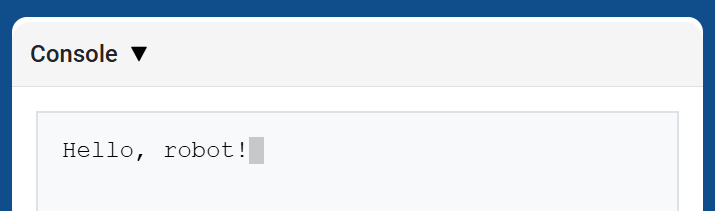
brain.screen.print displays text, numbers, or variable values in the Console using the current cursor position. It behaves like print on the Console API page.
Use brain.screen.next_row when you want the next printed value to start on a new row.
Usage:
brain.screen.print(value)
Parameters |
Description |
|---|---|
|
The text, number, or variable value to display in the Console. |
def main():
    # Display a message in the Console
    brain.screen.print("Hello, robot!")

# VR threads — Do not delete
vr_thread(main)
brain.screen.next_row#
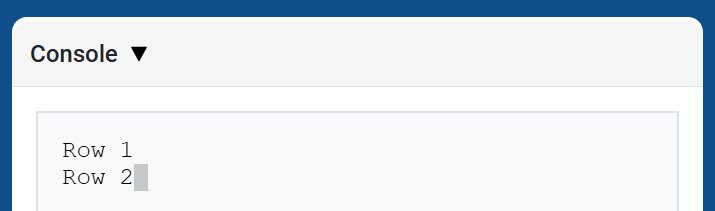
brain.screen.next_row moves the cursor to column 1 on the next row in the Console. The next value printed will appear on that row.
Usage:
brain.screen.next_row()
Parameters |
Description |
|---|---|
This method has no parameters. |
def main():
    # Print on two rows
    brain.screen.print("Row 1")
    brain.screen.next_row()
    brain.screen.print("Row 2")

# VR threads — Do not delete
vr_thread(main)
brain.screen.clear_screen#
brain.screen.clear_screen clears all rows from the Console and moves the cursor back to Row 1.
Usage:
brain.screen.clear_screen()
Parameters |
Description |
|---|---|
This method has no parameters. |
def main():
    # Display text, then clear it after two seconds
    brain.screen.print("This will disappear...")
    wait(2, SECONDS)
    brain.screen.clear_screen()

# VR threads — Do not delete
vr_thread(main)
Monitor#
monitor_variable#
monitor_variable adds one or more predefined variables to the Monitor tab in VEXcode. This lets you watch a variable’s value change while a project is running.
Variables must be global for monitor_variable to monitor them successfully. Provide each variable name as a string.
Usage:
monitor_variable(“variable”)
monitor_variable(“variable1”, “variable2”)
Parameters |
Description |
|---|---|
|
The name of a predefined global variable to monitor, given as a string. To monitor more than one variable, separate each variable name with a comma. |
def main():
    # Monitor the amount of loops
    global loops
    monitor_variable("loops")

    # Drive in a square 3 times
    for loops in range(12):
        drivetrain.turn_for(RIGHT, 90, DEGREES)
        drivetrain.drive_for(FORWARD, 150, MM)

# VR threads — Do not delete
vr_thread(main)
monitor_sensor#
monitor_sensor adds one or more sensor values to the Monitor tab in VEXcode. This lets you watch sensor values change while a project is running.
Provide each sensor value as a string.
Usage:
monitor_sensor(“sensor”)
monitor_sensor(“sensor1”, “sensor2”)
Parameters |
Description |
|---|---|
|
The sensor value to monitor, given as a string. To monitor more than one sensor value, separate each sensor value with a comma. Supported sensor identifiers include:
|
def main():
    # Monitor the robot's heading
    monitor_sensor("drivetrain.heading")
    drivetrain.turn_for(RIGHT, 450, DEGREES)

# VR threads — Do not delete
vr_thread(main)
Sensing#
Optical#
is_near_object#
is_near_object returns a Boolean indicating whether or not the Optical Sensor detects an object within range.
True– The Optical Sensor detects an object.False– The Optical Sensor does not detect an object.
Usage:
optical.is_near_object()
Parameters |
Description |
|---|---|
This method has no parameters. |
color#
color returns an instance of a Color class, based on the detected hue value. These can be compared to predefined Color objects to create conditional statements.
Possible colors are:
NONERED- A hue value between 340° - 20°GREEN- A hue value between 80° - 140°BLUE- A hue value between 200° - 240°YELLOW- A hue value between 40° - 60°ORANGE- A hue value between 20° - 40°PURPLE- A hue value between 240° - 280°CYAN- A hue value between 140° - 200°
Note: The Optical Sensor is looking for hue ranges that match the specified color. For detecting specific hue ranges, see hue.
Usage:
optical.color()
Parameters |
Description |
|---|---|
This method has no parameters. |
brightness#
brightness returns the amount of light reflected from the object as a decimal (float) representing a percent.
A higher percentage means more light is reflected back to the Optical Sensor. A lower percentage means less light is reflected back.
Usage:
optical.brightness()
Parameters |
Description |
|---|---|
This method has no parameters. |
hue#
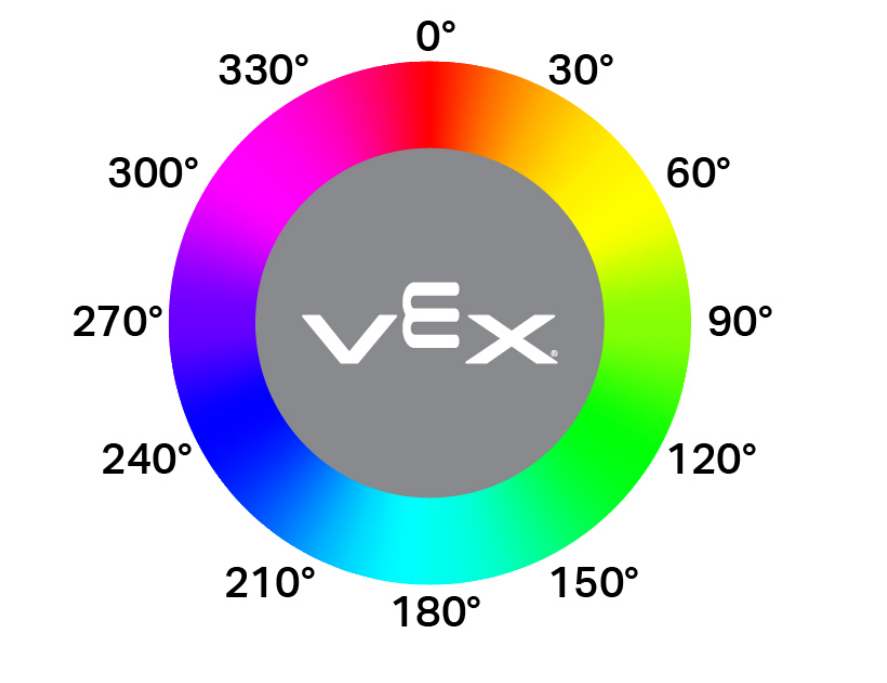
hue returns the hue value of the detected color as a decimal (float) from 0 to 359.
Hue is a way to describe color using numbers around a color wheel.
Usage:
optical.hue()
Parameters |
Description |
|---|---|
This method has no parameters. |
object_detected#
object_detected registers a function to be called whenever the Optical Sensor detects a new object.
Usage:
optical.object_detected(callback, arg)
Parameters |
Description |
|---|---|
|
A previously defined function that executes when the Optical Sensor detects a new object. |
|
Optional. A tuple containing arguments to pass to the callback function. See Using Functions with Parameters for more information. |
object_lost#
object_lost registers a function to be called whenever the Optical Sensor loses a detected object.
Usage:
optical.object_lost(callback, arg)
Parameters |
Description |
|---|---|
|
A previously defined function that executes when the Optical Sensor loses a detected object. |
|
Optional. A tuple containing arguments to pass to the callback function. See Using Functions with Parameters for more information. |
Rotation#
set_position#
set_position sets the current position of the Rotation Sensor to a value in degrees.
Usage:
rotation.set_position(position, units)
Parameters |
Description |
|---|---|
position |
The position to set the Rotation Sensor to. |
units |
Optional. The position unit: |
angle#
angle returns the current angle of the sensor as a float.
Usage:
rotation.angle(units)
Parameters |
Description |
|---|---|
units |
Optional. The angle unit:
|
position#
position returns the total rotational position.
Usage:
rotation.position(units)
Parameters |
Description |
|---|---|
units |
Optional. The position unit:
|
GPS#
x_position#
x_position returns the current x coordinate of a GPS (Game Positioning System™) Sensor on the field.
Usage:
gps.x_position(units)
Parameters |
Description |
|---|---|
units |
The unit of the offset value: |
y_position#
y_position returns the current y coordinate of a GPS (Game Positioning System™) Sensor on the field.
Usage:
gps.y_position(units)
Parameters |
Description |
|---|---|
units |
The unit of the offset value: |
heading#
heading returns the heading that the robot is currently facing based on the GPS (Game Positioning System™) Sensor’s readings from 0 to 359 degrees.
Usage:
gps.heading()
Parameters |
Description |
|---|---|
This method has no parameters. |