
控制器#
介绍#
VEX IQ(第一代)控制器配有按钮和两个摇杆。控制器模块可用于检测按钮按下、读取摇杆移动、启用或禁用已配置的控制器操作,或在控制器事件发生时运行模块。
第一代IQ大脑可以连接到第一代IQ控制器,也支持第二代IQ控制器。
已配置的控制器操作是指在“设备”菜单中设置的控制器行为。使用控制器启用/禁用模块可以在项目进行期间临时启用或禁用这些已配置的操作。
以下是所有模块的列表:
数值 — 检查控制器按钮状态或读取摇杆位置。
控制器按钮是否被按下? — 返回所选控制器按钮是否被按下。
控制器轴位置 — 返回沿选定轴的操纵杆位置。
操作 — 启用或禁用已配置的控制器操作,或在控制器输入更改时运行代码块。
价值观#
控制器按钮被按下了吗?#
**控制器按钮是否被按下?**布尔块返回所选控制器按钮是否被按下。
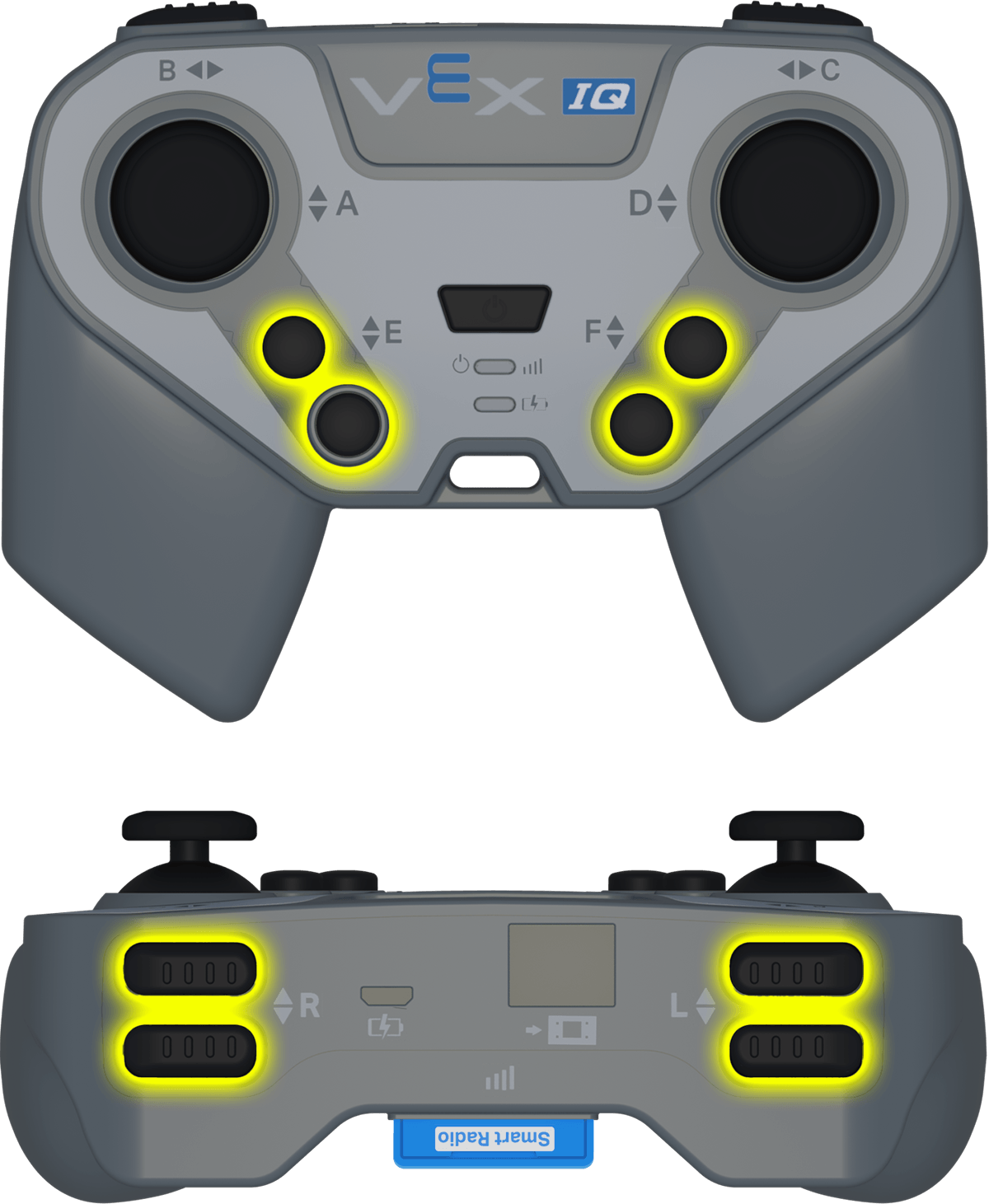
控制器按钮是否被按下?布尔块#
<Controller [E ▲ v] 按下了?>
范围 |
描述 |
|---|---|
按钮 |
要检查的按钮:
|
例子
启动时,按住 R ▲ 按钮向前行驶。#
当开始
[Move forward while the R ▲ button is pressed.]
永久循环
如果 <Controller [R ▲ v] 按下了?> 那么
驱动 [向前 v]
否则
驱动停止
结束
结束
控制器轴位置#
控制器轴位置报告器模块返回操纵杆沿选定轴的位置,数值范围为**-100到100**。
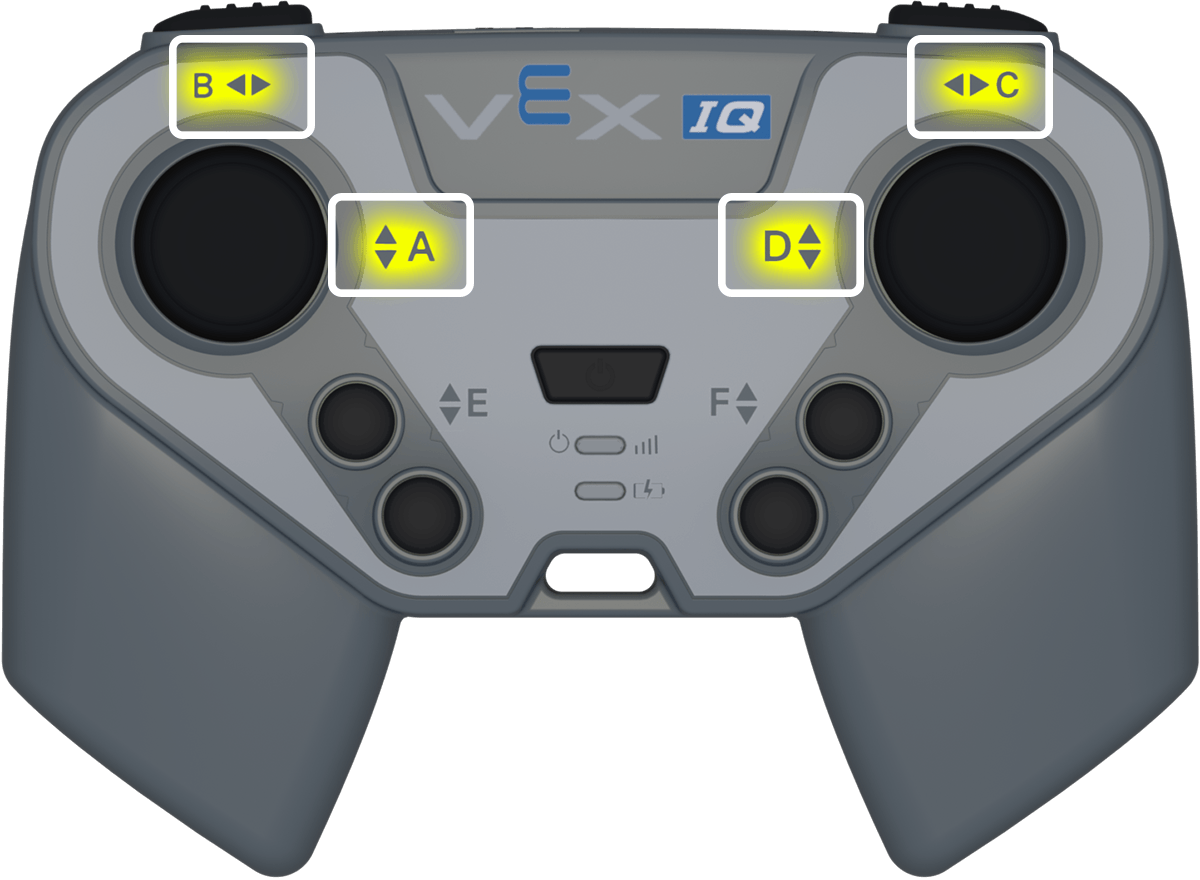
控制器轴位置报告块#
(Controller [A v] 位移)
范围 |
描述 |
|---|---|
轴 |
需要报告的操纵杆轴:
|
例子
启动后,根据右摇杆的位置旋转。#
当开始
[Turn depending on the position of the right joystick.]
永久循环
如果 <(Controller [C v] 位移) [math_less_than v] [0]> 那么
[左 v] 转
否则如果 <(Controller [C v] 位移) [math_greater_than v] [0]> 那么
[右 v] 转
否则
驱动停止
结束
结束
行动#
控制器启用/禁用#
控制器启用/禁用堆栈块启用或禁用在“设备”菜单中配置的控制器操作。
控制器启用/禁用堆栈块#
遥控器 [停用 v]
范围 |
描述 |
|---|---|
状态 |
控制器配置的操作状态:禁用或启用。 |
例子
启动时,禁用已配置的控制器操作,同时机器人向前行驶。#
当开始
[Disable controller configured actions until the drive movement is done.]
遥控器 [停用 v]
驱动 [向前 v] (6) [英寸 v] ▶
遥控器 [启用 v]
当控制器按钮#
当按下或释放选定的控制器按钮时,当控制器按钮 Hat 模块会运行附加的堆栈。
当控制器按钮 Hat block 时#
当Controller按键 [E ▲ v] [按下 v]
范围 |
描述 |
|---|---|
按钮 |
要检查的按钮:
|
按钮状态 |
触发附加堆栈的按钮事件:按下或释放。 |
例子
按下 R ▲ 按钮,机器人向右旋转 90 度。#
当Controller按键 [R ▲ v] [按下 v]
[Turn when the R ▲ button is pressed.]
[右 v] 转 (90) 度 ▶
当控制器轴发生变化时#
当控制器轴改变时,当控制器轴改变时 Hat 模块会在操纵杆的位置沿选定轴改变时运行附加的堆栈。
当控制器轴改变时,帽块#
当Controller [A v] 轴改变
范围 |
描述 |
|---|---|
轴 |
需要检查的摇杆轴:
|
例子
当操纵杆沿控制器轴 C 的位置发生变化时,机器人向右旋转 90 度。#
当Controller [C v] 轴改变
[Turn when the joystick's position changes along axis C.]
[右 v] 转 (90) 度 ▶