
Controlador#
Introducción#
El controlador VEX IQ (1.ª generación) tiene botones y dos joysticks. Los bloques del controlador se pueden usar para comprobar si se han pulsado los botones, leer el movimiento de los joysticks, habilitar o deshabilitar las acciones configuradas del controlador o ejecutar bloques cuando se producen eventos en el controlador.
El módulo IQ (1.ª generación) puede conectarse a un controlador IQ (1.ª generación). También es compatible con un controlador IQ (2.ª generación).
Las acciones del controlador configuradas son comportamientos del controlador establecidos en el menú Dispositivos. Utilice el bloque habilitar/deshabilitar controlador para habilitar o deshabilitar temporalmente dichas acciones configuradas durante un proyecto.
A continuación se muestra una lista de todos los bloques:
Valores: comprueba el estado de los botones del mando o lee la posición del joystick.
¿Botón del controlador presionado? — Devuelve si se está presionando un botón seleccionado del controlador.
posición del eje del controlador — Devuelve la posición del joystick a lo largo de un eje seleccionado.
Acciones: Habilita o deshabilita las acciones del controlador configuradas, o ejecuta bloques cuando cambie la entrada del controlador.
controller enable/disable — Habilita o deshabilita las acciones del controlador configuradas en el menú Dispositivos.
cuando se presiona el botón del controlador — Ejecuta la pila adjunta cuando se presiona o se suelta un botón seleccionado.
cuando se cambia el eje del controlador — Ejecuta la pila adjunta cuando la posición de un joystick cambia a lo largo del eje seleccionado.
Valores#
¿Se pulsó el botón del mando?#
El bloque booleano ¿botón del controlador pulsado? devuelve si se está pulsando un botón del controlador seleccionado.
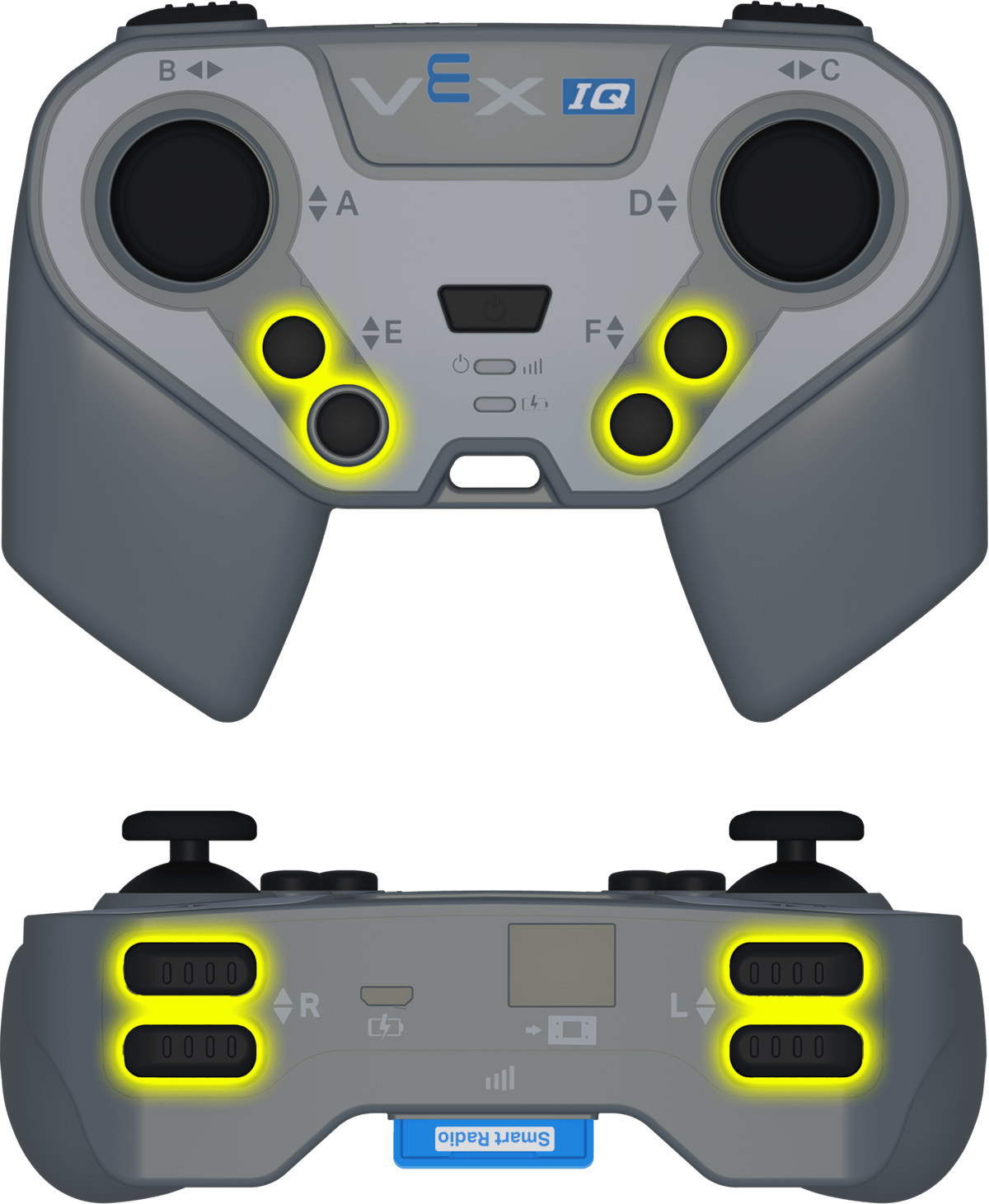
<¿botón [E ▲ v] del Control presionado?>
Parámetro |
Descripción |
|---|---|
botón |
El botón a comprobar:
|
Ejemplo
cuando inicie
[Move forward while the R ▲ button is pressed.]
por siempre
si <¿botón [R ▲ v] del Control presionado?> entonces
conducir [adelante v]
si no
detener conducción
fin
fin
posición del eje del controlador#
El bloque de informe de posición del eje del controlador devuelve la posición del joystick a lo largo de un eje seleccionado como un número de -100 a 100.
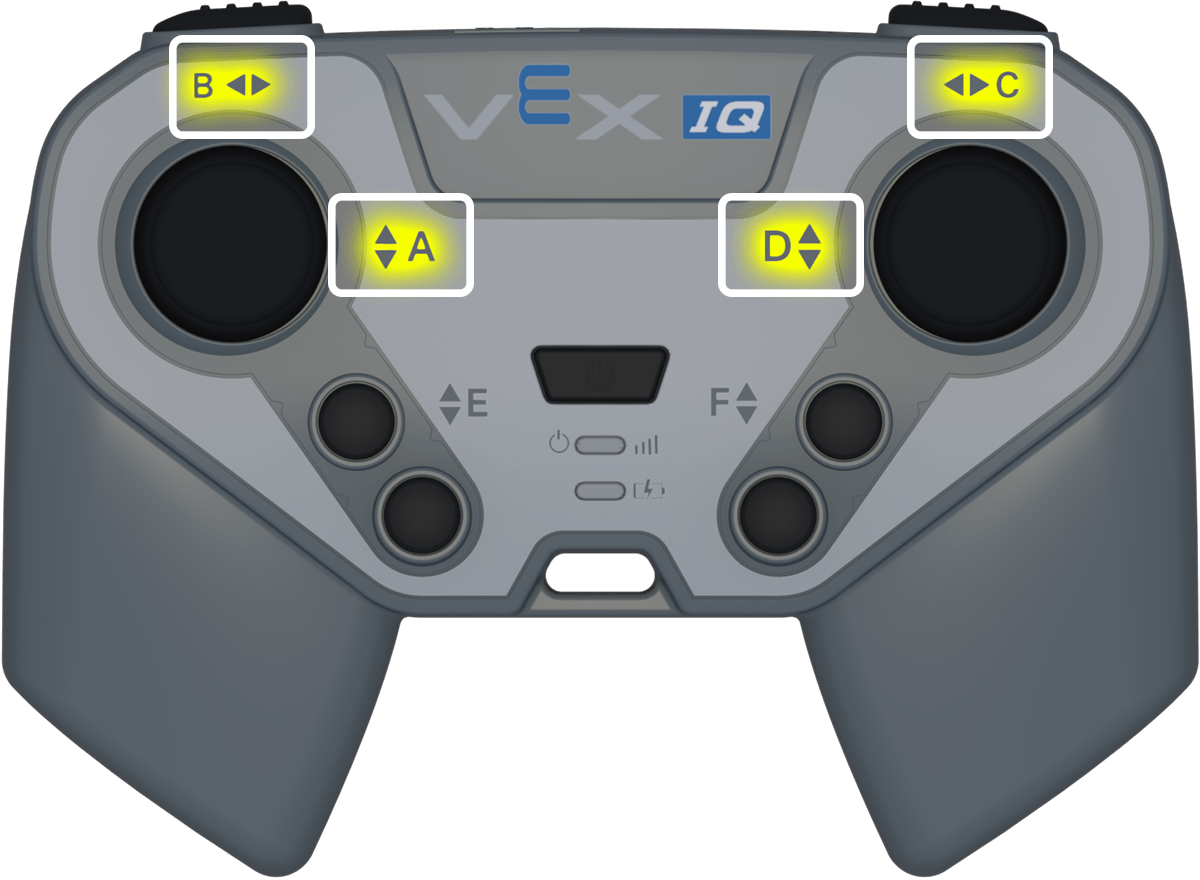
(Posición de eje [A v] del Control)
Parámetro |
Descripción |
|---|---|
eje |
Eje del joystick a informar:
|
Ejemplo
cuando inicie
[Turn depending on the position of the right joystick.]
por siempre
si <(Posición de eje [C v] del Control) [math_less_than v] [0]> entonces
girar [izquierda v]
si no, si <(Posición de eje [C v] del Control) [math_greater_than v] [0]> entonces
girar [derecha v]
si no
detener conducción
fin
fin
Comportamiento#
habilitar/deshabilitar controlador#
El bloque de pila habilitar/deshabilitar controlador habilita o deshabilita las acciones del controlador configuradas en el menú Dispositivos.
Control [Deshabilitar v]
Parámetro |
Descripción |
|---|---|
estado |
El controlador configuró el estado de acción: Deshabilitar o Habilitar. |
Ejemplo
cuando inicie
[Disable controller configured actions until the drive movement is done.]
Control [Deshabilitar v]
conducir [adelante v] por (6) [pulgadas v] ▶
Control [Habilitar v]
cuando el botón del controlador#
El bloque Hat when controller button ejecuta la pila adjunta cuando se presiona o se suelta un botón seleccionado del controlador.
cuando botón [E ▲ v] del Control [presionado v]
Parámetro |
Descripción |
|---|---|
botón |
El botón a comprobar:
|
estado del botón |
El evento del botón que activa la pila adjunta: presionado o soltado. |
Ejemplo
cuando botón [R ▲ v] del Control [presionado v]
[Turn when the R ▲ button is pressed.]
girar [derecha v] por (90) grados ▶
cuando se cambia el eje del controlador#
El bloque Hat cuando se cambia el eje del controlador ejecuta la pila adjunta cuando la posición de un joystick cambia a lo largo del eje seleccionado.
cuando eje [A v] del Control cambia
Parámetro |
Descripción |
|---|---|
eje |
Ejes del joystick a comprobar:
|
Ejemplo
cuando eje [C v] del Control cambia
[Turn when the joystick's position changes along axis C.]
girar [derecha v] por (90) grados ▶