
电机控制器 55#
介绍#
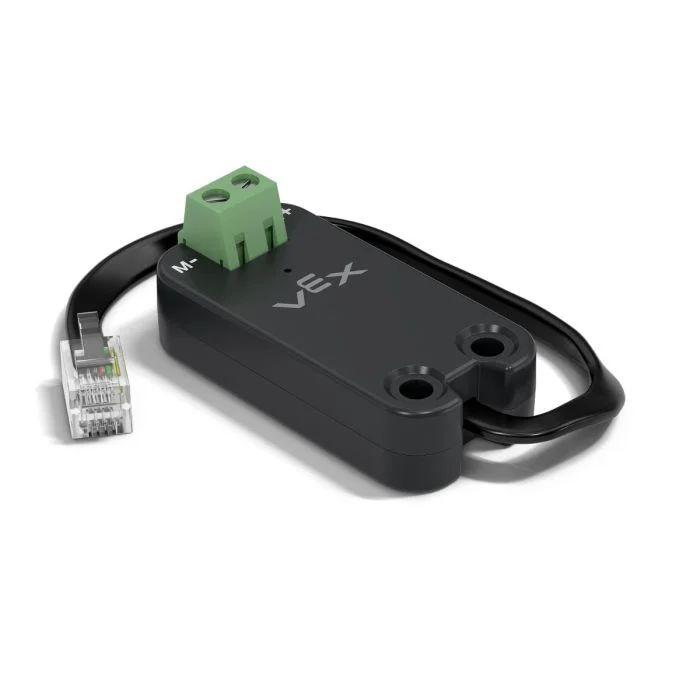
The motor55 class is used to control a VEX Motor Controller 55 connected to the V5 Brain. The Motor Controller 55 is a legacy motor controller designed to operate 2-wire DC motors.
类构造函数#
1 — Creates a
motor55object on the specified Smart Port.motor55( int32_t index );
2 — Creates a
motor55object on the specified Smart Port and changes the positive turning direction.motor55( int32_t index, bool reverse );
3 — Creates a
motor55object on the specified Smart Port, sets the maximum drive voltage, and changes the positive turning direction.motor55( int32_t index, double maxv, bool reverse );
类析构函数#
Destroys the motor55 object and releases associated resources.
~motor55();
参数#
范围 |
类型 |
描述 |
|---|---|---|
|
|
The Smart Port that the Motor Controller 55 is connected to, written as |
|
|
Determines whether the motor’s direction is reversed:
|
|
|
电机控制器 55 可以施加到电机的最大电压。 |
例子#
// Create the motor55 instance in Smart Port 1
motor55 Motor1 = motor55(PORT1);
成员功能#
The motor55 class includes the following member functions:
spin— Spins the motor in a specified direction.stop— Stops the motor.setVelocity— Tells the DC motor how fast to spin.setStopping— Sets the stopping behavior (coast or brake).setReversed— Sets whether the motor’s direction is reversed.current— Returns the motor’s electrical current.voltage— Returns the motor’s electrical voltage.temperature— Returns the motor temperature.getMotorType— Returns the detected motor/controller type.installed— Returns whether the Motor Controller 55 is detected on the specified Smart Port.
Before calling any motor55 member functions, an instance must be created, as shown below:
/* This constructor is required when using VS Code.
Motor Controller 55 configuration is generated automatically
in VEXcode using the Device Menu. Replace the values
as needed. */

// Create the motor55 instance in Smart Port 1
motor55 MC55_1 = motor55(PORT1);
spin#
使电机沿指定方向无限期旋转。
可用功能
1 — 使用 当前配置的速度 旋转。
void spin(
  directionType dir );
2 — 在指定电压下旋转。
void spin(
  directionType dir,
  double        voltage,
  voltageUnits  units );
参数
范围 |
类型 |
描述 |
|---|---|---|
|
|
The direction in which the motor spins: |
|
|
The voltage value applied to the motor. A negative value spins opposite the given |
|
|
The unit used to represent voltage:
|
返回值
此函数不返回值。
条笔记
该函数不等待,调用后程序立即继续执行。
The motor will continue spinning until
stopis called or anotherspinis used.
stop#
使用当前配置的制动模式 停止电机旋转。
可用功能
void stop();
参数
此函数不接受任何参数。
返回值
此函数不返回值。
条笔记
Stops the motor using the currently configured stopping mode set by
setStopping.
setVelocity#
控制直流电机转速。百分比越高,直流电机转速越快;百分比越低,直流电机转速越慢。
每个项目开始时,每个连接的直流电机默认以 50% 的速度旋转。
可用功能
void setVelocity(
    double       velocity,
    percentUnits units = percent );
参数
范围 |
类型 |
描述 |
|---|---|---|
|
|
The velocity to spin with from 0% to 100% when using |
|
|
The velocity unit:
|
返回值
此函数不返回值。
条笔记
Any subsequent call to
spinwithout a specified voltage will use this value.
setStopping#
设置电机停止时的行为方式。
可用功能
void setStopping(
    brakeType mode );
参数
范围 |
类型 |
描述 |
|---|---|---|
|
|
The stopping mode applied when
|
返回值
此函数不返回值。
条笔记
Any subsequent call to
stopwill use this stopping mode.The Motor Controller 55 supports
coastandbrakeonly.holdis not supported.
setReversed#
设置是否反转电机的旋转方向。
可用功能
void setReversed(
    bool value );
参数
范围 |
类型 |
描述 |
|---|---|---|
|
|
Whether the motor’s direction is reversed:
|
返回值
此函数不返回值。
条笔记
Calling
setReversedis the same as changing thereverseparameter in the constructor.
current#
current returns how much electrical current the DC motor is using. Current is the amount of electricity flowing through the DC motor. When returned in amps, current is reported from 0.0 to 1.2 A.
电流值越高,意味着直流电机消耗的电流越大。这种情况可能发生在直流电机提升重物、推动物体或试图在卡住时移动时。
这可以用来检查直流电机在运动过程中是否运转吃力。如果电流持续过高,电机可能会发热或功率利用率降低。
Available Functions1 — 返回直流电机的电流(单位为安培)。
double current(
  currentUnits units = amp );
Parameters2 — 返回直流电机电流占最大额定电流的百分比。
double current(
  percentUnits units );
范围 |
类型 |
描述 |
|---|---|---|
|
|
The unit used to represent current: |
|
|
Represents current as a percentage of the motor’s maximum rated current: |
Returns a double representing how much electrical current the DC motor is using in the specified units.
voltage#
返回提供给电机的电压。
Available Functionsdouble voltage(
voltageUnits units = volt );
参数
范围 |
类型 |
描述 |
|---|---|---|
|
|
The unit to represent the voltage:
|
返回值
Returns a double representing the motor’s electrical voltage in the specified units.
temperature#
temperature returns the temperature of the DC motor.
电机温度显示直流电机的温度。温度越高,说明直流电机在工作过程中温度越高。为了保持最佳性能,电机温度应保持在 55°C 以下。
如果直流电机过热,它会降低最大电流以保护自身。当温度达到 70°C 时,电机将停止运转,直到冷却下来。
这可以用来检查直流电机在重复运动、长时间运行或推动物体时是否过热。
Available Functions1 — 返回直流电机温度占最大工作温度的百分比。
double temperature(
  percentUnits units = percent );
2 — 返回以物理温度单位表示的直流电机温度。
double temperature(
  temperatureUnits units );
参数
范围 |
类型 |
描述 |
|---|---|---|
|
|
The unit used to represent DC motor temperature as a percentage:
|
|
|
The unit used to represent DC motor temperature in degrees:
|
返回值
Returns a double representing the DC motor’s temperature in the specified units.
条笔记
The operating temperature range for the motor is approximately
20°C(68°F) to70°C(158°F).
getMotorType#
返回检测到的电机/控制器类型。
可用功能
int32_t getMotorType();
参数
此函数不接受任何参数。
返回值
Returns an int32_t indicating the detected motor/controller type:
0— 11W Motor1— 5.5W Motor2— Motor Controller 55
installed#
返回电机控制器 55 是否连接到 V5 大脑。
Available Functionsbool installed();
参数
此函数不接受任何参数。
返回值
Returns a bool indicating if the Motor Controller 55 is connected.
true— The Motor Controller 55 is connected.false— The Motor Controller 55 is not connected.