
全球定位系统#
要使 GPS 命令出现在 VEXcode V5 中,必须在“设备”窗口中配置 GPS(游戏定位系统™)传感器。
更多信息,请参阅以下文章:
初始化 GPS 类#
This gps constructor creates an object of the gps Class in the specified port with the specified rotational offset.
范围 |
描述 |
|---|---|
|
A valid |
|
GPS传感器的旋转偏移量(以度为单位),范围从0.00到359.99。 |
// Construct a GPS Sensor "GPS1" with the gps class, using
// a 180 degree offset.
gps GPS1 = gps(PORT1, 180);
This gps constructor creates an object of the gps Class in the specified port with a specified origin position and rotational offset.
范围 |
描述 |
|---|---|
|
A valid |
|
GPS传感器相对于机器人原点(也称为参考点)的X坐标。 |
|
GPS传感器相对于机器人原点(也称为参考点)的Y坐标位置。 |
|
A valid |
|
GPS传感器的旋转偏移量(以度为单位),范围从0.00到359.99。 |
// Construct a GPS Sensor "GPS1" with the gps class, with
// the origin at (10, 10) and using a 180 degree offset.
gps GPS1 = gps(PORT1, 10.00, 10.00, mm, 180);
This GPS1 object will be used in all subsequent examples throughout this API documentation when referring to gps class methods.
类方法#
calibrate()#
The calibrate() method calibrates the GPS Sensor when the sensor has been configured as a part of a V5 Drivetrain. This will set the GPS’ configured heading (according to its angle offset) as the current heading of the Drivetrain.
在校准过程中,GPS传感器和传动系统必须保持静止。
在这个例子中,GPS传感器将进行校准,然后使用传感器的航向将机器人转向场地180度的航向。
// Turn to face the lower Field wall using data from the GPS Sensor.
DrivetrainGPS.calibrate()
Drivetrain.turnToHeading(180, degrees)
**返回值:**无。
isCalibrating()#
The isCalibrating() method returns true while the GPS Sensor is performing a requested recalibration, changing to false once recalibration has completed.
Returns: Returns true if GPS Sensor is still calibrating.
resetHeading()#
The resetHeading() method sets the heading of the GPS Sensor to 0.
**返回值:**无。
resetRotation()#
The resetRotation() method sets the rotation angle of the GPS Sensor to 0.
**返回值:**无。
setHeading()#
The setHeading(value, units) method sets the heading of the GPS Sensor to a new value.
参数 |
描述 |
|---|---|
|
要设置的旋转值。 |
|
Optional. A valid |
**返回值:**无。
setRotation()#
The setRotation(value, units) method sets the rotation of the GPS Sensor to a new value.
参数 |
描述 |
|---|---|
|
要设置的旋转值。 |
|
Optional. A valid |
**返回值:**无。
roll()#
The roll(units) method returns the roll of the GPS Sensor.
参数 |
描述 |
|---|---|
|
Optional. A valid |
返回值: GPS传感器的滚动值,单位为指定单位。
pitch()#
The pitch(units) method returns the pitch of the GPS Sensor.
参数 |
描述 |
|---|---|
|
Optional. A valid |
返回值: GPS 传感器的俯仰角,单位为指定单位。
yaw()#
The yaw(units) method returns the yaw of the GPS Sensor.
参数 |
描述 |
|---|---|
|
Optional. A valid |
返回值: GPS 传感器的偏航角,单位为指定单位。
xPosition()#
The xPosition(units) method returns the current x coordinate of a GPS Sensor on the Field.
参数 |
描述 |
|---|---|
|
Optional. A valid |
By default the xPosition() method returns the X coordinate location of a GPS Sensor.
如果在配置 GPS 传感器时添加了偏移量,则报告的 X 位置将是机器人上的参考点。
返回值: GPS传感器的x坐标,单位为指定单位。
在这个例子中,机器人(从场地右侧开始)向中心行驶,直到 X 轴位置小于 0 毫米。然后机器人停止行驶。
// Drive slowly towards the center of the Field.
Drivetrain.setDriveVelocity(20.0, percent);
Drivetrain.drive(forward);
// Stop driving when the GPS reports an x position near the center of the Field.
waitUntil((GPS20.xPosition(mm) < 0.0));
Drivetrain.stop();
yPosition()#
The yPosition(units) method returns the current y coordinate of a GPS Sensor on the Field.
参数 |
描述 |
|---|---|
|
Optional. A valid |
By default the yPosition() method returns the Y coordinate location of a GPS Sensor.
如果在配置 GPS 传感器时添加了偏移量,则报告的 Y 位置将是机器人上的参考点。
返回值: GPS传感器的y坐标,单位为指定单位。
// Get the current y coordinate for the GPS Sensor.
yPos = GPS1.yPosition();
在这个例子中,机器人(从场地顶部开始)向中心行驶,直到 Y 轴位置小于 0 毫米。然后机器人停止行驶。
// Drive slowly towards the center of the Field.
Drivetrain.setDriveVelocity(20.0, percent);
Drivetrain.drive(forward);
// Stop driving when the GPS reports an y position near the center of the Field.
waitUntil((GPS20.yPosition(mm) < 0.0));
Drivetrain.stop();
orientation()#
The orientation(axis, units) method returns the orientation for one axis of the gps.
参数 |
描述 |
|---|---|
|
A valid |
|
Optional. A valid |
x 轴或 roll 轴报告的值介于 -180 度到 +180 度之间,表示 GPS 传感器向左或向右倾斜时的方向。
y 轴(或俯仰轴)报告的值介于 -90 度到 +90 度之间,表示 GPS 传感器向前或向后倾斜时的方向。
z、yaw 轴报告的值介于 -180 度到 +180 度之间,表示 GPS 传感器绕垂直轴旋转时的方向。
返回值: 以指定单位表示的轴方向值。
// Get the orientation of the x axis on the GPS Sensor.
pitch = GPS1.orientation(xaxis);
heading()#
The heading(units) method returns the heading of a GPS Sensor on a Field based on the sensor’s readings from the GPS Field Code.
参数 |
描述 |
|---|---|
|
Optional. A valid |
The heading method reports a range from 0.00 to 359.99 degrees.
该航向对应于航场航向,其范围为顺时针方向的 0º 至 359.9º。0º 位于 12 点钟位置。
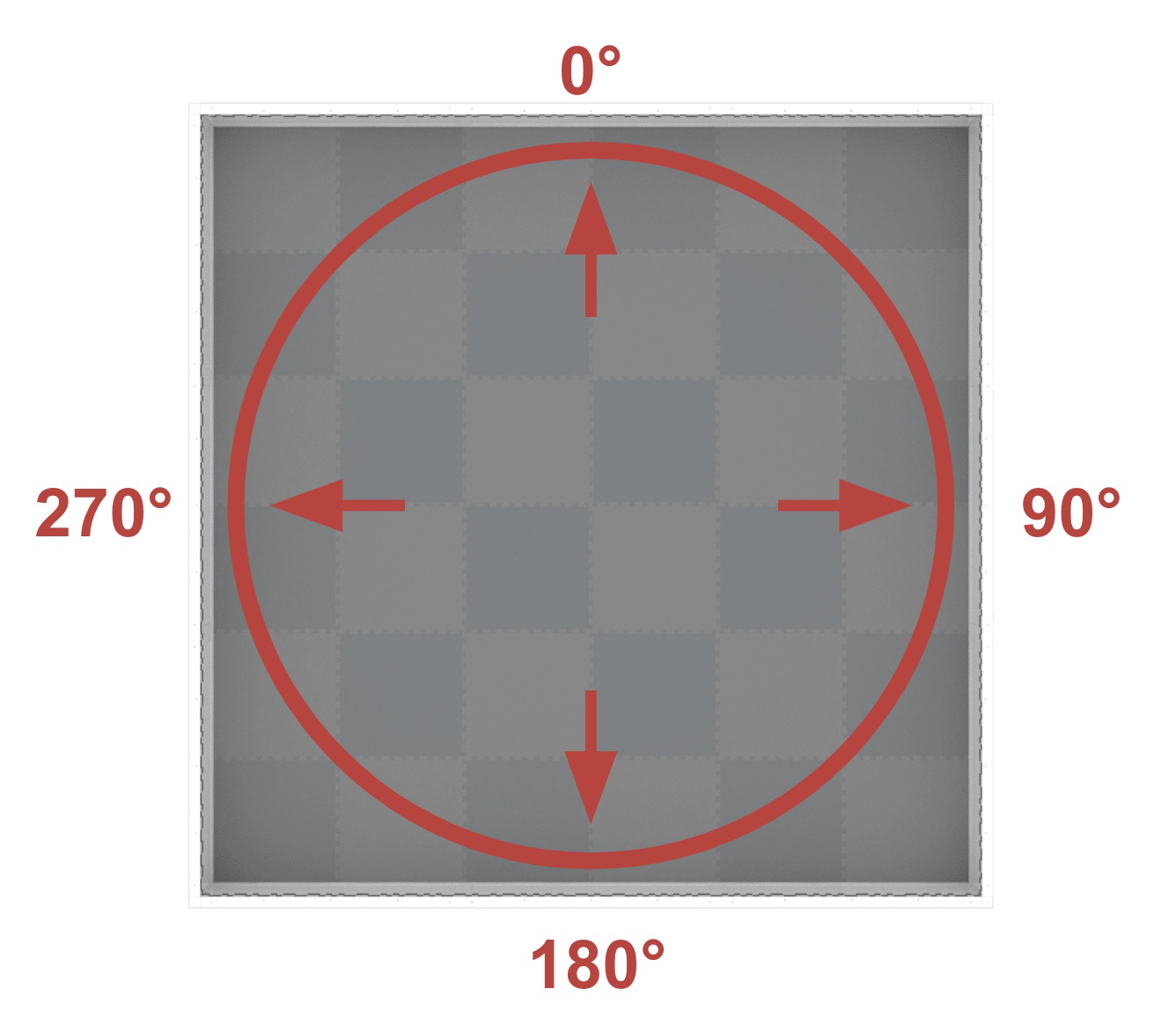
By default the heading method reports the heading of a GPS Sensor.
如果在配置 GPS 传感器时添加了角度偏移,则报告的航向将是机器人上的参考点。
返回值: GPS传感器的当前航向,单位为指定单位。
在这个例子中,机器人(初始方向朝向场地12点钟方向)转向场地右侧墙壁,直到航向角大于90度。然后机器人停止行驶。
// Turn slowly to face the right wall.
Drivetrain.setTurnVelocity(20.0, percent);
Drivetrain.turn(right);
// Stop turningwhen the GPS reports a heading greater than 90 degrees.
waitUntil((GPS20.heading() > 90.0));
Drivetrain.stop();
rotation()#
The rotation(units) method returns the current rotation of the GPS Sensor.
参数 |
描述 |
|---|---|
|
Optional. A valid |
返回值: GPS传感器的当前旋转角度,单位为指定单位。
// Get the current rotation for the GPS Sensor.
rotation = GPS1.rotation();
gyroRate()#
The gyroRate(axis, units) method returns the gyro rate for one axis of the GPS Sensor.
参数 |
描述 |
|---|---|
|
A valid |
|
Optional. A valid |
**返回值:**指定单位的轴的陀螺仪速率值。
// Get the gyro rate for the z axis of the GPS Sensor.
gyroRate = GPS1.gyroRate(zaxis);
acceleration()#
The acceleration(axis) method returns the acceleration for an axis of the GPS Sensor.
参数 |
描述 |
|---|---|
|
A valid |
返回值: 以重力单位表示的轴加速度值。
// Get the acceleration for the Zz axis of the GPS Sensor.
accel = GPS1.acceleration(zaxis);
quality()#
The quality() method reports a numerical value from 0-100 representing the current signal quality of a GPS Sensor.
报告值 |
描述 |
|---|---|
100 |
来自 GPS 传感器的所有报告位置和航向数据均有效。 |
约90 |
位置数据不再通过捕获 VEX 场代码的信息来计算,而是通过其他方式计算。 |
0-80 |
只有 GPS 传感器航向值是有效的,但随着时间的推移,GPS 传感器扫描的 VEX 场码不足以准确确定位置和航向信息,报告的信号质量将继续下降,直到 0,此时任何 GPS 传感器数据都将被冻结,不再有效。 |
返回值: GPS 传感器的质量,范围为 0 - 100。
In this code snippet, the signal quality will constantly be checked due to the while (true) loop. The TRUE branch will only run if the signal quality from the GPS Sensor is reporting values above 90, to ensure the GPS Sensor data being used in the project is valid.
while (true) {
    if (GPS20.quality() > 90.0) {} else {}
    wait(5, msec);
  }
  return 0;
setOrigin()#
The setOrigin(x, y, units) method sets the origin of the GPS Sensor.
参数 |
描述 |
|---|---|
|
GPS相对于机器人原点的X坐标。 |
|
GPS相对于机器人原点的Y坐标。 |
|
Optional. A valid |
**返回值:**无。
// Set the origin of the GPS Sensor.
GPS1.setOrigin(6, -6, inches);
setLocation()#
The setLocation(x, y, units, angle, units_r) method sets the X, Y coordinates, and heading of a GPS Sensor to a known value at the beginning of a project. This can be done to help reduce GPS data inaccuracies due a the sensor’s proximity to field walls when a project is started.
参数 |
描述 |
|---|---|
|
初始 x 坐标。 |
|
初始y坐标。 |
|
Optional. A valid |
|
可选。 机器人的初始航向。 |
|
Optional. A valid |
当 GPS 传感器离场地墙壁太近而无法读取场地代码时(例如,当机器人处于比赛场地上的起始位置时),如果代码依赖于 GPS 的坐标和航向数据,则经常会出现意外行为。
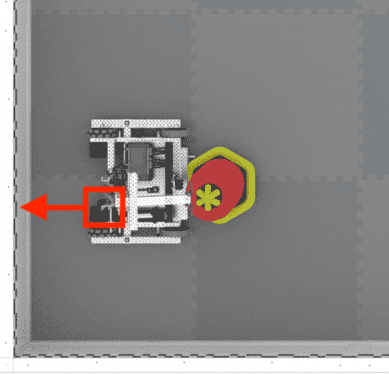
The x and y parameters are the X and Y coordinates of the reference point on your robot on the field in this known location. The reference point on your robot is the same location that was used to calculate the offsets when configuring the GPS Sensor.
The heading parameter is the heading of the reference point on your robot. Using the example image above, the GPS Sensor is mounted facing behind the robot, while the reference point is at the end of the arm on the robot. Because the reference point is facing the right wall (heading of 90), the heading value that should be input is 90.
**返回值:**无。
这里所示的示例将机器人手臂上的参考点位置设置为与机器人在场地上的位置相匹配。
// Wait so the GPS has time to initialize.
  wait(0.5, seconds)
  // Set the starting position to the bottom left corner of the Field facing the right wall.
  DrivetrainGPS.setLocation(-1200, -1200, mm, 90)
changed()#
The changed(callback) method registers a callback function for when the value for the GPS heading changes.
参数 |
描述 |
|---|---|
|
GPS航向改变时要调用的回调函数。 |
返回值: Event 类的一个实例。
// Define the headingChanged function with a void return
// type, showing it doesn't return a value.
void headingChanged() {
  // The Brain will print that the GPS Sensor's heading
  // changed on the Brain's screen.
  Brain.Screen.print("GPS heading changed");
}

int main() {
  // Initializing Robot Configuration. DO NOT REMOVE!
  vexcodeInit();

  // Turn the robot right.
  Drivetrain.turn(right);

  // Run headingChanged when the value of the GPS Sensor's
  // heading changes.
  GPS1.changed(headingChanged);
}
timestamp()#
The timestamp() method requests the timestamp of the last received status packet from the GPS Sensor.
返回值: 最后一个状态数据包的时间戳,以毫秒为单位的无符号 32 位整数。
installed()#
The installed() method checks if the GPS Sensor is installed.
Returns: true if the GPS Sensor is installed. false if it is not.