安慰#
介紹#
VEXcode IQ(第二代)控制台顯示在 VEXcode 的監視器視窗中。控制台方法可以在專案執行時顯示文字、數字和變數值。它們還可以清除控制台、讀取用戶輸入以及設定更改顏色後列印文字的顏色。
使用 VS Code 時,基於文字的控制台輸出會出現在終端機中,而不是 VEXcode 控制台中。
注意: 使用 VEXcode 控制台時,必須先連接到控制台串列埠,然後才能將任何輸出列印到控制台。
以下是所有方法的清單:
操作-輸出文字或清空控制台。
print— 在控制台或終端機中顯示文字、數字或變數值。clear_console— 清除控制台中的所有行。
Getter 方法-讀取使用者輸入。
input— 顯示可選的提示字串,等待使用者輸入,並將回應作為文字傳回。
Mutator — 格式化列印文字。
set_console_text_color— 設定控制台中列印的文字顏色。
行動#
print#
print 在控制台中顯示文字、數字或變數值。在 VS Code 中, print 在終端機中顯示輸出。
如果您希望列印訊息中包含項目中的值(例如分數、計時器或感測器讀數),請使用自訂字串格式。有關更多信息,請參閱字串格式頁面。
預設情況下,每個 print() 語句\n\n。這會在列印值後將遊標移至下一行。可選的 end 參數用於更改列印值之後新增的內容。
Usage:
print(value, end=“\n”)
範圍 |
描述 |
|---|---|
|
若要在控制台或終端機中顯示的文字、數字或變數值。 |
|
可選。在 |
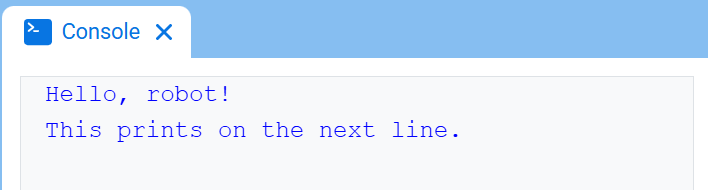
# Display two messages on separate lines
print("Hello, robot!")
print("This prints on the next line.")
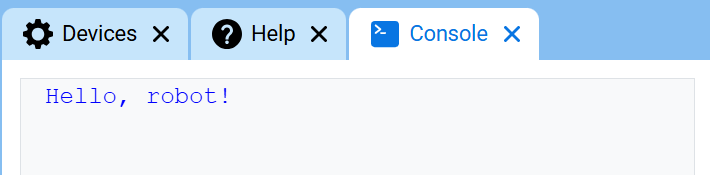
# Display two messages on the same line
print("Hello,", end=" ")
print("robot!")
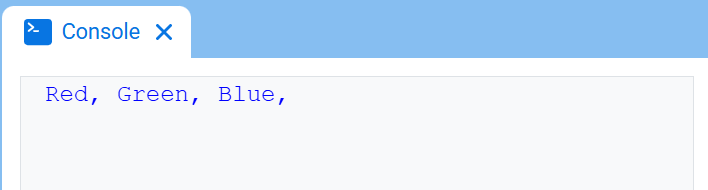
# Print three colors on one line, separated by commas
colors = ["Red", "Green", "Blue"]

for color in colors:
    print(color, end=", ")
轉義序列#
轉義序列是短代碼,可以用 print 來列印,以改變文字在控制台中的顯示方式。
大多數項目應該使用 set_console_text_color 來更改文字顏色,使用 clear_console 來清除控制台。當需要在 print 語句中直接執行這些操作時,轉義序列非常有用。 print
若要變更文字顏色,請列印 \033 ,後面接著顏色代碼。
顏色 |
轉義序列 |
|---|---|
紅色的 |
|
綠色的 |
|
藍色的 |
|
黑色的 |
|
白色的 |
|
黃色的 |
|
橘子 |
|
紫色的 |
|
青色 |
|
透明的 |
|
# Print VEXcode in red
print("\033[31mVEXcode")
# Set the Console text color to red before printing
print("\033[31m")
print("VEXcode")
若要使用轉義序列清除整個控制台,請列印 \033[2J。這也會將遊標移回第 1 行。
# Clear the Console after two seconds
print("VEXcode")
wait(2, SECONDS)
print("\033[2J")
clear_console#
clear_console 清除控制台中的所有行。
Usage:
clear_console()
參數 |
描述 |
|---|---|
此方法沒有參數。 |
# Display text, then clear it after two seconds
print("This will disappear...")
wait(2, SECONDS)
clear_console()
Getter#
input#
input 顯示一個可選的提示字串,等待使用者輸入回應,然後將該回應作為文字傳回。
項目會在執行到 input() 時暫停,直到在控制台中輸入回應。在 VS Code 中,回應會在終端機中輸入。
input() 是文本。要将响应用作数字,请先使用 int() 或 float()。
Usage:
input(prompt)
範圍 |
描述 |
|---|---|
|
可選。在等待回應之前,要在控制台或終端機中顯示的字串。如果未指定提示符,則在等待之前不顯示任何訊息。 |
# Ask for a name, then print a greeting
answer = input("What's your name?")
print("Hello, " + answer)
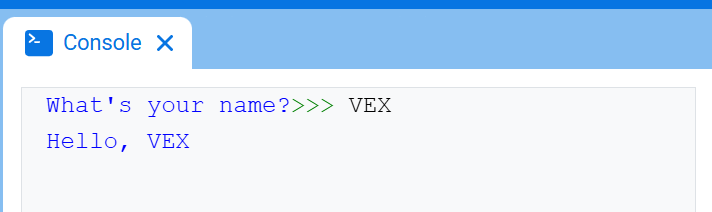
# Ask for a number, then use it in math
answer = input("Enter a number:")
number = float(answer)
print(number + 1)
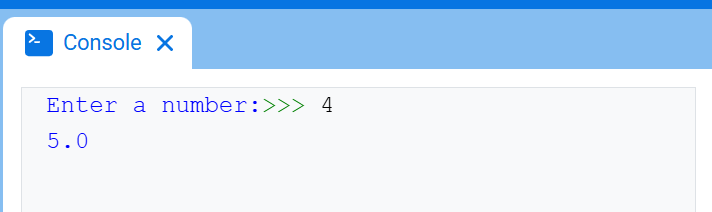
變異體#
set_console_text_color#
set_console_text_color 設定使用此方法後控制台中列印的文字顏色。在專案開始時,控制台文字顏色設定為 BLUE。
此方法可變更 VEXcode 控制台中的文字顏色。在 VS Code 中,不同終端對顏色的支援可能有所不同。
Usage:
set_console_text_color(color)
範圍 |
描述 |
|---|---|
|
The color to use for text printed in the Console:
|
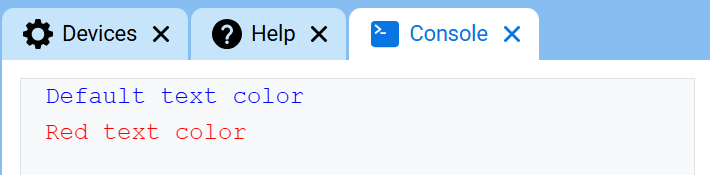
# Print text in different colors
print("Default text color")
set_console_text_color(Color.RED)
print("Red text color")