
螢幕#
介紹#
螢幕方法控制 IQ(第二代)大腦如何在其內建螢幕上顯示文字、數字和圖形。
大腦的繪圖解析度為 160 x 108 像素。
本頁面使用 brain 作為範例 Brain 名稱。請根據需要將其替換為您自己配置的名稱。
以下是所有方法的清單:
遊標列印 — 放置並列印文字。
print— 在目前遊標位置列印文字、數字或變數值。set_cursor— 將遊標移到指定的行和列。next_row— 將遊標移到下一行的第 1 列。clear_row— 清除一行文字。row— 傳回要列印文字的行。column— 傳回要列印文字的列。print_at— 在指定的 x 和 y 座標處列印文字、數字或變數值。get_string_width— 使用目前字體傳回字串的像素寬度。get_string_height— 使用目前字體傳回字串的像素高度。
修改器-更改螢幕設定、顏色和繪製行為。
clear_screen— 清除螢幕上的所有繪圖和文字。set_font— 設定列印文字的字型。set_pen_width— 設定繪製的線條和形狀輪廓的粗細。set_pen_color— 設定文字、像素、線條和形狀輪廓的顏色。set_fill_color— 設定繪製形狀和列印文字背景的填滿顏色。set_origin— 設定用於基於座標的列印和繪圖的原點。
繪製 — 在螢幕上新增圖形。
draw_pixel— 在座標處繪製一個像素。draw_line— 在兩點之間畫一條線。draw_rectangle— 繪製一個長方形。draw_circle— 畫一個圓。set_clip_region— 限制圖形和文字的顯示位置。render— 僅在呼叫時更新大腦的螢幕,顯示文字和圖形。
遊標列印#
print#
print 在 Brain 畫面上的目前 遊標位置 和 字型 處列印文字、數字或變數值。
Usage:
brain.screen.print(text, precision, opaque)
參數 |
描述 |
|---|---|
|
若要列印在螢幕上的文字、數字或變數值。 |
|
可選。顯示數字時要顯示的小數位數。必須以關鍵字參數的形式指定,例如: |
|
可選 |
# Display a message at the starting
# cursor position
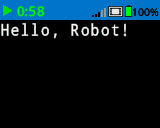
brain.screen.print("Hello, Robot!")
# Display a percentage with 4 decimal
# places and a blue background
brain.screen.set_fill_color(Color.BLUE)
brain.screen.print((42/100), precision = 4, opaque = True)
set_cursor#
set_cursor moves the cursor to a specific row and column on the Brain screen. The next print call will start printing at that location. How many rows and columns can comfortably fit depends on the selected font.
Monospaced fonts have characters that are all the same width, making text placement consistent. In contrast, proportional fonts vary in character width, so some letters take up more space than others. However, regardless of which type is used, set_cursor positions the cursor based on row and column size, not font style. The font size can be adjusted using set_font.
Usage:
brain.screen.set_cursor(row, column)
參數 |
描述 |
|---|---|
|
要將遊標移到的行。 |
|
要將遊標移到的列。 |
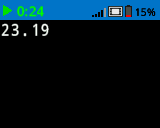
# Repeatedly print the Brain's timer at
# the top left of the screen
while True:
    brain.screen.print(brain.timer.time(SECONDS))
    brain.screen.next_row()
    wait(1, SECONDS)
    brain.screen.clear_screen()
    brain.screen.set_cursor(1, 1)
next_row#
next_row 將遊標移到 Brain 畫面上下一行的第 1 列。
Usage:
brain.screen.next_row()
參數 |
描述 |
|---|---|
此方法沒有參數。 |
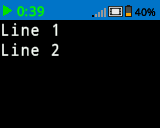
# Display two lines of text
brain.screen.print("Line 1")
brain.screen.next_row()
brain.screen.print("Line 2")
clear_row#
clear_row 清除大腦螢幕上的一行文字。
Usage:
brain.screen.clear_row(row, color)
參數 |
描述 |
|---|---|
排 |
可選。要清除的行。預設值為目前遊標所在行。 |
顏色 |
(可选)要应用于已清除行的颜色。选项包括:
|
# Display text on two rows
brain.screen.print("This text stays")
brain.screen.next_row()
brain.screen.print("This disappears")

# Wait 3 seconds before clearing
# only the second row
wait(3, SECONDS)
brain.screen.clear_row()
# Turn the 5th row green
brain.screen.clear_row(5, Color.GREEN)
row#
row 條傳回將以整數形式列印文字的行。
Usage:
brain.screen.row()
參數 |
描述 |
|---|---|
此方法沒有參數。 |
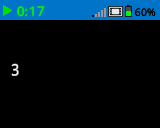
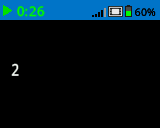
# Set cursor to (3,2) and print
# row number
brain.screen.set_cursor(3, 2)
brain.screen.print(brain.screen.row())
column#
column 傳回文字將以整數形式列印的列。
Usage:
brain.screen.column()
參數 |
描述 |
|---|---|
此方法沒有參數。 |
# Set cursor to (3,2) and print
# column number
brain.screen.set_cursor(3, 2)
brain.screen.print(brain.screen.column())
print_at#
print_at 在 Brain 畫面上,以目前設定的 font 和 origin 為參數,在指定的 x 和 y 座標處(以像素為單位)列印文字、數字或變數值。此方法忽略目前遊標位置。
Usage:
brain.screen.print_at(text, x, y, precision, opaque)
參數 |
描述 |
|---|---|
|
要列印的文字、數字或變數值。 |
|
要列印的 x 座標作為關鍵字參數,例如: |
|
要列印的 y 座標作為關鍵字參數,例如: |
|
可選。顯示數字時要顯示的小數位數。必須以關鍵字參數的形式指定,例如: |
|
可選 |
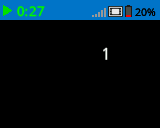
# Print the number 1 on the Brain's screen at position (100, 40)
brain.screen.print_at(1, x=100, y=40)
# Display 1/3 with 3 decimal places and a blue background
brain.screen.set_fill_color(Color.BLUE)
brain.screen.print_at((1/3), x=100, y=40, precision=3, opaque=True)
get_string_width#
get_string_width 傳回字串的寬度(以像素為單位),以整數形式表示,就像它在 Brain 螢幕上顯示的那樣。寬度會根據字串的長度和目前字體而變化。
Usage:
brain.screen.get_string_width(string)
參數 |
描述 |
|---|---|
|
待測量的繩子。 |
get_string_height#
get_string_height 傳回字串的高度(以像素為單位),以整數形式表示,就像它在 Brain 螢幕上顯示的那樣。高度會根據字串的長度和目前字體而變化。
Usage:
brain.screen.get_string_height(string)
參數 |
描述 |
|---|---|
|
待測量的繩子。 |
突變體#
clear_screen#
clear_screen 清除大腦螢幕上的所有圖形和文字。
Usage:
brain.screen.clear_screen(color)
參數 |
描述 |
|---|---|
|
可选。设置屏幕颜色。选项包括:
|
# Draw a circle and clear it after
# 2 seconds
brain.screen.draw_circle(80, 50, 20)
wait(2, SECONDS)
brain.screen.clear_screen()
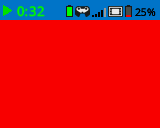
# Turn the screen red
brain.screen.clear_screen(Color.RED)
set_font#
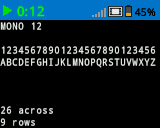
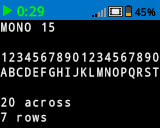
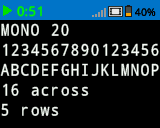
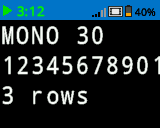
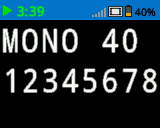
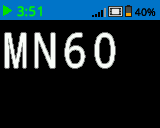
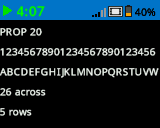
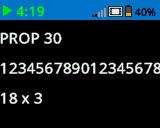
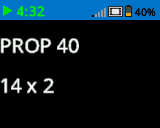
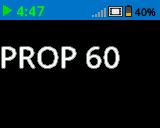
set_font 設定用於在 Brain 畫面上顯示文字的字型。此字型將會套用到所有使用 print 或 print_at 列印的文字。專案開始時的預設字體為 MONO20。
Usage:
brain.screen.set_font(fontname)
範圍 |
描述 |
|---|---|
|
將字體設定為以下選項之一:
|
|
|
|
|---|---|---|
|
|
|
|
|
|
|
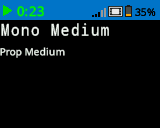
# Display two different fonts on
# two separate lines
brain.screen.set_font(FontType.MONO20)
brain.screen.print("Mono Medium")
brain.screen.next_row()
brain.screen.set_font(FontType.PROP20)
brain.screen.print("Prop Medium")
set_pen_width#
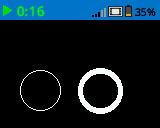
set_pen_width 設定繪製線條和形狀輪廓的粗細。
Usage:
brain.screen.set_pen_width(width)
範圍 |
描述 |
|---|---|
|
筆的寬度,以像素為單位,範圍從 0 到 32。 |
# Draw two circles with
# different pen widths
brain.screen.draw_circle(40, 70, 20)
brain.screen.set_pen_width(5)
brain.screen.draw_circle(100, 70, 20)
set_pen_color#
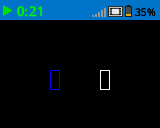
set_pen_color 設定文字、像素、線條和形狀輪廓的顏色。
Usage:
brain.screen.set_pen_color(color)
範圍 |
描述 |
|---|---|
|
(可选)要使用的笔和字体颜色。选项包括:
Color.YELLOW_GREEN |
# Draw two rectangles with
# different colors
brain.screen.draw_rectangle(100, 50, 10, 20)
brain.screen.set_pen_color(Color.BLUE)
brain.screen.draw_rectangle(50, 50, 10, 20)
set_fill_color#
set_fill_color 設定繪製形狀時所使用的填滿顏色。
Usage:
brain.screen.set_fill_color(color)
範圍 |
描述 |
|---|---|
|
(可选)要使用的填充颜色。选项包括:
|
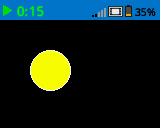
# Draw a yellow circle
brain.screen.set_fill_color(Color.YELLOW)
brain.screen.draw_circle(50, 50, 20)
set_origin#
set_origin 設定 Brain 螢幕上用於繪圖和基於座標的列印的原點。預設情況下,原點位於螢幕左上角。
Usage:
brain.screen.set_origin(x, y)
範圍 |
描述 |
|---|---|
|
若要設定為原點的新 x 座標,取值範圍為 0 到 159 之間的整數。 |
|
若要設定為原點的新 y 座標,取值範圍為 0 到 107 之間的整數。 |
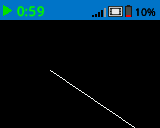
# Draw a line with the origin set to (50, 50)
brain.screen.set_origin(50, 50)
brain.screen.draw_line(1, 1, 159, 107)
畫#
draw_pixel#
draw_pixel 使用目前 筆顏色 在選取的 x 和 y 座標處繪製一個像素。
Usage:
brain.screen.draw_pixel(x, y)
範圍 |
描述 |
|---|---|
|
像素繪製位置的 x 座標,取值範圍為 0 到 159 之間的整數。 |
|
像素繪製位置的 y 座標,取值範圍為 0 到 107 之間的整數。 |
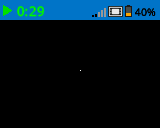
# Draw one pixel at the center
# of the screen
brain.screen.draw_pixel(80, 50)
draw_line#
draw_line 使用目前的 筆寬 和 筆顏色 從第一個螢幕座標 (x1, y1) 到第二個螢幕座標 (x2, y2) 繪製一條線。
x 和 y 座標使用預設原點 (0, 0),除非使用 set_origin 設定了不同的原點。
Usage:
brain.screen.draw_line(x1, y1, x2, y2)
範圍 |
描述 |
|---|---|
|
直線的起始 x 座標,取值範圍為 0 到 159 的整數。 |
|
直線的起始 y 座標,取值範圍為 0 到 107 的整數。 |
|
直線的終點 x 座標,取值範圍為 0 到 159 的整數。 |
|
直線的終點 y 座標,取值範圍為 0 到 107 的整數。 |
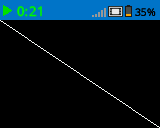
# Draw a line from the top left to
# bottom right of the screen
brain.screen.draw_line(0, 0, 159, 107)
draw_rectangle#
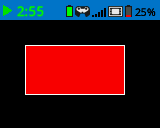
draw_rectangle draws a rectangle with its top-left corner at the selected (x, y) coordinate and a size determined by the given width and height, all measured in pixels. The rectangle’s outline is drawn using the current pen width and pen color. The interior is filled with the current fill color, unless the optional color parameter is used.
x 和 y 座標使用預設原點 (0,0),除非使用 set_origin 設定了不同的原點。
Usage:
brain.screen.draw_rectangle(x, y, width, height, color)
範圍 |
描述 |
|---|---|
|
矩形左上角的 x 座標,取值範圍為 0 到 159 的整數。 |
|
矩形左上角的 y 座標,取值範圍為 0 到 107 的整數。 |
|
矩形的寬度,以像素為單位。 |
|
矩形的高度,以像素為單位。 |
|
(可选)矩形的填充颜色。选项包括:
|
# Draw a red rectangle on the screen
brain.screen.draw_rectangle(25, 25, 100, 50, Color.RED)
draw_circle#
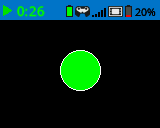
draw_circle draws a circle with its center at the selected (x, y) coordinate and a size determined by the given radius, all measured in pixels. The circle’s outline is drawn using the current pen width and pen color. The interior is filled with the current fill color, unless the optional color parameter is used.
x 和 y 座標使用預設原點 (0,0),除非使用 set_origin 設定了不同的原點。
Usage:
brain.screen.draw_circle(x, y, radius, color)
範圍 |
描述 |
|---|---|
|
圓心的 x 座標,取值範圍為 0 到 159 之間的整數。 |
|
圓心的 y 座標,取值範圍為 0 到 107 的整數。 |
|
圓的半徑,以像素為單位。 |
|
可选。圆圈的填充颜色。选项包括:
|
# Draw a green circle on the screen
brain.screen.draw_circle(80, 50, 20, Color.GREEN)
set_clip_region#
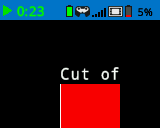
set_clip_region 定義了螢幕上的一個矩形區域,所有圖形和文字都將限制在該區域內。該區域以外的任何內容都不會顯示。
Usage:
brain.screen.set_clip_region(x, y, width, height)
範圍 |
描述 |
|---|---|
|
剪輯區域左上角的 x 座標,以 0 到 159 之間的整數或浮點數表示。 |
|
剪輯區域左上角的 y 座標,以 0 到 107 之間的整數或浮點數表示。 |
|
剪輯區域的寬度(以像素為單位)。 |
|
裁切區域的高度(以像素為單位)。 |
# Restrict text and drawings to a specific region
brain.screen.set_clip_region(0, 0, 120, 120)
brain.screen.draw_rectangle(60, 60, 100, 100, Color.RED)
brain.screen.print_at("Cut off!", x=60, y=60)
render#
render 為大腦螢幕啟用雙緩衝。呼叫後,任何繪圖命令(例如文字、形狀或圖像)都不會立即顯示在項目的其餘部分。相反,更新內容只有在再次使用 render 時才會顯示。這使得螢幕更新更加流暢和可控,但也意味著在 render 之前,螢幕內容將不可見。
Usage:
brain.screen.render()
參數 |
描述 |
|---|---|
此方法沒有參數。 |
# Render text after moving
brain.screen.render()
brain.screen.print("Render later...")
drivetrain.drive_for(FORWARD, 100, MM)
drivetrain.turn_for(RIGHT, 90, DEGREES)
brain.screen.render()