
Μάτι#
Εισαγωγή#
Ο αισθητήρας VEX GO Eye Sensor μπορεί να ανιχνεύσει αντικείμενα και χρώματα. Μπορεί επίσης να αναφέρει πόσο φως αντανακλάται πίσω στον αισθητήρα και την τιμή απόχρωσης του ανιχνευμένου χρώματος.
Ο αισθητήρας ματιού διαθέτει ένα φως που μπορεί να ενεργοποιηθεί ή να απενεργοποιηθεί για να βλέπει αντικείμενα και χρώματα πιο καθαρά. Ο αισθητήρας ματιού μπορεί επίσης να χρησιμοποιήσει ένα εύρος NEAR ή FAR για να ανιχνεύει αντικείμενα σε διαφορετικές αποστάσεις.
Ο Αισθητήρας Ματιού μπορεί να τοποθετηθεί σε διαφορετικές θέσεις ανάλογα με την έκδοση. Για παράδειγμα, η έκδοση Code Base 2.0 - Eye Forward έχει τον Αισθητήρα Ματιού στραμμένο προς τα εμπρός. Η έκδοση Code Base 2.0 - Eye Down, η έκδοση Code Base 2.0 - Eye + Electromagnet και η Super Code Base 2.0 έχουν τον Αισθητήρα Ματιού στραμμένο προς τα κάτω.
Για τα παρακάτω παραδείγματα, ο διαμορφωμένος αισθητήρας Eye ονομάζεται eyeΑυτό το όνομα χρησιμοποιείται στα παραδείγματα για την κλήση μεθόδων κλάσης Eye.
Υπάρχουν πολλοί τρόποι για να κωδικοποιήσετε τον αισθητήρα ματιών. Παρακάτω είναι μια λίστα με όλες τις μεθόδους ματιών:
Μεταλλαγμένοι παράγοντες — Προσαρμόστε τις ρυθμίσεις του αισθητήρα ματιών.
set_light— Ενεργοποιεί ή απενεργοποιεί το φως του αισθητήρα ματιού.set_range— Ορίζει την απόσταση στην οποία μπορεί να ανιχνεύσει ένα αντικείμενο ο αισθητήρας ματιού.set_light_power— Ορίζει το επίπεδο ισχύος φωτός του αισθητήρα ματιού.
Λήπτες — Επιστρέφουν ό,τι ανιχνεύει ο αισθητήρας ματιού.
get_color— Επιστρέφει το χρώμα που ανιχνεύεται από τον αισθητήρα ματιού.get_hue— Επιστρέφει την απόχρωση που ανιχνεύεται από τον αισθητήρα ματιού.get_brightness— Επιστρέφει τη φωτεινότητα που ανιχνεύεται από τον αισθητήρα ματιών.is_object_detected— Επιστρέφει εάν ο αισθητήρας ματιού ανιχνεύει ένα αντικείμενο εντός εμβέλειας.is_color_detected— Επιστρέφει εάν ο αισθητήρας ματιού ανιχνεύει ένα συγκεκριμένο χρώμα.
Μεταλλάκτες#
set_light#
set_light ενεργοποιεί ή απενεργοποιεί το φως του αισθητήρα ματιού.
Usage:
eye.set_light(state)
Παράμετροι |
Περιγραφή |
|---|---|
|
Η κατάσταση φωτισμού του αισθητήρα ματιού: |
# Build Used: Super Code Base 2.0
def main():
    # Turn the light on and off
    while True:
        eye.set_light(ON)
        wait(2, SECONDS)
        eye.set_light(OFF)
        wait(2, SECONDS)

# Start threads — Do not delete
start_thread(main)
set_range#
set_range ορίζει την απόσταση που μπορεί να έχει ένα αντικείμενο από τον αισθητήρα ματιού πριν ανιχνευθεί.
Κάθε έργο ξεκινά με τον Αισθητήρα Οφθαλμού ρυθμισμένο στο εύρος FAR από προεπιλογή.
Usage:
eye.set_range(distance)
Παράμετροι |
Περιγραφή |
|---|---|
|
Το εύρος ανίχνευσης αντικειμένων του αισθητήρα ματιών. |
# Build Used: Code Base 2.0 - Eye Forward
def main():
    # Drive to an object with different ranges
    eye.set_range(FAR)
    drivetrain.drive(FORWARD)
    wait(0.2, SECONDS)
    while not eye.is_object_detected():
        wait(0.2, SECONDS)
    drivetrain.drive_for(REVERSE, 100, MM)
    # Closer detection range
    eye.set_range(NEAR)
    drivetrain.drive(FORWARD)
    wait(0.2, SECONDS)
    while not eye.is_object_detected():
        wait(0.2, SECONDS)
    drivetrain.stop()


# Start threads — Do not delete
start_thread(main)
set_light_power#
set_light_power ορίζει πόσο έντονο είναι το φως του αισθητήρα ματιού. Το φως μπορεί να βοηθήσει τον αισθητήρα ματιού να ανιχνεύει αντικείμενα και χρώματα με μεγαλύτερη σαφήνεια.
Ένα υψηλότερο ποσοστό κάνει το φως πιο φωτεινό. Ένα χαμηλότερο ποσοστό κάνει το φως πιο αμυδρό.
Εάν το φως του αισθητήρα ματιού είναι σβηστό, η ρύθμιση της ισχύος φωτός πάνω από 0% θα ανάψει το φως.
Εάν το φως του αισθητήρα ματιού είναι αναμμένο, η ρύθμιση της ισχύος φωτός στο 0% θα το σβήσει.
Usage:
eye.set_light_power(value)
Παράμετροι |
Περιγραφή |
|---|---|
|
Η φωτεινότητα στην οποία θα ρυθμιστεί το φως του αισθητήρα ματιού, από 0% έως 100%. Χρησιμοποιήστε ακέραιους αριθμούς. |
# Build Used: Super Code Base 2.0
def main():
    # Turn on the light at different brightnesses
    eye.set_light_power(25)
    wait(2, SECONDS)
    eye.set_light_power(50)
    wait(2, SECONDS)
    eye.set_light_power(100)

# Start threads — Do not delete
start_thread(main)
Αποκτητές#
get_color#
Η συνάρτηση get_color επιστρέφει το χρώμα που ανιχνεύεται από τον αισθητήρα ματιού.
Αυτή η μέθοδος μπορεί να επιστρέψει:
RED— Τιμή απόχρωσης μεταξύ 340° - 20°GREEN— Τιμή απόχρωσης μεταξύ 75° - 154°BLUE— Τιμή απόχρωσης μεταξύ 160° - 254°NONE— Δεν ανιχνεύεται κανένα από τα διαθέσιμα χρώματα.
Usage:
eye.get_color()
Παράμετροι |
Περιγραφή |
|---|---|
Αυτή η μέθοδος δεν έχει παραμέτρους. |
# Build Used: Super Code Base 2.0
def main():
    # Stop when red is detected
    drivetrain.drive(FORWARD)
    while True:
        if eye.get_color() == RED:
            break
        wait(0.2, SECONDS)
    drivetrain.stop()

# Start threads — Do not delete
start_thread(main)
get_hue#
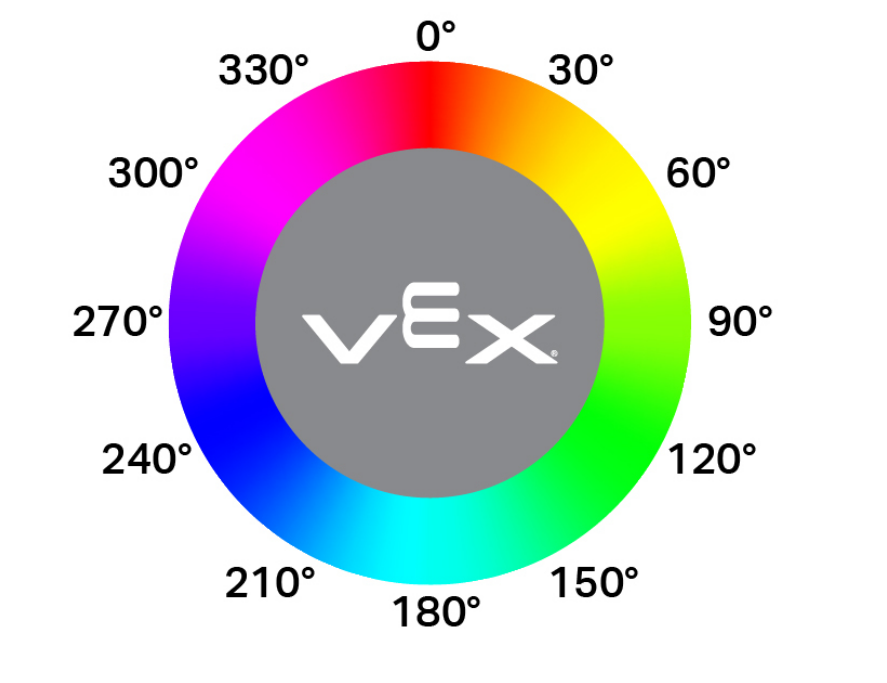
Η συνάρτηση get_hue επιστρέφει το χρώμα που ανιχνεύεται από τον αισθητήρα ματιού ως ακέραιο αριθμό από 0 έως 359,00 μοίρες.
Η απόχρωση είναι ένας τρόπος περιγραφής χρώματος χρησιμοποιώντας αριθμούς γύρω από έναν χρωματικό κύκλο.
Usage:
eye.get_hue()
Παράμετροι |
Περιγραφή |
|---|---|
Αυτή η μέθοδος δεν έχει παραμέτρους. |
# Build Used: Code Base 2.0 - Eye Forward
def main():
    # Display the hue of a pink GO piece
    while True:
        console.clear()
        if 10 < eye.get_hue() < 40:
            console.print("Pink!")
            wait(0.1,SECONDS)
        else:
            console.print("Not pink.")
            wait(0.1,SECONDS)

# Start threads — Do not delete
start_thread(main)
get_brightness#
get_brightness επιστρέφει πόσο φωτεινό είναι το ανιχνευμένο φως, ως ακέραιο αριθμό από 0% έως 100%.
Ένα υψηλότερο ποσοστό σημαίνει ότι περισσότερο φως ανακλάται πίσω στον αισθητήρα ματιών. Ένα χαμηλότερο ποσοστό σημαίνει ότι λιγότερο φως ανακλάται πίσω.
Usage:
eye.get_brightness()
Παράμετροι |
Περιγραφή |
|---|---|
Αυτή η μέθοδος δεν έχει παραμέτρους. |
# Build Used: Super Code Base 2.0
def main():
    # Monitor the brightness until red is detected
    monitor_sensor("eye.get_brightness")
    drivetrain.drive(FORWARD)
    while not eye.get_color() == RED:
        wait(0.2, SECONDS)
    drivetrain.stop()

# Start threads — Do not delete
start_thread(main)
is_object_detected#
is_object_detected επιστρέφει μια Boolean που αναφέρει εάν ο αισθητήρας ματιού ανιχνεύει ένα αντικείμενο εντός εμβέλειας.
True— Ο αισθητήρας ματιού ανιχνεύει ένα αντικείμενο.False— Ο αισθητήρας ματιού δεν ανιχνεύει κάποιο αντικείμενο.
Το εύρος ανίχνευσης μπορεί να αλλάξει χρησιμοποιώντας την συνάρτηση set_range.
Usage:
eye.is_object_detected()
Παράμετροι |
Περιγραφή |
|---|---|
Αυτή η μέθοδος δεν έχει παραμέτρους. |
# Build Used: Code Base 2.0 - Eye Forward
def main():
    # Drive forward until an object is detected
    drivetrain.drive(FORWARD)
    wait(0.2, SECONDS)
    while not eye.is_object_detected():
        wait(0.5, SECONDS)
    drivetrain.stop()

# Start threads — Do not delete
start_thread(main)
is_color_detected#
Η συνάρτηση is_color_detected επιστρέφει μια Boolean που αναφέρει εάν ο αισθητήρας ματιού ανιχνεύει ένα συγκεκριμένο χρώμα, με βάση την τιμή απόχρωσης που ανιχνεύθηκε.
True— Ο αισθητήρας ματιού ανιχνεύει το επιλεγμένο χρώμα.False— Ο αισθητήρας ματιού δεν ανιχνεύει το επιλεγμένο χρώμα.
Ο αισθητήρας ματιού λειτουργεί καλύτερα όταν το αντικείμενο είναι αρκετά κοντά για να το ανιχνεύσει και ο φωτισμός είναι καθαρός.
Usage:
eye.is_color_detected(color)
Παράμετροι |
Περιγραφή |
|---|---|
|
Το χρώμα που θα ελέγξει ο αισθητήρας ματιού:
|
# Build Used: Super Code Base 2.0
def main():
    # Drive forward until a green object is detected
    drivetrain.drive(FORWARD)
    wait(0.2, SECONDS)
    while not eye.is_color_detected(GREEN):
        wait(0.5, SECONDS)
    drivetrain.stop()

# Start threads — Do not delete
start_thread(main)