
Σύστημα μετάδοσης κίνησης#
Εισαγωγή#
Το σύστημα μετάδοσης κίνησης περιλαμβάνει τροχούς και κινητήρες που ελέγχουν τον τρόπο με τον οποίο το ρομπότ κινείται και περιστρέφεται. Τα συστήματα μετάδοσης κίνησης μπορούν να βρεθούν σε εκδόσεις όπως το Code Base 2.0, το Super Car ή σε ένα προσαρμοσμένο ρομπότ.
Τα συστήματα μετάδοσης κίνησης χρησιμοποιούν τον Αισθητήρα Αδράνειας στον εγκέφαλο για την ανίχνευση συγκρούσεων και την ακριβή κίνηση και στροφή του ρομπότ. Στην αρχή κάθε έργου, το σύστημα μετάδοσης κίνησης βαθμονομεί αυτόματα τον Αισθητήρα Αδράνειας. Κρατήστε το ρομπότ ακίνητο για περίπου 2 δευτερόλεπτα κατά τη βαθμονόμηση, ώστε το ρομπότ να μπορεί να κινείται και να στρέφεται σωστά.
Υπάρχουν πολλοί τρόποι για να κωδικοποιήσετε το σύστημα μετάδοσης κίνησης. Παρακάτω είναι μια λίστα με όλες τις μεθόδους συστήματος μετάδοσης κίνησης:
Ενέργειες — Μετακίνηση και περιστροφή του ρομπότ.
drive— Μετακινεί το ρομπότ προς τα εμπρός ή προς τα πίσω για πάντα.drive_for— Μετακινεί το ρομπότ προς τα εμπρός ή προς τα πίσω για μια συγκεκριμένη απόσταση.drive_until— Μετακινεί το ρομπότ προς τα εμπρός μέχρι ο αισθητήρας ματιού να ανιχνεύσει ένα αντικείμενο ή το ρομπότ να ανιχνεύσει μια σύγκρουση.turn— Στρέφει το ρομπότ αριστερά ή δεξιά για πάντα.turn_for— Στρέφει το ρομπότ αριστερά ή δεξιά για έναν συγκεκριμένο αριθμό μοιρών.turn_to_heading— Στρέφει το ρομπότ ώστε να βλέπει προς μια συγκεκριμένη κατεύθυνση από -359 σε 359 μοίρες. Το ρομπότ θα στρίψει προς τη συντομότερη κατεύθυνση για να φτάσει στην κατεύθυνση-στόχο.turn_to_rotation— Στρέφει το ρομπότ σε μια συγκεκριμένη περιστροφή.stop— Σταματά την κίνηση του ρομπότ.
Μεταλλαγμένοι — Προσαρμόστε τις ρυθμίσεις του συστήματος μετάδοσης κίνησης.
set_drive_velocity— Υποδεικνύει στο ρομπότ πόσο γρήγορα πρέπει να οδηγήσει.set_turn_velocity— Υποδεικνύει στο ρομπότ πόσο γρήγορα πρέπει να στρίψει.set_stopping— Υποδεικνύει πώς το ρομπότ θα σταματήσει να κινείται: φρενάροντας, κάνοντας αδράνεια ή κρατώντας το.set_timeout— Ορίζει το χρονικό διάστημα για το οποίο το ρομπότ θα προσπαθεί να ολοκληρώσει μια κίνηση.set_heading— Αλλάζει την τρέχουσα κατεύθυνση του ρομπότ σε νέα.set_rotation— Αλλάζει την τρέχουσα περιστροφή του ρομπότ σε μια νέα περιστροφή.
Λήψη κωδικών πρόσβασης — Ελέγξτε την κατάσταση της κίνησης.
get_heading— Επιστρέφει την τρέχουσα κατεύθυνση του ρομπότ από 0 έως 359 μοίρες.get_rotation— Επιστρέφει την τρέχουσα περιστροφή του ρομπότ.get_velocity— Επιστρέφει την ταχύτητα με την οποία κινείται το ρομπότ, ως ποσοστό από -100% έως 100%.get_yaw— Επιστρέφει την τρέχουσα εκτροπή του ρομπότ.get_roll— Επιστρέφει την τρέχουσα ζαριά του ρομπότ.get_pitch— Επιστρέφει την τρέχουσα κλίση του ρομπότ.get_crashed— Επιστρέφει εάν το ρομπότ έχει εντοπίσει μια συντριβή, ως λογική τιμή.is_stopped— Επιστρέφει εάν το ρομπότ έχει ολοκληρώσει την κίνησή του, ως λογική τιμή.
Ενέργειες#
drive#
drive κινεί το ρομπότ προς τα εμπρός ή προς τα πίσω για πάντα. Το ρομπότ θα συνεχίσει να κινείται μέχρι να του δοθεί μια άλλη ενέργεια, όπως στροφή ή στάση.
Usage:
drivetrain.drive(direction)
Παράμετροι |
Περιγραφή |
|---|---|
|
Η κατεύθυνση κίνησης του ρομπότ: |
# Build Used: Code Base 2.0
def main():
    # Drive forward then stop
    drivetrain.drive(FORWARD)
    wait(2, SECONDS)
    drivetrain.stop()

# Start threads — Do not delete
start_thread(main)
drive_for#
drive_for κινεί το ρομπότ προς τα εμπρός ή προς τα πίσω για μια συγκεκριμένη απόσταση.
Usage:
drivetrain.drive_for(direction, distance, units, wait)
Παράμετροι |
Περιγραφή |
|---|---|
|
Η κατεύθυνση κίνησης του ρομπότ: |
|
Η απόσταση που διανύει το ρομπότ. Αυτή μπορεί να είναι ακέραια ή δεκαδική. |
|
Προαιρετικά. Η μονάδα απόστασης: |
|
Προαιρετικό. |
# Build Used: Code Base 2.0
def main():
    # Drive back and forth
    drivetrain.drive_for(FORWARD, 100, MM)
    drivetrain.drive_for(REVERSE, 4, INCHES)


# Start threads — Do not delete
start_thread(main)
drive_until#
drive_until κινεί το ρομπότ προς τα εμπρός μέχρι ο αισθητήρας ματιού να ανιχνεύσει ένα αντικείμενο ή το ρομπότ να ανιχνεύσει μια σύγκρουση.
Usage:
drivetrain.drive_until(condition, wait)
Παράμετροι |
Περιγραφή |
|---|---|
|
Η συνθήκη που σταματά το ρομπότ: |
|
Προαιρετικό. |
# Build Used: Code Base 2.0
def main():
    # Turn right after a crash
    drivetrain.drive_until(CRASH)
    drivetrain.turn_for(RIGHT, 90)

# Start threads — Do not delete
start_thread(main)
turn#
turn γυρίζει το ρομπότ αριστερά ή δεξιά για πάντα. Το ρομπότ θα συνεχίσει να γυρίζει μέχρι να του δοθεί μια άλλη ενέργεια, όπως να οδηγήσει μέχρι να σταματήσει.
Usage:
drivetrain.turn(direction)
Παράμετροι |
Περιγραφή |
|---|---|
|
Η κατεύθυνση που γυρίζει το ρομπότ: |
# Build Used: Code Base 2.0
def main():
    # Turn right and left, then stop
    drivetrain.turn(RIGHT)
    wait(2, SECONDS)
    drivetrain.turn(LEFT)
    wait(2, SECONDS)
    drivetrain.stop()

# Start threads — Do not delete
start_thread(main)
turn_for#
turn_for γυρίζει το ρομπότ αριστερά ή δεξιά για έναν συγκεκριμένο αριθμό μοιρών. Η στροφή είναι σχετική με την τρέχουσα θέση του ρομπότ.
Usage:
drivetrain.turn_for(direction, angle, wait)
Παράμετροι |
Περιγραφή |
|---|---|
|
Η κατεύθυνση που γυρίζει το ρομπότ: |
|
Ο αριθμός των μοιρών που περιστρέφεται το ρομπότ. Μπορεί να είναι ακέραιος ή δεκαδικός αριθμός. |
|
Προαιρετικό. |
# Build Used: Code Base 2.0
def main():
    # Turn right then left
    drivetrain.turn_for(RIGHT, 90)
    drivetrain.turn_for(LEFT, 90)

# Start threads — Do not delete
start_thread(main)
turn_to_heading#
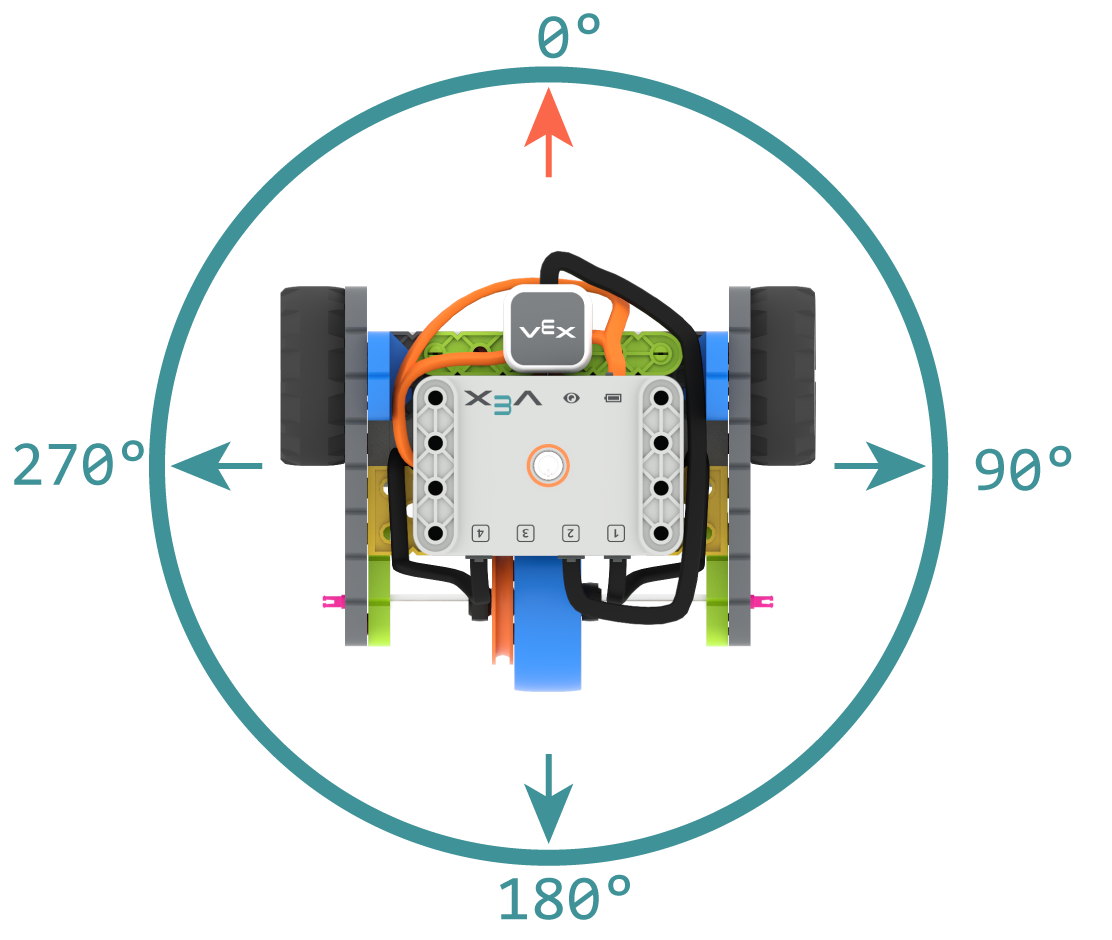
Μια κατεύθυνση είναι η κατεύθυνση προς την οποία είναι στραμμένος ο εγκέφαλος του ρομπότ, μετρούμενη σε μοίρες. turn_to_heading γυρίζει το ρομπότ ώστε να στραφεί προς μια συγκεκριμένη κατεύθυνση από -359 σε 359 μοίρες. Το ρομπότ θα στρίψει προς τη συντομότερη κατεύθυνση για να φτάσει στην κατεύθυνση-στόχο.
Η αρχική κατεύθυνση είναι 0 μοίρες.
Usage:
drivetrain.turn_to_heading(angle, wait)
Παράμετροι |
Περιγραφή |
|---|---|
|
Η κατεύθυνση προς την οποία πρέπει να στραφεί το ρομπότ ως ακέραιος αριθμός, από -359 έως 359 μοίρες. |
|
Προαιρετικό. |
# Build Used: Code Base 2.0
def main():
    # Turn to face the cardinal directions
    drivetrain.turn_to_heading(90)
    wait(1, SECONDS)
    drivetrain.turn_to_heading(180)
    wait(1, SECONDS)
    drivetrain.turn_to_heading(270)
    wait(1, SECONDS)
    drivetrain.turn_to_heading(0)

# Start threads — Do not delete
start_thread(main)
turn_to_rotation#
turn_to_rotation γυρίζει το ρομπότ σε μια συγκεκριμένη περιστροφή.
Η περιστροφή είναι η περιστροφή του ρομπότ, μετρούμενη σε μοίρες. Στην αρχή ενός έργου, η τιμή περιστροφής ορίζεται σε 0 μοίρες. Η περιστροφή μπορεί επίσης να οριστεί χρησιμοποιώντας την set_rotation.
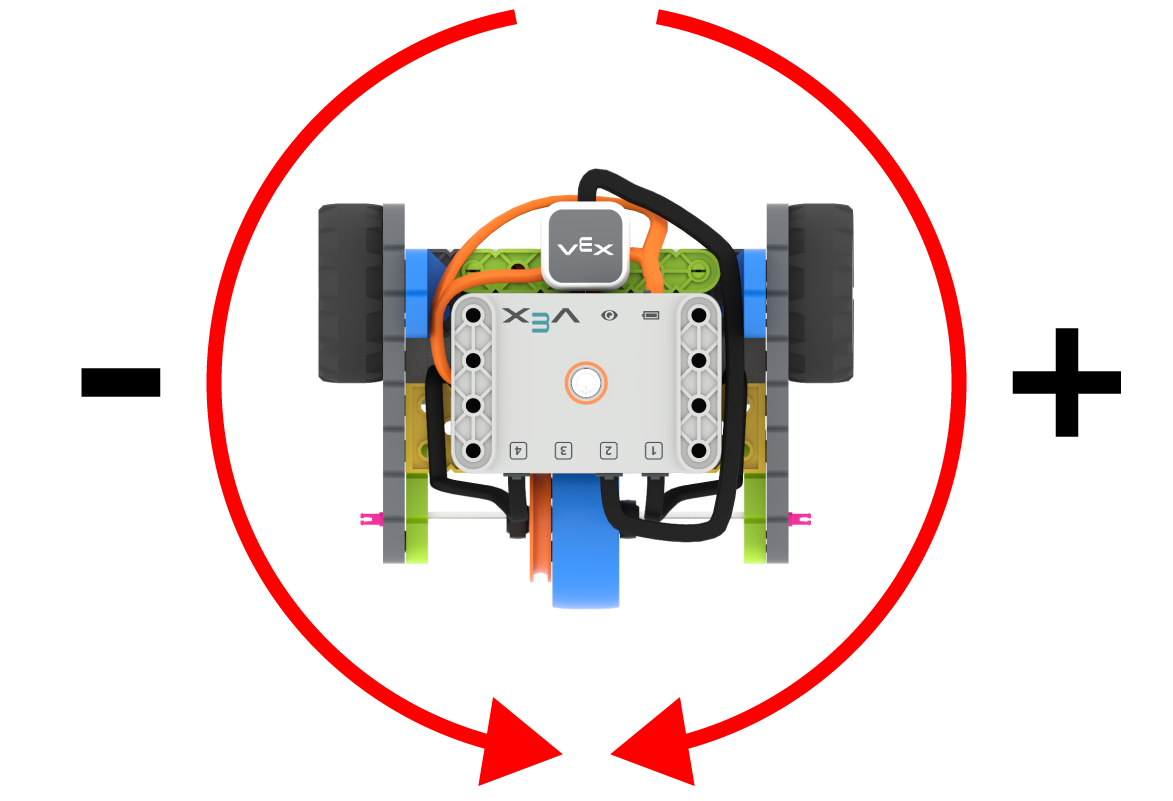
Οι τιμές περιστροφής είναι απόλυτες. Αυτό σημαίνει ότι η κατεύθυνση της στροφής εξαρτάται από την τρέχουσα περιστροφή του ρομπότ. Η στροφή προς τα δεξιά αυξάνει την περιστροφή και η στροφή προς τα αριστερά τη μειώνει.
Για παράδειγμα, αν το ρομπότ ξεκινήσει από 0 μοίρες και στρίψετε σε περιστροφή 720 μοιρών, θα στρίψει δεξιά δύο φορές. Αν στη συνέχεια στρίψετε σε περιστροφή 360 μοιρών, θα στρίψει αριστερά μία φορά, επειδή οι 360 μοίρες είναι μικρότερες από 720 μοίρες.
Usage:
drivetrain.turn_to_rotation(angle, wait)
Παράμετροι |
Περιγραφή |
|---|---|
|
Η τιμή περιστροφής, σε μοίρες, στην οποία θα στραφεί το ρομπότ. Αυτή μπορεί να είναι ακέραιος αριθμός. |
|
Προαιρετικό. |
# Build Used: Code Base 2.0
def main():
    # Make one full turn to the right
    drivetrain.turn_to_rotation(360)
    # Make another full turn to the right
    drivetrain.turn_to_rotation(720)
    # Make one full turn to the left, returning to 360 degrees
    drivetrain.turn_to_rotation(360)
# Start threads — Do not delete
start_thread(main)
stop#
stop σταματά την κίνηση του ρομπότ.
Usage:
drivetrain.stop()
Παράμετροι |
Περιγραφή |
|---|---|
Αυτή η μέθοδος δεν έχει παραμέτρους. |
# Build Used: Code Base 2.0
def main():
    # Drive forward then stop
    drivetrain.drive(FORWARD)
    wait(2, SECONDS)
    drivetrain.stop()

# Start threads — Do not delete
start_thread(main)
Μεταλλάκτες#
set_drive_velocity#
set_drive_velocity λέει στο ρομπότ πόσο γρήγορα πρέπει να οδηγήσει. Ένα υψηλότερο ποσοστό κάνει το ρομπότ να οδηγεί πιο γρήγορα και ένα χαμηλότερο ποσοστό κάνει το ρομπότ να οδηγεί πιο αργά.
Κάθε έργο ξεκινά με το ρομπότ να κινείται με ταχύτητα 50% από προεπιλογή.
Σημείωση: Μια υψηλότερη ταχύτητα κάνει το ρομπότ να κινείται πιο γρήγορα, αλλά μπορεί να είναι λιγότερο ακριβές. Μια χαμηλότερη ταχύτητα κάνει το ρομπότ να κινείται πιο αργά, αλλά να είναι πιο ακριβές.
Usage:
drivetrain.set_drive_velocity(velocity)
Παράμετροι |
Περιγραφή |
|---|---|
|
Η ταχύτητα οδήγησης κυμαίνεται από 0% έως 100%. |
# Build Used: Code Base 2.0
def main():
    # Drive at different velocities
    drivetrain.drive_for(FORWARD, 100, MM)
    wait(1, SECONDS)
    # Drive slow
    drivetrain.set_drive_velocity(20)
    drivetrain.drive_for(FORWARD, 100, MM)
    wait(1, SECONDS)
    # Drive fast
    drivetrain.set_drive_velocity(100)
    drivetrain.drive_for(FORWARD, 100, MM)

# Start threads — Do not delete
start_thread(main)
set_turn_velocity#
set_turn_velocity λέει στο ρομπότ πόσο γρήγορα να στρίψει. Ένα υψηλότερο ποσοστό κάνει το ρομπότ να στρίψει πιο γρήγορα και ένα χαμηλότερο ποσοστό το κάνει να στρίψει πιο αργά.
Κάθε έργο ξεκινά με το ρομπότ να περιστρέφεται με ταχύτητα 50% από προεπιλογή.
Σημείωση: Μια υψηλότερη ταχύτητα κάνει το ρομπότ να περιστρέφεται πιο γρήγορα, αλλά μπορεί να είναι λιγότερο ακριβές. Μια χαμηλότερη ταχύτητα κάνει το ρομπότ να περιστρέφεται πιο αργά, αλλά να είναι πιο ακριβές.
Usage:
drivetrain.set_turn_velocity(velocity)
Παράμετροι |
Περιγραφή |
|---|---|
|
Η ταχύτητα περιστροφής κυμαίνεται από 0% έως 100%. |
# Build Used: Code Base 2.0
def main():
    # Turn at different velocities
    drivetrain.turn_for(RIGHT, 180)
    wait(1, SECONDS)
    # Turn fast
    drivetrain.set_turn_velocity(100)
    drivetrain.turn_for(RIGHT, 180)

# Start threads — Do not delete
start_thread(main)
set_stopping#
set_stopping ορίζει τον τρόπο με τον οποίο το ρομπότ θα σταματήσει να κινείται: φρενάροντας, κινούμενο με ταχύτητα χωρίς κίνηση ή κρατώντας το.
Usage:
drivetrain.set_stopping(brake)
Παράμετροι |
Περιγραφή |
|---|---|
|
Πώς θα σταματήσει το ρομπότ:
|
Εάν δεν χρησιμοποιηθεί αυτή η μέθοδος, το ρομπότ θα χρησιμοποιήσει BRAKE κατά το σταμάτημα.
# Build Used: Code Base 2.0
def main():
    # Drive, then coast to a stop
    drivetrain.set_drive_velocity(100)
    drivetrain.set_stopping(COAST)
    drivetrain.drive(FORWARD)
    wait(2, SECONDS)
    drivetrain.stop()

# Start threads — Do not delete
start_thread(main)
set_timeout#
set_timeout ορίζει το χρονικό διάστημα για το οποίο το ρομπότ θα προσπαθεί να ολοκληρώσει μια κίνηση. Εάν το ρομπότ δεν μπορεί να ολοκληρώσει σε αυτό το χρονικό διάστημα, θα σταματήσει την προσπάθεια και θα προχωρήσει στην επόμενη γραμμή κώδικα. Αυτό εμποδίζει το ρομπότ να κολλήσει σε μια κίνηση.
Usage:
drivetrain.set_timeout(value, units)
Παράμετροι |
Περιγραφή |
|---|---|
|
Ο χρόνος που μπορεί να προσπαθήσει το ρομπότ για να ολοκληρώσει μια κίνηση. Αυτός μπορεί να είναι ακέραιος ή δεκαδικός αριθμός. |
|
Προαιρετικά. Η μονάδα χρόνου: |
# Build Used: Code Base 2.0
def main():
    # Drive as far as possible for 1 second before turning right
    drivetrain.set_timeout(1, SECONDS)
    drivetrain.drive_for(FORWARD, 25, INCHES)
    drivetrain.turn_for(RIGHT, 90)

# Start threads — Do not delete
start_thread(main)
set_heading#
Μια κατεύθυνση είναι η κατεύθυνση προς την οποία είναι στραμμένος ο εγκέφαλος του ρομπότ, μετρούμενη σε μοίρες. set_heading αλλάζει την τρέχουσα κατεύθυνση του ρομπότ σε μια νέα τιμή κατεύθυνσης.
Για παράδειγμα, εάν το ρομπότ έχει στραφεί προς τα δεξιά, η ρύθμιση της κατεύθυνσης σε 0 μοίρες καθιστά αυτή τη θέση προς τα δεξιά τις νέες 0 μοίρες. Στη συνέχεια, το ρομπότ μπορεί να στραφεί σε άλλες θέσεις με βάση αυτήν τη νέα κατεύθυνση.
Usage:
drivetrain.set_heading(value)
Παράμετροι |
Περιγραφή |
|---|---|
|
Η τιμή κατεύθυνσης, σε μοίρες, που θα οριστεί για το ρομπότ. Αυτή μπορεί να είναι ένας ακέραιος αριθμός από 0 έως 359. |
# Build Used: Code Base 2.0
def main():
    # Face the new 0 degree heading
    drivetrain.set_heading(90)
    drivetrain.turn_to_heading(0)

# Start threads — Do not delete
start_thread(main)
set_rotation#
Η περιστροφή είναι η περιστροφή του ρομπότ, μετρούμενη σε μοίρες. Στην αρχή ενός έργου, η τιμή περιστροφής ορίζεται σε 0 μοίρες. set_rotation αλλάζει την τρέχουσα περιστροφή του ρομπότ σε μια νέα τιμή.
Για παράδειγμα, αν το ρομπότ έχει κάνει δύο πλήρεις στροφές προς τα δεξιά, η τιμή περιστροφής του θα είναι 720 μοίρες. Αν ορίσετε την περιστροφή σε 0 μοίρες, η περιστροφή θα επαναφερθεί από 720 σε 0 μοίρες. Στη συνέχεια, το ρομπότ μπορεί να στραφεί σε περιστροφές με βάση αυτήν τη νέα τιμή.
Usage:
drivetrain.set_rotation(value)
Παράμετροι |
Περιγραφή |
|---|---|
|
Η τιμή περιστροφής, σε μοίρες, που θα οριστεί για το ρομπότ. Αυτή μπορεί να είναι ακέραιος αριθμός. |
# Build Used: Code Base 2.0
def main():
    # Spin counterclockwise two times
    drivetrain.set_rotation(720)
    drivetrain.turn_to_rotation(0)

# Start threads — Do not delete
start_thread(main)
Αποκτητές#
get_heading#
Μια κατεύθυνση είναι η κατεύθυνση προς την οποία είναι στραμμένος ο εγκέφαλος του ρομπότ, μετρούμενη σε μοίρες. Η συνάρτηση get_heading επιστρέφει αυτήν την κατεύθυνση από 0 έως 359 μοίρες.
Η αρχική κατεύθυνση του ρομπότ είναι 0 μοίρες.
Usage:
drivetrain.get_heading()
Παράμετροι |
Περιγραφή |
|---|---|
Αυτή η μέθοδος δεν έχει παραμέτρους. |
# Build Used: Code Base 2.0
def main():
    # Display the heading while turning
    monitor_sensor("drivetrain.get_heading")
    drivetrain.turn_for(RIGHT, 450)


# Start threads — Do not delete
start_thread(main)
get_rotation#
Η περιστροφή είναι η περιστροφή του ρομπότ, μετρούμενη σε μοίρες. Στην αρχή ενός έργου, η τιμή περιστροφής ορίζεται σε 0 μοίρες. Η συνάρτηση get_rotation επιστρέφει την τρέχουσα περιστροφή του ρομπότ.
Η δεξιά στροφή αυξάνει την περιστροφή και η αριστερά τη μειώνει. Για παράδειγμα, κάνοντας δύο πλήρεις στροφές προς τα δεξιά θα επιστρέψει μια περιστροφή 720 μοιρών.
Usage:
drivetrain.get_rotation()
Παράμετροι |
Περιγραφή |
|---|---|
Αυτή η μέθοδος δεν έχει παραμέτρους. |
# Build Used: Code Base 2.0
def main():
    # Display the rotation while turning
    monitor_sensor("drivetrain.get_rotation")
    drivetrain.turn_for(RIGHT, 450)


# Start threads — Do not delete
start_thread(main)
get_velocity#
Η συνάρτηση get_velocity επιστρέφει την ταχύτητα με την οποία κινείται το ρομπότ, ως ποσοστό από -100% έως 100%.
Μια θετική τιμή σημαίνει ότι το ρομπότ κινείται προς τα εμπρός. Μια αρνητική τιμή σημαίνει ότι το ρομπότ κινείται προς τα πίσω.
Usage:
drivetrain.get_velocity()
Παράμετροι |
Περιγραφή |
|---|---|
Αυτή η μέθοδος δεν έχει παραμέτρους. |
# Build Used: Code Base 2.0
def main():
    # Display the velocity of the robot before and while moving
    console.print("Start: ")
    console.print(drivetrain.get_velocity())
    console.new_line()
    drivetrain.drive(FORWARD)
    wait(0.5, SECONDS)
    console.print("Moving: ")
    console.print(drivetrain.get_velocity())
    drivetrain.stop()


# Start threads — Do not delete
start_thread(main)
get_yaw#
Η εκτροπή (yaw) είναι η στροφή του ρομπότ προς τα αριστερά ή προς τα δεξιά από την αρχική του θέση, μετρούμενη σε μοίρες. Η συνάρτηση get_yaw επιστρέφει την τρέχουσα τιμή εκτροπής (yaw) του ρομπότ.
Η δεξιά στροφή αυξάνει την τιμή της εκτροπής, ενώ η αριστερά τη μειώνει.
Usage:
drivetrain.get_yaw()
Παράμετροι |
Περιγραφή |
|---|---|
Αυτή η μέθοδος δεν έχει παραμέτρους. |
# Build Used: Super Code Base 2.0
def main():
    # Change the LED color based on the yaw while
    # moving the robot by hand
    monitor_sensor("drivetrain.get_yaw")
    while True:
        if drivetrain.get_yaw() > 0:
            bumper.set_color(GREEN)
        elif drivetrain.get_yaw() < 0:
            bumper.set_color(RED)
        else:
            bumper.set_color(NONE)

# Start threads — Do not delete
start_thread(main)
get_roll#
Η κύλιση είναι η κλίση του ρομπότ προς τα αριστερά ή τα δεξιά, μετρούμενη σε μοίρες. Η συνάρτηση get_roll επιστρέφει την τρέχουσα τιμή κύλισης του ρομπότ.
Με τον Εγκέφαλο στραμμένο προς τα εμπρός, η κλίση προς τα αριστερά αυξάνει την αξία της ζαριάς και η κλίση προς τα δεξιά τη μειώνει.
Usage:
drivetrain.get_roll()
Παράμετροι |
Περιγραφή |
|---|---|
Αυτή η μέθοδος δεν έχει παραμέτρους. |
# Build Used: Super Code Base 2.0
def main():
    # Change the LED color based on the roll while
    # moving the robot by hand
    monitor_sensor("drivetrain.get_roll")
    while True:
        if drivetrain.get_roll() > 0:
            bumper.set_color(GREEN)
        elif drivetrain.get_roll() < 0:
            bumper.set_color(RED)
        else:
            bumper.set_color(NONE)

# Start threads — Do not delete
start_thread(main)
get_pitch#
Το βήμα είναι η κλίση του ρομπότ προς τα εμπρός ή προς τα πίσω, μετρούμενη σε μοίρες. get_pitch επιστρέφει την τρέχουσα τιμή βήματος του ρομπότ.
Με τον εγκέφαλο στραμμένο προς τα εμπρός, η κλίση προς τα εμπρός αυξάνει την τιμή του τόνου, ενώ η κλίση προς τα πίσω τη μειώνει.
Usage:
drivetrain.get_pitch()
Παράμετροι |
Περιγραφή |
|---|---|
Αυτή η μέθοδος δεν έχει παραμέτρους. |
# Build Used: Super Code Base 2.0
def main():
    # Change the LED color based on the pitch while
    # moving the robot by hand
    monitor_sensor("drivetrain.get_pitch")
    while True:
        if drivetrain.get_pitch() > 0:
            bumper.set_color(GREEN)
        elif drivetrain.get_pitch() < 0:
            bumper.set_color(RED)
        else:
            bumper.set_color(NONE)

# Start threads — Do not delete
start_thread(main)
get_crashed#
Η συνάρτηση get_crashed επιστρέφει εάν το ρομπότ έχει εντοπίσει μια συντριβή, ως λογική τιμή.
True— Εντοπίστηκε σφάλμα.False— Δεν έχει εντοπιστεί σύγκρουση.
Usage:
drivetrain.get_crashed()
Παράμετροι |
Περιγραφή |
|---|---|
Αυτή η μέθοδος δεν έχει παραμέτρους. |
# Build Used: Super Code Base 2.0
def main():
    # Drive until a crash
    drivetrain.drive(FORWARD)
    while not drivetrain.get_crashed():
        wait(50, MSEC)
    drivetrain.stop()
    drivetrain.turn_for(RIGHT, 90)

# Start threads — Do not delete
start_thread(main)
is_stopped#
Η συνάρτηση is_stopped επιστρέφει εάν το ρομπότ έχει ολοκληρώσει την κίνησή του, ως δυαδική τιμή. Αυτή μπορεί να χρησιμοποιηθεί για τον έλεγχο του χρονισμού άλλων συμπεριφορών με βάση την κίνηση του ρομπότ.
True— Το ρομπότ έχει ολοκληρώσει την κίνηση.False— Το ρομπότ εξακολουθεί να κινείται.
Αυτή η μέθοδος λειτουργεί σε συνδυασμό με τις ακόλουθες μεθόδους μετάδοσης κίνησης που έχουν την παράμετρο wait : drive_for, drive_until, turn_for, turn_to_heading και turn_to_rotation.
Usage:
drivetrain.is_stopped()
Παράμετροι |
Περιγραφή |
|---|---|
Αυτή η μέθοδος δεν έχει παραμέτρους. |
# Build Used: Code Base 2.0
def main():
    # Turn when the drivetrain is done moving forward
    drivetrain.drive_for(FORWARD, 100, MM, wait=False)
    wait(0.25, SECONDS)
    while True:
        if drivetrain.is_stopped():
            drivetrain.turn_for(RIGHT, 180)
            break
        else:
            console.print("Still moving...")
            wait(0.1, SECONDS)
            console.clear()

# Start threads — Do not delete
start_thread(main)