
Αισθητήρας όρασης AI#
Εισαγωγή#
Η κλάση aivision χρησιμοποιείται για τον έλεγχο και την πρόσβαση σε δεδομένα από τον αισθητήρα όρασης AI IQ (2ης γενιάς). Ο αισθητήρας όρασης AI μπορεί να ανιχνεύσει:
Ταξινομήσεις Τεχνητής Νοημοσύνης (όπως αντικείμενα παιχνιδιού)
Αναγνωριστικά ετικέτας AprilTag
Προσαρμοσμένες χρωματικές υπογραφές
Προσαρμοσμένοι κωδικοί χρωμάτων
Παρέχει δεδομένα αντικειμένου, όπως θέση, μέγεθος, προσανατολισμό, αναγνωριστικό ταξινόμησης και βαθμολογία εμπιστοσύνης.
Ο αισθητήρας επεξεργάζεται οπτικές πληροφορίες χρησιμοποιώντας ένα ενσωματωμένο μοντέλο AI που έχει επιλεγεί στο AI Vision Utility μέσα στο VEXcode. Το επιλεγμένο μοντέλο καθορίζει ποιες ταξινομήσεις AI μπορεί να ανιχνεύσει ο αισθητήρας. Όταν χρησιμοποιείτε VS Code, το μοντέλο AI πρέπει πρώτα να διαμορφωθεί στο VEXcode πριν να μπορεί να χρησιμοποιηθεί στο πρόγραμμά σας. Τα ανιχνευόμενα αντικείμενα επιστρέφονται μέσω του πίνακα objects μετά την κλήση της takeSnapshot.
Κατασκευαστές κλάσεων#
aivision(
  int32_t index,
  Args&... sigs );
Παράμετροι#
Παράμετρος |
Τύπος |
Περιγραφή |
|---|---|---|
|
|
Η Έξυπνη Θύρα στην οποία είναι συνδεδεμένος ο Αισθητήρας Όρασης AI, γράφεται ως |
|
|
Ένας ή περισσότεροι τύποι ανίχνευσης για καταχώριση στον αισθητήρα:
|
Σχετικά μαθήματα#
Ο αισθητήρας όρασης AI χρησιμοποιεί τις ακόλουθες σχετικές κλάσεις:
aivision::colordesc— Ορίζει μια Χρωματική Υπογραφή που μπορεί να ανιχνεύσει ο Αισθητήρας Όρασης AI.aivision::codedesc— Ορίζει έναν Κώδικα Χρώματος που αποτελείται από πολλαπλάaivision::colordescαντικείμενα.
aivision::colordesc#
Η κλάση aivision::colordesc ορίζει μια Χρωματική Υπογραφή για τον Αισθητήρα Όρασης AI.
Μια Χρωματική Υπογραφή αντιπροσωπεύει ένα συγκεκριμένο χρώμα που μπορεί να ανιχνεύσει ο Αισθητήρας Όρασης AI. Αυτές οι υπογραφές επιτρέπουν στον αισθητήρα να αναγνωρίζει και να παρακολουθεί αντικείμενα με βάση το χρώμα.
Έως και επτά Χρωματικές Υπογραφές μπορούν να αποθηκευτούν σε έναν Αισθητήρα Όρασης AI ταυτόχρονα.
Οι Χρωματικές Υπογραφές χρησιμοποιούνται με το takeSnapshot για την ανίχνευση αντικειμένων με ίδιο χρώμα σε πραγματικό χρόνο.
Κατασκευαστής Κλάσης
aivision::colordesc(
  int32_t index,
  uint8_t red,
  uint8_t green,
  uint8_t blue,
  float   hangle,
  float   hdsat );
Παράμετροι
Παράμετρος |
Τύπος |
Περιγραφή |
|---|---|---|
|
|
Το ευρετήριο Υπογραφής Χρώματος (1–7). Η δημιουργία δύο υπογραφών με το ίδιο ευρετήριο θα αντικαταστήσει την προηγούμενη. |
|
|
Η κόκκινη τιμή από 0 – 255. |
|
|
Η πράσινη τιμή από 0 – 255. |
|
|
Η μπλε τιμή από 0 – 255. |
|
|
Η επιτρεπόμενη απόκλιση απόχρωσης κυμαίνεται από 1 έως 40 μοίρες. |
|
|
Η επιτρεπόμενη απόκλιση κορεσμού από 0,10 – 1,00. |
Σημειώσεις
Η δημιουργία δύο υπογραφών με τον ίδιο δείκτη
indexθα έχει ως αποτέλεσμα η μεταγενέστερη να αντικαταστήσει την προηγούμενη υπογραφή.Η παράμετρος
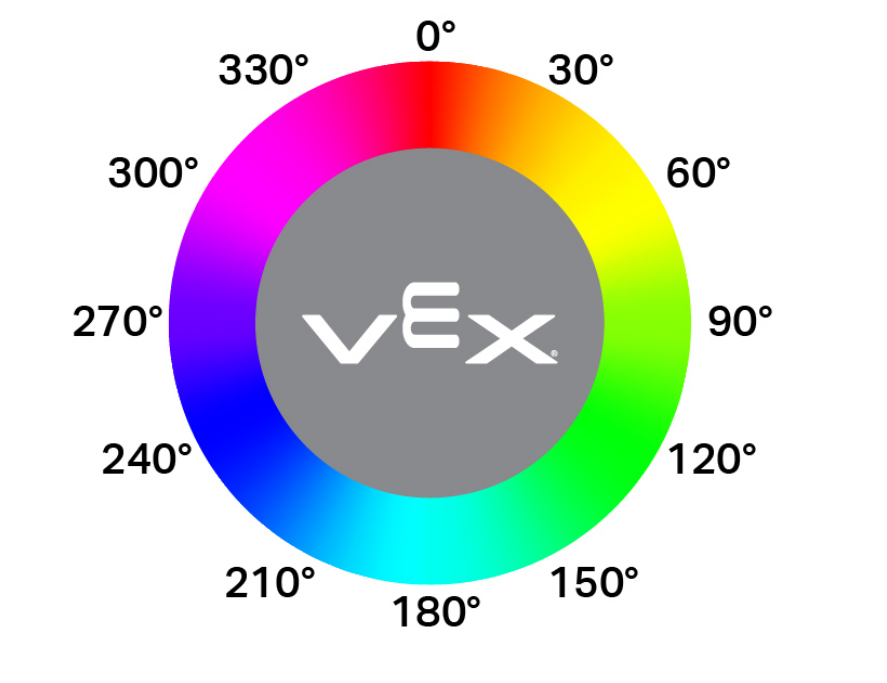
hangleαντιπροσωπεύει την επιτρεπόμενη διακύμανση απόχρωσης σε έναν κυκλικό χρωματικό κύκλο. Οι τιμές απόχρωσης αντιστοιχούν σε μοίρες γύρω από τον τροχό (για παράδειγμα, κόκκινο κοντά στις 0°, πράσινο κοντά στις 120° και μπλε κοντά στις 240°). Μεγαλύτερες τιμές επιτρέπουν την ανίχνευση ενός ευρύτερου εύρους χρωματικής διακύμανσης.
aivision::codedesc#
Η κλάση aivision::codedesc ορίζει έναν Χρωματικό Κώδικα για τον Αισθητήρα Όρασης AI.
Ένας Χρωματικός Κώδικας είναι ένα δομημένο μοτίβο που αποτελείται από πολλαπλές Χρωματικές Υπογραφές, διατεταγμένες σε μια συγκεκριμένη σειρά. Αυτοί οι κωδικοί επιτρέπουν στον Αισθητήρα Όρασης AI να αναγνωρίζει προκαθορισμένα πολύχρωμα μοτίβα.
Έως και οκτώ κωδικοί χρωμάτων μπορούν να αποθηκευτούν σε έναν αισθητήρα όρασης AI ταυτόχρονα.
Οι χρωματικοί κωδικοί χρησιμοποιούνται με το takeSnapshot για την ανίχνευση συγκεκριμένων πολυχρωματικών μοτίβων.
Κατασκευαστές Κλάσης
1 — Δημιουργεί έναν Κώδικα Χρώματος από δύο περιγραφείς χρωμάτων.
aivision::codedesc(
  int32_t index,
  aivision::colordesc &sig1,
  aivision::colordesc &sig2 );
2 — Δημιουργεί έναν Κώδικα Χρώματος από τρεις περιγραφείς χρωμάτων.
aivision::codedesc(
  int32_t index,
  aivision::colordesc &sig1,
  aivision::colordesc &sig2,
  aivision::colordesc &sig3 );
3 — Δημιουργεί έναν Κώδικα Χρώματος από τέσσερις περιγραφείς χρωμάτων.
aivision::codedesc(
  int32_t index,
  aivision::colordesc &sig1,
  aivision::colordesc &sig2,
  aivision::colordesc &sig3,
  aivision::colordesc &sig4 );
Parameters4 — Δημιουργεί έναν Κώδικα Χρώματος από πέντε περιγραφείς χρωμάτων.
aivision::codedesc(
  int32_t index,
  aivision::colordesc &sig1,
  aivision::colordesc &sig2,
  aivision::colordesc &sig3,
  aivision::colordesc &sig4,
  aivision::colordesc &sig5 );
Παράμετρος |
Τύπος |
Περιγραφή |
|---|---|---|
|
|
Ο αριθμός ευρετηρίου του Κωδικού Χρώματος (1–8). |
|
|
Αναφορές σε προηγουμένως δημιουργημένους περιγραφείς χρωμάτων που χρησιμοποιήθηκαν για τη δημιουργία του Χρωματικού Κώδικα. |
Σημειώσεις
Ένας Χρωματικός Κώδικας απαιτεί τουλάχιστον δύο Χρωματικές Υπογραφές.
Μπορούν να χρησιμοποιηθούν έως και πέντε Χρωματικές Υπογραφές σε έναν μόνο Χρωματικό Κώδικα.
Η δημιουργία δύο Χρωματικών Κωδικών με τον ίδιο δείκτη
indexθα αντικαταστήσει τον προηγούμενο.
aivision::tagdesc#
Δημιουργεί έναν Περιγραφέα Ετικέτας που χρησιμοποιείται για την ανίχνευση ενός συγκεκριμένου AprilTag ID.
Available Functionstagdesc( int32_t id );
Παράμετρος |
Τύπος |
Περιγραφή |
|---|---|---|
|
|
Ο αριθμός αναγνώρισης AprilTag που θα εντοπιστεί (0–36). |
Μοντέλα και Ταξινομήσεις Τεχνητής Νοημοσύνης#
Ο αισθητήρας όρασης AI μπορεί να ανιχνεύσει διαφορετικά αντικείμενα με συγκεκριμένες ταξινομήσεις AI. Ανάλογα με το μοντέλο ταξινόμησης AI που επιλέγεται κατά τη διαμόρφωση του αισθητήρα όρασης AI στο παράθυρο Συσκευές, μπορούν να ανιχνευθούν διαφορετικά αντικείμενα. Τα διαθέσιμα μοντέλα είναι:
Στοιχεία τάξης
Αριθμός Ταυτότητας |
Ταξινόμηση Τεχνητής Νοημοσύνης |
|---|---|
0 |
|
1 |
|
2 |
|
3 |
|
4 |
|
5 |
|
6 |
|
7 |
|
8 |
|
Διαγωνισμός Ρομποτικής VEX IQ Mix & Match
Αριθμός Ταυτότητας |
Ταξινόμηση Τεχνητής Νοημοσύνης |
|---|---|
0 |
|
1 |
|
2 |
|
3 |
|
Διαγωνισμός Ρομποτικής VEX IQ - Ανώτερο Επίπεδο
Αριθμός Ταυτότητας |
Ταξινόμηση Τεχνητής Νοημοσύνης |
|---|---|
0 |
|
1 |
|
2 |
|
Παραδείγματα#
// Create Color Signatures
aivision::colordesc AIVision1__greenBox(
    1,      // index
    85,     // red
    149,    // green
    46,     // blue
    23,     // hangle
    0.23 ); // hdsat

aivision::colordesc AIVision1__blueBox(
    2,      // index
    77,     // red
    135,    // green
    125,    // blue
    27,     // hangle
    0.29 ); // hdsat

// Create a Color Code from two color signatures
aivision::codedesc AIVision1__greenBlue(
    1,                    // code index
    AIVision1__greenBox,  // first color signature
    AIVision1__blueBox ); // second color signature

// Create the AI Vision Sensor instance
aivision AIVision1(
    PORT11,                  // Smart Port
    AIVision1__greenBlue,    // color code
    aivision::ALL_AIOBJS );  // enable AI Classifications
Συναρτήσεις Μελών#
Η κλάση aivision περιλαμβάνει τις ακόλουθες συναρτήσεις-μέλη:
takeSnapshot— Καταγράφει δεδομένα για μια συγκεκριμένη Υπογραφή Χρώματος, Κωδικό Χρώματος, ομάδα Ταξινόμησης AI ή ομάδα AprilTag ID.installed— Επιστρέφει εάν ο αισθητήρας AI Vision Sensor είναι συνδεδεμένος στον εγκέφαλο IQ (2ης γενιάς).
Για να αποκτήσετε πρόσβαση στα δεδομένα ανιχνευμένων αντικειμένων μετά την κλήση της συνάρτησης takeSnapshot, χρησιμοποιήστε τις διαθέσιμες Ιδιότητες.
Πριν από την κλήση οποιασδήποτε συνάρτησης μέλους aivision , πρέπει να δημιουργηθεί μια παρουσία aivision , όπως φαίνεται παρακάτω:
/* This constructor is required when using VS Code.
AI Vision Sensor configuration is generated automatically
in VEXcode using the Device Menu. Replace the values
as needed. */


// Create Color Signatures
aivision::colordesc AIVision1__greenBox(
    1,      // index
    85,     // red
    149,    // green
    46,     // blue
    23,     // hangle
    0.23 ); // hdsat

aivision::colordesc AIVision1__blueBox(
    2,      // index
    77,     // red
    135,    // green
    125,    // blue
    27,     // hangle
    0.29 ); // hdsat

// Create a Color Code from two color signatures
aivision::codedesc AIVision1__greenBlue(
    1,                    // code index
    AIVision1__greenBox,  // first color signature
    AIVision1__blueBox ); // second color signature

// Create the AI Vision Sensor instance
aivision AIVision1(
    PORT1,                   // Smart Port
    AIVision1__greenBlue,    // color code
    aivision::ALL_AIOBJS );  // enable AI Classifications
takeSnapshot#
Καταγράφει μια εικόνα από τον αισθητήρα όρασης AI, την επεξεργάζεται χρησιμοποιώντας το επιλεγμένο μοντέλο AI ή τις διαμορφωμένες χρωματικές υπογραφές και ενημερώνει τον πίνακα objects.
Κάθε κλήση ανανεώνει τον πίνακα objects με τα πιο πρόσφατα αποτελέσματα ανίχνευσης. Τα αντικείμενα ταξινομούνται από το μεγαλύτερο στο μικρότερο (κατά πλάτος), ξεκινώντας από τον δείκτη 0Εάν δεν εντοπιστούν αντικείμενα, το objectCount θα είναι 0 και το objects[i].exists θα είναι false.
1 — Λαμβάνει ένα στιγμιότυπο χρησιμοποιώντας ένα αναγνωριστικό αντικειμένου και έναν τύπο αντικειμένου.
int32_t takeSnapshot(
  uint32_t id,
  objectType type,
  uint32_t count );
2 — Λαμβάνει ένα στιγμιότυπο χρησιμοποιώντας μια Υπογραφή Χρώματος.
int32_t takeSnapshot(
  const colordesc &desc,
  int32_t count = 8 );
3 — Λαμβάνει ένα στιγμιότυπο χρησιμοποιώντας έναν Κωδικό Χρώματος.
int32_t takeSnapshot(
  const codedesc &desc,
  int32_t count = 8 );
4 — Λαμβάνει ένα στιγμιότυπο χρησιμοποιώντας ένα AprilTag ID.
int32_t takeSnapshot(
  const tagdesc &desc,
  int32_t count = 8 );
5 — Λαμβάνει ένα στιγμιότυπο χρησιμοποιώντας μια Ταξινόμηση AI.
int32_t takeSnapshot(
  const aiobjdesc &desc,
  int32_t count = 8 );
Parameters6 — Λαμβάνει ένα στιγμιότυπο χρησιμοποιώντας έναν Περιγραφέα Αντικειμένου.
int32_t takeSnapshot(
  const objdesc &desc,
  int32_t count = 8 );
Παράμετρος |
Τύπος |
Περιγραφή |
|---|---|---|
|
|
Το αναγνωριστικό του αντικειμένου που θα ανιχνευθεί κατά τη χρήση της συνάρτησης
Σημείωση: Στον VEXcode, τα ονόματα ταξινόμησης AI (όπως blueBall) μπορούν να χρησιμοποιηθούν απευθείας. Στον VS Code, πρέπει να χρησιμοποιείται το αριθμητικό ID. |
|
|
Καθορίζει την κατηγορία αντικειμένου που σχετίζεται με
|
|
|
Περιγραφέας που χρησιμοποιείται για την ανίχνευση ενός συγκεκριμένου αντικειμένου. Μεταβιβάζεται απευθείας στο
|
|
|
Μέγιστος αριθμός αντικειμένων που αποθηκεύονται από το στιγμιότυπο. Προεπιλογή: 8. |
Επιστρεφόμενες τιμές
Επιστρέφει μια τιμή int32_t που αντιπροσωπεύει τον αριθμό των ανιχνευμένων αντικειμένων που ταιριάζουν με την καθορισμένη υπογραφή ή τύπο ανίχνευσης.
Σημειώσεις
Ο αισθητήρας όρασης AI πρέπει να τραβήξει ένα στιγμιότυπο πριν είναι δυνατή η πρόσβαση στα δεδομένα του αντικειμένου.
Ο πίνακας
objectsανανεώνεται σε κάθε κλήση.Όταν καθορίζεται η τιμή
count, αποθηκεύονται μόνο τα μεγαλύτερα ανιχνευμένα αντικείμενα (μέχρι την καθορισμένη ποσότητα).
Οι ταξινομήσεις AI εξαρτώνται από το μοντέλο που έχει επιλεγεί στο AI Vision Utility στο VEXcode.
Παραδείγματα
// Move forward if an object is detected
while (true) {
  AIVision1.takeSnapshot(aivision::ALL_AIOBJS);
  if (AIVision1.objects[0].exists) {
    Drivetrain.driveFor(forward, 50, mm);
  }
  wait(50, msec);
}
installed#
Επιστρέφει εάν ο αισθητήρας όρασης AI είναι συνδεδεμένος με τον εγκέφαλο IQ (2ης γενιάς).
Διαθέσιμες Λειτουργίες
bool installed();
Παράμετροι
Αυτή η συνάρτηση δεν δέχεται καμία παράμετρο.
Επιστρεφόμενες τιμές
Επιστρέφει μια λογική τιμή που υποδεικνύει εάν ο αισθητήρας όρασης AI είναι συνδεδεμένος:
true— Ο αισθητήρας όρασης AI είναι συνδεδεμένος.false— Ο αισθητήρας όρασης AI δεν είναι συνδεδεμένος.
// Display a message if the AI Vision Sensor is connected
if (AIVision1.installed()){
  Brain.Screen.print("Installed!");
}
Σκηνικά θέατρου#
Η κλήση της συνάρτησης takeSnapshot ενημερώνει τα αποτελέσματα ανίχνευσης του αισθητήρα AI Vision Sensor. Κάθε στιγμιότυπο ανανεώνει τον πίνακα objects , ο οποίος περιέχει ανιχνευμένα αντικείμενα για την ζητούμενη ταξινόμηση AI, υπογραφή χρώματος, κωδικό χρώματος ή αναγνωριστικό AprilTag.
Η πρόσβαση στα δεδομένα AI Vision γίνεται μέσω ιδιοτήτων αντικειμένων που είναι αποθηκευμένα στο AIVisionSensor.objects[index], όπου index ξεκινά από το 0.
Τα αντικείμενα ταξινομούνται από το μεγαλύτερο στο μικρότερο (ανά εμβαδόν).
Η ανάλυση εικόνας του αισθητήρα AI Vision Sensor είναι 320 × 240 pixelΟι τιμές θέσης και μεγέθους αντικειμένου αναφέρονται σε μονάδες pixel σε σχέση με την τρέχουσα προβολή του αισθητήρα.
Διατίθενται τα ακόλουθα ακίνητα:
objectCount— Επιστρέφει τον αριθμό των ανιχνευμένων αντικειμένων από το πιο πρόσφατο στιγμιότυπο.largestObject— Επιλέγει το μεγαλύτερο ανιχνευμένο αντικείμενο από το πιο πρόσφατο στιγμιότυπο.objects— Πίνακας που περιέχει ανιχνευμένα αντικείμενα, ο οποίος ενημερώθηκε από τοtakeSnapshot..exists— Εάν η καταχώρηση αντικειμένου περιέχει έγκυρα δεδομένα..width— Πλάτος του ανιχνευμένου αντικειμένου σε pixel..height— Ύψος του ανιχνευμένου αντικειμένου σε pixel..centerX— X position of the object’s center in pixels..centerY— Η θέση Y του κέντρου του αντικειμένου σε pixel..originX— X position of the object’s top-left corner in pixels..originY— Y position of the object’s top-left corner in pixels..angle— Προσανατολισμός ενός Χρωματικού Κώδικα ή ενός AprilTag ID σε μοίρες..id— Classification ID or AprilTag ID..score— Βαθμολογία εμπιστοσύνης για ταξινομήσεις τεχνητής νοημοσύνης.
objectCount#
Η συνάρτηση objectCount επιστρέφει τον αριθμό των στοιχείων μέσα στον πίνακα objects ως ακέραιο αριθμό.
AIVisionSensor.objectCount
Συστατικό |
Περιγραφή |
|---|---|
|
Το όνομα της παρουσίας του αισθητήρα AI Vision Sensor. |
Παραδείγματα
// Display the number of detected objects
while (true) {
  Brain.Screen.setCursor(1, 1);
  Brain.Screen.clearLine(1);
  AIVision1.takeSnapshot(aivision::ALL_AIOBJS);
  if (AIVision1.objects[0].exists) {
    Brain.Screen.print("%d", AIVision1.objectCount);
  }
  wait(50, msec);
}
largestObject#
largestObject ανακτά το μεγαλύτερο ανιχνευμένο αντικείμενο από τον πίνακα objects.
Αυτή η μέθοδος μπορεί να χρησιμοποιηθεί για να λαμβάνεται πάντα το μεγαλύτερο αντικείμενο από objects χωρίς να καθορίζεται δείκτης.
AIVisionSensor.largestObject
Συστατικό |
Περιγραφή |
|---|---|
|
Το όνομα της παρουσίας του αισθητήρα AI Vision Sensor. |
Παραδείγματα
// Display the closest AprilTag ID
while (true) {
  Brain.Screen.setCursor(1, 1);
  Brain.Screen.clearLine(1);
  AIVision1.takeSnapshot(aivision::ALL_TAGS);
  if (AIVision1.objects[0].exists) {
    Brain.Screen.print("%d", AIVision1.largestObject.id);
  }
  wait(50, msec);
}
objects#
objects επιστρέφει έναν πίνακα με ανιχνευμένες ιδιότητες αντικειμένου. Χρησιμοποιήστε τον πίνακα για να αποκτήσετε πρόσβαση σε συγκεκριμένες τιμές ιδιότητας μεμονωμένων αντικειμένων.
Υπάρχουν δέκα ιδιότητες που περιλαμβάνονται σε κάθε αντικείμενο που είναι αποθηκευμένο στον πίνακα objects αφού χρησιμοποιηθεί takeSnapshot.
Όλες οι τιμές ιδιοτήτων εκτός από τις τιμές id και score περιγράφουν τη θέση και το μέγεθος του ανιχνευμένου αντικειμένου στην προβολή του αισθητήρα AI Vision Sensor τη στιγμή που χρησιμοποιήθηκε takeSnapshot Αυτές οι τιμές μετριούνται σε pixel, με βάση την ανάλυση 320 επί 240 pixel του αισθητήρα.
AIVisionSensor.objects[index].property
Συστατικό |
Περιγραφή |
|---|---|
|
Το όνομα της παρουσίας του αισθητήρα AI Vision Sensor. |
|
Ο δείκτης αντικειμένου στον πίνακα. Ο δείκτης ξεκινά από |
|
Μία από τις διαθέσιμες ιδιότητες αντικειμένου. |
.υπάρχει#
Η συνάρτηση .exists επιστρέφει εάν ο καθορισμένος δείκτης αντικειμένου περιέχει ένα έγκυρο ανιχνευμένο αντικείμενο.
Πρόσβαση
SensorName.objects[index].exists
Επιστρεφόμενες τιμές
Επιστρέφει μια λογική τιμή που υποδεικνύει εάν ο καθορισμένος δείκτης αντικειμένου περιέχει ένα έγκυρο ανιχνευμένο αντικείμενο:
-
true— A valid object exists at the specified index. -
false— No object exists at the specified index.
Παραδείγματα
// Move forward if an object is detected
while (true) {
  AIVision1.takeSnapshot(aivision::ALL_AIOBJS);
  if (AIVision1.objects[0].exists) {
    Drivetrain.driveFor(forward, 50, mm);
  }
  wait(50, msec);
}
.πλάτος#
Η συνάρτηση .width επιστρέφει το πλάτος του ανιχνευμένου αντικειμένου.
Πρόσβαση
SensorName.objects[index].width
Επιστρεφόμενες τιμές
Επιστρέφει την τιμή int16_t που αντιπροσωπεύει το πλάτος του ανιχνευμένου αντικειμένου σε pixel. Η τιμή κυμαίνεται από 1 έως 320.
Παραδείγματα
// Approach an object until it's at least 100 pixels wide
while (true) {
  AIVision1.takeSnapshot(aivision::ALL_AIOBJS);

  if (AIVision1.objects[0].exists) {
    if (AIVision1.objects[0].width < 100) {
      Drivetrain.drive(forward);
    } else {
      Drivetrain.stop();
    }
  } else {
    Drivetrain.stop();
  }
  wait(50, msec);
}
.ύψος#
.height επιστρέφει το ύψος του ανιχνευμένου αντικειμένου.
Πρόσβαση
SensorName.objects[index].height
Επιστρεφόμενες τιμές
Επιστρέφει την τιμή int16_t που αντιπροσωπεύει το ύψος του ανιχνευμένου αντικειμένου σε pixel. Η τιμή κυμαίνεται από 1 έως 240.
Παραδείγματα
// Approach an object until it's at least 90 pixels tall
while (true) {
  AIVision1.takeSnapshot(aivision::ALL_AIOBJS);

  if (AIVision1.objects[0].exists) {
    if (AIVision1.objects[0].height < 90) {
      Drivetrain.drive(forward);
    } else {
      Drivetrain.stop();
    }
  } else {
    Drivetrain.stop();
  }
  wait(50, msec);
}
.centerX#
.centerX επιστρέφει τη συντεταγμένη x του κέντρου του ανιχνευμένου αντικειμένου.
Πρόσβαση
SensorName.objects[index].centerX
Επιστρεφόμενες τιμές
Επιστρέφει μια τιμή int16_t που αντιπροσωπεύει τη συντεταγμένη x του κέντρου του αντικειμένου σε pixel. Η τιμή κυμαίνεται από 0 έως 320.
Παραδείγματα
// Turn until an object is directly in front of the sensor
Drivetrain.setTurnVelocity(10, percent);
Drivetrain.turn(right);
while (true) {
  AIVision1.takeSnapshot(aivision::ALL_AIOBJS);

  if (AIVision1.objects[0].exists) {
    if (AIVision1.objects[0].centerX > 140 && AIVision1.objects[0].centerX < 180) {
      Drivetrain.stop();
    }
  }
  wait(10, msec);
}
.centerY#
.centerY επιστρέφει τη συντεταγμένη y του κέντρου του ανιχνευμένου αντικειμένου.
Πρόσβαση
SensorName.objects[index].centerY
Επιστρεφόμενες τιμές
Επιστρέφει μια τιμή int16_t που αντιπροσωπεύει τη συντεταγμένη y του κέντρου του αντικειμένου σε pixel. Η τιμή κυμαίνεται από 0 έως 240.
Παραδείγματα
// Approach an object until it's close to the sensor
while (true) {
  AIVision1.takeSnapshot(aivision::ALL_AIOBJS);

  if (AIVision1.objects[0].exists) {
    if (AIVision1.objects[0].centerY < 150) {
      Drivetrain.drive(forward);
    } else {
      Drivetrain.stop();
    }
  } else {
    Drivetrain.stop();
  }
  wait(50, msec);
}
.γωνία#
Η συνάρτηση .angle επιστρέφει τον προσανατολισμό του ανιχνευμένου Χρωματικού Κωδικού ή του AprilTag ID.
Πρόσβαση
SensorName.objects[index].angle
Επιστρεφόμενες τιμές
Returns a float representing the rotation of the detected Color Code or AprilTag ID in degrees. The value ranges from 0 to 359.9.
Παραδείγματα
// Turn left or right depending on how a configured
// Color Code is rotated
while (true) {
  AIVision1.takeSnapshot(AIVision1__redBlue);
  if (AIVision1.objects[0].exists) {
    if (AIVision1.objects[0].angle > 50 && AIVision1.objects[0].angle < 100) {
      Drivetrain.turn(right);
    }
    else if (AIVision1.objects[0].angle > 270 && AIVision1.objects[0].angle < 330) {
      Drivetrain.turn(left);
    }
    else {
      Drivetrain.stop();
    }
  } else {
    Drivetrain.stop();
  }
  wait(50, msec);
}
.originX#
.originX επιστρέφει τη συντεταγμένη x της επάνω αριστερής γωνίας του πλαισίου οριοθέτησης του ανιχνευμένου αντικειμένου.
Πρόσβαση
SensorName.objects[index].originX
Επιστρεφόμενες τιμές
Επιστρέφει μια τιμή int16_t που αντιπροσωπεύει τη συντεταγμένη x της αρχής του πλαισίου οριοθέτησης του αντικειμένου σε pixel. Η τιμή κυμαίνεται από 0 έως 320.
Παραδείγματα
// Display if an object is to the left or the right
while (true) {
  Brain.Screen.clearScreen();
  Brain.Screen.setCursor(1, 1);
  AIVision1.takeSnapshot(aivision::ALL_AIOBJS);
  if (AIVision1.objects[0].exists) {
    if (AIVision1.objects[0].originX < 120) {
      Brain.Screen.print("To the left!");
    } else {
      Brain.Screen.print("To the right!");
    }
  } else {
    Brain.Screen.print("No objects");
  }
  wait(100, msec);
}
.originY#
.originY επιστρέφει τη συντεταγμένη y της επάνω αριστερής γωνίας του πλαισίου οριοθέτησης του ανιχνευμένου αντικειμένου.
Πρόσβαση
SensorName.objects[index].originY
Επιστρεφόμενες τιμές
Επιστρέφει μια τιμή int16_t που αντιπροσωπεύει τη συντεταγμένη y της αρχής του πλαισίου οριοθέτησης του αντικειμένου σε pixel. Η τιμή κυμαίνεται από 0 έως 240.
Παραδείγματα
// Display if an object is close or far
while (true) {
  Brain.Screen.clearScreen();
  Brain.Screen.setCursor(1, 1);
  AIVision1.takeSnapshot(aivision::ALL_AIOBJS);
  if (AIVision1.objects[0].exists) {
    if (AIVision1.objects[0].originY < 110) {
      Brain.Screen.print("Close");
    } else {
      Brain.Screen.print("Far");
    }
  }
  wait(100, msec);
}
.ταυτότητα#
.id επιστρέφει το αναγνωριστικό AprilTag ή το αναγνωριστικό ταξινόμησης AI που εντοπίστηκε.
Πρόσβαση
SensorName.objects[index].id
Επιστρεφόμενες τιμές
Επιστρέφει μια τιμή int32_t που αντιπροσωπεύει το ID του ανιχνευμένου αντικειμένου:
Για τις Ταξινομήσεις Τεχνητής Νοημοσύνης, αυτό αντιστοιχεί στο αναγνωριστικό που ορίζεται από το επιλεγμένο μοντέλο Τεχνητής Νοημοσύνης.
Για τα AprilTag ID, αυτό αντιπροσωπεύει τον ανιχνευμένο αριθμό AprilTag ID (0–36).
Παραδείγματα
// Move forward when AprilTag ID 1 is detected
while (true) {
  AIVision1.takeSnapshot(aivision::ALL_TAGS);
  if (AIVision1.objects[0].exists) {
    if (AIVision1.objects[0].id == 1) {
      Drivetrain.drive(forward);
    }
  } else {
    Drivetrain.stop();
  }
  wait(50, msec);
}
.σκορ#
.score επιστρέφει τη βαθμολογία εμπιστοσύνης της ανιχνευμένης ταξινόμησης AI.
Πρόσβαση
SensorName.objects[index].score
Επιστρεφόμενες τιμές
Επιστρέφει μια τιμή int16_t που υποδεικνύει τη βαθμολογία εμπιστοσύνης της ανιχνευμένης ταξινόμησης AI μεταξύ 1 και 100.
Μια χαμηλότερη βαθμολογία σημαίνει ότι ο αισθητήρας είναι λιγότερο σίγουρος για το ανιχνευμένο αντικείμενο, ενώ μια υψηλότερη βαθμολογία σημαίνει ότι ο αισθητήρας είναι πιο σίγουρος.
Παραδείγματα
// Display if a score is confident
while (true) {
  AIVision1.takeSnapshot(aivision::ALL_AIOBJS);

  if (AIVision1.objects[0].exists) {
    Brain.Screen.clearScreen();
    Brain.Screen.setCursor(1, 1);

    if (AIVision1.objects[0].score > 95) {
      Brain.Screen.print("Confident");
    } else {
      Brain.Screen.print("Not confident");
    }
  }
  wait(50, msec);
}