
Οθόνη#
Εισαγωγή#
Η κλάση screen είναι μια παράγωγη κλάση της κλάσης controller. Παρέχει συναρτήσεις για την εμφάνιση κειμένου, αριθμών και τιμών στην οθόνη του V5 Controller.
Ένα αντικείμενο οθόνης screen προσπελαύνεται μέσω ενός αντικειμένου ελεγκτή controller Δεν κατασκευάζεται απευθείας.
Η οθόνη του ελεγκτή V5 έχει 3 γραμμές και 19 στήλες για την εμφάνιση κειμένου και αριθμών.
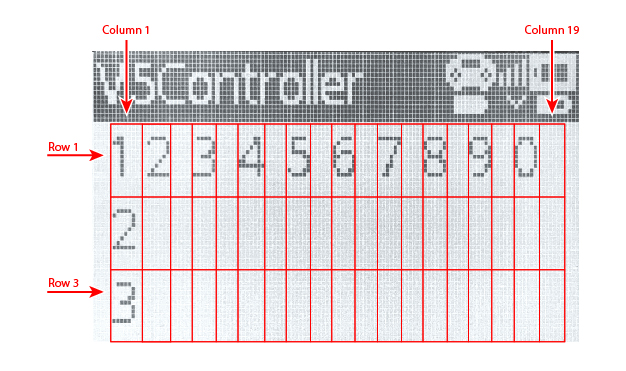
Πρόσβαση#
The controller class provides a Screen object. It is an instance of the screen class.
Αντικείμενο |
Παράδειγμα Χρήσης |
Περιγραφή |
|---|---|---|
|
|
Η οθόνη του χειριστηρίου V5. |
Σημειώσεις#
Πριν χρησιμοποιήσετε μια συνάρτηση μέλους
screen, δημιουργήστε ένα αντικείμενοcontroller.Η οθόνη Ελεγκτή έχει 3 γραμμές και 19 στήλες.
Η θέση του κέρσορα καθορίζει πού εμφανίζεται η επόμενη εκτυπωμένη τιμή.
// Create a Controller object
controller Controller = controller();
Συναρτήσεις Μελών#
Η κλάση screen περιλαμβάνει τις ακόλουθες συναρτήσεις-μέλη:
Ενέργειες — Εμφάνιση κειμένου ή εκκαθάριση της οθόνης Ελεγκτή.
print— Εμφανίζει μορφοποιημένο κείμενο, αριθμούς ή τιμές στην οθόνη του Ελεγκτή.setCursor— Μετακινεί τον κέρσορα σε μια καθορισμένη γραμμή και στήλη.newLine— Διαγράφει την υπόλοιπη τρέχουσα γραμμή και μετακινεί τον κέρσορα στην επόμενη γραμμή.clearScreen— Καθαρίζει την οθόνη του Ελεγκτή.clearLine— Διαγράφει μία γραμμή στην οθόνη Ελεγκτή.
Λήψη δεδομένων — Ανάγνωση της τρέχουσας θέσης του κέρσορα.
Ενέργειες#
print#
print εμφανίζει μορφοποιημένο κείμενο, αριθμούς ή τιμές στην οθόνη του ελεγκτή V5 στην τρέχουσα θέση του κέρσορα.
Διαθέσιμες λειτουργίες
void print(
  const char* format,
  ...
);
void print(
  char* format,
  ...
);
Παράμετρος |
Τύπος |
Περιγραφή |
|---|---|---|
|
|
Μια συμβολοσειρά μορφοποίησης που παρέχεται ως κυριολεκτική συμβολοσειρά ή συμβολοσειρά τύπου C μόνο για ανάγνωση, όπως |
|
|
Μια συμβολοσειρά μορφοποίησης που παρέχεται ως τροποποιήσιμος πίνακας χαρακτήρων. |
|
Προαιρετικό. Μία ή περισσότερες πρόσθετες τιμές εισάγονται στη συμβολοσειρά μορφοποίησης, διαχωρισμένες με κόμματα. |
Επιστρεφόμενη τιμή
Αυτή η συνάρτηση δεν επιστρέφει τιμή.
Σημειώσεις
Η έξοδος ξεκινά από την τρέχουσα θέση του κέρσορα στην οθόνη Ελεγκτή.
Όταν χρησιμοποιείτε μια συμβολοσειρά μορφοποίησης, ο αριθμός και οι τύποι των τιμών που διαβιβάζονται πρέπει να ταιριάζουν με τους προσδιοριστές μορφής στη συμβολοσειρά.
Παράδειγμα
// Display a message at the starting cursor position
Controller.Screen.print("Hello, Robot!");
// Display a formatted number
Controller.Screen.print("Score: %d", 25);
setCursor#
setCursor μετακινεί τον κέρσορα σε μια καθορισμένη γραμμή και στήλη στην οθόνη του ελεγκτή V5. Η επόμενη εκτυπωμένη τιμή θα εμφανιστεί σε αυτήν τη θέση.
Διαθέσιμη λειτουργία
void setCursor(
  int32_t row,
  int32_t col
);
Παράμετρος |
Τύπος |
Περιγραφή |
|---|---|---|
|
|
Ο αριθμός γραμμής όπου θα τοποθετηθεί ο δρομέας, από |
|
|
Ο αριθμός της στήλης όπου θα τοποθετηθεί ο δρομέας, από |
Επιστρεφόμενη τιμή
Αυτή η συνάρτηση δεν επιστρέφει τιμή.
Παράδειγμα
// Display text starting at row 2, column 3
Controller.Screen.setCursor(2, 3);
Controller.Screen.print("Row 2, Column 3");
newLine#
newLine διαγράφει την υπόλοιπη τρέχουσα γραμμή και μετακινεί τον κέρσορα στη στήλη 1 στην επόμενη γραμμή της οθόνης V5 Controller.
Διαθέσιμη λειτουργία
void newLine();
Παράμετροι
Αυτή η συνάρτηση δεν έχει παραμέτρους.
Επιστρεφόμενη τιμή
Αυτή η συνάρτηση δεν επιστρέφει τιμή.
Παράδειγμα
// Display two lines of text
Controller.Screen.print("Line 1");
Controller.Screen.newLine();
Controller.Screen.print("Line 2");
clearScreen#
clearScreen διαγράφει όλο το κείμενο από την οθόνη του ελεγκτή V5.
Διαθέσιμη λειτουργία
void clearScreen();
Παράμετροι
Αυτή η συνάρτηση δεν έχει παραμέτρους.
Επιστρεφόμενη τιμή
Αυτή η συνάρτηση δεν επιστρέφει τιμή.
Παράδειγμα
// Clear the Controller screen after 2 seconds
Controller.Screen.print("VEXcode");
wait(2, seconds);
Controller.Screen.clearScreen();
clearLine#
clearLine διαγράφει μία σειρά στην οθόνη του ελεγκτή V5.
Διαθέσιμες λειτουργίες
void clearLine(
  int line
);
void clearLine();
Παράμετρος |
Τύπος |
Περιγραφή |
|---|---|---|
|
|
Προαιρετικό. Η γραμμή που θα διαγραφεί, από |
Επιστρεφόμενη τιμή
Αυτή η συνάρτηση δεν επιστρέφει τιμή.
Σημειώσεις
Η διαγραφή μιας γραμμής δεν αλλάζει την τρέχουσα θέση του δρομέα.
Παράδειγμα
// Display text on two rows
Controller.Screen.print("This text stays");
Controller.Screen.newLine();
Controller.Screen.print("This disappears");

// Wait 3 seconds before clearing row 2
wait(3, seconds);
Controller.Screen.clearLine(2);
Αποκτητές#
row#
Η γραμμή row επιστρέφει την τρέχουσα γραμμή κέρσορα στην οθόνη του ελεγκτή V5.
Διαθέσιμη λειτουργία
int32_t row();
Παράμετροι
Αυτή η συνάρτηση δεν έχει παραμέτρους.
Επιστρεφόμενη τιμή
Επιστρέφει μια τιμή int32_t που αντιπροσωπεύει την τρέχουσα γραμμή του δρομέα. Η αρίθμηση γραμμών ξεκινά από 1.
Παράδειγμα
// Display the cursor's current row
Controller.Screen.setCursor(3, 2);
Controller.Screen.print(Controller.Screen.row());
column#
Η στήλη column επιστρέφει την τρέχουσα στήλη του δρομέα στην οθόνη του Ελεγκτή V5.
Διαθέσιμη λειτουργία
int32_t column();
Παράμετροι
Αυτή η συνάρτηση δεν έχει παραμέτρους.
Επιστρεφόμενη τιμή
Επιστρέφει μια τιμή int32_t που αντιπροσωπεύει την τρέχουσα στήλη του δρομέα. Η αρίθμηση στηλών ξεκινά από 1.
Παράδειγμα
// Display the cursor's current column
Controller.Screen.setCursor(3, 2);
Controller.Screen.print(Controller.Screen.column());