
屏幕#
介绍#
The screen class is a derived class of the controller class. It provides functions for displaying text, numbers, and values on the V5 Controller screen.
A screen object is accessed through a controller object. It is not constructed directly.
V5 控制器屏幕有 3 行 19 列,用于显示文本和数字。
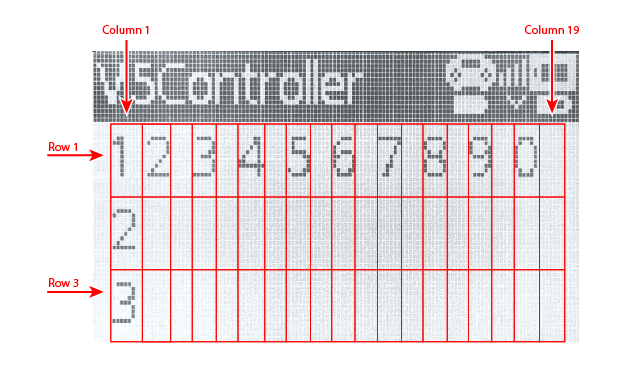
使用权#
The controller class provides a Screen object. It is an instance of the screen class.
目的 |
用法示例 |
描述 |
|---|---|---|
|
|
V5 控制器屏幕。 |
笔记#
Before using a
screenmember function, create acontrollerobject.控制器屏幕有 3 行 19 列。
光标位置决定了下一个打印值出现的位置。
// Create a Controller object
controller Controller = controller();
成员功能#
The screen class includes the following member functions:
操作——显示文本或清除控制器屏幕。
print— Displays formatted text, numbers, or values on the Controller screen.setCursor— Moves the cursor to a specified row and column.newLine— Clears the rest of the current row and moves the cursor to the next row.clearScreen— Clears the Controller screen.clearLine— Clears one row on the Controller screen.
Getter 方法 — 读取当前光标位置。
行动#
print#
print displays formatted text, numbers, or values on the V5 Controller screen at the current cursor position.
可用功能
void print(
  const char* format,
  ...
);
void print(
  char* format,
  ...
);
范围 |
类型 |
描述 |
|---|---|---|
|
|
A format string provided as a string literal or read-only C-style string, such as |
|
|
以可修改字符数组形式提供的格式字符串。 |
|
可选。在格式字符串中插入一个或多个附加值,以逗号分隔。 |
返回值
此函数不返回值。
笔记
输出从控制器屏幕上的当前光标位置开始。
使用格式字符串时,传递的值的数量和类型必须与字符串中的 格式说明符 匹配。
例子
// Display a message at the starting cursor position
Controller.Screen.print("Hello, Robot!");
// Display a formatted number
Controller.Screen.print("Score: %d", 25);
setCursor#
setCursor moves the cursor to a specified row and column on the V5 Controller screen. The next printed value will appear at that position.
可用功能
void setCursor(
  int32_t row,
  int32_t col
);
范围 |
类型 |
描述 |
|---|---|---|
|
|
The row number where the cursor will be placed, from |
|
|
The column number where the cursor will be placed, from |
返回值
此函数不返回值。
例子
// Display text starting at row 2, column 3
Controller.Screen.setCursor(2, 3);
Controller.Screen.print("Row 2, Column 3");
newLine#
newLine clears the rest of the current row and moves the cursor to column 1 on the next row of the V5 Controller screen.
可用功能
void newLine();
参数
此函数没有参数。
返回值
此函数不返回值。
例子
// Display two lines of text
Controller.Screen.print("Line 1");
Controller.Screen.newLine();
Controller.Screen.print("Line 2");
clearScreen#
clearScreen clears all text from the V5 Controller screen.
可用功能
void clearScreen();
参数
此函数没有参数。
返回值
此函数不返回值。
例子
// Clear the Controller screen after 2 seconds
Controller.Screen.print("VEXcode");
wait(2, seconds);
Controller.Screen.clearScreen();
clearLine#
clearLine clears one row on the V5 Controller screen.
可用功能
void clearLine(
  int line
);
void clearLine();
范围 |
类型 |
描述 |
|---|---|---|
|
|
Optional. The row to clear, from |
返回值
此函数不返回值。
笔记
清除一行不会改变当前光标位置。
例子
// Display text on two rows
Controller.Screen.print("This text stays");
Controller.Screen.newLine();
Controller.Screen.print("This disappears");

// Wait 3 seconds before clearing row 2
wait(3, seconds);
Controller.Screen.clearLine(2);
获取器#
row#
row returns the current cursor row on the V5 Controller screen.
可用功能
int32_t row();
参数
此函数没有参数。
返回值
Returns an int32_t representing the current cursor row. Row numbering starts at 1.
例子
// Display the cursor's current row
Controller.Screen.setCursor(3, 2);
Controller.Screen.print(Controller.Screen.row());
column#
column returns the current cursor column on the V5 Controller screen.
可用功能
int32_t column();
参数
此函数没有参数。
返回值
Returns an int32_t representing the current cursor column. Column numbering starts at 1.
例子
// Display the cursor's current column
Controller.Screen.setCursor(3, 2);
Controller.Screen.print(Controller.Screen.column());