
Pantalla#
Introducción#
The screen class is a derived class of the controller class. It provides functions for displaying text, numbers, and values on the V5 Controller screen.
A screen object is accessed through a controller object. It is not constructed directly.
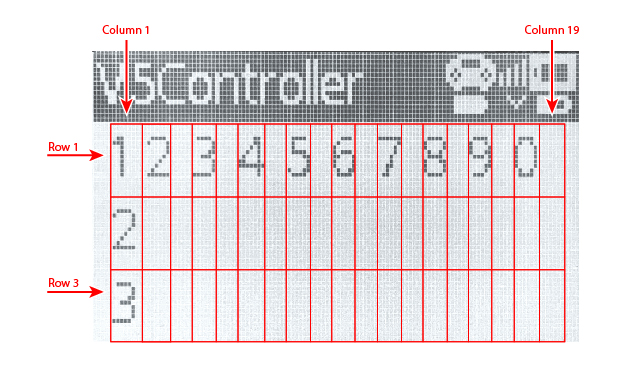
La pantalla del controlador V5 tiene 3 filas y 19 columnas para mostrar texto y números.
Acceso#
The controller class provides a Screen object. It is an instance of the screen class.
Objeto |
Ejemplo de uso |
Descripción |
|---|---|---|
|
|
La pantalla del controlador V5. |
Notas#
Before using a
screenmember function, create acontrollerobject.La pantalla del controlador tiene 3 filas y 19 columnas.
La posición del cursor determina dónde aparece el siguiente valor impreso.
// Create a Controller object
controller Controller = controller();
Funciones de los miembros#
The screen class includes the following member functions:
Acciones: Mostrar texto o borrar la pantalla del controlador.
print— Displays formatted text, numbers, or values on the Controller screen.setCursor— Moves the cursor to a specified row and column.newLine— Clears the rest of the current row and moves the cursor to the next row.clearScreen— Clears the Controller screen.clearLine— Clears one row on the Controller screen.
Obtenedores: Leen la posición actual del cursor.
Comportamiento#
print#
print displays formatted text, numbers, or values on the V5 Controller screen at the current cursor position.
Funciones disponibles
void print(
  const char* format,
  ...
);
void print(
  char* format,
  ...
);
Parámetro |
Tipo |
Descripción |
|---|---|---|
|
|
A format string provided as a string literal or read-only C-style string, such as |
|
|
Una cadena de formato proporcionada como una matriz de caracteres modificable. |
|
Opcional. Uno o más valores adicionales insertados en la cadena de formato, separados por comas. |
Valor de retorno
Esta función no devuelve ningún valor.
Notas
La salida comienza en la posición actual del cursor en la pantalla del controlador.
Al utilizar una cadena de formato, el número y los tipos de valores pasados deben coincidir con los especificadores de formato en la cadena.
Ejemplo
// Display a message at the starting cursor position
Controller.Screen.print("Hello, Robot!");
// Display a formatted number
Controller.Screen.print("Score: %d", 25);
setCursor#
setCursor moves the cursor to a specified row and column on the V5 Controller screen. The next printed value will appear at that position.
Función disponible
void setCursor(
  int32_t row,
  int32_t col
);
Parámetro |
Tipo |
Descripción |
|---|---|---|
|
|
The row number where the cursor will be placed, from |
|
|
The column number where the cursor will be placed, from |
Valor de retorno
Esta función no devuelve ningún valor.
Ejemplo
// Display text starting at row 2, column 3
Controller.Screen.setCursor(2, 3);
Controller.Screen.print("Row 2, Column 3");
newLine#
newLine clears the rest of the current row and moves the cursor to column 1 on the next row of the V5 Controller screen.
Función disponible
void newLine();
Parámetros
Esta función no tiene parámetros.
Valor de retorno
Esta función no devuelve ningún valor.
Ejemplo
// Display two lines of text
Controller.Screen.print("Line 1");
Controller.Screen.newLine();
Controller.Screen.print("Line 2");
clearScreen#
clearScreen clears all text from the V5 Controller screen.
Función disponible
void clearScreen();
Parámetros
Esta función no tiene parámetros.
Valor de retorno
Esta función no devuelve ningún valor.
Ejemplo
// Clear the Controller screen after 2 seconds
Controller.Screen.print("VEXcode");
wait(2, seconds);
Controller.Screen.clearScreen();
clearLine#
clearLine clears one row on the V5 Controller screen.
Funciones disponibles
void clearLine(
  int line
);
void clearLine();
Parámetro |
Tipo |
Descripción |
|---|---|---|
|
|
Optional. The row to clear, from |
Valor de retorno
Esta función no devuelve ningún valor.
Notas
Borrar una fila no cambia la posición actual del cursor.
Ejemplo
// Display text on two rows
Controller.Screen.print("This text stays");
Controller.Screen.newLine();
Controller.Screen.print("This disappears");

// Wait 3 seconds before clearing row 2
wait(3, seconds);
Controller.Screen.clearLine(2);
Getters#
row#
row returns the current cursor row on the V5 Controller screen.
Función disponible
int32_t row();
Parámetros
Esta función no tiene parámetros.
Valor de retorno
Returns an int32_t representing the current cursor row. Row numbering starts at 1.
Ejemplo
// Display the cursor's current row
Controller.Screen.setCursor(3, 2);
Controller.Screen.print(Controller.Screen.row());
column#
column returns the current cursor column on the V5 Controller screen.
Función disponible
int32_t column();
Parámetros
Esta función no tiene parámetros.
Valor de retorno
Returns an int32_t representing the current cursor column. Column numbering starts at 1.
Ejemplo
// Display the cursor's current column
Controller.Screen.setCursor(3, 2);
Controller.Screen.print(Controller.Screen.column());