
螢幕#
介紹#
screen 類別是 controller 類別的衍生類別。它提供了在 V5 控制器螢幕上顯示文字、數字和值的功能。
screen 物件是透過 controller 物件存取的,它不是直接建構的。
V5 控制器螢幕有 3 行 19 列,用於顯示文字和數字。
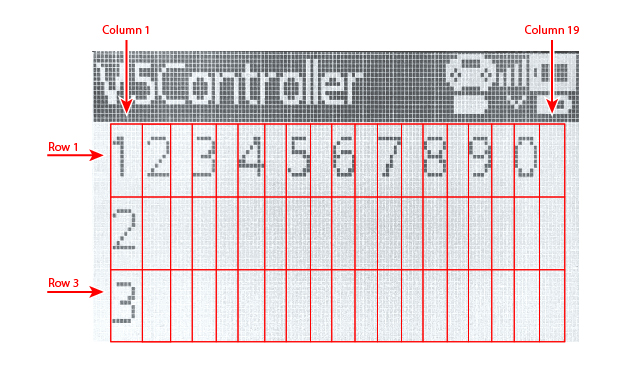
使用權#
controller 類別提供了 Screen 物件。它是 screen 類別的一個實例。
目的 |
用法範例 |
描述 |
|---|---|---|
|
|
V5 控制器螢幕。 |
筆記#
在使用
screen成員函數之前,請建立一個controller物件。控制器螢幕有 3 行 19 列。
遊標位置決定了下一個列印值出現的位置。
// Create a Controller object
controller Controller = controller();
成員功能#
screen 類別包含以下成員函數:
操作-顯示文字或清除控制器畫面。
print— 在控制器畫面上顯示已格式化的文字、數字或值。setCursor— 將遊標移到指定的行和列。newLine— 清除目前行的其餘部分並將遊標移到下一行。clearScreen— 清除控制器螢幕。clearLine— 清除控制器螢幕上的一行。
Getter 方法 — 讀取目前遊標位置。
行動#
print#
print 在 V5 控制器畫面上目前遊標位置顯示格式化的文字、數字或值。
可用功能
void print(
  const char* format,
  ...
);
void print(
  char* format,
  ...
);
範圍 |
類型 |
描述 |
|---|---|---|
|
|
格式字串以字串字面量或唯讀 C 風格字串的形式提供,例如 |
|
|
以可修改字元數組形式提供的格式字串。 |
|
可選。在格式字串中插入一個或多個附加價值,以逗號分隔。 |
傳回值
此函數不傳回值。
筆記
輸出從控制器螢幕上的目前遊標位置開始。
使用格式字串時,傳遞的值的數量和類型必須與字串中的 格式說明符 相符。
例子
// Display a message at the starting cursor position
Controller.Screen.print("Hello, Robot!");
// Display a formatted number
Controller.Screen.print("Score: %d", 25);
setCursor#
setCursor 將遊標移到 V5 控制器畫面上的指定行和列。下一個列印值將顯示在該位置。
可用功能
void setCursor(
  int32_t row,
  int32_t col
);
範圍 |
類型 |
描述 |
|---|---|---|
|
|
遊標將放置的行號,從 |
|
|
遊標將放置的列號,從 |
傳回值
此函數不傳回值。
例子
// Display text starting at row 2, column 3
Controller.Screen.setCursor(2, 3);
Controller.Screen.print("Row 2, Column 3");
newLine#
newLine 清除目前行的其餘部分,並將遊標移至 V5 控制器畫面下一行的第 1 列。
可用功能
void newLine();
參數
此函數沒有參數。
傳回值
此函數不傳回值。
例子
// Display two lines of text
Controller.Screen.print("Line 1");
Controller.Screen.newLine();
Controller.Screen.print("Line 2");
clearScreen#
clearScreen 清除 V5 控制器螢幕上的所有文字。
可用功能
void clearScreen();
參數
此函數沒有參數。
傳回值
此函數不傳回值。
例子
// Clear the Controller screen after 2 seconds
Controller.Screen.print("VEXcode");
wait(2, seconds);
Controller.Screen.clearScreen();
clearLine#
clearLine 清除 V5 控制器螢幕上的一行。
可用功能
void clearLine(
  int line
);
void clearLine();
範圍 |
類型 |
描述 |
|---|---|---|
|
|
可選。要清除的行,從 |
傳回值
此函數不傳回值。
筆記
清除一行不會改變目前遊標位置。
例子
// Display text on two rows
Controller.Screen.print("This text stays");
Controller.Screen.newLine();
Controller.Screen.print("This disappears");

// Wait 3 seconds before clearing row 2
wait(3, seconds);
Controller.Screen.clearLine(2);
獲取器#
row#
row 返回 V5 控制器螢幕上的目前遊標行。
可用功能
int32_t row();
參數
此函數沒有參數。
傳回值
傳回一個 int32_t 表示目前遊標所在行。行號從 1開始。
例子
// Display the cursor's current row
Controller.Screen.setCursor(3, 2);
Controller.Screen.print(Controller.Screen.row());
column#
column 返回 V5 控制器螢幕上的目前遊標列。
可用功能
int32_t column();
參數
此函數沒有參數。
傳回值
傳回一個 int32_t ,表示目前遊標列。列編號從 1開始。
例子
// Display the cursor's current column
Controller.Screen.setCursor(3, 2);
Controller.Screen.print(Controller.Screen.column());