
遥控器#
简介#
VEX AIR 无人机遥控器采用 12 个按钮布局和两个摇杆。这些输入使无人机能够检测按钮按下和摇杆移动,从而实现交互式和灵敏的控制。
以下是所有可用方法的列表:
获取方法 – 读取按钮、摇杆和连接状态。
pressing– 返回指定按钮当前是否被按下。position– 返回摇杆沿指定轴的位置。is_drone_connected– 返回遥控器是否已连接到无人机。get_battery_level—返回遥控器的电池电量。
回调——响应按钮或摇杆输入变化。
获取方法#
pressing#
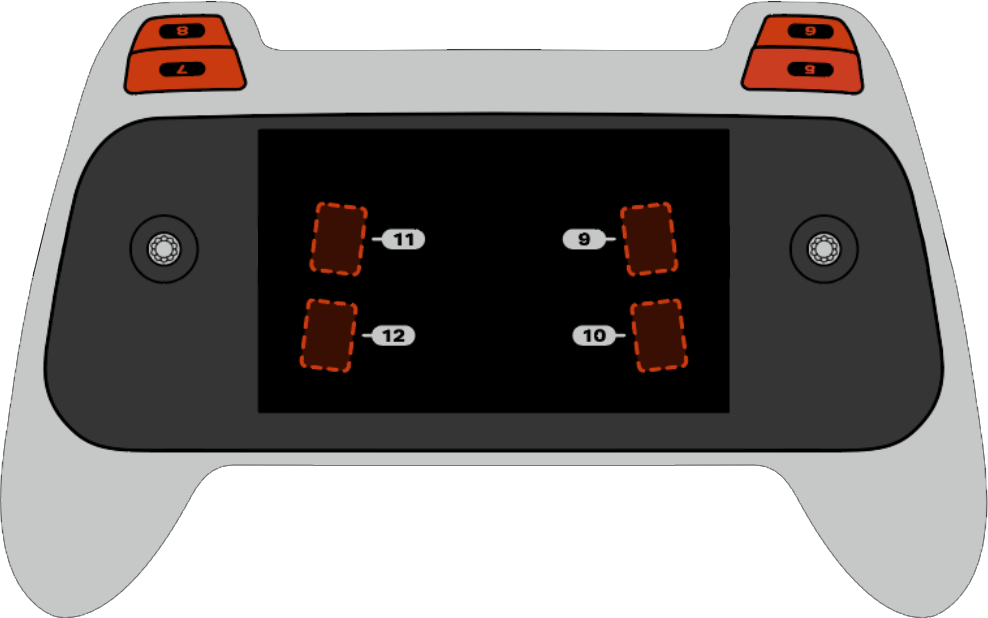
pressing 返回一个布尔值,指示遥控器上的特定按钮当前是否被按下。此方法必须在特定的按钮对象上调用,例如 button5(见下方完整的按钮对象列表)。
True- 指定的按钮正被按下。False—未按下指定按钮。
用法:
八个可用按钮(编号 5 至 12)之一可用于此方法,如下所示:
按钮 |
命令 |
|---|---|
|
|
|
|
|
|
|
|
|
|
|
|
|
|
|
|
参数 |
描述 |
|---|---|
该方法没有参数。 |
# Take a picture when button 5 is pressed.
drone.take_off(climb_to=500)
while True:
    # Fly using the controller sticks
    drone.move_with_vectors(
        forward=controller.axis4.position(),
        rightward=controller.axis3.position(),
        upward=controller.axis1.position(),
        rotation=controller.axis2.position()
    )

    # Capture an image from the forward camera when button 5 is pressed.
    if controller.button5.pressing():
        drone.camera.capture_image(FORWARD_CAMERA)

    wait(5, MSEC)
position#
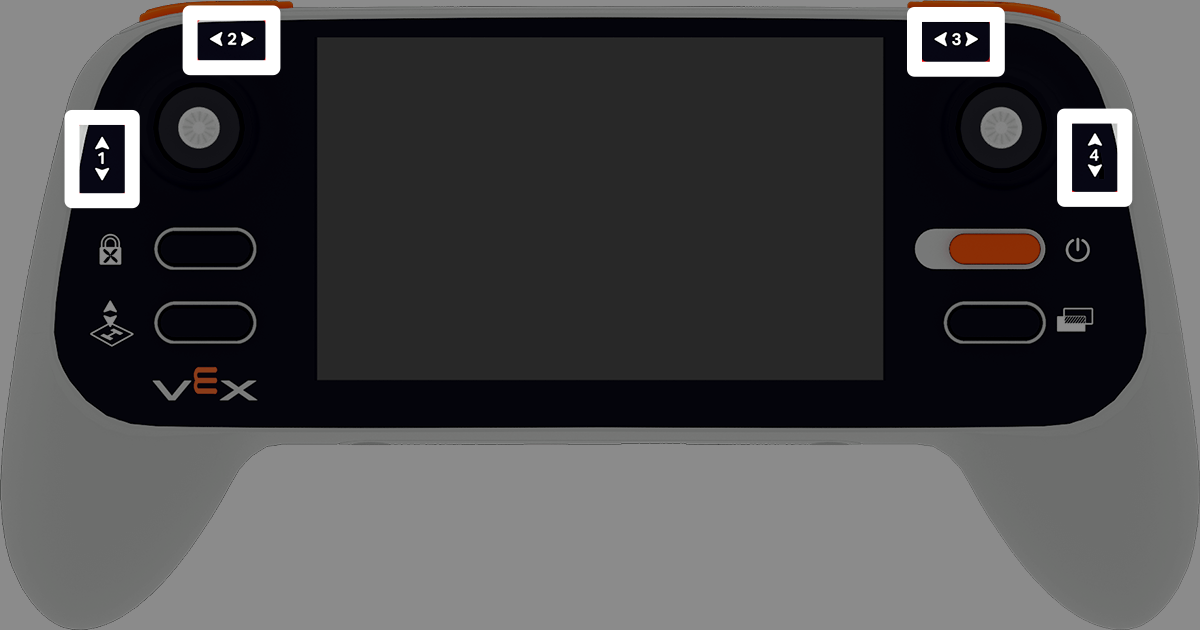
position 返回摇杆指定轴的位置,以 –100% 到 100% 的百分比表示。
用法:
此方法可使用四个可用轴中的一个,编号为 1 至 4。
轴 |
命令 |
|---|---|
|
|
|
|
|
|
|
|
参数 |
描述 |
|---|---|
该方法没有参数。 |
# Climb when the left joystick is moved up.
drone.take_off(climb_to=500)
while True:
    if controller.axis1.position() > 0:
        drone.climb(direction=UP, velocity=50)
    else:
        drone.hover()
    wait(5, MSEC)
is_drone_connected#
is_drone_connected 返回一个布尔值,指示无人机是否已连接。
True- 无人机已连接。False—无人机未连接。
用法:
controller.is_drone_connected()
参数 |
描述 |
|---|---|
该方法没有参数。 |
# Print controller connection status on screen.
while True:
    if controller.is_drone_connected():
        controller.screen.clear_screen()
        controller.screen.set_cursor(1, 1)
        controller.screen.print("Controller connected")
    wait(0.5, SECONDS)
get_battery_level#
get_battery_level 返回遥控器的电池电量,以 0% 到 100% 的百分比表示。
用法:
controller.get_battery_level()
参数 |
描述 |
|---|---|
该方法没有参数。 |
# Show controller's battery level.
if controller.get_battery_level() > 50:
    controller.screen.print("Battery level ok")
else:
    controller.screen.print("Battery level low")
回调#
pressed#
pressed 在指定按钮被按下时运行一个函数。一旦使用,每次该按钮被按下时,该函数都会自动运行。
用法:
此方法可使用八个可用按钮之一,编号为 5 至 12。
按钮 |
命令 |
|---|---|
|
|
|
|
|
|
|
|
|
|
|
|
|
|
|
|
参数 |
描述 |
|---|---|
|
预先定义的 函数,每次按下指定的按钮时运行。 |
|
# Take a picture when button 5 is pressed.
def take_picture():
    drone.camera.capture_image(FORWARD_CAMERA)

# Run take_picture each time button 5 is pressed.
controller.button5.pressed(take_picture)

# Fly using the controller sticks.
drone.take_off(climb_to=500)
while True:
    drone.move_with_vectors(
        forward=controller.axis4.position(),
        rightward=controller.axis3.position(),
        upward=controller.axis1.position(),
        rotation=controller.axis2.position()
    )
    wait(5, MSEC)
released#
released 运行一个函数当指定的按钮被放开。 一旦它被使用,每次按键被释放时,该函数将自动运行。
用法:
此方法可使用八个可用按钮之一,编号为 5 至 12。
按钮 |
命令 |
|---|---|
|
|
|
|
|
|
|
|
|
|
|
|
|
|
|
|
参数 |
描述 |
|---|---|
|
预先定义的 函数,每次释放指定的按钮时运行。 |
|
# Take a picture when button 5 is released.
def take_picture():
    drone.camera.capture_image(FORWARD_CAMERA)

# Run take_picture each time button 5 is released.
controller.button5.released(take_picture)

# Fly using the controller sticks.
drone.take_off(climb_to=500)
while True:
    drone.move_with_vectors(
        forward=controller.axis4.position(),
        rightward=controller.axis3.position(),
        upward=controller.axis1.position(),
        rotation=controller.axis2.position()
    )
    wait(5, MSEC)
changed#
changed 在摇杆沿指定轴的位置发生变化时运行一个函数。一旦使用,该功能将在每次摇杆的位置沿该轴发生变化时自动运行。
用法:
此方法可使用四个可用轴中的一个,编号为 1 至 4。
轴 |
命令 |
|---|---|
|
|
|
|
|
|
|
|
参数 |
描述 |
|---|---|
|
预先定义的 函数,每次操纵杆的位置沿指定轴发生变化时运行。 |
|
# Move forward when the left joystick moves.
def on_axis1_changed():
    drone.move_for(direction=0, distance=200, velocity=50, units=MM)

drone.take_off(climb_to=500)
controller.axis1.changed(on_axis1_changed)