
AI视觉传感器#
介绍#
The aivision class is used to control and access data from the V5 AI Vision Sensor. The AI Vision Sensor can detect:
AI分类(例如游戏对象)
AprilTag IDs
自定义颜色签名
自定义颜色代码
它提供对象数据,包括位置、大小、方向、分类 ID 和置信度分数。
The sensor processes visual information using an onboard AI model selected in the AI Vision Utility within VEXcode. The selected model determines which AI Classifications the sensor can detect. When using VS Code, the AI model must first be configured in VEXcode before it can be used in your program. Detected objects are returned through the objects array after takeSnapshot is called.
类构造函数#
aivision(
  int32_t index,
  Args&... sigs );
参数#
范围 |
类型 |
描述 |
|---|---|---|
|
|
The Smart Port that the AI Vision Sensor is connected to, written as |
|
|
One or more detection types to register with the sensor:
|
相关课程#
AI视觉传感器使用以下相关类:
aivision::colordesc— Defines a Color Signature that the AI Vision Sensor can detect.aivision::codedesc— Defines a Color Code composed of multipleaivision::colordescobjects.
aivision::colordesc#
The aivision::colordesc class defines a Color Signature for the AI Vision Sensor.
颜色特征码代表人工智能视觉传感器可以检测到的特定颜色。这些特征码使传感器能够根据颜色识别和跟踪物体。
AI视觉传感器一次最多可以存储七个颜色特征。
Color Signatures are used with takeSnapshot to detect matching colored objects in real time.
类构造函数
aivision::colordesc(
  int32_t index,
  uint8_t red,
  uint8_t green,
  uint8_t blue,
  float   hangle,
  float   hdsat );
参数
范围 |
类型 |
描述 |
|---|---|---|
|
|
颜色签名索引(1-7)。创建两个具有相同索引的签名将会覆盖之前的签名。 |
|
|
红色值介于 0 到 255 之间。 |
|
|
绿色值范围为 0 到 255。 |
|
|
蓝色值介于 0 到 255 之间。 |
|
|
允许的色调偏差范围为 1 至 40 度。 |
|
|
允许的饱和度偏差为 0.10 – 1.00。 |
条笔记
Creating two signatures with the same
indexwill cause the later one to replace the earlier signature.The
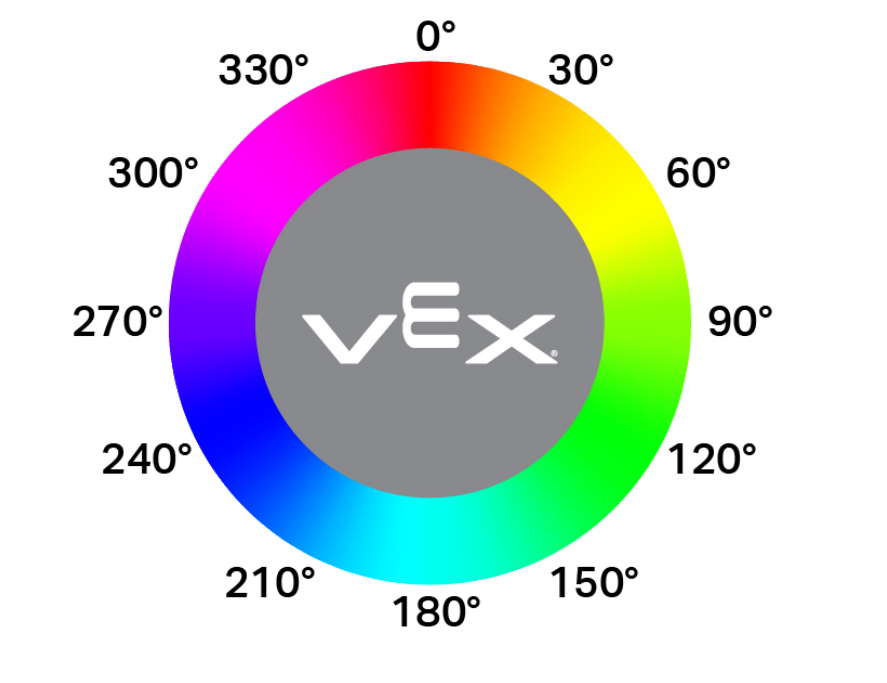
hangleparameter represents the allowable hue variance on a circular color wheel. Hue values correspond to degrees around the wheel (for example, red near 0°, green near 120°, and blue near 240°). Larger values allow a wider range of color variation to be detected.
aivision::codedesc#
The aivision::codedesc class defines a Color Code for the AI Vision Sensor.
颜色代码是一种结构化的模式,由多个按特定顺序排列的颜色特征组成。这些代码使人工智能视觉传感器能够识别预定义的多色模式。
AI视觉传感器一次最多可以存储八个颜色代码。
Color Codes are used with takeSnapshot to detect specific multi-color patterns.
类构造函数
1 — 根据两个颜色描述符创建颜色代码。
aivision::codedesc(
  int32_t index,
  aivision::colordesc &sig1,
  aivision::colordesc &sig2 );
2 — 根据三个颜色描述符创建颜色代码。
aivision::codedesc(
  int32_t index,
  aivision::colordesc &sig1,
  aivision::colordesc &sig2,
  aivision::colordesc &sig3 );
3 — 根据四个颜色描述符创建颜色代码。
aivision::codedesc(
  int32_t index,
  aivision::colordesc &sig1,
  aivision::colordesc &sig2,
  aivision::colordesc &sig3,
  aivision::colordesc &sig4 );
Parameters4 — 根据五个颜色描述符创建颜色代码。
aivision::codedesc(
  int32_t index,
  aivision::colordesc &sig1,
  aivision::colordesc &sig2,
  aivision::colordesc &sig3,
  aivision::colordesc &sig4,
  aivision::colordesc &sig5 );
范围 |
类型 |
描述 |
|---|---|---|
|
|
颜色代码索引号(1-8)。 |
|
|
用于构建颜色代码的先前创建的颜色描述符的引用。 |
条笔记
颜色代码至少需要两个颜色签名。
一个颜色代码中最多可以使用五个颜色签名。
Creating two Color Codes with the same
indexwill overwrite the previous one.
aivision::tagdesc#
创建一个标签描述符,用于检测特定的 AprilTag ID。
Available Functionstagdesc( int32_t id );
范围 |
类型 |
描述 |
|---|---|---|
|
|
要检测的 AprilTag ID 号(0–36)。 |
人工智能模型和分类#
AI视觉传感器能够通过特定的AI分类来检测不同的物体。根据在“设备”窗口中配置AI视觉传感器时选择的AI分类模型,可以检测到不同的物体。目前可用的模型包括:
课堂要素
身份证号码 |
人工智能分类 |
|---|---|
0 |
|
1 |
|
2 |
|
3 |
|
4 |
|
5 |
|
6 |
|
7 |
|
8 |
|
VEX V5 机器人大赛 高风险赛
身份证号码 |
人工智能分类 |
|---|---|
0 |
|
1 |
|
2 |
|
VEX V5 机器人竞赛延期
身份证号码 |
人工智能分类 |
|---|---|
0 |
|
1 |
|
VEX V5 机器人竞赛规则变更
身份证号码 |
人工智能分类 |
|---|---|
0 |
|
1 |
|
2 |
|
3 |
|
4 |
|
示例#
// Create Color Signatures
aivision::colordesc AIVision1__greenBox(
    1,      // index
    85,     // red
    149,    // green
    46,     // blue
    23,     // hangle
    0.23 ); // hdsat

aivision::colordesc AIVision1__blueBox(
    2,      // index
    77,     // red
    135,    // green
    125,    // blue
    27,     // hangle
    0.29 ); // hdsat

// Create a Color Code from two color signatures
aivision::codedesc AIVision1__greenBlue(
    1,                    // code index
    AIVision1__greenBox,  // first color signature
    AIVision1__blueBox ); // second color signature

// Create the AI Vision Sensor instance
aivision AIVision1(
    PORT11,                  // Smart Port
    AIVision1__greenBlue,    // color code
    aivision::ALL_AIOBJS );  // enable AI Classifications
成员功能#
The aivision class includes the following member functions:
takeSnapshot— Captures data for a specific Color Signature, Color Code, AI Classification group, or AprilTag ID group.installed— Returns whether the AI Vision Sensor is connected to the V5 Brain.
To access detected object data after calling takeSnapshot, use the available Properties.
Before calling any aivision member functions, an aivision instance must be created, as shown below:
/* This constructor is required when using VS Code.
AI Vision Sensor configuration is generated automatically
in VEXcode using the Device Menu. Replace the values
as needed. */


// Create Color Signatures
aivision::colordesc AIVision1__greenBox(
    1,      // index
    85,     // red
    149,    // green
    46,     // blue
    23,     // hangle
    0.23 ); // hdsat

aivision::colordesc AIVision1__blueBox(
    2,      // index
    77,     // red
    135,    // green
    125,    // blue
    27,     // hangle
    0.29 ); // hdsat

// Create a Color Code from two color signatures
aivision::codedesc AIVision1__greenBlue(
    1,                    // code index
    AIVision1__greenBox,  // first color signature
    AIVision1__blueBox ); // second color signature

// Create the AI Vision Sensor instance
aivision AIVision1(
    PORT1,                   // Smart Port
    AIVision1__greenBlue,    // color code
    aivision::ALL_AIOBJS );  // enable AI Classifications
takeSnapshot#
Captures an image from the AI Vision Sensor, processes it using the selected AI model or configured color signatures, and updates the objects array.
Each call refreshes the objects array with the most recent detection results. Objects are ordered from largest to smallest (by width), beginning at index 0. If no objects are detected objectCount will be 0 and objects[i].exists will be false.
1 — 使用对象 ID 和对象类型拍摄快照。
int32_t takeSnapshot(
  uint32_t id,
  objectType type,
  uint32_t count );
2 — 使用 颜色签名 拍摄快照。
int32_t takeSnapshot(
  const colordesc &desc,
  int32_t count = 8 );
3 — 使用 颜色代码 拍摄快照。
int32_t takeSnapshot(
  const codedesc &desc,
  int32_t count = 8 );
4 — 使用 AprilTag ID 拍摄快照。
int32_t takeSnapshot(
  const tagdesc &desc,
  int32_t count = 8 );
5 — 使用 AI 分类 拍摄快照。
int32_t takeSnapshot(
  const aiobjdesc &desc,
  int32_t count = 8 );
Parameters6 — 使用对象描述符拍摄快照。
int32_t takeSnapshot(
  const objdesc &desc,
  int32_t count = 8 );
范围 |
类型 |
描述 |
|---|---|---|
|
|
The identifier of the object to detect when using the
Note: In VEXcode, AI Classification names (such as blueBall) may be used directly. In VS Code, the numeric ID must be used. |
|
|
Specifies the category of object associated with
|
|
|
Descriptor used to detect a specific object. Passed directly to
|
|
|
从快照中存储的最大对象数。默认为 8。 |
返回值
Returns an int32_t representing the number of detected objects matching the specified signature or detection type.
条笔记
AI视觉传感器必须先拍摄快照才能访问物体数据。
The
objectsarray is refreshed on every call.When
countis specified, only the largest detected objects (up to the specified amount) are stored.
AI 分类取决于在 VEXcode 的 AI 视觉实用程序中选择的模型。
示例
// Move forward if an object is detected
while (true) {
  AIVision1.takeSnapshot(aivision::ALL_AIOBJS);
  if (AIVision1.objects[0].exists) {
    Drivetrain.driveFor(forward, 50, mm);
  }
  wait(50, msec);
}
installed#
返回 AI 视觉传感器是否已连接到 V5 大脑。
可用功能
bool installed();
参数
此函数不接受任何参数。
返回值
返回一个布尔值,指示 AI 视觉传感器是否已连接:
true— The AI Vision Sensor is connected.false— The AI Vision Sensor is not connected.
// Display a message if the AI Vision Sensor is connected
if (AIVision1.installed()){
  Brain.Screen.print("Installed!");
}
特性#
Calling takeSnapshot updates the AI Vision Sensor’s detection results. Each snapshot refreshes the objects array, which contains detected objects for the requested AI Classification, Color Signature, Color Code, or AprilTag ID.
AI Vision data is accessed through properties of objects stored in AIVisionSensor.objects[index], where index begins at 0.
物体按面积从大到小排序。
AI视觉传感器图像分辨率为 320 × 240像素物体位置和大小值以像素单位表示,相对于传感器的当前视图。
以下房源可供选择:
objectCount— Returns the number of detected objects from the most recent snapshot.largestObject— Selects the largest detected object from the most recent snapshot.objects— Array containing detected objects updated bytakeSnapshot..exists— Whether the object entry contains valid data..width— Width of the detected object in pixels..height— Height of the detected object in pixels..centerX— X position of the object’s center in pixels..centerY— Y position of the object’s center in pixels..originX— X position of the object’s top-left corner in pixels..originY— Y position of the object’s top-left corner in pixels..angle— Orientation of a Color Code or AprilTag ID in degrees..id— Classification ID or AprilTag ID..score— Confidence score for AI Classifications.
objectCount#
objectCount returns the number of items inside the objects array as an integer.
AIVisionSensor.objectCount
成分 |
描述 |
|---|---|
|
您的AI视觉传感器实例的名称。 |
示例
// Display the number of detected objects
while (true) {
  Brain.Screen.setCursor(1, 1);
  Brain.Screen.clearLine(1);
  AIVision1.takeSnapshot(aivision::ALL_AIOBJS);
  if (AIVision1.objects[0].exists) {
    Brain.Screen.print("%d", AIVision1.objectCount);
  }
  wait(50, msec);
}
largestObject#
largestObject retrieves the largest detected object from the objects array.
This method can be used to always get the largest object from objects without specifying an index.
AIVisionSensor.largestObject
成分 |
描述 |
|---|---|
|
您的AI视觉传感器实例的名称。 |
示例
// Display the closest AprilTag ID
while (true) {
  Brain.Screen.setCursor(1, 1);
  Brain.Screen.clearLine(1);
  AIVision1.takeSnapshot(aivision::ALL_TAGS);
  if (AIVision1.objects[0].exists) {
    Brain.Screen.print("%d", AIVision1.largestObject.id);
  }
  wait(50, msec);
}
objects#
objects returns an array of detected object properties. Use the array to access specific property values of individual objects.
There are ten properties that are included with each object stored in the objects array after takeSnapshot is used.
All property values except id and score describe the detected object’s position and size in the AI Vision Sensor’s view at the moment takeSnapshot was used. These values are measured in pixels, based on the sensor’s 320 by 240 pixel resolution.
AIVisionSensor.objects[index].property
成分 |
描述 |
|---|---|
|
您的AI视觉传感器实例的名称。 |
|
The object index in the array. Index begins at |
|
可用的对象属性。 |
.存在#
.exists returns whether the specified object index contains a valid detected object.
访问
SensorName.objects[index].exists
返回值
返回一个布尔值,指示指定的对象索引是否包含有效的检测到的对象:
-
true— A valid object exists at the specified index. -
false— No object exists at the specified index.
示例
// Move forward if an object is detected
while (true) {
  AIVision1.takeSnapshot(aivision::ALL_AIOBJS);
  if (AIVision1.objects[0].exists) {
    Drivetrain.driveFor(forward, 50, mm);
  }
  wait(50, msec);
}
。宽度#
.width returns the width of the detected object.
访问
SensorName.objects[index].width
返回值
Returns an int16_t representing the width of the detected object in pixels. The value ranges from 1 to 320.
示例
// Approach an object until it's at least 100 pixels wide
while (true) {
  AIVision1.takeSnapshot(aivision::ALL_AIOBJS);

  if (AIVision1.objects[0].exists) {
    if (AIVision1.objects[0].width < 100) {
      Drivetrain.drive(forward);
    } else {
      Drivetrain.stop();
    }
  } else {
    Drivetrain.stop();
  }
  wait(50, msec);
}
。高度#
.height returns the height of the detected object.
访问
SensorName.objects[index].height
返回值
Returns an int16_t representing the height of the detected object in pixels. The value ranges from 1 to 240.
示例
// Approach an object until it's at least 90 pixels tall
while (true) {
  AIVision1.takeSnapshot(aivision::ALL_AIOBJS);

  if (AIVision1.objects[0].exists) {
    if (AIVision1.objects[0].height < 90) {
      Drivetrain.drive(forward);
    } else {
      Drivetrain.stop();
    }
  } else {
    Drivetrain.stop();
  }
  wait(50, msec);
}
.centerX#
.centerX returns the x-coordinate of the center of the detected object.
访问
SensorName.objects[index].centerX
返回值
Returns an int16_t representing the x-coordinate of the object’s center in pixels. The value ranges from 0 to 320.
示例
// Turn until an object is directly in front of the sensor
Drivetrain.setTurnVelocity(10, percent);
Drivetrain.turn(right);
while (true) {
  AIVision1.takeSnapshot(aivision::ALL_AIOBJS);

  if (AIVision1.objects[0].exists) {
    if (AIVision1.objects[0].centerX > 140 && AIVision1.objects[0].centerX < 180) {
      Drivetrain.stop();
    }
  }
  wait(10, msec);
}
.centerY#
.centerY returns the y-coordinate of the center of the detected object.
访问
SensorName.objects[index].centerY
返回值
Returns an int16_t representing the y-coordinate of the object’s center in pixels. The value ranges from 0 to 240.
示例
// Approach an object until it's close to the sensor
while (true) {
  AIVision1.takeSnapshot(aivision::ALL_AIOBJS);

  if (AIVision1.objects[0].exists) {
    if (AIVision1.objects[0].centerY < 150) {
      Drivetrain.drive(forward);
    } else {
      Drivetrain.stop();
    }
  } else {
    Drivetrain.stop();
  }
  wait(50, msec);
}
。角度#
.angle returns the orientation of the detected Color Code or AprilTag ID.
访问
SensorName.objects[index].angle
返回值
Returns a float representing the rotation of the detected Color Code or AprilTag ID in degrees. The value ranges from 0 to 359.9.
示例
// Turn left or right depending on how a configured
// Color Code is rotated
while (true) {
  AIVision1.takeSnapshot(AIVision1__redBlue);
  if (AIVision1.objects[0].exists) {
    if (AIVision1.objects[0].angle > 50 && AIVision1.objects[0].angle < 100) {
      Drivetrain.turn(right);
    }
    else if (AIVision1.objects[0].angle > 270 && AIVision1.objects[0].angle < 330) {
      Drivetrain.turn(left);
    }
    else {
      Drivetrain.stop();
    }
  } else {
    Drivetrain.stop();
  }
  wait(50, msec);
}
.originX#
.originX returns the x-coordinate of the top-left corner of the detected object’s bounding box.
访问
SensorName.objects[index].originX
返回值
Returns an int16_t representing the x-coordinate of the object’s bounding box origin in pixels. The value ranges from 0 to 320.
示例
// Display if an object is to the left or the right
while (true) {
  Brain.Screen.clearScreen();
  Brain.Screen.setCursor(1, 1);
  AIVision1.takeSnapshot(aivision::ALL_AIOBJS);
  if (AIVision1.objects[0].exists) {
    if (AIVision1.objects[0].originX < 120) {
      Brain.Screen.print("To the left!");
    } else {
      Brain.Screen.print("To the right!");
    }
  } else {
    Brain.Screen.print("No objects");
  }
  wait(100, msec);
}
.originY#
.originY returns the y-coordinate of the top-left corner of the detected object’s bounding box.
访问
SensorName.objects[index].originY
返回值
Returns an int16_t representing the y-coordinate of the object’s bounding box origin in pixels. The value ranges from 0 to 240.
示例
// Display if an object is close or far
while (true) {
  Brain.Screen.clearScreen();
  Brain.Screen.setCursor(1, 1);
  AIVision1.takeSnapshot(aivision::ALL_AIOBJS);
  if (AIVision1.objects[0].exists) {
    if (AIVision1.objects[0].originY < 110) {
      Brain.Screen.print("Close");
    } else {
      Brain.Screen.print("Far");
    }
  }
  wait(100, msec);
}
。ID#
.id returns the detected AprilTag ID or AI Classification ID.
访问
SensorName.objects[index].id
返回值
Returns an int32_t representing the ID of the detected object:
示例
// Move forward when AprilTag ID 1 is detected
while (true) {
  AIVision1.takeSnapshot(aivision::ALL_TAGS);
  if (AIVision1.objects[0].exists) {
    if (AIVision1.objects[0].id == 1) {
      Drivetrain.drive(forward);
    }
  } else {
    Drivetrain.stop();
  }
  wait(50, msec);
}
。分数#
.score returns the confidence score of the detected AI Classification.
访问
SensorName.objects[index].score
返回值
Returns an int16_t indicating the confidence score of the detected AI Classification between 1 and 100.
得分越低,表示传感器对检测到的物体信心越低;得分越高,表示传感器对检测到的物体信心越高。
示例
// Display if a score is confident
while (true) {
  AIVision1.takeSnapshot(aivision::ALL_AIOBJS);

  if (AIVision1.objects[0].exists) {
    Brain.Screen.clearScreen();
    Brain.Screen.setCursor(1, 1);

    if (AIVision1.objects[0].score > 95) {
      Brain.Screen.print("Confident");
    } else {
      Brain.Screen.print("Not confident");
    }
  }
  wait(50, msec);
}