
Sensor de visión con IA#
Introducción#
The aivision class is used to control and access data from the V5 AI Vision Sensor. The AI Vision Sensor can detect:
Clasificaciones de IA (como objetos de juego)
Identificadores de etiquetas de abril
Firmas de color personalizadas
Códigos de color personalizados
Proporciona datos del objeto, incluyendo posición, tamaño, orientación, ID de clasificación y puntuación de confianza.
The sensor processes visual information using an onboard AI model selected in the AI Vision Utility within VEXcode. The selected model determines which AI Classifications the sensor can detect. When using VS Code, the AI model must first be configured in VEXcode before it can be used in your program. Detected objects are returned through the objects array after takeSnapshot is called.
Constructores de clases#
aivision(
  int32_t index,
  Args&... sigs );
Parámetros#
Parámetro |
Tipo |
Descripción |
|---|---|---|
|
|
The Smart Port that the AI Vision Sensor is connected to, written as |
|
|
One or more detection types to register with the sensor:
|
Clases relacionadas#
El sensor de visión de IA utiliza las siguientes clases relacionadas:
aivision::colordesc— Defines a Color Signature that the AI Vision Sensor can detect.aivision::codedesc— Defines a Color Code composed of multipleaivision::colordescobjects.
aivision::colordesc#
The aivision::colordesc class defines a Color Signature for the AI Vision Sensor.
Una firma de color representa un color específico que el sensor de visión artificial puede detectar. Estas firmas permiten al sensor identificar y rastrear objetos basándose en el color.
En un sensor de visión con IA se pueden almacenar hasta siete firmas de color simultáneamente.
Color Signatures are used with takeSnapshot to detect matching colored objects in real time.
Constructor de clase
aivision::colordesc(
  int32_t index,
  uint8_t red,
  uint8_t green,
  uint8_t blue,
  float   hangle,
  float   hdsat );
Parámetros
Parámetro |
Tipo |
Descripción |
|---|---|---|
|
|
Índice de firma de color (1–7). Crear dos firmas con el mismo índice sobrescribirá la anterior. |
|
|
El valor rojo va de 0 a 255. |
|
|
El valor verde va de 0 a 255. |
|
|
El valor azul va de 0 a 255. |
|
|
La variación de tonalidad permitida es de 1 a 40 grados. |
|
|
La desviación de saturación permitida es de 0,10 a 1,00. |
Notas
Creating two signatures with the same
indexwill cause the later one to replace the earlier signature.The
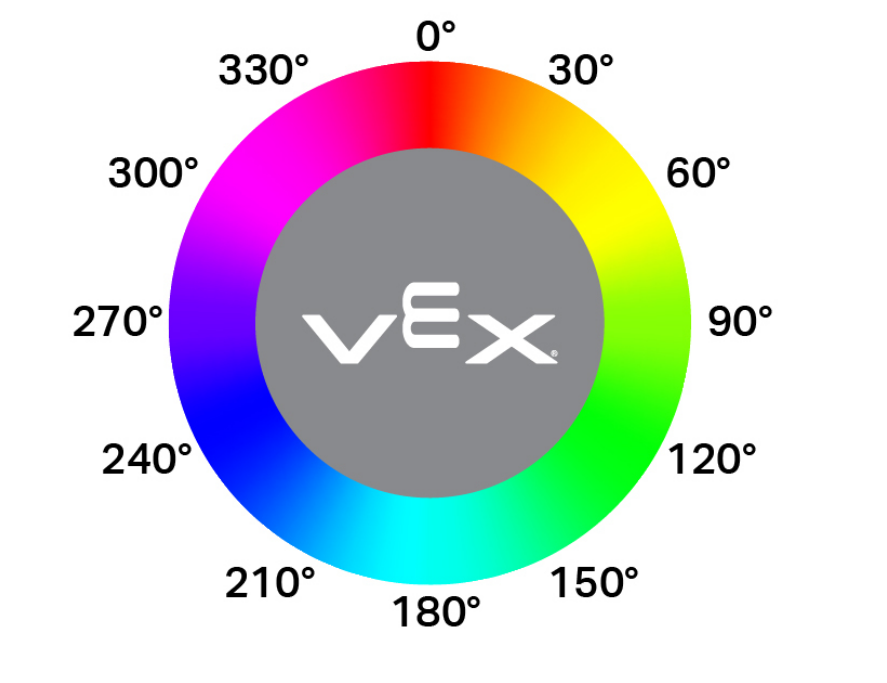
hangleparameter represents the allowable hue variance on a circular color wheel. Hue values correspond to degrees around the wheel (for example, red near 0°, green near 120°, and blue near 240°). Larger values allow a wider range of color variation to be detected.
aivision::codedesc#
The aivision::codedesc class defines a Color Code for the AI Vision Sensor.
Un código de color es un patrón estructurado compuesto por múltiples firmas de color dispuestas en un orden específico. Estos códigos permiten que el sensor de visión artificial reconozca patrones multicolores predefinidos.
En un sensor de visión con IA se pueden almacenar hasta ocho códigos de color simultáneamente.
Color Codes are used with takeSnapshot to detect specific multi-color patterns.
Constructores de clase
1 — Crea un código de color a partir de dos descriptores de color.
aivision::codedesc(
  int32_t index,
  aivision::colordesc &sig1,
  aivision::colordesc &sig2 );
2 — Crea un código de color a partir de tres descriptores de color.
aivision::codedesc(
  int32_t index,
  aivision::colordesc &sig1,
  aivision::colordesc &sig2,
  aivision::colordesc &sig3 );
3 — Crea un código de color a partir de cuatro descriptores de color.
aivision::codedesc(
  int32_t index,
  aivision::colordesc &sig1,
  aivision::colordesc &sig2,
  aivision::colordesc &sig3,
  aivision::colordesc &sig4 );
Parameters4 — Crea un código de color a partir de cinco descriptores de color.
aivision::codedesc(
  int32_t index,
  aivision::colordesc &sig1,
  aivision::colordesc &sig2,
  aivision::colordesc &sig3,
  aivision::colordesc &sig4,
  aivision::colordesc &sig5 );
Parámetro |
Tipo |
Descripción |
|---|---|---|
|
|
El número de índice del código de color (1–8). |
|
|
Referencias a descriptores de color creados previamente y utilizados para construir el código de color. |
Notas
Un código de color requiere al menos dos firmas de color.
En un mismo código de color se puede utilizar un máximo de cinco firmas de color.
Creating two Color Codes with the same
indexwill overwrite the previous one.
aivision::tagdesc#
Crea un descriptor de etiqueta que se utiliza para detectar un ID de AprilTag específico.
Available Functionstagdesc( int32_t id );
Parámetro |
Tipo |
Descripción |
|---|---|---|
|
|
El número de identificación AprilTag a detectar (0–36). |
Modelos y clasificaciones de IA#
El sensor de visión con IA puede detectar diferentes objetos con ciertas clasificaciones de IA. Dependiendo del modelo de clasificación de IA seleccionado al configurar el sensor de visión con IA en la ventana Dispositivos, se pueden detectar diferentes objetos. Los modelos disponibles actualmente son:
Elementos del aula
Número de identificación |
Clasificación de IA |
|---|---|
0 |
|
1 |
|
2 |
|
3 |
|
4 |
|
5 |
|
6 |
|
7 |
|
8 |
|
La competición de robótica VEX V5 es de alto riesgo
Número de identificación |
Clasificación de IA |
|---|---|
0 |
|
1 |
|
2 |
|
Rechazo a la competición de robótica VEX V5
Número de identificación |
Clasificación de IA |
|---|---|
0 |
|
1 |
|
Anulación de la competición de robótica VEX V5
Número de identificación |
Clasificación de IA |
|---|---|
0 |
|
1 |
|
2 |
|
3 |
|
4 |
|
Ejemplos#
// Create Color Signatures
aivision::colordesc AIVision1__greenBox(
    1,      // index
    85,     // red
    149,    // green
    46,     // blue
    23,     // hangle
    0.23 ); // hdsat

aivision::colordesc AIVision1__blueBox(
    2,      // index
    77,     // red
    135,    // green
    125,    // blue
    27,     // hangle
    0.29 ); // hdsat

// Create a Color Code from two color signatures
aivision::codedesc AIVision1__greenBlue(
    1,                    // code index
    AIVision1__greenBox,  // first color signature
    AIVision1__blueBox ); // second color signature

// Create the AI Vision Sensor instance
aivision AIVision1(
    PORT11,                  // Smart Port
    AIVision1__greenBlue,    // color code
    aivision::ALL_AIOBJS );  // enable AI Classifications
Funciones de los miembros#
The aivision class includes the following member functions:
takeSnapshot— Captures data for a specific Color Signature, Color Code, AI Classification group, or AprilTag ID group.installed— Returns whether the AI Vision Sensor is connected to the V5 Brain.
To access detected object data after calling takeSnapshot, use the available Properties.
Before calling any aivision member functions, an aivision instance must be created, as shown below:
/* This constructor is required when using VS Code.
AI Vision Sensor configuration is generated automatically
in VEXcode using the Device Menu. Replace the values
as needed. */


// Create Color Signatures
aivision::colordesc AIVision1__greenBox(
    1,      // index
    85,     // red
    149,    // green
    46,     // blue
    23,     // hangle
    0.23 ); // hdsat

aivision::colordesc AIVision1__blueBox(
    2,      // index
    77,     // red
    135,    // green
    125,    // blue
    27,     // hangle
    0.29 ); // hdsat

// Create a Color Code from two color signatures
aivision::codedesc AIVision1__greenBlue(
    1,                    // code index
    AIVision1__greenBox,  // first color signature
    AIVision1__blueBox ); // second color signature

// Create the AI Vision Sensor instance
aivision AIVision1(
    PORT1,                   // Smart Port
    AIVision1__greenBlue,    // color code
    aivision::ALL_AIOBJS );  // enable AI Classifications
takeSnapshot#
Captures an image from the AI Vision Sensor, processes it using the selected AI model or configured color signatures, and updates the objects array.
Each call refreshes the objects array with the most recent detection results. Objects are ordered from largest to smallest (by width), beginning at index 0. If no objects are detected objectCount will be 0 and objects[i].exists will be false.
1 — Toma una instantánea usando un ID de objeto y un tipo de objeto.
int32_t takeSnapshot(
  uint32_t id,
  objectType type,
  uint32_t count );
2 — Toma una instantánea usando una Firma de color.
int32_t takeSnapshot(
  const colordesc &desc,
  int32_t count = 8 );
3 — Toma una instantánea usando un Código de color.
int32_t takeSnapshot(
  const codedesc &desc,
  int32_t count = 8 );
4 — Toma una instantánea usando un ID de AprilTag.
int32_t takeSnapshot(
  const tagdesc &desc,
  int32_t count = 8 );
5 — Toma una instantánea usando una Clasificación de IA.
int32_t takeSnapshot(
  const aiobjdesc &desc,
  int32_t count = 8 );
Parameters6 — Toma una instantánea usando un descriptor de objeto.
int32_t takeSnapshot(
  const objdesc &desc,
  int32_t count = 8 );
Parámetro |
Tipo |
Descripción |
|---|---|---|
|
|
The identifier of the object to detect when using the
Note: In VEXcode, AI Classification names (such as blueBall) may be used directly. In VS Code, the numeric ID must be used. |
|
|
Specifies the category of object associated with
|
|
|
Descriptor used to detect a specific object. Passed directly to
|
|
|
Número máximo de objetos almacenados a partir de la instantánea. El valor predeterminado es 8. |
Valores de retorno
Returns an int32_t representing the number of detected objects matching the specified signature or detection type.
Notas
El sensor de visión con IA debe tomar una instantánea antes de que se pueda acceder a los datos del objeto.
The
objectsarray is refreshed on every call.When
countis specified, only the largest detected objects (up to the specified amount) are stored.
Las clasificaciones de IA dependen del modelo seleccionado en la utilidad de visión artificial de VEXcode.
Ejemplos
// Move forward if an object is detected
while (true) {
  AIVision1.takeSnapshot(aivision::ALL_AIOBJS);
  if (AIVision1.objects[0].exists) {
    Drivetrain.driveFor(forward, 50, mm);
  }
  wait(50, msec);
}
installed#
Indica si el sensor de visión con IA está conectado al procesador V5.
Funciones disponibles
bool installed();
Parámetros
Esta función no requiere ningún parámetro.
Valores de retorno
Devuelve un valor booleano que indica si el sensor de visión de IA está conectado:
true— The AI Vision Sensor is connected.false— The AI Vision Sensor is not connected.
// Display a message if the AI Vision Sensor is connected
if (AIVision1.installed()){
  Brain.Screen.print("Installed!");
}
Propiedades#
Calling takeSnapshot updates the AI Vision Sensor’s detection results. Each snapshot refreshes the objects array, which contains detected objects for the requested AI Classification, Color Signature, Color Code, or AprilTag ID.
AI Vision data is accessed through properties of objects stored in AIVisionSensor.objects[index], where index begins at 0.
Los objetos están ordenados de mayor a menor (por área).
La resolución de imagen del sensor de visión de IA es × 240. Los valores de posición y tamaño del objeto se informan en unidades de píxeles en relación con la vista actual del sensor.
Las siguientes propiedades están disponibles:
objectCount— Returns the number of detected objects from the most recent snapshot.largestObject— Selects the largest detected object from the most recent snapshot.objects— Array containing detected objects updated bytakeSnapshot..exists— Whether the object entry contains valid data..width— Width of the detected object in pixels..height— Height of the detected object in pixels..centerX— X position of the object’s center in pixels..centerY— Y position of the object’s center in pixels..originX— X position of the object’s top-left corner in pixels..originY— Y position of the object’s top-left corner in pixels..angle— Orientation of a Color Code or AprilTag ID in degrees..id— Classification ID or AprilTag ID..score— Confidence score for AI Classifications.
objectCount#
objectCount returns the number of items inside the objects array as an integer.
AIVisionSensor.objectCount
Componente |
Descripción |
|---|---|
|
El nombre de su instancia de sensor de visión de IA. |
Ejemplos
// Display the number of detected objects
while (true) {
  Brain.Screen.setCursor(1, 1);
  Brain.Screen.clearLine(1);
  AIVision1.takeSnapshot(aivision::ALL_AIOBJS);
  if (AIVision1.objects[0].exists) {
    Brain.Screen.print("%d", AIVision1.objectCount);
  }
  wait(50, msec);
}
largestObject#
largestObject retrieves the largest detected object from the objects array.
This method can be used to always get the largest object from objects without specifying an index.
AIVisionSensor.largestObject
Componente |
Descripción |
|---|---|
|
El nombre de su instancia de sensor de visión de IA. |
Ejemplos
// Display the closest AprilTag ID
while (true) {
  Brain.Screen.setCursor(1, 1);
  Brain.Screen.clearLine(1);
  AIVision1.takeSnapshot(aivision::ALL_TAGS);
  if (AIVision1.objects[0].exists) {
    Brain.Screen.print("%d", AIVision1.largestObject.id);
  }
  wait(50, msec);
}
objects#
objects returns an array of detected object properties. Use the array to access specific property values of individual objects.
There are ten properties that are included with each object stored in the objects array after takeSnapshot is used.
All property values except id and score describe the detected object’s position and size in the AI Vision Sensor’s view at the moment takeSnapshot was used. These values are measured in pixels, based on the sensor’s 320 by 240 pixel resolution.
AIVisionSensor.objects[index].property
Componente |
Descripción |
|---|---|
|
El nombre de su instancia de sensor de visión de IA. |
|
The object index in the array. Index begins at |
|
Una de las propiedades del objeto. |
.existe#
.exists returns whether the specified object index contains a valid detected object.
Acceso
SensorName.objects[index].exists
Valores de retorno
Devuelve un valor booleano que indica si el índice de objeto especificado contiene un objeto válido detectado:
-
true— A valid object exists at the specified index. -
false— No object exists at the specified index.
Ejemplos
// Move forward if an object is detected
while (true) {
  AIVision1.takeSnapshot(aivision::ALL_AIOBJS);
  if (AIVision1.objects[0].exists) {
    Drivetrain.driveFor(forward, 50, mm);
  }
  wait(50, msec);
}
.ancho#
.width returns the width of the detected object.
Acceso
SensorName.objects[index].width
Valores de retorno
Returns an int16_t representing the width of the detected object in pixels. The value ranges from 1 to 320.
Ejemplos
// Approach an object until it's at least 100 pixels wide
while (true) {
  AIVision1.takeSnapshot(aivision::ALL_AIOBJS);

  if (AIVision1.objects[0].exists) {
    if (AIVision1.objects[0].width < 100) {
      Drivetrain.drive(forward);
    } else {
      Drivetrain.stop();
    }
  } else {
    Drivetrain.stop();
  }
  wait(50, msec);
}
.altura#
.height returns the height of the detected object.
Acceso
SensorName.objects[index].height
Valores de retorno
Returns an int16_t representing the height of the detected object in pixels. The value ranges from 1 to 240.
Ejemplos
// Approach an object until it's at least 90 pixels tall
while (true) {
  AIVision1.takeSnapshot(aivision::ALL_AIOBJS);

  if (AIVision1.objects[0].exists) {
    if (AIVision1.objects[0].height < 90) {
      Drivetrain.drive(forward);
    } else {
      Drivetrain.stop();
    }
  } else {
    Drivetrain.stop();
  }
  wait(50, msec);
}
.centerX#
.centerX returns the x-coordinate of the center of the detected object.
Acceso
SensorName.objects[index].centerX
Valores de retorno
Returns an int16_t representing the x-coordinate of the object’s center in pixels. The value ranges from 0 to 320.
Ejemplos
// Turn until an object is directly in front of the sensor
Drivetrain.setTurnVelocity(10, percent);
Drivetrain.turn(right);
while (true) {
  AIVision1.takeSnapshot(aivision::ALL_AIOBJS);

  if (AIVision1.objects[0].exists) {
    if (AIVision1.objects[0].centerX > 140 && AIVision1.objects[0].centerX < 180) {
      Drivetrain.stop();
    }
  }
  wait(10, msec);
}
.centroY#
.centerY returns the y-coordinate of the center of the detected object.
Acceso
SensorName.objects[index].centerY
Valores de retorno
Returns an int16_t representing the y-coordinate of the object’s center in pixels. The value ranges from 0 to 240.
Ejemplos
// Approach an object until it's close to the sensor
while (true) {
  AIVision1.takeSnapshot(aivision::ALL_AIOBJS);

  if (AIVision1.objects[0].exists) {
    if (AIVision1.objects[0].centerY < 150) {
      Drivetrain.drive(forward);
    } else {
      Drivetrain.stop();
    }
  } else {
    Drivetrain.stop();
  }
  wait(50, msec);
}
.ángulo#
.angle returns the orientation of the detected Color Code or AprilTag ID.
Acceso
SensorName.objects[index].angle
Valores de retorno
Returns a float representing the rotation of the detected Color Code or AprilTag ID in degrees. The value ranges from 0 to 359.9.
Ejemplos
// Turn left or right depending on how a configured
// Color Code is rotated
while (true) {
  AIVision1.takeSnapshot(AIVision1__redBlue);
  if (AIVision1.objects[0].exists) {
    if (AIVision1.objects[0].angle > 50 && AIVision1.objects[0].angle < 100) {
      Drivetrain.turn(right);
    }
    else if (AIVision1.objects[0].angle > 270 && AIVision1.objects[0].angle < 330) {
      Drivetrain.turn(left);
    }
    else {
      Drivetrain.stop();
    }
  } else {
    Drivetrain.stop();
  }
  wait(50, msec);
}
.originX#
.originX returns the x-coordinate of the top-left corner of the detected object’s bounding box.
Acceso
SensorName.objects[index].originX
Valores de retorno
Returns an int16_t representing the x-coordinate of the object’s bounding box origin in pixels. The value ranges from 0 to 320.
Ejemplos
// Display if an object is to the left or the right
while (true) {
  Brain.Screen.clearScreen();
  Brain.Screen.setCursor(1, 1);
  AIVision1.takeSnapshot(aivision::ALL_AIOBJS);
  if (AIVision1.objects[0].exists) {
    if (AIVision1.objects[0].originX < 120) {
      Brain.Screen.print("To the left!");
    } else {
      Brain.Screen.print("To the right!");
    }
  } else {
    Brain.Screen.print("No objects");
  }
  wait(100, msec);
}
.origenY#
.originY returns the y-coordinate of the top-left corner of the detected object’s bounding box.
Acceso
SensorName.objects[index].originY
Valores de retorno
Returns an int16_t representing the y-coordinate of the object’s bounding box origin in pixels. The value ranges from 0 to 240.
Ejemplos
// Display if an object is close or far
while (true) {
  Brain.Screen.clearScreen();
  Brain.Screen.setCursor(1, 1);
  AIVision1.takeSnapshot(aivision::ALL_AIOBJS);
  if (AIVision1.objects[0].exists) {
    if (AIVision1.objects[0].originY < 110) {
      Brain.Screen.print("Close");
    } else {
      Brain.Screen.print("Far");
    }
  }
  wait(100, msec);
}
.identificación#
.id returns the detected AprilTag ID or AI Classification ID.
Acceso
SensorName.objects[index].id
Valores de retorno
Returns an int32_t representing the ID of the detected object:
Para Clasificaciones de IA, esto corresponde a la ID definida por el modelo de IA seleccionado.
Para los ID de AprilTag, esto representa el número de ID de AprilTag detectado (0–36).
Ejemplos
// Move forward when AprilTag ID 1 is detected
while (true) {
  AIVision1.takeSnapshot(aivision::ALL_TAGS);
  if (AIVision1.objects[0].exists) {
    if (AIVision1.objects[0].id == 1) {
      Drivetrain.drive(forward);
    }
  } else {
    Drivetrain.stop();
  }
  wait(50, msec);
}
.puntaje#
.score returns the confidence score of the detected AI Classification.
Acceso
SensorName.objects[index].score
Valores de retorno
Returns an int16_t indicating the confidence score of the detected AI Classification between 1 and 100.
Una puntuación más baja significa que el sensor tiene menos confianza en el objeto detectado, mientras que una puntuación más alta significa que el sensor tiene más confianza.
Ejemplos
// Display if a score is confident
while (true) {
  AIVision1.takeSnapshot(aivision::ALL_AIOBJS);

  if (AIVision1.objects[0].exists) {
    Brain.Screen.clearScreen();
    Brain.Screen.setCursor(1, 1);

    if (AIVision1.objects[0].score > 95) {
      Brain.Screen.print("Confident");
    } else {
      Brain.Screen.print("Not confident");
    }
  }
  wait(50, msec);
}