
مستشعر الألوان#
مقدمة#
The colorsensor class is used to access data from the Color Sensor. It uses reflected light to detect objects, identify colors, and measure brightness and hue.
مُنشئ الفئة#
colorsensor Color1 = colorsensor(index);
مُدمِّر الفئة#
يقوم بتدمير الكائن colorsensor وتحرير الموارد المرتبطة به.
virtual ~colorsensor();
حدود#
المعلمة |
يكتب |
وصف |
|---|---|---|
|
|
المنفذ الذكي الذي يتصل به مستشعر اللون، مكتوبًا على النحو التالي: |
أمثلة#
// Create an colorsensor instance in Port 1
colorsensor Color1 = colorsensor(PORT1);
الدوال الأعضاء#
The colorsensor class includes the following member functions:
setLight– يقوم بتشغيل أو إيقاف تشغيل مؤشر LED الخاص بمستشعر اللون أو ضبطه على مستوى سطوع محدد.isNearObject– تُرجع ما إذا كان الكائن قريبًا من مستشعر اللون أم لا.detects– يُرجع ما إذا كان مستشعر اللون قد اكتشف لونًا محددًا أم لا.colorname– يُرجع اسم اللون الذي تم اكتشافه بواسطة مستشعر الألوان.brightness– تُرجع السطوع المكتشف للكائن.hue– تُرجع قيمة اللون المكتشفة.
قبل استدعاء أي من الدوال الأعضاء colorsensor ، يجب إنشاء مثيل colorsensor ، كما هو موضح أدناه:
/* This constructor is required when using VS Code.
Color Sensor configuration is generated automatically
in VEXcode using the Device Menu. Replace the values
as needed. */

// Create an colorsensor instance in Port 1
colorsensor Color1 = colorsensor(PORT1);
setLight#
يضبط هذا الخيار قوة إضاءة مؤشر LED الخاص بمستشعر الألوان. تساعد هذه الإضاءة مستشعر الألوان على اكتشاف الأجسام والألوان بشكل أوضح.
إذا كان ضوء مستشعر اللون مطفأً، فإن ضبط طاقة الضوء فوق 0% سيؤدي إلى تشغيل الضوء.
إذا كان ضوء مستشعر اللون مضاءً، فإن ضبط طاقة الضوء على 0% سيؤدي إلى إطفاء الضوء.
نسبة أعلى تجعل الضوء أكثر سطوعاً. نسبة أقل تجعل الضوء أقل سطوعاً.
Available Functions1 — يقوم بتشغيل أو إيقاف تشغيل مؤشر LED باستخدام
ledState.void setLight( ledState state );
Parameters2 — يقوم بتشغيل مصباح LED بكثافة محددة.
void setLight(
  int32_t      intensity,
  percentUnits units = percent );
المعلمة |
يكتب |
وصف |
|---|---|---|
|
|
يُشغّل أو يُطفئ مؤشر LED. |
|
|
مستوى الطاقة لضبط الإضاءة من 0 إلى 100. |
|
|
The unit that represents the light intensity: |
هذه الدالة لا تُرجع قيمة.
Examples// Set the light power to 50 percent.
Color1.setLight(50, percent);
isNearObject#
يُرجع قيمة إذا اكتشف مستشعر اللون جسمًا قريبًا.
Available Functionsbool isNearObject();
لا تقبل هذه الدالة أي معلمات.
Return Valuesتُرجع هذه الدالة قيمة منطقية تشير إلى ما إذا تم اكتشاف جسم قريب أم لا:
true- يكتشف مستشعر اللون وجود جسم.false- لا يكتشف مستشعر الألوان وجود جسم.
// If an object is detected by the Color Sensor, print
// "near object".
if (Color1.isNearObject()){
  Brain.Screen.print("near object");
}
detects#
يتم إرجاع القيمة إذا كان مستشعر اللون يكتشف لونًا محددًا.
Available Functions1 — Detects a
colorType.bool detects( colorType color );
Parameters2 — Detects a
vex::color.bool detects( vex::color color );
حدود |
يكتب |
وصف |
|---|---|---|
|
|
الألوان الصالحة:
|
|
|
A valid custom color, or one of the predefined colors listed above. |
true- يقوم مستشعر اللون باكتشاف اللون.false- لا يكتشف مستشعر اللون اللون.
int main() {
  // Initializing Robot Configuration. DO NOT REMOVE!
  vexcodeInit();

  // Drive until a red object is seen
  Drivetrain.drive(forward);
  while (true) {
    if (Color1.detects(red)) {
      Drivetrain.stop();
      break;
    }
    wait(0.5, seconds);
  }
}
colorname#
يُعيد اللون الأقرب تطابقاً الذي تم اكتشافه.
Available FunctionscolorType colorname();
لا تقبل هذه الدالة أي معلمات.
Return Valuesعند طباعتها مباشرة، فإنها تُظهر القيمة العددية المرتبطة بهذا اللون:
لون |
القيمة العددية |
|---|---|
|
0 |
|
1 |
|
2 |
|
3 |
|
4 |
|
5 |
|
6 |
|
7 |
|
8 |
|
9 |
|
10 |
|
11 |
|
12 |
|
13 |
|
14 |
|
15 |
|
16 |
|
17 |
يتم إنشاء الدالة
convertColorToStringبواسطة VEXcode عند تهيئة مستشعر الألوان في نافذة الأجهزة. وهي متاحة فقط داخل مشاريع VEXcode IQ ولن تعمل في بيئات أخرى.عند استخدام
colornameخارج VEXcode، يجب إجراء المقارنات مباشرة مع قيمةcolorType- أي لون يبدأ بـcolorType::(على سبيل المثال،colorType::greenأوcolorType::red).
int main() {
  // Initializing Robot Configuration. DO NOT REMOVE!
  vexcodeInit();

  // Continuously check the detected color
  while (true) {

    // Compare the color name with "red"
    if (convertColorToString(Color1.colorname()) == "red") {
      Brain.Screen.print("Red object!");
    } else {
      Brain.Screen.print("Not red");
    }

    wait(0.5, seconds);
    Brain.Screen.clearScreen();
    Brain.Screen.setCursor(1, 1);
  }
}
int main() {
  // Initializing Robot Configuration. DO NOT REMOVE!
  vexcodeInit();

  // Continuously check the detected color
  while (true) {

    // Compare the color name with the colorType
    if (Color1.colorname() == colorType::red) {
      Brain.Screen.print("Red object!");
    } else {
      Brain.Screen.print("Not red");
    }

    wait(0.5, seconds);
    Brain.Screen.clearScreen();
    Brain.Screen.setCursor(1, 1);
  }
}
brightness#
يُعيد مقدار الضوء المنعكس من الجسم.
نسبة أعلى تعني انعكاس المزيد من الضوء إلى مستشعر الألوان. نسبة أقل تعني انعكاس كمية أقل من الضوء.
Available Functionsdouble brightness(bool bRaw = false);
المعلمة |
يكتب |
وصف |
|---|---|---|
|
|
قيمة منطقية لقراءة بيانات السطوع الخام بدلاً من النسبة المئوية. القيمة الافتراضية هي |
قيمة مزدوجة تمثل السطوع الذي تم اكتشافه بواسطة مستشعر الألوان في النطاق من 0 إلى 100%، أو قيمة مزدوجة تمثل البيانات الأولية التي تم اكتشافها بواسطة المستشعر.
Examples// Set a variable, brightness, to the value of the brightness
// detected by the Color Sensor
double brightness = Color1.brightness();
// Print the brightness detected by the Color Sensor to the
// Brain's screen
Brain.Screen.print(brightness);
hue#
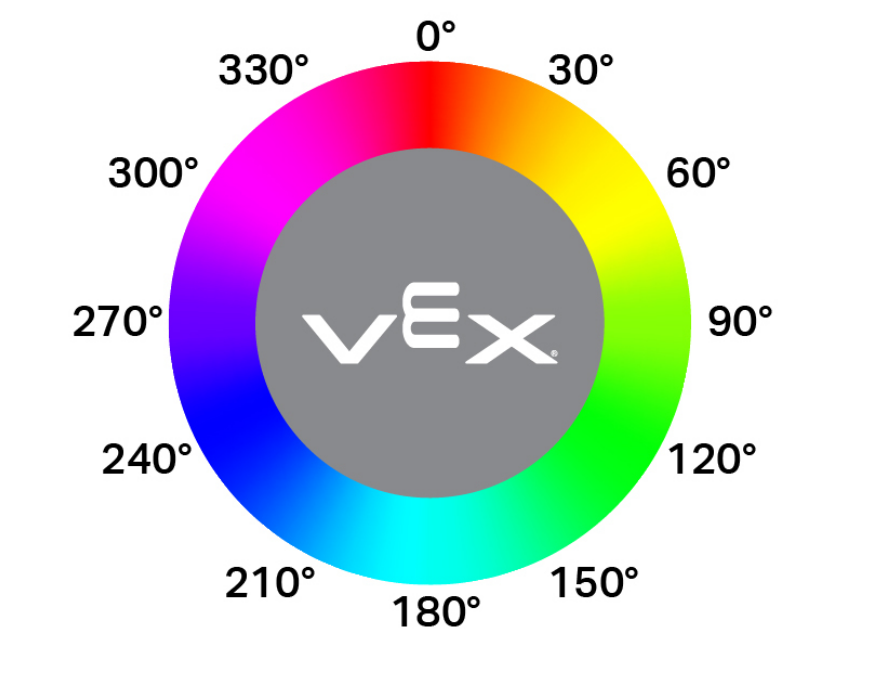
يعيد اللون الذي تم اكتشافه بواسطة مستشعر الألوان.
اللون هو طريقة لوصف اللون باستخدام الأرقام الموجودة على عجلة الألوان.
double hue();
لا تقبل هذه الدالة أي معلمات.
Return Valuesقيمة مزدوجة تمثل قيمة اللون الذي تم اكتشافه بواسطة مستشعر الألوان في النطاق 0 - 359.00.
Examples// Set a variable, hue, to the value of the hue detected
// by the Color Sensor.
double hue = Color1.hue();