
颜色传感器#
介绍#
colorsensor 类用于访问来自颜色传感器的数据。它利用反射光来检测物体、识别颜色以及测量亮度和色调。
类构造函数#
colorsensor Color1 = colorsensor(index);
类析构函数#
销毁 colorsensor 对象并释放相关资源。
virtual ~colorsensor();
参数#
范围 |
类型 |
描述 |
|---|---|---|
|
|
颜色传感器连接的智能端口,记为 |
示例#
// Create an colorsensor instance in Port 1
colorsensor Color1 = colorsensor(PORT1);
成员功能#
colorsensor 类包含以下成员函数:
setLight– 打开、关闭或将颜色传感器的 LED 设置为设定的亮度级别。isNearObject– 返回对象是否靠近颜色传感器。detects– 返回颜色传感器是否检测到指定的颜色。colorname– 返回颜色传感器检测到的颜色名称。brightness– 返回检测到的对象亮度。hue– 返回检测到的色调值。
在调用 colorsensor 成员函数之前,必须先创建一个 colorsensor 实例,如下所示:
/* This constructor is required when using VS Code.
Color Sensor configuration is generated automatically
in VEXcode using the Device Menu. Replace the values
as needed. */

// Create an colorsensor instance in Port 1
colorsensor Color1 = colorsensor(PORT1);
setLight#
设置颜色传感器 LED 的亮度。灯光可以帮助颜色传感器更清晰地检测物体和颜色。
如果颜色传感器的灯熄灭,将灯光功率设置为 0% 以上即可打开灯。
如果颜色传感器的指示灯亮着,将灯光功率设置为 0% 将关闭指示灯。
百分比越高,灯光越亮;百分比越低,灯光越暗。
Available Functions1 — 使用
ledState打开或关闭 LED。void setLight( ledState state );
Parameters2 — 将 LED 灯调至特定亮度。
void setLight(
  int32_t      intensity,
  percentUnits units = percent );
范围 |
类型 |
描述 |
|---|---|---|
|
|
设置 LED 的亮灭状态。0 |
|
|
灯光亮度级别,范围从 0 到 100。 |
|
|
表示光照强度的单位: |
此函数不返回值。
Examples// Set the light power to 50 percent.
Color1.setLight(50, percent);
isNearObject#
如果颜色传感器检测到附近物体,则返回该值。
Available Functionsbool isNearObject();
此函数不接受任何参数。
Return Values此函数返回一个布尔值,指示是否检测到附近物体:
true– 颜色传感器检测到物体。false– 颜色传感器未检测到物体。
// If an object is detected by the Color Sensor, print
// "near object".
if (Color1.isNearObject()){
  Brain.Screen.print("near object");
}
detects#
返回颜色传感器是否检测到指定颜色。
Available Functions1 — Detects a
colorType.bool detects( colorType color );
Parameters2 — Detects a
vex::color.bool detects( vex::color color );
参数 |
类型 |
描述 |
|---|---|---|
|
|
有效颜色:
|
|
|
有效的自定义颜色,或上面列出的预定义颜色之一。 |
true– 颜色传感器检测颜色。false– 颜色传感器未检测到颜色。
int main() {
  // Initializing Robot Configuration. DO NOT REMOVE!
  vexcodeInit();

  // Drive until a red object is seen
  Drivetrain.drive(forward);
  while (true) {
    if (Color1.detects(red)) {
      Drivetrain.stop();
      break;
    }
    wait(0.5, seconds);
  }
}
colorname#
返回检测到的最接近的匹配颜色。
Available FunctionscolorType colorname();
此函数不接受任何参数。
Return Values直接打印时,会显示与该颜色关联的数值:
颜色 |
数值 |
|---|---|
|
0 |
|
1 |
|
2 |
|
3 |
|
4 |
|
5 |
|
6 |
|
7 |
|
8 |
|
9 |
|
10 |
|
11 |
|
12 |
|
13 |
|
14 |
|
15 |
|
16 |
|
17 |
当在“设备”窗口中配置颜色传感器时,VEXcode 会自动创建函数
convertColorToString该函数仅在 VEXcode IQ 项目中可用,在其他环境中无法运行。在 VEXcode 之外使用
colorname时,应直接与colorType值进行比较——任何以colorType::开头的颜色(例如,colorType::green或colorType::red)。
int main() {
  // Initializing Robot Configuration. DO NOT REMOVE!
  vexcodeInit();

  // Continuously check the detected color
  while (true) {

    // Compare the color name with "red"
    if (convertColorToString(Color1.colorname()) == "red") {
      Brain.Screen.print("Red object!");
    } else {
      Brain.Screen.print("Not red");
    }

    wait(0.5, seconds);
    Brain.Screen.clearScreen();
    Brain.Screen.setCursor(1, 1);
  }
}
int main() {
  // Initializing Robot Configuration. DO NOT REMOVE!
  vexcodeInit();

  // Continuously check the detected color
  while (true) {

    // Compare the color name with the colorType
    if (Color1.colorname() == colorType::red) {
      Brain.Screen.print("Red object!");
    } else {
      Brain.Screen.print("Not red");
    }

    wait(0.5, seconds);
    Brain.Screen.clearScreen();
    Brain.Screen.setCursor(1, 1);
  }
}
brightness#
返回物体反射的光量。
百分比越高,意味着反射回颜色传感器的光线越多;百分比越低,意味着反射回的光线越少。
Available Functionsdouble brightness(bool bRaw = false);
范围 |
类型 |
描述 |
|---|---|---|
|
|
一个布尔值,用于读取原始亮度数据而不是百分比。默认值为 |
表示颜色传感器检测到的亮度值的双精度浮点数,范围为 0 - 100%;或者表示传感器检测到的原始数据的双精度浮点数。
Examples// Set a variable, brightness, to the value of the brightness
// detected by the Color Sensor
double brightness = Color1.brightness();
// Print the brightness detected by the Color Sensor to the
// Brain's screen
Brain.Screen.print(brightness);
hue#
返回颜色传感器检测到的色调。
色相是用色轮上的数字来描述颜色的一种方法。
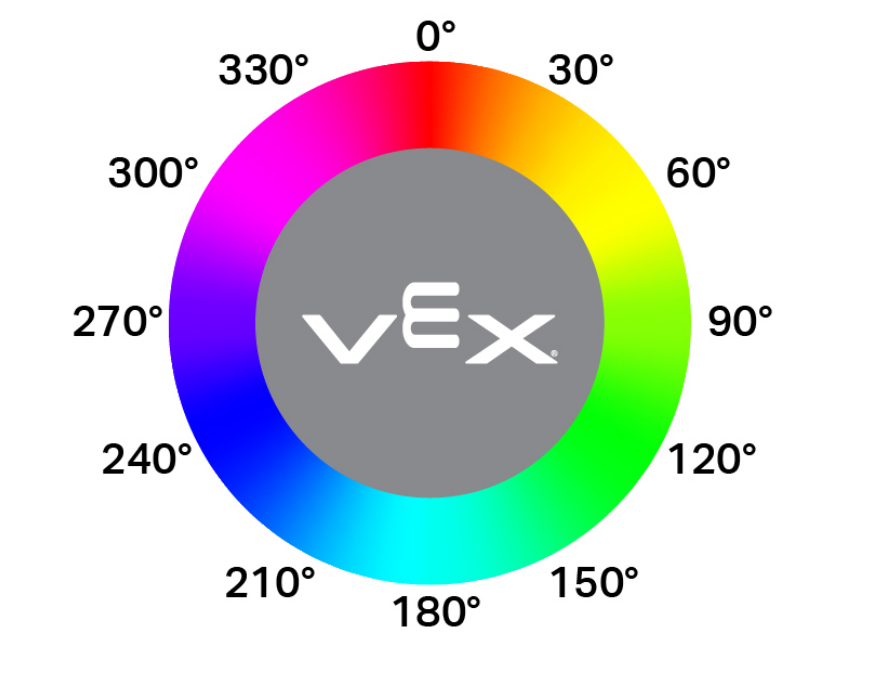
double hue();
此函数不接受任何参数。
Return Values表示颜色传感器检测到的色调值的双精度浮点数,范围为 0 — 359.00。
Examples// Set a variable, hue, to the value of the hue detected
// by the Color Sensor.
double hue = Color1.hue();